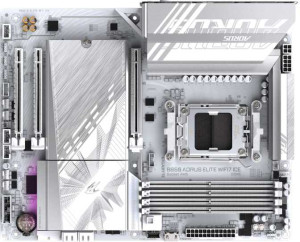
Gigabyte B850 Aorus Elite WiFi7 Ice
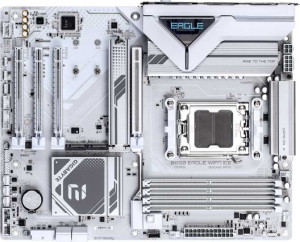
Gigabyte B850 Eagle Wi-Fi7 Ice

Gigabyte B850 Aorus Elite WiFi7 Ice Gigabyte B850 Eagle Wi-Fi7 Ice

Overview

When two white-aesthetic AMD motherboards from the same brand share a B850 chipset and Wi-Fi 7 support, the differences that remain become all the more decisive. This comparison of the Gigabyte B850 Aorus Elite WiFi7 Ice and the Gigabyte B850 Eagle Wi-Fi7 Ice examines the key battlegrounds: USB port variety, audio output options, expansion slot availability, and platform-level reliability features — so you can pick the right board for your next AMD AM5 build.

Common Features

  • Both products use the AM5 CPU socket.
  • Both products feature the B850 chipset.
  • Both products use the ATX form factor.
  • Wi-Fi is supported on both products, covering Wi-Fi 4, Wi-Fi 5, Wi-Fi 6, Wi-Fi 6E, and Wi-Fi 7.
  • Bluetooth 5.4 is available on both products.
  • Overclocking is supported on both products.
  • Both products support a maximum memory amount of 256GB.
  • Both products have a maximum RAM speed of 5200 MHz and an overclocked RAM speed of 8200 MHz.
  • Both products have 4 memory slots across 2 memory channels using DDR5.
  • ECC memory is not supported on either product.
  • Both products include 2 USB 3.2 Gen 2 ports (USB-A), 4 USB 2.0 ports, and no USB 3.2 Gen 2x2, USB 4, or Thunderbolt ports.
  • Both products include 1 DisplayPort output.
  • Both products offer 2 USB 3.2 Gen 1 ports and 4 USB 2.0 ports through expansion, plus 2 USB 3.0 ports through expansion.
  • Both products have 4 SATA 3 connectors, 6 fan headers, 3 M.2 sockets, and 0 U.2 sockets.
  • A TPM connector is present on both products.
  • Both products have 1 PCIe 5.0 x16 slot, 2 PCIe x1 slots, and no PCIe 4.0, 3.0, 2.0, x8, or PCI slots.
  • Both products support 7.1 audio channels.
  • RAID 0, RAID 1, RAID 5, and RAID 10 are supported on both products, while RAID 0+1 is not supported on either.

Main Differences

  • Dual BIOS is present on Gigabyte B850 Aorus Elite WiFi7 Ice but not available on Gigabyte B850 Eagle Wi-Fi7 Ice.
  • USB 3.2 Gen 1 ports (USB-A) number 5 on Gigabyte B850 Aorus Elite WiFi7 Ice and 2 on Gigabyte B850 Eagle Wi-Fi7 Ice.
  • A USB 3.2 Gen 2 port (USB-C) is present on Gigabyte B850 Aorus Elite WiFi7 Ice but not available on Gigabyte B850 Eagle Wi-Fi7 Ice.
  • A USB 3.2 Gen 1 port (USB-C) is present on Gigabyte B850 Eagle Wi-Fi7 Ice but not available on Gigabyte B850 Aorus Elite WiFi7 Ice.
  • An HDMI output is present on Gigabyte B850 Eagle Wi-Fi7 Ice but not available on Gigabyte B850 Aorus Elite WiFi7 Ice.
  • A PS/2 port is present on Gigabyte B850 Eagle Wi-Fi7 Ice but not available on Gigabyte B850 Aorus Elite WiFi7 Ice.
  • A PCIe x4 slot is present on Gigabyte B850 Eagle Wi-Fi7 Ice but not available on Gigabyte B850 Aorus Elite WiFi7 Ice.
  • An S/PDIF Out port is present on Gigabyte B850 Aorus Elite WiFi7 Ice but not available on Gigabyte B850 Eagle Wi-Fi7 Ice.
  • Audio connectors number 2 on Gigabyte B850 Aorus Elite WiFi7 Ice and 3 on Gigabyte B850 Eagle Wi-Fi7 Ice.
Specs Comparison
Gigabyte B850 Aorus Elite WiFi7 Ice

Gigabyte B850 Aorus Elite WiFi7 Ice

Gigabyte B850 Eagle Wi-Fi7 Ice

Gigabyte B850 Eagle Wi-Fi7 Ice

General info:
CPU socket AM5 AM5
chipset B850 B850
form factor ATX ATX
release date January 2025 April 2025
supports Wi-Fi
Wi-Fi version Wi-Fi 4 (802.11n), Wi-Fi 5 (802.11ac), Wi-Fi 6 (802.11ax), Wi-Fi 6E (802.11ax), Wi-Fi 7 (802.11be) Wi-Fi 4 (802.11n), Wi-Fi 5 (802.11ac), Wi-Fi 6 (802.11ax), Wi-Fi 6E (802.11ax), Wi-Fi 7 (802.11be)
Has Bluetooth
Bluetooth version 5.4 5.4
Easy to overclock
has RGB lighting
Easy to reset BIOS
Has dual BIOS
has aptX
CPU sockets 1 1
Has integrated graphics
warranty period 3 years 3 years
height 244 mm 244 mm
width 305 mm 305 mm
Has integrated CPU

Both the Aorus Elite WiFi7 Ice and the Eagle Wi-Fi7 Ice share an identical foundation: the AM5 socket paired with the B850 chipset, housed in a standard ATX form factor at exactly the same dimensions (244 × 305 mm). Their wireless capabilities are equally matched, with full Wi-Fi 7 (802.11be) support across all major Wi-Fi generations and Bluetooth 5.4, which brings improved range, connection stability, and lower latency over older Bluetooth versions. Both boards also support overclocking, include RGB lighting, and carry the same 3-year warranty — so on paper, they target a very similar audience.

The one meaningful differentiator in this group is dual BIOS: the Aorus Elite includes it, while the Eagle does not. In practice, dual BIOS means a physical backup chip that can restore a corrupted or failed firmware automatically, which is a tangible safety net — especially relevant for users who plan to push BIOS updates or experiment with overclocking settings. Its absence on the Eagle is not a dealbreaker for cautious users, but it does represent a real reduction in resilience against BIOS-related failures.

At the general-info level, the Aorus Elite WiFi7 Ice holds a clear edge solely due to its dual BIOS feature. Everything else — platform, connectivity, size, warranty — is identical between the two boards.

Memory:
maximum memory amount 256GB 256GB
RAM speed (max) 5200 MHz 5200 MHz
overclocked RAM speed 8200 MHz 8200 MHz
memory slots 4 4
DDR memory version 5 5
memory channels 2 2
Supports ECC memory

When it comes to memory, the Aorus Elite WiFi7 Ice and the Eagle Wi-Fi7 Ice are carbon copies of each other. Both run DDR5 across 4 slots in a dual-channel configuration, support up to 256GB of total capacity, and share identical speed ceilings — 5200 MHz natively and up to 8200 MHz when overclocked via XMP/EXPO profiles.

Those numbers deserve some context. A native ceiling of 5200 MHz aligns well with AMD's EXPO standard for Ryzen 7000/9000 series processors on the AM5 platform, meaning out-of-the-box performance should be solid without manual tuning. The overclocked headroom reaching 8200 MHz is particularly notable — at that frequency, memory bandwidth becomes a meaningful asset for content creation, data-intensive workloads, and gaming scenarios where latency-sensitive operations benefit from faster RAM. The 256GB maximum capacity, spread across four slots, also leaves ample room for high-density DIMMs, future-proofing the build for demanding professional use cases.

With every memory specification — capacity, speed, slots, channels, and DDR generation — landing identically on both boards, this group is a complete tie. Neither the Aorus Elite nor the Eagle offers any memory-related advantage over the other, and the choice between them should rest entirely on other specification groups.

Ports:
USB 3.2 Gen 2 ports (USB-A) 2 2
USB 3.2 Gen 1 ports (USB-A) 5 2
USB 3.2 Gen 2 ports (USB-C) 1 0
USB 3.2 Gen 1 ports (USB-C) 0 1
USB 2.0 ports 4 4
USB 3.2 Gen 2x2 ports 0 0
USB 4 40Gbps ports 0 0
USB 4 20Gbps ports 0 0
Thunderbolt 4 ports 0 0
Thunderbolt 3 ports 0 0
has an HDMI output
DisplayPort outputs 1 1
RJ45 ports 1 1
Has USB Type-C
eSATA ports 0 0
DVI outputs 0 0
has a VGA connector
PS/2 ports 0 1

Port selection is where these two boards begin to diverge more noticeably. The Aorus Elite WiFi7 Ice comes out ahead on sheer USB quantity and speed: it offers 5 USB 3.2 Gen 1 Type-A ports versus just 2 on the Eagle Wi-Fi7 Ice, giving it a total of 7 full-speed USB-A ports on the rear panel. More meaningfully, its USB Type-C port operates at Gen 2 (10 Gbps), doubling the throughput of the Eagle's Type-C, which is limited to Gen 1 (5 Gbps). For users frequently connecting external SSDs, high-speed hubs, or modern peripherals via USB-C, that bandwidth difference has real-world consequences.

The Eagle counters with two features absent on the Aorus Elite: an HDMI output and a PS/2 port. The HDMI adds a second video output option alongside the shared DisplayPort, which can be useful when pairing with an AM5 processor that includes integrated graphics — offering more flexibility for multi-monitor setups without a discrete GPU. The PS/2 port is a niche addition, relevant mainly to users with legacy keyboards or mice, or those who need PS/2 for specific low-latency input scenarios.

On balance, the Aorus Elite holds the stronger position in this group. Its advantage in total USB-A port count and the faster Gen 2 USB-C are more broadly impactful for modern use cases than the Eagle's HDMI and PS/2 additions, which cater to narrower scenarios.

Connectors:
USB 3.2 Gen 1 ports (through expansion) 2 2
USB 2.0 ports (through expansion) 4 4
SATA 3 connectors 4 4
fan headers 6 6
USB 3.0 ports (through expansion) 2 2
M.2 sockets 3 3
Has TPM connector
U.2 sockets 0 0
Has mSATA connector
SATA 2 connectors 0 0

Internal connectivity tells a consistent story for both boards. The Aorus Elite WiFi7 Ice and the Eagle Wi-Fi7 Ice offer an identical internal layout: 3 M.2 sockets for NVMe storage, 4 SATA 3 connectors for traditional drives, 6 fan headers for thermal management, and matching expansion USB headers. There is simply no gap between them here.

The 3 M.2 sockets are worth highlighting as a shared strength — they allow users to build fully NVMe-based storage arrays without touching any SATA ports, which is increasingly the preferred approach for high-performance builds. The 6 fan headers similarly provide solid coverage for builds with complex cooling setups, supporting multiple case fans and radiator pumps without needing a separate fan controller. Both boards also include a TPM connector, which is relevant for Windows 11 compliance and enterprise security use cases.

This group is a complete tie. Every internal connector and expansion option is identical across both boards, so the decision between the Aorus Elite and the Eagle rests entirely on the differences surfaced in other specification groups.

Expansion slots:
PCIe 4.0 x16 slots 0 0
PCIe 5.0 x16 slots 1 1
PCIe 3.0 x16 slots 0 0
PCIe x1 slots 2 2
PCI slots 0 0
PCIe 2.0 x16 slots 0 0
PCIe x4 slots 0 1
PCIe x8 slots 0 0

Expansion slot layouts are nearly identical across both boards, anchored by a single PCIe 5.0 x16 slot and two PCIe x1 slots. The PCIe 5.0 x16 slot is the headline here — it delivers the full bandwidth headroom needed for current and next-generation discrete GPUs, ensuring neither board creates a bottleneck for high-end graphics cards.

The sole differentiator is the Eagle Wi-Fi7 Ice's additional PCIe x4 slot, which the Aorus Elite lacks entirely. In practice, a PCIe x4 slot opens the door for add-in cards that need more bandwidth than a x1 slot can provide — such as additional NVMe controllers, 10GbE network cards, or capture cards. It is a modest but real advantage for users who anticipate populating their build with multiple expansion cards beyond a GPU.

For the majority of users running a GPU plus one or two standard peripherals, the x4 slot will go unused and the boards feel equivalent. But for those planning a more accessory-heavy build, the Eagle holds a narrow edge in this group thanks to that extra PCIe x4 slot.

Audio:
audio channels 7.1 7.1
Has S/PDIF Out port
audio connectors 2 3

Audio is a study in trade-offs between these two boards. Sharing the same 7.1-channel audio foundation, they diverge on how that audio is delivered. The Aorus Elite WiFi7 Ice includes an S/PDIF optical output but only 2 analog audio connectors, while the Eagle Wi-Fi7 Ice drops S/PDIF entirely in favor of 3 analog connectors.

S/PDIF is a digital audio output that passes a clean, interference-free signal directly to an external DAC, AV receiver, or soundbar — bypassing the motherboard's analog circuitry entirely. For home theater setups or audiophiles routing audio through dedicated external equipment, its presence on the Aorus Elite is a meaningful advantage. The Eagle's extra analog connector, on the other hand, is more useful for users who rely purely on analog peripherals and want to connect front and rear speaker sets alongside a microphone without an adapter.

Which board wins here depends entirely on the user's audio setup. The Aorus Elite has the edge for digital audio routing via S/PDIF, making it the stronger pick for home theater and DAC-based configurations. The Eagle suits analog-first users better, offering one additional physical jack for multi-speaker or multi-peripheral setups. Neither board holds a universal advantage — the decision is use-case driven.

Storage:
Supports RAID 1
Supports RAID 10 (1+0)
Supports RAID 5
Supports RAID 0
Supports RAID 0+1

Storage configuration support is identical across both boards. The Aorus Elite WiFi7 Ice and the Eagle Wi-Fi7 Ice both support RAID 0, 1, 5, and 10, covering the full practical spectrum of consumer and prosumer RAID modes, while neither supports RAID 0+1.

That lineup is worth contextualizing. RAID 0 stripes data across drives for maximum throughput, RAID 1 mirrors drives for redundancy, RAID 5 balances performance and fault tolerance across three or more drives, and RAID 10 combines mirroring and striping for both speed and resilience. Together, these four modes address virtually every real-world storage scenario — from high-speed scratch disks to always-on data protection — making both boards capable platforms for NAS-adjacent or workstation-style storage builds.

With no differences whatsoever across every listed RAID mode, this group is a complete tie. Storage capability plays no role in distinguishing the Aorus Elite from the Eagle.

Comparison Summary & Verdict

Both boards deliver a strong shared foundation — AM5 socket, B850 chipset, DDR5 support up to 256GB, Wi-Fi 7, Bluetooth 5.4, PCIe 5.0, and four SATA connectors — making either a capable choice for a modern AMD build. The differentiators, however, are meaningful. The Gigabyte B850 Aorus Elite WiFi7 Ice stands out with dual BIOS protection, five USB 3.2 Gen 1 Type-A ports, a USB 3.2 Gen 2 Type-C port, and an S/PDIF optical audio output, making it better suited for power users who value redundancy, connectivity density, and audiophile-grade digital audio. The Gigabyte B850 Eagle Wi-Fi7 Ice, on the other hand, offers an HDMI video output, a legacy PS/2 port, a PCIe x4 expansion slot, and three audio connectors — advantages that appeal to builders needing display output from integrated graphics, broader peripheral compatibility, or extra card expansion flexibility.

Gigabyte B850 Aorus Elite WiFi7 Ice
Buy Gigabyte B850 Aorus Elite WiFi7 Ice if...

Buy the Gigabyte B850 Aorus Elite WiFi7 Ice if you want dual BIOS protection, a greater number of USB Type-A ports, a USB 3.2 Gen 2 Type-C port, and a digital S/PDIF audio output for a more connectivity-rich and resilient build.

Gigabyte B850 Eagle Wi-Fi7 Ice
Buy Gigabyte B850 Eagle Wi-Fi7 Ice if...

Buy the Gigabyte B850 Eagle Wi-Fi7 Ice if you need an HDMI output for integrated graphics, a PCIe x4 slot for additional expansion cards, a PS/2 port for legacy peripherals, or an extra audio connector on the rear panel.