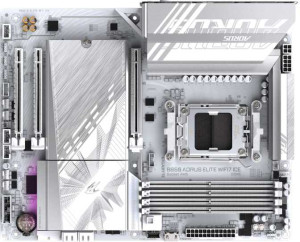
Gigabyte B850 Aorus Elite WiFi7 Ice
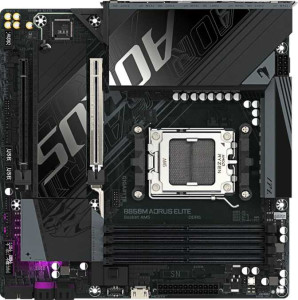
Gigabyte B850M Aorus Elite

Gigabyte B850 Aorus Elite WiFi7 Ice Gigabyte B850M Aorus Elite

Overview

Welcome to our in-depth comparison of the Gigabyte B850 Aorus Elite WiFi7 Ice and the Gigabyte B850M Aorus Elite — two AM5 motherboards built on the B850 chipset that share a strong common foundation yet diverge in meaningful ways. Both boards target DDR5 builders who want overclocking headroom and solid connectivity, but key battlegrounds like form factor, wireless capabilities, and storage expansion options set them apart in ways that could prove decisive for your next build.

Common Features

  • Both boards use the AM5 CPU socket.
  • Both boards feature the B850 chipset.
  • Overclocking is supported on both products.
  • RGB lighting is present on both products.
  • BIOS reset is not easy on either product.
  • Each board has a single CPU socket.
  • Integrated graphics are not available on either product.
  • Both products carry a 3-year warranty.
  • Both boards support up to 256GB of maximum memory.
  • Both boards support a maximum RAM speed of 5200 MHz.
  • Both boards support overclocked RAM speeds up to 8200 MHz.
  • Both boards have 4 memory slots.
  • Both boards use DDR5 memory.
  • Both boards have 2 memory channels.
  • ECC memory is not supported on either product.
  • Both boards provide 2 USB 3.2 Gen 2 Type-A ports.
  • Both boards provide 5 USB 3.2 Gen 1 Type-A ports.
  • Both boards provide 1 USB 3.2 Gen 2 Type-C port.
  • Both boards provide 4 USB 2.0 ports.
  • Neither board has USB 3.2 Gen 2x2, USB 4 40Gbps, or USB 4 20Gbps ports.
  • Both boards offer 2 USB 3.2 Gen 1 headers and 4 USB 2.0 headers for expansion.
  • Both boards include 1 USB 3.2 Gen 2x2 header for expansion.
  • Both boards have 4 SATA 3 connectors.
  • Both boards include 6 fan headers.
  • Both boards have a TPM connector.
  • Neither board has U.2 sockets.
  • Both boards have 1 PCIe 5.0 x16 slot and no PCIe 4.0, 3.0, 2.0, or x8 slots.
  • Both boards support 7.1 audio channels.
  • Both boards have an S/PDIF Out port.
  • Both boards have 2 audio connectors.
  • Both boards support RAID 0, RAID 1, RAID 5, and RAID 10.
  • RAID 0+1 is not supported on either product.

Main Differences

  • The form factor is ATX on Gigabyte B850 Aorus Elite WiFi7 Ice and Micro-ATX on Gigabyte B850M Aorus Elite.
  • Wi-Fi support is present on Gigabyte B850 Aorus Elite WiFi7 Ice but not available on Gigabyte B850M Aorus Elite.
  • Bluetooth is present on Gigabyte B850 Aorus Elite WiFi7 Ice but not available on Gigabyte B850M Aorus Elite.
  • Dual BIOS is present on Gigabyte B850 Aorus Elite WiFi7 Ice but not available on Gigabyte B850M Aorus Elite.
  • The board width is 305 mm on Gigabyte B850 Aorus Elite WiFi7 Ice and 244 mm on Gigabyte B850M Aorus Elite.
  • The number of M.2 sockets is 3 on Gigabyte B850 Aorus Elite WiFi7 Ice and 2 on Gigabyte B850M Aorus Elite.
  • The number of PCIe x1 slots is 2 on Gigabyte B850 Aorus Elite WiFi7 Ice and 0 on Gigabyte B850M Aorus Elite.
  • The number of PCIe x4 slots is 0 on Gigabyte B850 Aorus Elite WiFi7 Ice and 1 on Gigabyte B850M Aorus Elite.
Specs Comparison
Gigabyte B850 Aorus Elite WiFi7 Ice

Gigabyte B850 Aorus Elite WiFi7 Ice

Gigabyte B850M Aorus Elite

Gigabyte B850M Aorus Elite

General info:
CPU socket AM5 AM5
chipset B850 B850
form factor ATX Micro-ATX
release date January 2025 January 2025
supports Wi-Fi
Has Bluetooth
Easy to overclock
has RGB lighting
Easy to reset BIOS
Has dual BIOS
CPU sockets 1 1
Has integrated graphics
warranty period 3 years 3 years
height 244 mm 244 mm
width 305 mm 244 mm
Has integrated CPU

Both boards share the same AM5 socket and B850 chipset, making them equally capable as a platform for current AMD processors. They also match on core reliability features: a 3-year warranty, support for overclocking, RGB lighting, and a single CPU socket with no integrated graphics or CPU — exactly what you'd expect from dedicated DIY motherboards at this tier.

The most consequential difference is form factor. The Aorus Elite WiFi7 Ice is a full ATX board (305 × 244 mm), while the Aorus Elite M is Micro-ATX (244 × 244 mm). This affects case compatibility, the number of expansion slots available, and overall build flexibility — ATX opens up larger cases and typically more PCIe real estate. Equally important, the ATX model includes Wi-Fi 7 and Bluetooth, whereas the Micro-ATX version has neither, meaning wireless connectivity on the smaller board requires an add-in card or adapter.

The ATX model also adds dual BIOS, a meaningful safety net that lets the board recover from a failed firmware update automatically — the Micro-ATX lacks this. On the other hand, neither board offers an easy BIOS reset mechanism, so they are tied on that front. Overall, the Aorus Elite WiFi7 Ice holds a clear advantage in this group: it delivers built-in wireless, a dual-BIOS failsafe, and greater expandability, making it the stronger all-in-one foundation — at the cost of requiring a larger case.

Memory:
maximum memory amount 256GB 256GB
RAM speed (max) 5200 MHz 5200 MHz
overclocked RAM speed 8200 MHz 8200 MHz
memory slots 4 4
DDR memory version 5 5
memory channels 2 2
Supports ECC memory

On memory, these two boards are completely identical across every measured spec. Both support DDR5 with 4 slots across 2 channels, a maximum capacity of 256 GB, a native speed ceiling of 5200 MHz, and an overclocked ceiling of 8200 MHz — the latter being particularly relevant for enthusiasts looking to push high-frequency kits on the B850 platform.

That 8200 MHz headroom is worth noting: reaching those speeds depends heavily on the specific memory kit and CPU's IMF tolerance, but having the board rated for it means neither product artificially limits your upgrade path. Neither board supports ECC memory, which is expected at this non-workstation tier and unlikely to matter for the target audience.

This group is a complete tie. No matter which of these two boards you choose, your memory configuration options — capacity, speed, slot count, and channel layout — are exactly the same. Memory compatibility and pricing should play no role in differentiating these two products.

Ports:
USB 3.2 Gen 2 ports (USB-A) 2 2
USB 3.2 Gen 1 ports (USB-A) 5 5
USB 3.2 Gen 2 ports (USB-C) 1 1
USB 3.2 Gen 1 ports (USB-C) 0 0
USB 2.0 ports 4 4
USB 3.2 Gen 2x2 ports 0 0
USB 4 40Gbps ports 0 0
USB 4 20Gbps ports 0 0
Thunderbolt 4 ports 0 0
Thunderbolt 3 ports 0 0
has an HDMI output
DisplayPort outputs 1 1
RJ45 ports 1 1
Has USB Type-C
eSATA ports 0 0
DVI outputs 0 0
has a VGA connector
PS/2 ports 0 0

Rear I/O connectivity is identical across both boards. Each offers a well-rounded USB lineup: 2× USB 3.2 Gen 2 Type-A (10 Gbps), 5× USB 3.2 Gen 1 Type-A (5 Gbps), 1× USB 3.2 Gen 2 Type-C (10 Gbps), and 4× USB 2.0 ports — enough to cover peripherals, storage, and fast-charging devices simultaneously without a hub. Neither board reaches for USB4 or Thunderbolt, which is consistent with the B850 mid-range positioning.

For display output, both provide a single DisplayPort with no HDMI — a deliberate choice that reflects the assumption that discrete GPU users won't need the board's video output at all. The lone RJ45 ethernet port handles wired networking on both, and neither board carries legacy connectors like VGA, DVI, or PS/2, keeping the rear panel clean and modern.

This group is another complete tie. Every port type, count, and speed rating is exactly mirrored between the two boards. Connectivity at the rear panel should have zero influence on choosing between them.

Connectors:
USB 3.2 Gen 1 ports (through expansion) 2 2
USB 3.2 Gen 2x2 ports (through expansion) 1 1
USB 2.0 ports (through expansion) 4 4
SATA 3 connectors 4 4
fan headers 6 6
USB 3.0 ports (through expansion) 2 2
M.2 sockets 3 2
Has TPM connector
U.2 sockets 0 0
Has mSATA connector
SATA 2 connectors 0 0

Internal connectors are nearly identical between the two boards, with one meaningful exception: the ATX Aorus Elite WiFi7 Ice offers 3 M.2 sockets, while the Micro-ATX Aorus Elite provides 2. For users planning a fast NVMe boot drive plus one or two additional SSDs, that third slot on the ATX board removes the need to fall back on the 4× SATA 3 ports — keeping the high-speed M.2 ecosystem intact for all primary storage needs.

Where they converge, the shared spec sheet is solid. Both carry 6 fan headers, which is generous and allows thorough thermal management without add-in controllers — particularly useful in larger or more densely cooled builds. The internal USB expansion headers, including a USB 3.2 Gen 2×2 front-panel connector, are mirrored exactly, meaning case compatibility and front-panel USB speeds are no differentiator here. Both also include a TPM connector, satisfying Windows 11 requirements and enterprise security use cases without needing a discrete TPM module.

The Aorus Elite WiFi7 Ice holds a clear edge in this group purely on the strength of that extra M.2 slot. For storage-heavy builds — content creation workstations, game libraries, or multi-drive NVMe setups — the additional socket offers meaningfully more flexibility than the Micro-ATX alternative can match.

Expansion slots:
PCIe 4.0 x16 slots 0 0
PCIe 5.0 x16 slots 1 1
PCIe 3.0 x16 slots 0 0
PCIe x1 slots 2 0
PCI slots 0 0
PCIe 2.0 x16 slots 0 0
PCIe x4 slots 0 1
PCIe x8 slots 0 0

The primary GPU slot is identical on both boards: a single PCIe 5.0 x16 socket, which is the current gold standard for discrete graphics and ensures neither board bottlenecks even the most demanding modern GPUs. That parity means the choice between them has no impact on graphics performance.

Beyond the main slot, the two boards diverge in how they handle secondary expansion. The ATX Aorus Elite WiFi7 Ice adds 2× PCIe x1 slots, useful for compact add-in cards like sound cards, capture cards, or network adapters. The Micro-ATX Aorus Elite takes a different approach, substituting those with 1× PCIe x4 slot — a physically larger slot that can accommodate higher-bandwidth add-in cards, such as PCIe SSD expansion cards or 10GbE NICs, but at the cost of total slot count.

Neither configuration is strictly superior — it comes down to build intent. The ATX board's two x1 slots offer more simultaneous expansion options, while the Micro-ATX board's single x4 slot delivers more bandwidth per secondary device. Users adding multiple low-bandwidth peripherals favor the ATX model; those needing one high-throughput add-in card may find the Micro-ATX layout equally sufficient. This group is effectively a contextual tie, with the ATX board holding a slight practical edge for multi-card expansion scenarios.

Audio:
audio channels 7.1 7.1
Has S/PDIF Out port
audio connectors 2 2

Audio capability is identical on both boards. Each delivers 7.1-channel surround support, a S/PDIF optical output for connecting to external DACs or AV receivers, and 2 rear audio connectors — a configuration that covers the needs of most headset and speaker users without requiring a dedicated sound card.

The S/PDIF out is worth highlighting for users with higher-end audio setups: it allows the audio signal to be passed digitally to an external decoder, bypassing the motherboard's onboard audio entirely and avoiding any electrical interference from internal components. Both boards offer this equally, so neither has an edge for audiophile or home-theater use cases.

This group is a complete tie. Audio hardware, output options, and channel support are mirrored exactly, and the choice between these two boards should not factor into any audio-related decision.

Storage:
Supports RAID 1
Supports RAID 10 (1+0)
Supports RAID 5
Supports RAID 0
Supports RAID 0+1

RAID support is identical across both boards. Each covers the four most practical configurations: RAID 0 for striped performance, RAID 1 for mirrored redundancy, RAID 5 for distributed parity across three or more drives, and RAID 10 for the combined speed-and-redundancy approach favored in workstation and small server contexts. Neither board supports RAID 0+1, though this omission is inconsequential given that RAID 10 achieves effectively the same outcome with better fault tolerance.

For the vast majority of users these boards target, RAID 0 and RAID 1 are the practically relevant options — whether chasing sequential read/write gains across multiple SSDs or protecting critical data with a live mirror. The presence of RAID 5 is a thoughtful inclusion for those running multi-drive SATA arrays, though its utility depends on having enough drives connected to make it worthwhile.

With no differences whatsoever between the two, this group is a complete tie. Storage redundancy and configuration options will play no part in distinguishing these two boards.

Comparison Summary & Verdict

After examining every specification, these two boards reveal themselves as products designed for different builder profiles. The Gigabyte B850 Aorus Elite WiFi7 Ice is the stronger choice for those building in a full-size ATX case who want a more complete out-of-the-box experience: it adds Wi-Fi and Bluetooth, a reassuring dual BIOS for recovery peace of mind, three M.2 sockets for generous NVMe storage, and two PCIe x1 slots for additional cards. The Gigabyte B850M Aorus Elite, on the other hand, suits builders working within the constraints of a Micro-ATX chassis who do not need wireless connectivity and can manage with two M.2 slots, while still enjoying the same DDR5 memory support, USB layout, audio, and RAID capabilities as its larger sibling. Neither board is objectively superior — the right pick depends entirely on your case size and feature priorities.

Gigabyte B850 Aorus Elite WiFi7 Ice
Buy Gigabyte B850 Aorus Elite WiFi7 Ice if...

Buy the Gigabyte B850 Aorus Elite WiFi7 Ice if you want built-in Wi-Fi, Bluetooth, and dual BIOS in an ATX build with more M.2 storage slots.

Gigabyte B850M Aorus Elite
Buy Gigabyte B850M Aorus Elite if...

Buy the Gigabyte B850M Aorus Elite if you are building in a compact Micro-ATX case and do not require wireless connectivity.