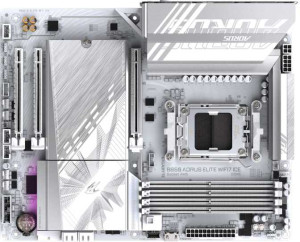
Gigabyte B850 Aorus Elite WiFi7 Ice
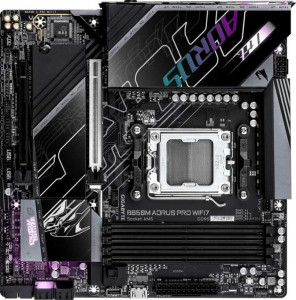
Gigabyte B850M Aorus Pro Wi-Fi7

Gigabyte B850 Aorus Elite WiFi7 Ice Gigabyte B850M Aorus Pro Wi-Fi7

Overview

Welcome to our in-depth comparison of the Gigabyte B850 Aorus Elite WiFi7 Ice and the Gigabyte B850M Aorus Pro Wi-Fi7 — two AM5 motherboards sharing the same B850 chipset and a rich feature set, yet diverging in meaningful ways. In this head-to-head, we examine key battlegrounds including form factor and physical dimensions, M.2 storage capacity, display output options, and overclocked memory ceilings to help you decide which board best suits your next build.

Common Features

  • Both boards use the AM5 CPU socket.
  • Both boards feature the B850 chipset.
  • Wi-Fi is supported on both products.
  • Both support Wi-Fi 4 (802.11n), Wi-Fi 5 (802.11ac), Wi-Fi 6 (802.11ax), Wi-Fi 6E (802.11ax), and Wi-Fi 7 (802.11be).
  • Bluetooth is available on both products.
  • Both share Bluetooth version 5.4.
  • Overclocking is supported on both products.
  • RGB lighting is present on both products.
  • Both boards support up to 256GB of maximum memory.
  • Both boards support a maximum RAM speed of 5200 MHz.
  • Both boards have 4 memory slots.
  • Both use DDR5 memory.
  • Both boards operate on 2 memory channels.
  • ECC memory is not supported on either product.
  • Both boards have 2 USB 3.2 Gen 2 ports (USB-A), 5 USB 3.2 Gen 1 ports (USB-A), 1 USB 3.2 Gen 2 port (USB-C), and 4 USB 2.0 ports.
  • Neither board has USB 3.2 Gen 2x2, USB 4 40Gbps, or USB 4 20Gbps ports.
  • Both boards include 4 SATA 3 connectors and 6 fan headers.
  • Both boards feature 1 PCIe 5.0 x16 slot and no PCIe 4.0, 3.0, 2.0, or PCI slots.
  • 7.1 audio channels and an S/PDIF Out port are present on both products.
  • Both boards support RAID 0, RAID 1, RAID 5, and RAID 10, but neither supports RAID 0+1.

Main Differences

  • The form factor is ATX on Gigabyte B850 Aorus Elite WiFi7 Ice and Micro-ATX on Gigabyte B850M Aorus Pro Wi-Fi7.
  • Dual BIOS is present on Gigabyte B850 Aorus Elite WiFi7 Ice but not available on Gigabyte B850M Aorus Pro Wi-Fi7.
  • The board width is 305 mm on Gigabyte B850 Aorus Elite WiFi7 Ice and 244 mm on Gigabyte B850M Aorus Pro Wi-Fi7.
  • The maximum overclocked RAM speed is 8200 MHz on Gigabyte B850 Aorus Elite WiFi7 Ice and 8600 MHz on Gigabyte B850M Aorus Pro Wi-Fi7.
  • An HDMI output is present on Gigabyte B850M Aorus Pro Wi-Fi7 but not available on Gigabyte B850 Aorus Elite WiFi7 Ice.
  • DisplayPort outputs number 1 on Gigabyte B850 Aorus Elite WiFi7 Ice and 0 on Gigabyte B850M Aorus Pro Wi-Fi7.
  • M.2 sockets number 3 on Gigabyte B850 Aorus Elite WiFi7 Ice and 2 on Gigabyte B850M Aorus Pro Wi-Fi7.
  • PCIe x1 slots number 2 on Gigabyte B850 Aorus Elite WiFi7 Ice and 0 on Gigabyte B850M Aorus Pro Wi-Fi7.
  • PCIe x4 slots number 0 on Gigabyte B850 Aorus Elite WiFi7 Ice and 1 on Gigabyte B850M Aorus Pro Wi-Fi7.
Specs Comparison
Gigabyte B850 Aorus Elite WiFi7 Ice

Gigabyte B850 Aorus Elite WiFi7 Ice

Gigabyte B850M Aorus Pro Wi-Fi7

Gigabyte B850M Aorus Pro Wi-Fi7

General info:
CPU socket AM5 AM5
chipset B850 B850
form factor ATX Micro-ATX
release date January 2025 January 2025
supports Wi-Fi
Wi-Fi version Wi-Fi 4 (802.11n), Wi-Fi 5 (802.11ac), Wi-Fi 6 (802.11ax), Wi-Fi 6E (802.11ax), Wi-Fi 7 (802.11be) Wi-Fi 4 (802.11n), Wi-Fi 5 (802.11ac), Wi-Fi 6 (802.11ax), Wi-Fi 6E (802.11ax), Wi-Fi 7 (802.11be)
Has Bluetooth
Bluetooth version 5.4 5.4
Easy to overclock
has RGB lighting
Easy to reset BIOS
Has dual BIOS
has aptX
CPU sockets 1 1
Has integrated graphics
warranty period 3 years 3 years
height 244 mm 244 mm
width 305 mm 244 mm
Has integrated CPU

Both boards share the same core platform: the AM5 socket with a B850 chipset, identical wireless connectivity (Wi-Fi 7 with backward compatibility down to Wi-Fi 4, plus Bluetooth 5.4), RGB lighting, and overclocking support — all under a 3-year warranty. For a user choosing strictly on platform capability or connectivity, these two are essentially tied.

The defining difference lies in form factor. The Aorus Elite WiFi7 Ice is a full ATX board (305 × 244 mm), while the Aorus Pro Wi-Fi7 is Micro-ATX (244 × 244 mm). This matters practically: ATX fits standard mid-tower and full-tower cases and typically offers more PCIe slots and expansion room, whereas Micro-ATX targets smaller builds where physical footprint is a priority. Neither is objectively superior — it depends entirely on the target case and build goals.

The one functional edge the Elite holds over the Pro is dual BIOS, a backup chip that lets the board recover automatically from a failed firmware update. The Pro lacks this feature, which is a meaningful reliability safeguard — especially relevant since neither board offers an easy BIOS reset mechanism. For builders who plan to push firmware updates or experiment with settings, the Aorus Elite WiFi7 Ice has a clear, if narrow, advantage in this group.

Memory:
maximum memory amount 256GB 256GB
RAM speed (max) 5200 MHz 5200 MHz
overclocked RAM speed 8200 MHz 8600 MHz
memory slots 4 4
DDR memory version 5 5
memory channels 2 2
Supports ECC memory

On paper, the memory configurations of these two boards are nearly identical: both support DDR5 across 4 slots in a dual-channel arrangement, cap out at 256GB maximum capacity, and share the same native JEDEC speed ceiling of 5200 MHz. For most mainstream use cases — gaming, content creation, everyday multitasking — this parity means neither board offers a practical edge in day-to-day memory performance.

The only measurable split between them is the overclocked memory ceiling. The Aorus Elite WiFi7 Ice tops out at 8200 MHz (via XMP/EXPO profiles), while the Aorus Pro Wi-Fi7 reaches 8600 MHz — a 400 MHz gap at the extreme end of the frequency range. In real-world workloads, this difference is unlikely to produce perceptible gains; memory scaling returns diminish sharply above 6000–6400 MHz on the AM5 platform, and pushing to 8200+ MHz already demands premium, finely-binned DDR5 kits with careful tuning.

For the overwhelming majority of users, this group is effectively a tie. The Aorus Pro Wi-Fi7 holds a technical edge on paper thanks to its higher overclocked ceiling, but only enthusiasts specifically chasing maximum memory frequencies will ever see it materialize. Neither board supports ECC memory, so workstation or server use cases are off the table for both.

Ports:
USB 3.2 Gen 2 ports (USB-A) 2 2
USB 3.2 Gen 1 ports (USB-A) 5 5
USB 3.2 Gen 2 ports (USB-C) 1 1
USB 3.2 Gen 1 ports (USB-C) 0 0
USB 2.0 ports 4 4
USB 3.2 Gen 2x2 ports 0 0
USB 4 40Gbps ports 0 0
USB 4 20Gbps ports 0 0
Thunderbolt 4 ports 0 0
Thunderbolt 3 ports 0 0
has an HDMI output
DisplayPort outputs 1 0
RJ45 ports 1 1
Has USB Type-C
eSATA ports 0 0
DVI outputs 0 0
has a VGA connector
PS/2 ports 0 0

The USB lineup on these two boards is a perfect mirror: both offer the same count of USB 3.2 Gen 2 (10Gbps) and Gen 1 (5Gbps) ports in both Type-A and Type-C configurations, the same four USB 2.0 ports for legacy peripherals, and a single RJ45 ethernet jack. Neither board ventures into USB4 or Thunderbolt territory, which is expected at this chipset tier. For connectivity breadth, there is no distinction to draw between them.

The sole differentiator in this group is the video output — and it is a direct trade-off rather than an outright advantage for either side. The Aorus Elite WiFi7 Ice includes a DisplayPort 1 output but no HDMI, while the Aorus Pro Wi-Fi7 flips that equation with an HDMI output and no DisplayPort. This matters when using integrated graphics from a compatible APU or for troubleshooting without a discrete GPU. DisplayPort is generally preferred for high-refresh-rate monitors and daisy-chaining, whereas HDMI enjoys near-universal compatibility with TVs, projectors, and consumer displays.

Which board wins here depends entirely on the user's display ecosystem. For a typical desktop monitor — especially a gaming or productivity panel — the Aorus Elite WiFi7 Ice and its DisplayPort output is often the more versatile choice. For users whose primary display is a TV or a device with only HDMI inputs, the Aorus Pro Wi-Fi7 is the natural fit. Outside of this single video output difference, the two boards are completely tied on port selection.

Connectors:
USB 3.2 Gen 1 ports (through expansion) 2 2
USB 3.2 Gen 2x2 ports (through expansion) 1 1
USB 2.0 ports (through expansion) 4 4
SATA 3 connectors 4 4
fan headers 6 6
USB 3.0 ports (through expansion) 2 2
M.2 sockets 3 2
Has TPM connector
U.2 sockets 0 0
Has mSATA connector
SATA 2 connectors 0 0

Strip away the one key difference and these two boards are internally identical on connectors: both provide 4 SATA 3 ports, 6 fan headers, the same internal USB expansion headers, and a TPM connector. For thermal management, storage via traditional drives, and front-panel USB expansion, builders will have the exact same experience on either board.

The single point of separation is the number of M.2 sockets — 3 on the Aorus Elite WiFi7 Ice versus 2 on the Aorus Pro Wi-Fi7. This is a meaningful practical difference. M.2 is the dominant interface for modern NVMe SSDs, and having a third slot means the Elite can accommodate an additional high-speed drive without consuming any of the four SATA ports. For users planning a multi-drive setup — say, a primary NVMe boot drive, a secondary NVMe for games or media, and a third for backup or overflow — the Elite handles it entirely within M.2, keeping the build cleaner and the SATA ports free for optical drives or additional storage.

The Aorus Elite WiFi7 Ice holds a clear edge in this group. The extra M.2 slot adds meaningful storage flexibility with no trade-offs visible in the provided specs, making it the stronger choice for users who anticipate expanding their NVMe storage over time. The Aorus Pro Wi-Fi7's two M.2 slots will satisfy most typical builds, but power users planning three or more fast drives will hit a ceiling sooner.

Expansion slots:
PCIe 4.0 x16 slots 0 0
PCIe 5.0 x16 slots 1 1
PCIe 3.0 x16 slots 0 0
PCIe x1 slots 2 0
PCI slots 0 0
PCIe 2.0 x16 slots 0 0
PCIe x4 slots 0 1
PCIe x8 slots 0 0

The headline is the same for both boards: a single PCIe 5.0 x16 slot for the primary GPU. This is the current top-tier standard for discrete graphics, offering up to 128GB/s of bandwidth — more than enough headroom for even the most demanding current and near-future graphics cards. Neither board compromises on the primary expansion slot.

Where they diverge is in secondary expansion. The Aorus Elite WiFi7 Ice includes 2 PCIe x1 slots, which are suited to add-in cards like sound cards, capture cards, or USB expansion cards. The Aorus Pro Wi-Fi7 trades those for a single PCIe x4 slot and no x1 slots. A x4 slot carries four times the bandwidth of a x1 slot, making it more appropriate for cards that can actually use that throughput — such as additional NVMe controllers, 10GbE network cards, or certain capture devices — but it offers only one expansion position instead of two.

Neither configuration is strictly superior; it comes down to intended use. Builders who want to slot in multiple lower-bandwidth accessories will find the Aorus Elite WiFi7 Ice more accommodating with its two x1 slots. Those planning a single, higher-bandwidth expansion card will be better served by the Aorus Pro Wi-Fi7's x4 slot. For purely GPU-focused single-card builds, both boards are functionally tied at this tier.

Audio:
audio channels 7.1 7.1
Has S/PDIF Out port
audio connectors 2 2

Audio is a clean sweep for parity: both boards deliver identical specifications across every provided data point. Each supports 7.1 surround sound, includes an S/PDIF optical output for connecting to external DACs, AV receivers, or soundbars via digital signal, and offers the same count of 2 analog audio connectors on the rear panel.

The 7.1 channel capability is worth contextualizing — it means the onboard audio codec can output a full surround sound configuration, useful for multi-speaker setups or virtual surround processing in compatible headsets. The S/PDIF out is a meaningful inclusion for users who want to bypass the onboard analog circuitry entirely and hand off audio processing to a dedicated external unit, preserving signal quality.

This group is a complete tie. There is no data point here that favors one board over the other, and the choice between the Aorus Elite WiFi7 Ice and the Aorus Pro Wi-Fi7 should rest entirely on the differentiators identified in other specification groups.

Storage:
Supports RAID 1
Supports RAID 10 (1+0)
Supports RAID 5
Supports RAID 0
Supports RAID 0+1

RAID support is identical across both boards. Each one covers the four most practical configurations: RAID 0 for striped performance, RAID 1 for mirrored redundancy, RAID 5 for distributed parity across three or more drives, and RAID 10 for a combined stripe-and-mirror setup. Neither supports RAID 0+1, though this omission is inconsequential in practice — RAID 10 achieves a superior version of the same concept and is the standard recommendation when both performance and redundancy are needed.

The inclusion of RAID 5 is noteworthy for users building small NAS-like desktop setups or workstations where storage efficiency and fault tolerance both matter — it allows one drive to fail without data loss while using capacity more efficiently than pure mirroring. That said, both boards offer this equally, so it does not shift the balance between them.

This group is a straight tie with no differentiators to analyze. Whichever board a user selects, their RAID options are exactly the same, and the storage decision should be driven by the physical drive counts each board supports — a distinction already covered under the Connectors group.

Comparison Summary & Verdict

Both the Gigabyte B850 Aorus Elite WiFi7 Ice and the Gigabyte B850M Aorus Pro Wi-Fi7 deliver a strong, well-rounded platform with Wi-Fi 7, Bluetooth 5.4, DDR5 support up to 256GB, and comprehensive RAID options. However, their differences point each board toward a distinct audience. The Gigabyte B850 Aorus Elite WiFi7 Ice stands out with its full ATX form factor, dual BIOS safety net, three M.2 sockets, a dedicated DisplayPort output, and two extra PCIe x1 slots — making it the stronger choice for enthusiasts who want maximum expandability in a standard tower. The Gigabyte B850M Aorus Pro Wi-Fi7, on the other hand, wins on compact Micro-ATX dimensions, a slightly higher overclocked RAM ceiling of 8600 MHz, a built-in HDMI output for quick display connectivity, and a PCIe x4 slot — ideal for small-form-factor builders who still demand modern performance without sacrificing connectivity.

Gigabyte B850 Aorus Elite WiFi7 Ice
Buy Gigabyte B850 Aorus Elite WiFi7 Ice if...

Choose the Gigabyte B850 Aorus Elite WiFi7 Ice if you need a full ATX board with maximum expansion, three M.2 slots, dual BIOS protection, and a dedicated DisplayPort output for a versatile full-size build.

Gigabyte B850M Aorus Pro Wi-Fi7
Buy Gigabyte B850M Aorus Pro Wi-Fi7 if...

Choose the Gigabyte B850M Aorus Pro Wi-Fi7 if you are building a compact Micro-ATX system and want a slightly higher overclocked RAM speed, a built-in HDMI output, and a space-efficient footprint without giving up modern connectivity.