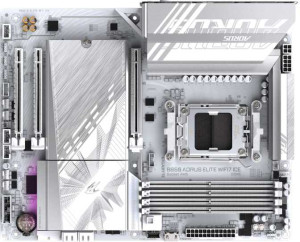
Gigabyte B850 Aorus Elite WiFi7 Ice
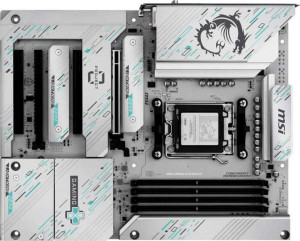
MSI B850 Gaming Plus Wi-Fi PZ

Gigabyte B850 Aorus Elite WiFi7 Ice MSI B850 Gaming Plus Wi-Fi PZ

Overview

Welcome to our in-depth spec comparison between the Gigabyte B850 Aorus Elite WiFi7 Ice and the MSI B850 Gaming Plus Wi-Fi PZ — two AM5 motherboards built on the B850 chipset that share a surprising amount of common ground. Both bring Wi-Fi 7, DDR5 support, and PCIe 5.0 to the table, yet they diverge in meaningful ways around USB connectivity, native RAM speeds, and key reliability and expansion features worth examining closely.

Common Features

  • Both motherboards use the AM5 CPU socket.
  • Both motherboards feature the B850 chipset.
  • Both motherboards have an ATX form factor.
  • Wi-Fi is supported on both motherboards.
  • Both support the same Wi-Fi versions: Wi-Fi 4 (802.11n), Wi-Fi 5 (802.11ac), Wi-Fi 6 (802.11ax), Wi-Fi 6E (802.11ax), and Wi-Fi 7 (802.11be).
  • Bluetooth is available on both motherboards.
  • Both motherboards have Bluetooth version 5.4.
  • Overclocking is supported on both motherboards.
  • Both motherboards support a maximum memory amount of 256GB.
  • Both motherboards support an overclocked RAM speed of up to 8200 MHz.
  • Both motherboards have 4 memory slots.
  • Both motherboards use DDR5 memory.
  • Both motherboards have 2 memory channels.
  • ECC memory is not supported on either motherboard.
  • Neither motherboard has USB 3.2 Gen 1 ports (USB-C) on the rear panel.
  • Both motherboards have 4 USB 2.0 ports.
  • Neither motherboard has USB 3.2 Gen 2x2 ports on the rear panel.
  • Neither motherboard has USB 4 40Gbps ports.
  • Neither motherboard has USB 4 20Gbps ports.
  • Neither motherboard has Thunderbolt 4 ports.
  • Neither motherboard has Thunderbolt 3 ports.
  • Neither motherboard has an HDMI output.
  • Both motherboards have 4 USB 2.0 ports available through expansion.
  • Both motherboards have 4 SATA 3 connectors.
  • Both motherboards have 6 fan headers.
  • Both motherboards have 3 M.2 sockets.
  • Both motherboards include a TPM connector.
  • Neither motherboard has U.2 sockets.
  • Neither motherboard has an mSATA connector.
  • Neither motherboard has SATA 2 connectors.
  • Both motherboards have 1 PCIe 5.0 x16 slot.
  • Neither motherboard has PCIe 4.0 x16 slots.
  • Neither motherboard has PCIe 3.0 x16 slots.
  • Both motherboards have 2 PCIe x1 slots.
  • Neither motherboard has PCI slots.
  • Neither motherboard has PCIe 2.0 x16 slots.
  • Neither motherboard has PCIe x8 slots.
  • Both motherboards support 7.1 audio channels.
  • Both motherboards have an S/PDIF Out port.
  • Both motherboards have 2 audio connectors.
  • Both motherboards support RAID 0, RAID 1, RAID 5, and RAID 10 (1+0).
  • Neither motherboard supports RAID 0+1.

Main Differences

  • Easy BIOS reset is available on MSI B850 Gaming Plus Wi-Fi PZ but not on Gigabyte B850 Aorus Elite WiFi7 Ice.
  • Dual BIOS is present on Gigabyte B850 Aorus Elite WiFi7 Ice but not available on MSI B850 Gaming Plus Wi-Fi PZ.
  • The height is 244 mm on Gigabyte B850 Aorus Elite WiFi7 Ice and 243.8 mm on MSI B850 Gaming Plus Wi-Fi PZ.
  • The width is 305 mm on Gigabyte B850 Aorus Elite WiFi7 Ice and 304.8 mm on MSI B850 Gaming Plus Wi-Fi PZ.
  • The maximum native RAM speed is 5200 MHz on Gigabyte B850 Aorus Elite WiFi7 Ice and 5600 MHz on MSI B850 Gaming Plus Wi-Fi PZ.
  • USB 3.2 Gen 2 ports (USB-A) count is 2 on Gigabyte B850 Aorus Elite WiFi7 Ice and 1 on MSI B850 Gaming Plus Wi-Fi PZ.
  • USB 3.2 Gen 1 ports (USB-A) count is 5 on Gigabyte B850 Aorus Elite WiFi7 Ice and 1 on MSI B850 Gaming Plus Wi-Fi PZ.
  • USB 3.2 Gen 2 ports (USB-C) count is 1 on Gigabyte B850 Aorus Elite WiFi7 Ice and 2 on MSI B850 Gaming Plus Wi-Fi PZ.
  • USB 3.2 Gen 1 ports available through expansion is 2 on Gigabyte B850 Aorus Elite WiFi7 Ice and 4 on MSI B850 Gaming Plus Wi-Fi PZ.
  • USB 3.2 Gen 2x2 ports available through expansion is 1 on Gigabyte B850 Aorus Elite WiFi7 Ice and 0 on MSI B850 Gaming Plus Wi-Fi PZ.
  • USB 3.0 ports available through expansion is 2 on Gigabyte B850 Aorus Elite WiFi7 Ice and 4 on MSI B850 Gaming Plus Wi-Fi PZ.
  • A PCIe x4 slot is present on MSI B850 Gaming Plus Wi-Fi PZ but not available on Gigabyte B850 Aorus Elite WiFi7 Ice.
Specs Comparison
Gigabyte B850 Aorus Elite WiFi7 Ice

Gigabyte B850 Aorus Elite WiFi7 Ice

MSI B850 Gaming Plus Wi-Fi PZ

MSI B850 Gaming Plus Wi-Fi PZ

General info:
CPU socket AM5 AM5
chipset B850 B850
form factor ATX ATX
release date January 2025 June 2025
supports Wi-Fi
Wi-Fi version Wi-Fi 4 (802.11n), Wi-Fi 5 (802.11ac), Wi-Fi 6 (802.11ax), Wi-Fi 6E (802.11ax), Wi-Fi 7 (802.11be) Wi-Fi 4 (802.11n), Wi-Fi 5 (802.11ac), Wi-Fi 6 (802.11ax), Wi-Fi 6E (802.11ax), Wi-Fi 7 (802.11be)
Has Bluetooth
Bluetooth version 5.4 5.4
Easy to overclock
has RGB lighting
Easy to reset BIOS
Has dual BIOS
has aptX
CPU sockets 1 1
Has integrated graphics
warranty period 3 years 3 years
height 244 mm 243.8 mm
width 305 mm 304.8 mm
Has integrated CPU

At their core, both the Gigabyte B850 Aorus Elite WiFi7 Ice and the MSI B850 Gaming Plus Wi-Fi PZ share the same fundamental platform: the AM5 socket, B850 chipset, and standard ATX form factor. Their wireless credentials are also identical, with full Wi-Fi 7 (802.11be) support spanning all major Wi-Fi generations, paired with Bluetooth 5.4. Both boards support overclocking, include RGB lighting, and carry a 3-year warranty. For a buyer focused purely on platform compatibility or wireless capability, these two boards are effectively interchangeable.

The only meaningful differentiators in this group come down to BIOS resilience features. The Gigabyte board ships with a dual BIOS — a backup chip that automatically takes over if the primary BIOS becomes corrupted during a failed flash or update. This is a significant safety net for enthusiasts who update firmware frequently or push overclocking limits. The MSI board lacks this but counters with an easy BIOS reset mechanism, which allows users to clear a bad BIOS configuration without needing to physically remove the CMOS battery or use jumpers — a practical convenience, especially in tight cases. The Gigabyte board does not offer this feature.

In terms of general info, neither board holds an outright dominant position. The Gigabyte Aorus Elite has a slight edge for users who prioritize BIOS corruption recovery via dual BIOS, making it marginally better suited to heavy firmware tinkerers. The MSI Gaming Plus, meanwhile, wins on everyday BIOS recovery convenience with its easy reset feature. Choose the Gigabyte if firmware stability under aggressive updates matters most; choose the MSI if simple, tool-free BIOS recovery is more relevant to your workflow.
Memory:
maximum memory amount 256GB 256GB
RAM speed (max) 5200 MHz 5600 MHz
overclocked RAM speed 8200 MHz 8200 MHz
memory slots 4 4
DDR memory version 5 5
memory channels 2 2
Supports ECC memory

Both boards share the same foundational memory architecture: DDR5 with 4 slots, a dual-channel configuration, and a maximum capacity of 256GB. For most users — whether building a gaming rig or a content creation workstation — this ceiling is more than sufficient, and the dual-channel setup ensures bandwidth is used efficiently across all use cases.

The one differentiator here is the native JEDEC RAM speed ceiling. The MSI B850 Gaming Plus supports up to 5600 MHz natively, while the Gigabyte Aorus Elite tops out at 5200 MHz. This 400 MHz gap matters in practice because it determines how fast your RAM can run without relying on XMP/EXPO overclocking profiles — meaning greater out-of-the-box stability with higher-speed kits. When it comes to overclocked speeds, however, both boards reach an identical ceiling of 8200 MHz, so enthusiasts pushing bleeding-edge DDR5 kits will find no daylight between them.

The MSI board holds a narrow but real edge in this category, thanks to its higher native RAM speed support. For users who prefer running memory at its rated JEDEC speed — or who pair the board with fast DDR5 kits without enabling XMP — the MSI offers a slightly more capable default configuration. Those planning to run heavily overclocked RAM regardless will find both boards equally capable.

Ports:
USB 3.2 Gen 2 ports (USB-A) 2 1
USB 3.2 Gen 1 ports (USB-A) 5 1
USB 3.2 Gen 2 ports (USB-C) 1 2
USB 3.2 Gen 1 ports (USB-C) 0 0
USB 2.0 ports 4 4
USB 3.2 Gen 2x2 ports 0 0
USB 4 40Gbps ports 0 0
USB 4 20Gbps ports 0 0
Thunderbolt 4 ports 0 0
Thunderbolt 3 ports 0 0
has an HDMI output
DisplayPort outputs 1 1
RJ45 ports 1 1
Has USB Type-C
eSATA ports 0 0
DVI outputs 0 0
has a VGA connector
PS/2 ports 0 0

Rear I/O connectivity is where these two boards diverge most noticeably. The Gigabyte Aorus Elite offers a significantly larger total USB-A port count — 7 high-speed USB-A ports (2× Gen 2 + 5× Gen 1) compared to the MSI Gaming Plus's more modest 2 high-speed USB-A ports (1× Gen 2 + 1× Gen 1). For users with a dense peripheral setup — multiple external drives, DACs, dongles, or legacy devices — the Gigabyte's rear panel is far less likely to require a hub.

The MSI counters with a stronger USB-C presence: 2× USB 3.2 Gen 2 Type-C ports on the rear, versus just one on the Gigabyte. This is increasingly relevant as modern peripherals — high-speed SSDs, displays, and smartphones — migrate toward USB-C. Having two Gen 2 Type-C ports at 10Gbps each means the MSI is better positioned for forward-looking, USB-C-centric workflows. Both boards match on USB 2.0 (4 ports each), networking (single RJ45), and video output (one DisplayPort, no HDMI).

The edge depends squarely on your peripheral habits. The Gigabyte Aorus Elite is the stronger choice for users with many USB-A devices who want to avoid hub clutter, while the MSI Gaming Plus is better suited to those building around modern USB-C peripherals. Neither board is outright superior — it comes down to whether your desk leans legacy or contemporary.

Connectors:
USB 3.2 Gen 1 ports (through expansion) 2 4
USB 3.2 Gen 2x2 ports (through expansion) 1 0
USB 2.0 ports (through expansion) 4 4
SATA 3 connectors 4 4
fan headers 6 6
USB 3.0 ports (through expansion) 2 4
M.2 sockets 3 3
Has TPM connector
U.2 sockets 0 0
Has mSATA connector
SATA 2 connectors 0 0

Inside the chassis, both boards offer an identical storage and cooling backbone: 3 M.2 sockets, 4 SATA 3 connectors, and 6 fan headers. For most builds — even those with multiple NVMe drives and several case fans — this is a fully capable internal layout, and neither board creates a bottleneck here.

The meaningful split comes from the internal USB expansion headers. The Gigabyte Aorus Elite includes a USB 3.2 Gen 2x2 internal header, which delivers up to 20Gbps to a compatible front-panel port or expansion card — useful for users who want the fastest possible front-panel USB-C speeds for high-throughput devices like fast external SSDs. The MSI Gaming Plus omits this header entirely, but compensates with 4 USB 3.2 Gen 1 internal ports (versus 2 on the Gigabyte), giving it more slots for front-panel USB-A expansion without consuming a hub or splitter.

The Gigabyte holds a niche but notable advantage for builders who specifically want to wire up an ultra-fast front-panel USB-C connection, as its Gen 2x2 header is the only path to 20Gbps internal throughput — and the MSI simply does not offer this. For users who prioritize sheer quantity of internal USB headers over peak speed, the MSI's broader Gen 1 coverage is the more practical choice. The Gigabyte edges ahead overall for performance-oriented front-panel connectivity.

Expansion slots:
PCIe 4.0 x16 slots 0 0
PCIe 5.0 x16 slots 1 1
PCIe 3.0 x16 slots 0 0
PCIe x1 slots 2 2
PCI slots 0 0
PCIe 2.0 x16 slots 0 0
PCIe x4 slots 0 1
PCIe x8 slots 0 0

Expansion slot layouts on these two boards are nearly identical where it counts most: both offer a single PCIe 5.0 x16 slot for the primary GPU, paired with 2× PCIe x1 slots for smaller add-in cards like sound cards, network adapters, or USB controllers. PCIe 5.0 on the primary slot ensures full bandwidth headroom for current and next-generation graphics cards, so neither board creates any GPU bottleneck.

The only differentiator is that the MSI B850 Gaming Plus includes an additional PCIe x4 slot, which the Gigabyte Aorus Elite lacks entirely. A PCIe x4 slot opens up meaningful expansion possibilities — dedicated NVMe storage controllers, 10GbE networking cards, or capture cards that require more bandwidth than a x1 slot can deliver. It is a modest but practical addition for users who want to grow their build beyond what the onboard connectors alone can support.

The MSI takes a clear, if narrow, edge here. For a typical single-GPU build, both boards are equally capable. But for builders who anticipate adding a bandwidth-hungry expansion card down the line, the MSI's extra PCIe x4 slot provides genuine flexibility that the Gigabyte simply cannot match in this category.

Audio:
audio channels 7.1 7.1
Has S/PDIF Out port
audio connectors 2 2

Audio is a clean draw between these two boards — every spec in this category is identical. Both deliver 7.1-channel surround sound support, an S/PDIF optical output for connecting to external receivers or DACs, and 2 analog audio connectors on the rear panel. For gaming, casual listening, or home theater passthrough, neither board offers anything the other does not.

This is a category where the decision simply does not move the needle either way. Users with more demanding audio requirements — such as multi-port analog output for a full 7.1 speaker array — will find both boards equally limited to 2 rear connectors, and should consider a dedicated sound card regardless of which board they choose.

Storage:
Supports RAID 1
Supports RAID 10 (1+0)
Supports RAID 5
Supports RAID 0
Supports RAID 0+1

Storage configuration support is identical across both boards. Each offers the same RAID suite: RAID 0 for striped performance, RAID 1 for mirrored redundancy, RAID 5 for parity-based protection across three or more drives, and RAID 10 for a combined stripe-and-mirror setup. Neither supports RAID 0+1, though in practice this mode is rarely used given that RAID 10 achieves a similar outcome more efficiently.

This is another category that produces no differentiation between the two boards. Whether a user is building a NAS-adjacent workstation with redundant drives or simply striping two SSDs for maximum throughput, both boards offer exactly the same tools to do it. Storage configuration should play no part in deciding between these two.

Comparison Summary & Verdict

After reviewing every specification, these two boards serve subtly different builders. The Gigabyte B850 Aorus Elite WiFi7 Ice stands out for its dual BIOS safety net and its considerably richer rear USB-A selection — five USB 3.2 Gen 1 and two USB 3.2 Gen 2 ports — making it the stronger pick for users with many USB-A peripherals and those who value firmware redundancy. The MSI B850 Gaming Plus Wi-Fi PZ counters with a higher native RAM speed of 5600 MHz, two rear USB-C ports, an extra PCIe x4 slot for added expansion, and a convenient easy BIOS reset button ideal for less experienced overclockers. Both boards are equally matched on audio, storage, wireless, and memory capacity, so your decision should hinge on whether you prioritize USB-A abundance and dual BIOS protection, or faster out-of-the-box memory speeds and greater PCIe flexibility.

Gigabyte B850 Aorus Elite WiFi7 Ice
Buy Gigabyte B850 Aorus Elite WiFi7 Ice if...

Buy the Gigabyte B850 Aorus Elite WiFi7 Ice if you want the security of dual BIOS and need a large number of rear USB-A ports for your existing peripherals.

MSI B850 Gaming Plus Wi-Fi PZ
Buy MSI B850 Gaming Plus Wi-Fi PZ if...

Buy the MSI B850 Gaming Plus Wi-Fi PZ if you want a higher native RAM speed of 5600 MHz, more rear USB-C ports, an extra PCIe x4 slot, and an easy BIOS reset button.