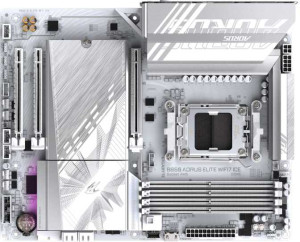
Gigabyte B850 Aorus Elite WiFi7 Ice
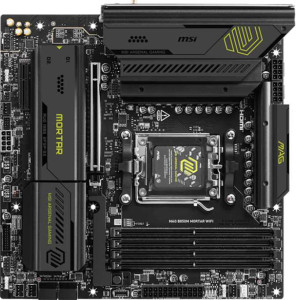
MSI MAG B850M Mortar WiFI

Gigabyte B850 Aorus Elite WiFi7 Ice MSI MAG B850M Mortar WiFI

Overview

When comparing the Gigabyte B850 Aorus Elite WiFi7 Ice and the MSI MAG B850M Mortar WiFI, you are looking at two AM5 motherboards that share the same B850 chipset and Wi-Fi 7 support, yet diverge in important ways. From their contrasting form factors to their differing port selections and expansion slot configurations, each board makes deliberate trade-offs that cater to distinct types of builders. Explore the full specification breakdown below to see which one fits your next build.

Common Features

  • Both products use the AM5 CPU socket.
  • Both products feature the B850 chipset.
  • Wi-Fi is supported on both products.
  • Both products support Wi-Fi 4 (802.11n), Wi-Fi 5 (802.11ac), Wi-Fi 6 (802.11ax), Wi-Fi 6E (802.11ax), and Wi-Fi 7 (802.11be).
  • Bluetooth is available on both products.
  • Both products have Bluetooth version 5.4.
  • Overclocking is supported on both products.
  • RGB lighting is present on both products.
  • Both products support a maximum memory amount of 256GB.
  • Both products support overclocked RAM speeds of up to 8200 MHz.
  • Both products have 4 memory slots.
  • Both products use DDR5 memory.
  • Both products have 2 memory channels.
  • ECC memory is not supported on either product.
  • Both products have 1 USB 3.2 Gen 2 port (USB-C).
  • Neither product has any USB 3.2 Gen 1 ports (USB-C).
  • Neither product has USB 4 40Gbps or USB 4 20Gbps ports.
  • Neither product has Thunderbolt 3 or Thunderbolt 4 ports.
  • Both products have 1 RJ45 port.
  • USB Type-C is present on both products.
  • Both products provide 2 USB 3.2 Gen 1 ports through expansion.
  • Both products provide 4 USB 2.0 ports through expansion.
  • Both products have 4 SATA 3 connectors.
  • Both products have 6 fan headers.
  • Both products have 3 M.2 sockets.
  • A TPM connector is present on both products.
  • Neither product has any U.2 sockets.
  • Neither product has any PCIe 4.0 x16, PCIe 3.0 x16, PCIe 2.0 x16, PCIe x8, or PCI slots.
  • Both products have 1 PCIe 5.0 x16 slot.
  • Both products support 7.1 audio channels.
  • An S/PDIF Out port is available on both products.
  • Both products have 2 audio connectors.
  • Both products support RAID 0, RAID 1, RAID 5, and RAID 10 (1+0).
  • RAID 0+1 is not supported on either product.

Main Differences

  • The form factor is ATX on Gigabyte B850 Aorus Elite WiFi7 Ice and Micro-ATX on MSI MAG B850M Mortar WiFI.
  • Easy BIOS reset is available on MSI MAG B850M Mortar WiFI but not on Gigabyte B850 Aorus Elite WiFi7 Ice.
  • The board width is 305 mm on Gigabyte B850 Aorus Elite WiFi7 Ice and 244 mm on MSI MAG B850M Mortar WiFI.
  • The maximum native RAM speed is 5200 MHz on Gigabyte B850 Aorus Elite WiFi7 Ice and 5600 MHz on MSI MAG B850M Mortar WiFI.
  • USB 3.2 Gen 2 ports (USB-A) count is 2 on Gigabyte B850 Aorus Elite WiFi7 Ice and 3 on MSI MAG B850M Mortar WiFI.
  • USB 3.2 Gen 1 ports (USB-A) count is 5 on Gigabyte B850 Aorus Elite WiFi7 Ice and 4 on MSI MAG B850M Mortar WiFI.
  • USB 2.0 ports number 4 on Gigabyte B850 Aorus Elite WiFi7 Ice while MSI MAG B850M Mortar WiFI has none.
  • A USB 3.2 Gen 2x2 port is present on MSI MAG B850M Mortar WiFI but not available on Gigabyte B850 Aorus Elite WiFi7 Ice.
  • An HDMI output is available on MSI MAG B850M Mortar WiFI but not on Gigabyte B850 Aorus Elite WiFi7 Ice.
  • DisplayPort output is present on Gigabyte B850 Aorus Elite WiFi7 Ice (1 port) but not available on MSI MAG B850M Mortar WiFI.
  • PCIe x1 slots number 2 on Gigabyte B850 Aorus Elite WiFi7 Ice while MSI MAG B850M Mortar WiFI has none.
  • A PCIe x4 slot is present on MSI MAG B850M Mortar WiFI but not available on Gigabyte B850 Aorus Elite WiFi7 Ice.
Specs Comparison
Gigabyte B850 Aorus Elite WiFi7 Ice

Gigabyte B850 Aorus Elite WiFi7 Ice

MSI MAG B850M Mortar WiFI

MSI MAG B850M Mortar WiFI

General info:
CPU socket AM5 AM5
chipset B850 B850
form factor ATX Micro-ATX
release date January 2025 March 2025
supports Wi-Fi
Wi-Fi version Wi-Fi 4 (802.11n), Wi-Fi 5 (802.11ac), Wi-Fi 6 (802.11ax), Wi-Fi 6E (802.11ax), Wi-Fi 7 (802.11be) Wi-Fi 4 (802.11n), Wi-Fi 5 (802.11ac), Wi-Fi 6 (802.11ax), Wi-Fi 6E (802.11ax), Wi-Fi 7 (802.11be)
Has Bluetooth
Bluetooth version 5.4 5.4
Easy to overclock
has RGB lighting
Easy to reset BIOS
Has dual BIOS
has aptX
CPU sockets 1 1
Has integrated graphics
warranty period 3 years 3 years
height 244 mm 244 mm
width 305 mm 244 mm
Has integrated CPU

Both the Gigabyte B850 Aorus Elite WiFi7 Ice and the MSI MAG B850M Mortar WiFi share the same AM5 socket and B850 chipset, meaning they target the same processor lineup and offer identical platform capabilities. Both support the full Wi-Fi spectrum up to Wi-Fi 7 (802.11be) and Bluetooth 5.4, so wireless connectivity is a wash. They also both feature RGB lighting, dual BIOS, a 3-year warranty, and overclocking support — making them closely matched on paper in most general categories.

The most significant differentiator in this group is form factor. The Aorus Elite is a full-size ATX board (305 × 244 mm), while the Mortar is Micro-ATX (244 × 244 mm). This is a meaningful real-world decision: ATX fits standard mid-tower and full-tower cases and typically offers more expansion slots, while Micro-ATX suits smaller or more compact builds. If case size is a constraint, the Mortar wins by default; if you want maximum expandability headroom, the Aorus Elite has the physical advantage. A secondary but practical difference is that the Mortar supports easy BIOS reset, whereas the Aorus Elite does not — a small but genuinely useful convenience during troubleshooting or initial builds.

In summary, for users building in a compact case or prioritizing a smaller footprint, the MSI MAG B850M Mortar WiFi holds a clear edge here thanks to its Micro-ATX size and easier BIOS reset. For those building in a standard ATX case who want the broader layout that form factor enables, the Gigabyte B850 Aorus Elite WiFi7 Ice is the natural fit. Beyond these two points, the two boards are effectively tied across all general specs in this group.
Memory:
maximum memory amount 256GB 256GB
RAM speed (max) 5200 MHz 5600 MHz
overclocked RAM speed 8200 MHz 8200 MHz
memory slots 4 4
DDR memory version 5 5
memory channels 2 2
Supports ECC memory

On the memory front, these two boards share a great deal of common ground: both support DDR5, offer 4 slots across 2 channels, cap out at 256GB maximum capacity, and top out at the same 8200 MHz overclocked ceiling. For the vast majority of users, this means identical practical expandability and the same headroom for high-frequency memory kits.

The one meaningful gap lies in the native (non-overclocked) official RAM speed. The MSI MAG B850M Mortar WiFi supports a rated maximum of 5600 MHz, while the Gigabyte B850 Aorus Elite WiFi7 Ice tops out at 5200 MHz on the official spec. In practice, this 400 MHz difference at stock speeds is relevant for users who want to run fast memory without enabling XMP/EXPO profiles — for instance, in stability-critical workloads or when using memory kits that aren't explicitly overclocked-rated. Those who do run XMP/EXPO will find both boards equally capable up to 8200 MHz.

The MSI Mortar holds a narrow but real edge here for users who prioritize higher out-of-the-box memory speeds without relying on overclocking profiles. For everyone else running tuned memory kits, the two boards are functionally identical in this category.

Ports:
USB 3.2 Gen 2 ports (USB-A) 2 3
USB 3.2 Gen 1 ports (USB-A) 5 4
USB 3.2 Gen 2 ports (USB-C) 1 1
USB 3.2 Gen 1 ports (USB-C) 0 0
USB 2.0 ports 4 0
USB 3.2 Gen 2x2 ports 0 1
USB 4 40Gbps ports 0 0
USB 4 20Gbps ports 0 0
Thunderbolt 4 ports 0 0
Thunderbolt 3 ports 0 0
has an HDMI output
DisplayPort outputs 1 0
RJ45 ports 1 1
Has USB Type-C
eSATA ports 0 0
DVI outputs 0 0
has a VGA connector
PS/2 ports 0 0

The port layouts on these two boards reflect genuinely different design philosophies. The Gigabyte B850 Aorus Elite WiFi7 Ice offers a higher raw USB count — 12 ports total across all standards — but four of those are USB 2.0, which at 480 Mbps are largely only useful for keyboards, mice, and dongles in a modern build. The MSI MAG B850M Mortar WiFi counters with a leaner but more modern 9-port lineup that drops USB 2.0 entirely and instead includes a USB 3.2 Gen 2x2 port delivering up to 20 Gbps — double the speed of standard Gen 2. For users connecting fast external SSDs or high-bandwidth peripherals, that single Gen 2x2 port is a meaningful practical advantage.

On the video output side, the Aorus Elite provides a DisplayPort output while the Mortar offers HDMI — relevant only when using a processor with integrated graphics, which neither board supports according to the specs. Still, as a secondary display connection for diagnostics or iGPU-equipped CPUs down the line, HDMI tends to be more universally compatible with monitors and TVs, while DisplayPort is generally preferred for high-refresh-rate setups.

Taken together, the MSI Mortar has a slight edge for users who prioritize port quality and bandwidth — the Gen 2x2 port stands out as the single fastest USB connection available across both boards. The Aorus Elite wins on sheer port quantity, which matters if you regularly run many simultaneous USB devices, even if some of those connections are slower legacy ports.

Connectors:
USB 3.2 Gen 1 ports (through expansion) 2 2
USB 2.0 ports (through expansion) 4 4
SATA 3 connectors 4 4
fan headers 6 6
USB 3.0 ports (through expansion) 2 2
M.2 sockets 3 3
Has TPM connector
U.2 sockets 0 0
Has mSATA connector
SATA 2 connectors 0 0

This is a rare case of a complete tie. Every internal connector spec is identical across both boards: 3 M.2 sockets, 4 SATA 3 ports, 6 fan headers, matching expansion USB headers, and a TPM connector on each. There is no differentiator here whatsoever.

What these shared specs do tell you about both builds is worth noting. Three M.2 sockets provide ample room for a fast primary NVMe drive plus additional storage or a secondary SSD without ever touching the SATA ports — and the four SATA 3 connectors remain available for HDDs, SSDs, or optical drives if needed. Six fan headers is a generous allocation that supports a well-ventilated build or a custom liquid-cooling loop without requiring a separate fan hub.

For this specification group, neither the Gigabyte B850 Aorus Elite WiFi7 Ice nor the MSI MAG B850M Mortar WiFi holds any advantage — the internal connectivity on offer is exactly matched, and your choice between them should rest entirely on the differentiators found in other spec groups.

Expansion slots:
PCIe 4.0 x16 slots 0 0
PCIe 5.0 x16 slots 1 1
PCIe 3.0 x16 slots 0 0
PCIe x1 slots 2 0
PCI slots 0 0
PCIe 2.0 x16 slots 0 0
PCIe x4 slots 0 1
PCIe x8 slots 0 0

Both boards lead with a single PCIe 5.0 x16 slot for the primary GPU — the current top-tier standard that delivers maximum bandwidth for modern graphics cards and ensures forward compatibility with upcoming hardware. That shared foundation means neither board compromises on primary GPU performance.

Where they diverge is in the secondary expansion options. The Gigabyte B850 Aorus Elite WiFi7 Ice adds two PCIe x1 slots, which are suited for lower-bandwidth add-in cards such as sound cards, network adapters, or capture cards. The MSI MAG B850M Mortar WiFi instead offers a single PCIe x4 slot, which carries four times the lane bandwidth of an x1 slot. A PCIe x4 connection is more capable for cards that can actually use the additional throughput — such as certain NVMe expansion cards, high-end capture devices, or 10GbE network cards — even though it provides only one expansion slot rather than two.

The right call here depends on your use case. If you plan to populate multiple expansion slots simultaneously, the Aorus Elite gives you more slots to work with. If you expect to add a single high-bandwidth expansion card alongside your GPU, the MSI Mortar's x4 slot is the more capable option for that purpose. Neither board holds a universal advantage — it is a trade-off between quantity and per-slot bandwidth.

Audio:
audio channels 7.1 7.1
Has S/PDIF Out port
audio connectors 2 2

Audio is another category where these two boards are perfectly matched. Both deliver 7.1 channel surround sound support, include an S/PDIF optical output for connecting to external receivers or DACs, and provide the same number of analog audio connectors. There is nothing in the provided data to separate them here.

The presence of 7.1 channel audio on both boards is worth contextualizing: it covers the full range of surround sound configurations used in gaming headsets, speaker systems, and home theater setups without requiring a dedicated sound card. S/PDIF out adds a clean digital path to external audio equipment, which is useful for anyone routing audio through an AV receiver or high-quality external DAC rather than relying solely on the onboard analog output.

This group is a complete tie — both the Gigabyte B850 Aorus Elite WiFi7 Ice and the MSI MAG B850M Mortar WiFi offer identical onboard audio capabilities, and audio should play no role in deciding between them.

Storage:
Supports RAID 1
Supports RAID 10 (1+0)
Supports RAID 5
Supports RAID 0
Supports RAID 0+1

Storage configuration support is identical across both boards. Each offers RAID 0, 1, 5, and 10 — covering the full practical range from pure performance striping to mirrored redundancy and the combined protection of RAID 10. Neither supports RAID 0+1, but that omission is shared and largely inconsequential, as RAID 10 is generally the preferred implementation of a stripe-plus-mirror array anyway.

Having RAID 5 available is noteworthy for a consumer B850 board — it allows parity-based redundancy across three or more drives, offering a balance of usable capacity and fault tolerance that suits small NAS-style or workstation storage setups. The fact that both boards include it means neither holds an edge, but it is a capability worth recognizing for users planning multi-drive configurations.

Storage is a complete tie between the Gigabyte B850 Aorus Elite WiFi7 Ice and the MSI MAG B850M Mortar WiFi — RAID support is perfectly matched, and this category should not influence the buying decision either way.

Comparison Summary & Verdict

Both the Gigabyte B850 Aorus Elite WiFi7 Ice and the MSI MAG B850M Mortar WiFI are well-equipped B850 boards sharing Wi-Fi 7, DDR5 memory support up to 256GB, three M.2 sockets, and 7.1 audio. The differences, however, point each product toward a specific builder profile. The Gigabyte B850 Aorus Elite WiFi7 Ice suits those planning a full ATX build who value broader expandability, with two PCIe x1 slots, five USB 3.2 Gen 1 Type-A ports, four USB 2.0 ports, and a DisplayPort output. The MSI MAG B850M Mortar WiFI is the stronger pick for compact Micro-ATX systems, offering a higher native RAM speed of 5600 MHz, a USB 3.2 Gen 2x2 port, three USB 3.2 Gen 2 Type-A ports, an HDMI output for integrated graphics use, and a convenient easy BIOS reset feature that simplifies troubleshooting.

Gigabyte B850 Aorus Elite WiFi7 Ice
Buy Gigabyte B850 Aorus Elite WiFi7 Ice if...

Buy the Gigabyte B850 Aorus Elite WiFi7 Ice if you are building in a standard ATX case and want maximum expandability with more PCIe and USB slots alongside a DisplayPort output.

MSI MAG B850M Mortar WiFI
Buy MSI MAG B850M Mortar WiFI if...

Choose the MSI MAG B850M Mortar WiFI if you need a compact Micro-ATX board with a higher native RAM speed, an HDMI output, a USB 3.2 Gen 2x2 port, and an easy BIOS reset for straightforward setup.