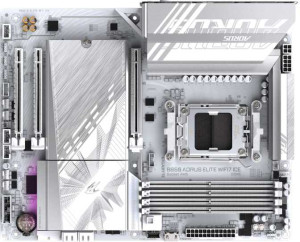
Gigabyte B850 Aorus Elite WiFi7 Ice
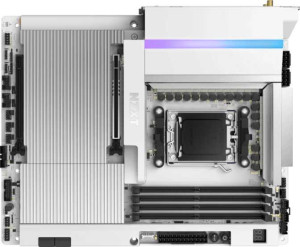
NZXT N9 X870E

Gigabyte B850 Aorus Elite WiFi7 Ice NZXT N9 X870E

Overview

When choosing between the Gigabyte B850 Aorus Elite WiFi7 Ice and the NZXT N9 X870E, enthusiasts face a compelling matchup of two AM5 ATX motherboards with Wi-Fi 7 and DDR5 support. While both share a strong foundation of modern connectivity and overclocking capability, key battlegrounds emerge around chipset tier, memory capacity, USB port variety, and storage expansion — making the right choice highly dependent on your specific build priorities.

Common Features

  • Both products use the AM5 CPU socket.
  • Both products have an ATX form factor.
  • Wi-Fi is supported on both products.
  • Both products support Wi-Fi 4 (802.11n), Wi-Fi 5 (802.11ac), Wi-Fi 6 (802.11ax), Wi-Fi 6E (802.11ax), and Wi-Fi 7 (802.11be).
  • Bluetooth is available on both products.
  • Both products have Bluetooth version 5.4.
  • Overclocking is supported on both products.
  • RGB lighting is present on both products.
  • Both products have 4 memory slots.
  • Both products use DDR5 memory.
  • Both products support 2 memory channels.
  • ECC memory is not supported on either product.
  • Neither product has USB 3.2 Gen 1 ports of the USB-C type.
  • Neither product has USB 3.2 Gen 2x2 ports.
  • Neither product has USB 4 20Gbps ports.
  • Neither product has Thunderbolt 3 ports.
  • Neither product has an HDMI output.
  • Both products have 1 RJ45 port.
  • USB Type-C connectivity is available on both products.
  • Neither product has eSATA ports.
  • Both products have 1 USB 3.2 Gen 2x2 port through expansion.
  • Both products have 4 USB 2.0 ports through expansion.
  • Both products have 4 SATA 3 connectors.
  • Neither product has a U.2 socket.
  • Neither product has an mSATA connector.
  • Neither product has SATA 2 connectors.
  • Both products have 1 PCIe 5.0 x16 slot.
  • Neither product has PCIe 4.0 x16 slots.
  • Neither product has PCI slots.
  • Neither product has PCIe 2.0 x16 slots.
  • Neither product has PCIe x4 slots.
  • Neither product has PCIe x8 slots.
  • Both products support 7.1 audio channels.
  • Both products have an S/PDIF Out port.
  • Both products have 2 audio connectors.
  • RAID 0 support is available on both products.
  • RAID 1 support is available on both products.
  • RAID 10 (1+0) support is available on both products.
  • RAID 0+1 is not supported on either product.

Main Differences

  • The chipset is B850 on Gigabyte B850 Aorus Elite WiFi7 Ice and X870 on NZXT N9 X870E.
  • Easy BIOS reset is not available on Gigabyte B850 Aorus Elite WiFi7 Ice but is present on NZXT N9 X870E.
  • Dual BIOS is present on Gigabyte B850 Aorus Elite WiFi7 Ice but not available on NZXT N9 X870E.
  • Maximum memory amount is 256GB on Gigabyte B850 Aorus Elite WiFi7 Ice and 192GB on NZXT N9 X870E.
  • Maximum RAM speed is 5200 MHz on Gigabyte B850 Aorus Elite WiFi7 Ice and 8200 MHz on NZXT N9 X870E.
  • USB 3.2 Gen 2 ports (USB-A) count is 2 on Gigabyte B850 Aorus Elite WiFi7 Ice and 5 on NZXT N9 X870E.
  • USB 3.2 Gen 1 ports (USB-A) count is 5 on Gigabyte B850 Aorus Elite WiFi7 Ice and 3 on NZXT N9 X870E.
  • USB 3.2 Gen 2 ports (USB-C) count is 1 on Gigabyte B850 Aorus Elite WiFi7 Ice and 0 on NZXT N9 X870E.
  • USB 2.0 ports count is 4 on Gigabyte B850 Aorus Elite WiFi7 Ice and 2 on NZXT N9 X870E.
  • USB 4 40Gbps ports are not present on Gigabyte B850 Aorus Elite WiFi7 Ice but NZXT N9 X870E has 2.
  • Thunderbolt 4 ports are not present on Gigabyte B850 Aorus Elite WiFi7 Ice but NZXT N9 X870E has 2.
  • DisplayPort output is present on Gigabyte B850 Aorus Elite WiFi7 Ice (1 port) but not available on NZXT N9 X870E.
  • USB 3.2 Gen 1 ports through expansion count is 2 on Gigabyte B850 Aorus Elite WiFi7 Ice and 4 on NZXT N9 X870E.
  • Fan headers count is 6 on Gigabyte B850 Aorus Elite WiFi7 Ice and 4 on NZXT N9 X870E.
  • USB 3.0 ports through expansion count is 2 on Gigabyte B850 Aorus Elite WiFi7 Ice and 4 on NZXT N9 X870E.
  • M.2 sockets count is 3 on Gigabyte B850 Aorus Elite WiFi7 Ice and 4 on NZXT N9 X870E.
  • A TPM connector is present on Gigabyte B850 Aorus Elite WiFi7 Ice but not available on NZXT N9 X870E.
  • PCIe 3.0 x16 slots are not present on Gigabyte B850 Aorus Elite WiFi7 Ice but NZXT N9 X870E has 1.
  • PCIe x1 slots count is 2 on Gigabyte B850 Aorus Elite WiFi7 Ice and 0 on NZXT N9 X870E.
  • RAID 5 support is available on Gigabyte B850 Aorus Elite WiFi7 Ice but not on NZXT N9 X870E.
Specs Comparison
Gigabyte B850 Aorus Elite WiFi7 Ice

Gigabyte B850 Aorus Elite WiFi7 Ice

NZXT N9 X870E

NZXT N9 X870E

General info:
CPU socket AM5 AM5
chipset B850 X870
form factor ATX ATX
release date January 2025 March 2025
supports Wi-Fi
Wi-Fi version Wi-Fi 4 (802.11n), Wi-Fi 5 (802.11ac), Wi-Fi 6 (802.11ax), Wi-Fi 6E (802.11ax), Wi-Fi 7 (802.11be) Wi-Fi 4 (802.11n), Wi-Fi 5 (802.11ac), Wi-Fi 6 (802.11ax), Wi-Fi 6E (802.11ax), Wi-Fi 7 (802.11be)
Has Bluetooth
Bluetooth version 5.4 5.4
Easy to overclock
has RGB lighting
Easy to reset BIOS
Has dual BIOS
has aptX
CPU sockets 1 1
Has integrated graphics
warranty period 3 years 3 years
height 244 mm 244 mm
width 305 mm 305 mm
Has integrated CPU

At a high level, the Gigabyte B850 Aorus Elite WiFi7 Ice and the NZXT N9 X870E share a remarkably similar foundation: both are full-size ATX boards for the AM5 socket, with identical physical dimensions (244 × 305 mm), matching Wi-Fi 7 and Bluetooth 5.4 support, RGB lighting, and a three-year warranty. For everyday builders, this common ground means neither board forces a compromise on connectivity or platform compatibility.

The most meaningful distinction lies in the chipset and BIOS management philosophy. The NZXT uses the higher-tier X870 chipset, which is designed with more headroom for enthusiast-level tuning and USB/PCIe bandwidth — relevant if you plan to push a Ryzen 9000-series CPU hard. The Gigabyte runs on B850, a capable mid-range chipset that still supports overclocking (both boards are flagged as ″easy to overclock″), but with less inherent platform overhead. In exchange, the Gigabyte counters with dual BIOS, a meaningful safety net that lets you recover from a bad flash without external tools — something the NZXT lacks. The NZXT, however, offers an easy BIOS reset mechanism, while the Gigabyte does not, which can matter in edge-case troubleshooting scenarios.

In summary, neither board holds a sweeping advantage. The NZXT N9 X870E edges ahead for users who want the top-tier chipset and straightforward BIOS recovery via a physical reset option. The Gigabyte B850 Aorus Elite WiFi7 Ice makes more sense for builders who prioritize resilience against firmware corruption through its dual-BIOS redundancy, while accepting a slightly lower-tier chipset. The right choice depends on whether you value platform ceiling or fault tolerance more.
Memory:
maximum memory amount 256GB 192GB
RAM speed (max) 5200 MHz 8200 MHz
memory slots 4 4
DDR memory version 5 5
memory channels 2 2
Supports ECC memory

Both boards share the same structural memory setup: 4 slots, dual-channel DDR5, and no ECC support — so for most builders, the configuration process will feel identical. The real divergence comes down to two competing priorities: raw capacity versus raw speed.

The Gigabyte B850 Aorus Elite WiFi7 Ice supports up to 256 GB of RAM, compared to the NZXT N9 X870E's ceiling of 192 GB. That 64 GB gap is largely irrelevant for gaming or typical workstation builds, but it matters for memory-intensive workloads like large virtual machines, deep learning datasets, or professional video editing pipelines. Flip that around, and the NZXT pulls decisively ahead on speed: it supports RAM up to 8200 MHz, versus the Gigabyte's 5200 MHz cap. Higher memory frequency reduces latency and increases bandwidth, which benefits CPU-bound tasks, fast-paced gaming, and any workflow where the processor repeatedly feeds data in and out of RAM.

The edge here depends entirely on use case. For workloads that demand maximum memory headroom, the Gigabyte B850 wins. For users who want to push memory performance to the limit — especially enthusiasts pairing fast DDR5 kits with a high-end Ryzen CPU — the NZXT N9 X870E holds a clear advantage. Neither trade-off is trivial, which makes this one of the more consequential differences between the two boards.

Ports:
USB 3.2 Gen 2 ports (USB-A) 2 5
USB 3.2 Gen 1 ports (USB-A) 5 3
USB 3.2 Gen 2 ports (USB-C) 1 0
USB 3.2 Gen 1 ports (USB-C) 0 0
USB 2.0 ports 4 2
USB 3.2 Gen 2x2 ports 0 0
USB 4 40Gbps ports 0 2
USB 4 20Gbps ports 0 0
Thunderbolt 4 ports 0 2
Thunderbolt 3 ports 0 0
has an HDMI output
DisplayPort outputs 1 0
RJ45 ports 1 1
Has USB Type-C
eSATA ports 0 0
DVI outputs 0 0
has a VGA connector
PS/2 ports 0 0

The headline difference here is impossible to overlook: the NZXT N9 X870E includes 2 Thunderbolt 4 ports (which also double as USB 4 40Gbps), while the Gigabyte B850 Aorus Elite WiFi7 Ice has none. Thunderbolt 4 at 40 Gbps is the gold standard for high-bandwidth peripherals — it enables daisy-chaining external GPUs, connecting ultra-fast NVMe enclosures, driving high-refresh external displays, and pairing with professional audio or video capture gear. For content creators, video editors, or anyone building a high-end peripheral ecosystem, this alone could be the deciding factor.

Stepping back to the broader USB landscape, the NZXT also leads on high-speed USB-A output with 5 USB 3.2 Gen 2 ports (10 Gbps each) versus the Gigabyte's 2. The Gigabyte counters with a USB 3.2 Gen 2 Type-C rear port and more total USB-A ports overall when counting lower-speed Gen 1 and USB 2.0 connections — useful for mice, keyboards, and other low-bandwidth devices that don't need fast throughput. The Gigabyte also uniquely offers a DisplayPort output, handy for users with an integrated-graphics-capable CPU who want a quick display connection without a discrete GPU.

Taken together, the NZXT N9 X870E holds a clear advantage in port quality and future-proofing, primarily due to its Thunderbolt 4 / USB 4 implementation. The Gigabyte offers sheer quantity at the lower-speed end and a DisplayPort output, which suits more conventional, peripheral-heavy setups. Unless Thunderbolt 4 connectivity is a specific requirement, the Gigabyte's port spread is adequate — but for high-bandwidth workloads, the NZXT's rear I/O is in a different class.

Connectors:
USB 3.2 Gen 1 ports (through expansion) 2 4
USB 3.2 Gen 2x2 ports (through expansion) 1 1
USB 2.0 ports (through expansion) 4 4
SATA 3 connectors 4 4
fan headers 6 4
USB 3.0 ports (through expansion) 2 4
M.2 sockets 3 4
Has TPM connector
U.2 sockets 0 0
Has mSATA connector
SATA 2 connectors 0 0

Storage expansion is where the NZXT N9 X870E quietly pulls ahead: it offers 4 M.2 sockets versus the Gigabyte B850's 3. That extra slot is meaningful for builders who want to run multiple NVMe SSDs simultaneously — for example, a fast primary drive, a large secondary storage drive, and a dedicated cache or scratch disk — without touching the SATA ports. Both boards provide 4 SATA 3 connectors, so legacy drive support is equally matched.

Thermal management tells a different story. The Gigabyte counters with 6 fan headers compared to the NZXT's 4, which gives builders more direct control over airflow without relying on splitter cables. In a large case with multiple intake and exhaust fans plus a CPU cooler and AIO pump, those extra headers simplify wiring and allow more granular temperature-based fan curves. The Gigabyte also includes a TPM connector — useful for hardware-based security features and Windows 11 compliance in enterprise or security-conscious builds — while the NZXT omits it entirely.

Neither board dominates this category outright. The NZXT N9 X870E wins for storage flexibility with its additional M.2 slot, suiting NVMe-heavy builds. The Gigabyte B850 Aorus Elite WiFi7 Ice earns the edge for system builders who prioritize detailed thermal management or need onboard TPM support. Which advantage matters more comes down squarely to how you intend to configure the system.

Expansion slots:
PCIe 4.0 x16 slots 0 0
PCIe 5.0 x16 slots 1 1
PCIe 3.0 x16 slots 0 1
PCIe x1 slots 2 0
PCI slots 0 0
PCIe 2.0 x16 slots 0 0
PCIe x4 slots 0 0
PCIe x8 slots 0 0

For the primary GPU slot, both boards are evenly matched: each offers a single PCIe 5.0 x16 slot, delivering the maximum available bandwidth for current-generation discrete graphics cards. PCIe 5.0 doubles the throughput of PCIe 4.0, and while most GPUs today don't yet saturate even PCIe 4.0 bandwidth, this slot ensures neither board creates a bottleneck for future hardware generations.

Beyond that primary slot, the two boards diverge. The Gigabyte B850 Aorus Elite WiFi7 Ice adds 2 PCIe x1 slots, which are well-suited for adding discrete expansion cards — network adapters, sound cards, USB controllers, or capture cards. The NZXT N9 X870E instead includes a PCIe 3.0 x16 slot (physically x16 but at the older 3.0 standard), which offers more lane bandwidth than an x1 slot and can accommodate a secondary GPU, a high-bandwidth capture card, or a 10GbE network card more comfortably.

The practical edge depends on expansion intent. Builders adding multiple single-function cards will find the Gigabyte's two x1 slots more accommodating. Those who need one high-bandwidth secondary card — whether for multi-GPU experimentation, professional capture, or networking — will benefit more from the NZXT's PCIe 3.0 x16 secondary slot. Overall, the NZXT N9 X870E holds a slight advantage for power users needing secondary high-bandwidth expansion, while the Gigabyte suits more conventional multi-card peripheral setups.

Audio:
audio channels 7.1 7.1
Has S/PDIF Out port
audio connectors 2 2

Audio is the rare category where these two boards are in complete lockstep. Both offer 7.1-channel surround sound support, S/PDIF optical output for connecting to external DACs or AV receivers, and an identical count of 2 audio connectors on the rear I/O. There is nothing in the provided data that separates them here.

For practical context, 7.1-channel onboard audio covers the full range of surround sound configurations used in gaming headsets and home theater setups, and S/PDIF output is valuable for anyone routing audio to an external processor rather than relying on the motherboard's analog circuitry. Both boards check these boxes equally.

This group is a straightforward tie — the audio specifications are identical across both products, and neither holds any advantage here. Buyers with serious audio requirements beyond what onboard solutions typically offer would likely invest in a dedicated sound card regardless, making this a non-factor in the decision between the two boards.

Storage:
Supports RAID 1
Supports RAID 10 (1+0)
Supports RAID 5
Supports RAID 0
Supports RAID 0+1

RAID support is nearly identical between these two boards, with one notable exception. Both handle the most common consumer configurations — RAID 0 for striped performance, RAID 1 for mirroring and redundancy, and RAID 10 for a combined stripe-and-mirror setup across four drives. Where they diverge is RAID 5: the Gigabyte B850 Aorus Elite WiFi7 Ice supports it; the NZXT N9 X870E does not.

RAID 5 distributes parity data across three or more drives, offering a balance of usable storage capacity, read performance, and fault tolerance — if one drive fails, data can be reconstructed. It is more commonly seen in workstation or small server contexts than in typical gaming builds, but for a builder managing large media libraries or running a home NAS-adjacent setup, losing RAID 5 support is a real constraint.

For the majority of users who rely on RAID 0, 1, or 10, this group is effectively a tie. But for anyone specifically requiring RAID 5, the Gigabyte B850 Aorus Elite WiFi7 Ice holds a clear and unambiguous advantage — it is the only option here that supports it.

Comparison Summary & Verdict

Both the Gigabyte B850 Aorus Elite WiFi7 Ice and the NZXT N9 X870E are capable AM5 DDR5 platforms with Wi-Fi 7, Bluetooth 5.4, and PCIe 5.0 support. However, their differences reveal distinct target audiences. The Gigabyte B850 Aorus Elite WiFi7 Ice stands out with a higher maximum memory capacity of 256GB, a dual BIOS safety net, a TPM connector, RAID 5 support, and a DisplayPort output — making it a well-rounded choice for users who value flexibility and resilience. The NZXT N9 X870E, riding the premium X870 chipset, counters with a blazing 8200 MHz RAM ceiling, two Thunderbolt 4 and USB 4 40Gbps ports, four M.2 slots, and a larger high-speed USB-A port count, appealing to power users who demand cutting-edge transfer speeds and future-proof connectivity.

Gigabyte B850 Aorus Elite WiFi7 Ice
Buy Gigabyte B850 Aorus Elite WiFi7 Ice if...

Buy the Gigabyte B850 Aorus Elite WiFi7 Ice if you want dual BIOS protection, a higher maximum memory capacity of 256GB, a TPM connector, and RAID 5 support at a mainstream B850 chipset tier.

NZXT N9 X870E
Buy NZXT N9 X870E if...

Buy the NZXT N9 X870E if you need the fastest possible RAM speeds up to 8200 MHz, Thunderbolt 4 connectivity, USB 4 40Gbps ports, and an extra M.2 slot for maximum storage expansion.