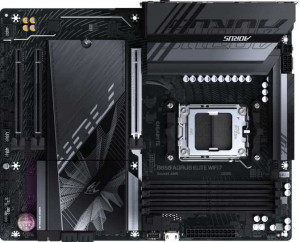
Gigabyte B850 Aorus Elite WiFi7
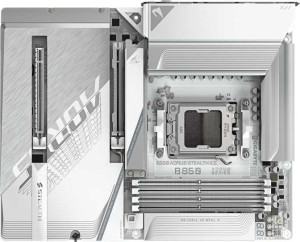
Gigabyte B850 Aorus Stealth Ice

Gigabyte B850 Aorus Elite WiFi7 Gigabyte B850 Aorus Stealth Ice

Overview

If you are building an AMD AM5 platform and trying to decide between two B850-chipset motherboards, the Gigabyte B850 Aorus Elite WiFi7 and the Gigabyte B850 Aorus Stealth Ice present a fascinating head-to-head match. While both boards share a remarkably common foundation, the real debate centers on storage and expansion flexibility, display output options, and cooling headroom, making the final choice highly dependent on the priorities of your specific build.

Common Features

  • Both products use the AM5 CPU socket.
  • Both products feature the B850 chipset.
  • Both products use the ATX form factor.
  • Wi-Fi is supported on both products, covering Wi-Fi 4, Wi-Fi 5, Wi-Fi 6, Wi-Fi 6E, and Wi-Fi 7.
  • Bluetooth 5.4 is available on both products.
  • Overclocking is supported on both products.
  • Both products support up to 256GB of maximum memory.
  • Both products support a maximum RAM speed of 5200 MHz and an overclocked RAM speed of 8200 MHz.
  • Both products have 4 memory slots and use DDR5 memory across 2 channels.
  • ECC memory is not supported on either product.
  • Both products include 2 USB 3.2 Gen 2 Type-A ports, 1 USB 3.2 Gen 2 Type-C port, and 4 USB 2.0 ports.
  • USB 3.2 Gen 2x2, USB 4 40Gbps, USB 4 20Gbps, and Thunderbolt 4 ports are not available on either product.
  • Both products provide 2 USB 3.2 Gen 1 ports through expansion, 1 USB 3.2 Gen 2x2 port through expansion, 4 USB 2.0 ports through expansion, and 2 USB 3.0 ports through expansion.
  • A TPM connector is present on both products.
  • Neither product has a U.2 socket or an mSATA connector.
  • Both products feature 1 PCIe 5.0 x16 slot and no PCIe 4.0, 3.0, or 2.0 x16 slots, PCI slots, or PCIe x8 slots.
  • Both products support 7.1 audio channels, include an S/PDIF Out port, and have 2 audio connectors.
  • Both products support RAID 0, RAID 1, RAID 5, and RAID 10, but neither supports RAID 0+1.

Main Differences

  • USB 3.2 Gen 1 Type-A ports number 5 on Gigabyte B850 Aorus Elite WiFi7 and 4 on Gigabyte B850 Aorus Stealth Ice.
  • An HDMI output is present on Gigabyte B850 Aorus Stealth Ice but not available on Gigabyte B850 Aorus Elite WiFi7.
  • DisplayPort outputs number 1 on Gigabyte B850 Aorus Elite WiFi7 and 0 on Gigabyte B850 Aorus Stealth Ice.
  • SATA 3 connectors number 4 on Gigabyte B850 Aorus Elite WiFi7 and 2 on Gigabyte B850 Aorus Stealth Ice.
  • Fan headers number 6 on Gigabyte B850 Aorus Elite WiFi7 and 8 on Gigabyte B850 Aorus Stealth Ice.
  • M.2 sockets number 3 on Gigabyte B850 Aorus Elite WiFi7 and 4 on Gigabyte B850 Aorus Stealth Ice.
  • PCIe x1 slots number 2 on Gigabyte B850 Aorus Elite WiFi7 and 0 on Gigabyte B850 Aorus Stealth Ice.
  • PCIe x4 slots number 0 on Gigabyte B850 Aorus Elite WiFi7 and 1 on Gigabyte B850 Aorus Stealth Ice.
Specs Comparison
Gigabyte B850 Aorus Elite WiFi7

Gigabyte B850 Aorus Elite WiFi7

Gigabyte B850 Aorus Stealth Ice

Gigabyte B850 Aorus Stealth Ice

General info:
CPU socket AM5 AM5
chipset B850 B850
form factor ATX ATX
release date January 2025 May 2025
supports Wi-Fi
Wi-Fi version Wi-Fi 4 (802.11n), Wi-Fi 5 (802.11ac), Wi-Fi 6 (802.11ax), Wi-Fi 6E (802.11ax), Wi-Fi 7 (802.11be) Wi-Fi 4 (802.11n), Wi-Fi 5 (802.11ac), Wi-Fi 6 (802.11ax), Wi-Fi 6E (802.11ax), Wi-Fi 7 (802.11be)
Has Bluetooth
Bluetooth version 5.4 5.4
Easy to overclock
has RGB lighting
Easy to reset BIOS
Has dual BIOS
has aptX
CPU sockets 1 1
Has integrated graphics
warranty period 3 years 3 years
height 244 mm 244 mm
width 305 mm 305 mm
Has integrated CPU

In terms of general specifications, the Gigabyte B850 Aorus Elite WiFi7 and the Gigabyte B850 Aorus Stealth Ice are essentially identical twins. Both boards share the same AM5 socket, B850 chipset, and standard ATX form factor (244 × 305 mm), meaning they fit the same cases, support the same AMD processors, and offer the same platform-level feature set.

On the connectivity front, both offer the full Wi-Fi 7 (802.11be) stack — backward-compatible down to Wi-Fi 4 — alongside Bluetooth 5.4, which delivers improved range, stability, and lower latency compared to older Bluetooth versions. Both boards also support overclocking, include dual BIOS for firmware recovery safety, and carry a 3-year warranty. Neither board has an easy BIOS reset button, integrated graphics, or aptX audio support — identical omissions across the board.

Based strictly on the provided general specs, these two motherboards are in a complete tie. There is not a single differentiating data point in this category. Any decision between the two will need to rest entirely on other spec groups — such as power delivery, I/O, or audio — rather than anything found here.

Memory:
maximum memory amount 256GB 256GB
RAM speed (max) 5200 MHz 5200 MHz
overclocked RAM speed 8200 MHz 8200 MHz
memory slots 4 4
DDR memory version 5 5
memory channels 2 2
Supports ECC memory

Both the Aorus Elite WiFi7 and the Aorus Stealth Ice deliver an identical memory configuration, built around DDR5 with four slots arranged in a dual-channel layout. That dual-channel setup is worth highlighting — it effectively doubles the memory bandwidth available to the CPU compared to single-channel, which has a meaningful impact on CPU-bound tasks, gaming frame rates, and content creation workloads.

The platform tops out at 256GB of maximum RAM — more than sufficient for even the most demanding professional workloads — while the native RAM speed cap sits at 5200 MHz. More interesting is the overclocking headroom: both boards support speeds up to 8200 MHz via XMP/EXPO profiles, which is toward the high end of what current DDR5 kits offer and leaves considerable room to grow as faster memory becomes mainstream. Neither board supports ECC memory, which rules them both out for workstation or server use cases requiring error-corrected RAM, though this is entirely expected at the B850 consumer tier.

As with the general specs group, this category ends in a complete tie. Every memory parameter — capacity ceiling, native speed, overclocked ceiling, slot count, channel count, and ECC support — is identical across both boards. Memory subsystem performance will be purely a function of which RAM kit the user installs, not which of these two motherboards they choose.

Ports:
USB 3.2 Gen 2 ports (USB-A) 2 2
USB 3.2 Gen 1 ports (USB-A) 5 4
USB 3.2 Gen 2 ports (USB-C) 1 1
USB 3.2 Gen 1 ports (USB-C) 0 0
USB 2.0 ports 4 4
USB 3.2 Gen 2x2 ports 0 0
USB 4 40Gbps ports 0 0
USB 4 20Gbps ports 0 0
Thunderbolt 4 ports 0 0
Thunderbolt 3 ports 0 0
has an HDMI output
DisplayPort outputs 1 0
RJ45 ports 1 1
Has USB Type-C
eSATA ports 0 0
DVI outputs 0 0
has a VGA connector
PS/2 ports 0 0

This is the first spec group where the two boards genuinely diverge, and the differences — while modest — are worth understanding. On the USB front, the Aorus Elite WiFi7 edges ahead with 5 USB 3.2 Gen 1 Type-A ports compared to 4 on the Aorus Stealth Ice. That extra port may seem minor, but on a rear I/O panel it can matter practically — one fewer hub or adapter needed for users running multiple peripherals simultaneously. Both boards otherwise match on USB 3.2 Gen 2 Type-A (2 ports), Gen 2 Type-C (1 port), and USB 2.0 (4 ports), with no USB 4 or Thunderbolt connectivity on either.

The more consequential difference lies in the video output. The Elite WiFi7 provides a single DisplayPort output, while the Stealth Ice opts for an HDMI output instead — and neither offers both. This matters when using the integrated graphics of a compatible APU (or a future CPU with integrated graphics on AM5): DisplayPort generally supports higher refresh rates and resolutions natively, while HDMI is more universally compatible with TVs and consumer displays. The ″right″ choice here depends entirely on the user's monitor or display ecosystem.

Neither board includes eSATA, DVI, VGA, or legacy PS/2 ports, and both share a single RJ45 ethernet port. The Elite WiFi7 holds a slight edge in raw USB port count, but the display output difference is a genuine preference split rather than a clear win — users with HDMI monitors favor the Stealth Ice, while those on DisplayPort monitors or high-refresh setups will prefer the Elite WiFi7.

Connectors:
USB 3.2 Gen 1 ports (through expansion) 2 2
USB 3.2 Gen 2x2 ports (through expansion) 1 1
USB 2.0 ports (through expansion) 4 4
SATA 3 connectors 4 2
fan headers 6 8
USB 3.0 ports (through expansion) 2 2
M.2 sockets 3 4
Has TPM connector
U.2 sockets 0 0
Has mSATA connector
SATA 2 connectors 0 0

The internal connectors category reveals meaningful differences that will directly influence build flexibility. The Aorus Stealth Ice pulls ahead on storage expansion, offering 4 M.2 sockets versus 3 on the Aorus Elite WiFi7. Since M.2 NVMe drives are the go-to choice for fast primary and secondary storage in modern builds, that extra slot is genuinely useful — it allows for a more capable all-NVMe storage configuration without relying on SATA drives at all.

The SATA picture, however, flips in the opposite direction. The Elite WiFi7 provides 4 SATA 3 connectors compared to just 2 on the Stealth Ice. For users with large HDD arrays, multiple SATA SSDs, or optical drives, this gap is significant — two SATA ports is a tight ceiling. The Stealth Ice effectively trades SATA capacity for M.2 expandability, which is a reasonable bet for modern builds but limits legacy storage flexibility. Fan header count also diverges notably: the Stealth Ice offers 8 fan headers to the Elite WiFi7's 6, giving it a clear advantage in thermal management for builds with elaborate cooling setups or all-in-one liquid coolers that require multiple pump and fan connections without a separate hub.

Both boards match on internal USB expansion headers and include a TPM connector, with no U.2 or mSATA on either. Overall, the Stealth Ice holds the edge in this group for users building NVMe-centric, cooling-heavy systems, while the Elite WiFi7 is the stronger choice for anyone still relying on multiple SATA devices.

Expansion slots:
PCIe 4.0 x16 slots 0 0
PCIe 5.0 x16 slots 1 1
PCIe 3.0 x16 slots 0 0
PCIe x1 slots 2 0
PCI slots 0 0
PCIe 2.0 x16 slots 0 0
PCIe x4 slots 0 1
PCIe x8 slots 0 0

Shared foundation first: both the Aorus Elite WiFi7 and the Aorus Stealth Ice feature a single PCIe 5.0 x16 slot for the primary GPU. PCIe 5.0 doubles the bandwidth of PCIe 4.0, making both boards future-ready for current and next-generation graphics cards and high-speed add-in cards that can leverage that headroom.

Where they diverge is in secondary expansion. The Elite WiFi7 adds 2 PCIe x1 slots, while the Stealth Ice replaces these with a single PCIe x4 slot. In practice, PCIe x1 slots are suited to lower-bandwidth add-in cards such as sound cards, USB expansion cards, or network adapters. A PCIe x4 slot, by contrast, offers four times the lane bandwidth, making it more capable for cards that benefit from greater throughput — such as certain NVMe expansion cards, capture cards, or RAID controllers. The Stealth Ice essentially trades quantity of secondary slots for quality, while the Elite WiFi7 prioritizes having more expansion options simultaneously.

Neither approach is universally superior — the right choice depends on the user's specific expansion needs. Users planning to add multiple standard peripherals cards will favor the Elite WiFi7, while those needing a single higher-bandwidth secondary card will find the Stealth Ice more appropriate. For the majority of single-GPU gaming builds with no secondary cards at all, this group is effectively a tie.

Audio:
audio channels 7.1 7.1
Has S/PDIF Out port
audio connectors 2 2

Audio is another category where the two boards land in lockstep. Both the Aorus Elite WiFi7 and the Aorus Stealth Ice support 7.1-channel surround sound, which is the standard for high-fidelity PC audio and covers the full spectrum from stereo headphone use to multi-speaker home theater setups. Paired with that, each board includes an S/PDIF optical output — useful for users routing audio to an external DAC, AV receiver, or soundbar via a digital connection that bypasses the onboard analog circuitry entirely.

With just 2 audio connectors on the rear I/O for each board, neither offers the expanded multi-jack analog panel sometimes found on higher-end motherboards. That said, 2 connectors is a practical minimum for typical use cases — headphone/speaker output and microphone input — and the S/PDIF output compensates well for users who prefer digital passthrough over analog connections.

No differentiator exists in this group. Every audio specification is identical across both boards, making this category a complete tie. Audio quality and feature preferences will hinge on the specific codec implementation each board uses, which is not captured in the provided data.

Storage:
Supports RAID 1
Supports RAID 10 (1+0)
Supports RAID 5
Supports RAID 0
Supports RAID 0+1

Storage redundancy and performance configurations are identical across the Aorus Elite WiFi7 and the Aorus Stealth Ice. Both support RAID 0, 1, 5, and 10 — the four configurations that cover the practical needs of the vast majority of users. RAID 0 stripes data across drives for maximum throughput, RAID 1 mirrors data for redundancy, RAID 5 balances performance with fault tolerance using parity, and RAID 10 combines mirroring and striping for both speed and resilience. Neither board supports RAID 0+1, though this omission is inconsequential given that RAID 10 achieves a functionally similar outcome with generally better fault tolerance characteristics.

It is worth noting that effective RAID utilization on these boards is tied to the available physical connectors — particularly relevant given that the two boards differ in their SATA port counts, as analyzed in the Connectors group. A user planning a multi-drive RAID array should weigh that context alongside the shared RAID capability confirmed here.

Within the scope of this group alone, the verdict is a complete tie. Both boards offer the same RAID support matrix, and neither holds any storage configuration advantage over the other based on the provided data.

Comparison Summary & Verdict

Both the Gigabyte B850 Aorus Elite WiFi7 and the Gigabyte B850 Aorus Stealth Ice are well-matched B850 motherboards that share an identical foundation across memory support, audio capabilities, wireless connectivity, and RAID configurations. The differences, however, steer each board toward a distinct type of builder. The Elite WiFi7 distinguishes itself with 4 SATA 3 connectors and a dedicated DisplayPort output, making it the more practical choice for users who depend on multiple traditional storage drives or require integrated display output. The Stealth Ice, on the other hand, pulls ahead with 4 M.2 sockets, 8 fan headers, and an HDMI port, positioning it as the better fit for builders who prioritize high-speed NVMe storage expansion, advanced thermal management, and versatile display connectivity in a demanding system.

Gigabyte B850 Aorus Elite WiFi7
Buy Gigabyte B850 Aorus Elite WiFi7 if...

Choose the Gigabyte B850 Aorus Elite WiFi7 if you need more SATA 3 connectors for traditional storage drives, a built-in DisplayPort output, or an additional USB 3.2 Gen 1 Type-A port.

Gigabyte B850 Aorus Stealth Ice
Buy Gigabyte B850 Aorus Stealth Ice if...

Opt for the Gigabyte B850 Aorus Stealth Ice if you want an extra M.2 socket for NVMe drives, more fan headers for greater thermal control, or an HDMI output for direct display connectivity.