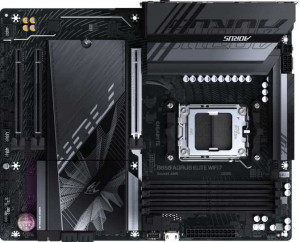
Gigabyte B850 Aorus Elite WiFi7
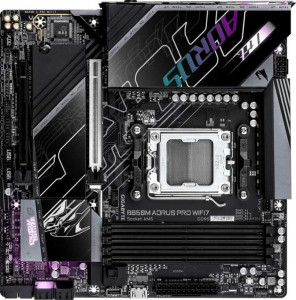
Gigabyte B850M Aorus Pro Wi-Fi7

Gigabyte B850 Aorus Elite WiFi7 Gigabyte B850M Aorus Pro Wi-Fi7

Overview

Choosing between the Gigabyte B850 Aorus Elite WiFi7 and the Gigabyte B850M Aorus Pro Wi-Fi7 means weighing trade-offs across form factor, expansion potential, storage capacity, and display connectivity. Both boards share the same AM5 socket, B850 chipset, DDR5 support, and full Wi-Fi 7 capability, yet they diverge in meaningful ways that could strongly influence your build. Read on as we examine their key battlegrounds side by side.

Common Features

  • Both products use the AM5 CPU socket.
  • Both products feature the B850 chipset.
  • Wi-Fi is supported on both products, covering Wi-Fi 4 (802.11n), Wi-Fi 5 (802.11ac), Wi-Fi 6 (802.11ax), Wi-Fi 6E (802.11ax), and Wi-Fi 7 (802.11be).
  • Bluetooth 5.4 is available on both products.
  • Both products support overclocking.
  • RGB lighting is present on both products.
  • Both products support a maximum of 256GB of RAM.
  • The maximum standard RAM speed is 5200 MHz on both products.
  • Both products have 4 memory slots.
  • Both products use DDR5 memory.
  • Both products support 2 memory channels.
  • ECC memory is not supported on either product.
  • Both products have 2 USB 3.2 Gen 2 ports (USB-A), 5 USB 3.2 Gen 1 ports (USB-A), 1 USB 3.2 Gen 2 port (USB-C), and 4 USB 2.0 ports.
  • Neither product has USB 3.2 Gen 2x2, USB 4 40Gbps, or USB 4 20Gbps ports.
  • Both products have 4 SATA 3 connectors.
  • Both products have 6 fan headers.
  • A TPM connector is present on both products.
  • Both products feature one PCIe 5.0 x16 slot and no PCIe 4.0, 3.0, 2.0 x16, PCI, or PCIe x8 slots.
  • Both products support 7.1 audio channels, have an S/PDIF Out port, and include 2 audio connectors.
  • Both products support RAID 0, RAID 1, RAID 5, and RAID 10, but neither supports RAID 0+1.

Main Differences

  • The form factor is ATX on Gigabyte B850 Aorus Elite WiFi7 and Micro-ATX on Gigabyte B850M Aorus Pro Wi-Fi7.
  • The width is 305 mm on Gigabyte B850 Aorus Elite WiFi7 and 244 mm on Gigabyte B850M Aorus Pro Wi-Fi7.
  • Dual BIOS is present on Gigabyte B850 Aorus Elite WiFi7 but not available on Gigabyte B850M Aorus Pro Wi-Fi7.
  • The maximum overclocked RAM speed is 8200 MHz on Gigabyte B850 Aorus Elite WiFi7 and 8600 MHz on Gigabyte B850M Aorus Pro Wi-Fi7.
  • An HDMI output is present on Gigabyte B850M Aorus Pro Wi-Fi7 but not available on Gigabyte B850 Aorus Elite WiFi7.
  • DisplayPort outputs total 1 on Gigabyte B850 Aorus Elite WiFi7 and 0 on Gigabyte B850M Aorus Pro Wi-Fi7.
  • M.2 sockets total 3 on Gigabyte B850 Aorus Elite WiFi7 and 2 on Gigabyte B850M Aorus Pro Wi-Fi7.
  • PCIe x1 slots total 2 on Gigabyte B850 Aorus Elite WiFi7 and 0 on Gigabyte B850M Aorus Pro Wi-Fi7.
  • PCIe x4 slots total 0 on Gigabyte B850 Aorus Elite WiFi7 and 1 on Gigabyte B850M Aorus Pro Wi-Fi7.
Specs Comparison
Gigabyte B850 Aorus Elite WiFi7

Gigabyte B850 Aorus Elite WiFi7

Gigabyte B850M Aorus Pro Wi-Fi7

Gigabyte B850M Aorus Pro Wi-Fi7

General info:
CPU socket AM5 AM5
chipset B850 B850
form factor ATX Micro-ATX
release date January 2025 January 2025
supports Wi-Fi
Wi-Fi version Wi-Fi 4 (802.11n), Wi-Fi 5 (802.11ac), Wi-Fi 6 (802.11ax), Wi-Fi 6E (802.11ax), Wi-Fi 7 (802.11be) Wi-Fi 4 (802.11n), Wi-Fi 5 (802.11ac), Wi-Fi 6 (802.11ax), Wi-Fi 6E (802.11ax), Wi-Fi 7 (802.11be)
Has Bluetooth
Bluetooth version 5.4 5.4
Easy to overclock
has RGB lighting
Easy to reset BIOS
Has dual BIOS
has aptX
CPU sockets 1 1
Has integrated graphics
warranty period 3 years 3 years
height 244 mm 244 mm
width 305 mm 244 mm
Has integrated CPU

Both boards share the same AM5 socket and B850 chipset foundation, meaning they target identical CPU compatibility and platform capabilities. They also match on wireless connectivity — both support the full Wi-Fi spectrum up to Wi-Fi 7 (802.11be) with Bluetooth 5.4 — so neither has an edge in network features. Overclocking support, RGB lighting, and a 3-year warranty are likewise identical, making these shared traits non-factors in the buying decision.

The most consequential difference lies in form factor. The Aorus Elite WiFi7 is a full-size ATX board (305 × 244 mm), while the Aorus Pro Wi-Fi7 is a compact Micro-ATX design (244 × 244 mm). In practice, the ATX footprint offers more room for additional PCIe slots, RAM slots, and onboard headers, while the Micro-ATX is the better fit for smaller cases or builds where desk space is a priority. Neither is objectively superior here — it is purely a case-compatibility and build-philosophy choice.

The one meaningful functional differentiator is dual BIOS: the Aorus Elite WiFi7 has it, the Aorus Pro Wi-Fi7 does not. Dual BIOS acts as a hardware-level failsafe — if a firmware flash goes wrong, the board can automatically recover from the backup chip, which is particularly valuable for users who update BIOS frequently or experiment with settings. Combined with its larger form factor, the Aorus Elite WiFi7 holds a clear edge for users who prioritize build resilience and expansion headroom, while the Aorus Pro Wi-Fi7 is the rational pick for compact builds where that safety net is an acceptable trade-off.

Memory:
maximum memory amount 256GB 256GB
RAM speed (max) 5200 MHz 5200 MHz
overclocked RAM speed 8200 MHz 8600 MHz
memory slots 4 4
DDR memory version 5 5
memory channels 2 2
Supports ECC memory

On paper, these two boards are virtually identical in memory configuration: both offer 4 DDR5 slots, dual-channel architecture, a 256 GB maximum capacity, and a native RAM speed ceiling of 5200 MHz. For the vast majority of users, this means the memory experience will be indistinguishable between the two — you get the same kit compatibility, the same channel bandwidth, and the same upper limit on how much RAM you can install.

The only separating factor is the maximum overclocked RAM speed. The Aorus Pro Wi-Fi7 edges ahead here, supporting up to 8600 MHz versus the Aorus Elite WiFi7's 8200 MHz. A 400 MHz gap at the extreme end of the overclocking envelope matters primarily to enthusiasts running high-frequency memory kits for benchmarking or latency-sensitive workloads. In everyday computing, gaming, or even content creation, the practical performance difference between these two ceilings is negligible.

For memory, the Aorus Pro Wi-Fi7 holds a narrow technical edge due to its higher overclocked frequency ceiling — but this advantage is only relevant if you plan to push a premium DDR5 kit to its limits. For anyone running memory at stock or moderately overclocked speeds, the two boards are effectively tied.

Ports:
USB 3.2 Gen 2 ports (USB-A) 2 2
USB 3.2 Gen 1 ports (USB-A) 5 5
USB 3.2 Gen 2 ports (USB-C) 1 1
USB 3.2 Gen 1 ports (USB-C) 0 0
USB 2.0 ports 4 4
USB 3.2 Gen 2x2 ports 0 0
USB 4 40Gbps ports 0 0
USB 4 20Gbps ports 0 0
Thunderbolt 4 ports 0 0
Thunderbolt 3 ports 0 0
has an HDMI output
DisplayPort outputs 1 0
RJ45 ports 1 1
Has USB Type-C
eSATA ports 0 0
DVI outputs 0 0
has a VGA connector
PS/2 ports 0 0

Strip away the video output, and these two boards are port-for-port identical: the same USB spread across 2× USB 3.2 Gen 2 Type-A, 5× USB 3.2 Gen 1 Type-A, 1× USB 3.2 Gen 2 Type-C, and 4× USB 2.0, plus a single RJ45 ethernet jack. Neither board offers USB4, Thunderbolt, or eSATA, so for connectivity beyond USB and networking, the display output becomes the only meaningful point of differentiation.

And that difference is straightforward: the Aorus Elite WiFi7 ships with a DisplayPort output, while the Aorus Pro Wi-Fi7 opts for HDMI. In practical terms, DisplayPort is generally preferred for high-refresh-rate monitors and multi-monitor daisy-chaining, whereas HDMI is more universally compatible with TVs, projectors, and a wider range of consumer displays out of the box. Worth noting that on a B850 platform without integrated graphics, this rear video output is only functional when using a CPU with an integrated GPU — so for users running a discrete graphics card, the distinction is largely moot.

Neither board holds a universal edge here — the ″better″ video output depends entirely on what display you own. The Aorus Elite WiFi7 is the stronger pick for monitor-centric desktop setups, while the Aorus Pro Wi-Fi7 suits users who connect to HDMI-native screens or living-room displays. For everything else in this spec group, the two boards are completely tied.

Connectors:
USB 3.2 Gen 1 ports (through expansion) 2 2
USB 3.2 Gen 2x2 ports (through expansion) 1 1
USB 2.0 ports (through expansion) 4 4
SATA 3 connectors 4 4
fan headers 6 6
USB 3.0 ports (through expansion) 2 2
M.2 sockets 3 2
Has TPM connector
U.2 sockets 0 0
Has mSATA connector
SATA 2 connectors 0 0

Internally, these two boards are nearly carbon copies of each other. Both provide 4× SATA 3 connectors, 6 fan headers, identical USB expansion headers, and a TPM connector — a solid and practical internal layout in either case. For system builders planning a standard configuration with a couple of drives and a well-cooled chassis, neither board creates any friction.

The single differentiator worth flagging is M.2 storage: the Aorus Elite WiFi7 offers 3 M.2 sockets versus the Aorus Pro Wi-Fi7's 2. That extra slot may seem minor, but it has real implications for storage-heavy builds. Three M.2 sockets means you can simultaneously run a boot drive, a secondary NVMe for games or scratch space, and a third for additional capacity or a dedicated cache — all without touching the SATA ports. With the Aorus Pro Wi-Fi7, a third NVMe drive simply isn't an option without external adapters.

For most users running one or two NVMe drives, the gap is irrelevant and the boards are functionally tied. But for content creators, professionals, or enthusiasts who want to maximize fast storage without relying on SATA, the Aorus Elite WiFi7 has a clear advantage in this group.

Expansion slots:
PCIe 4.0 x16 slots 0 0
PCIe 5.0 x16 slots 1 1
PCIe 3.0 x16 slots 0 0
PCIe x1 slots 2 0
PCI slots 0 0
PCIe 2.0 x16 slots 0 0
PCIe x4 slots 0 1
PCIe x8 slots 0 0

The primary slot is a match: both boards feature a single PCIe 5.0 x16 slot, which is the correct home for a modern discrete GPU and ensures neither board bottlenecks current or near-future graphics cards. That shared foundation means GPU performance potential is identical across both.

Where they diverge is in the secondary expansion slots. The Aorus Elite WiFi7 adds 2× PCIe x1 slots, while the Aorus Pro Wi-Fi7 instead provides a PCIe x4 slot. These serve meaningfully different purposes: PCIe x1 slots are suited for low-bandwidth add-in cards like sound cards, USB controllers, or network cards, and having two of them allows for more simultaneous peripherals. A PCIe x4 slot, on the other hand, offers higher bandwidth and is better suited for capture cards, NVMe expansion cards, or other throughput-hungry accessories — but it only gives you one such slot.

Neither configuration is universally superior — it hinges on what you plan to install. The Aorus Elite WiFi7 is the better fit for users who want to populate the system with multiple lower-bandwidth add-in cards, while the Aorus Pro Wi-Fi7 is the stronger choice for a single higher-bandwidth expansion device. For users who need no secondary slots at all, the two boards are effectively tied in this group.

Audio:
audio channels 7.1 7.1
Has S/PDIF Out port
audio connectors 2 2

Audio is a clean draw between these two boards — every spec is identical. Both support 7.1 surround sound, include an S/PDIF optical output for connecting to external DACs or AV receivers, and provide 2 audio connectors on the rear panel. There is nothing in this data set that separates them.

The 7.1 channel capability is worth contextualizing: it means the onboard audio can drive a full surround sound speaker setup, which is a meaningful feature for home theater or immersive gaming configurations. The S/PDIF output adds flexibility for users who prefer to bypass the onboard DAC entirely and hand off audio processing to a dedicated external device, preserving signal quality in audiophile or studio-adjacent setups.

For this specification group, the verdict is a complete tie. Regardless of which board you choose, you are getting the same audio feature set — so this category should carry no weight in the buying decision between the two.

Storage:
Supports RAID 1
Supports RAID 10 (1+0)
Supports RAID 5
Supports RAID 0
Supports RAID 0+1

RAID support is identical across both boards. Each one covers the four most practically relevant configurations: RAID 0 for striped performance, RAID 1 for mirrored redundancy, RAID 5 for a balanced mix of performance and fault tolerance across three or more drives, and RAID 10 for the combined benefits of striping and mirroring in larger arrays. Neither board supports RAID 0+1, but that omission is shared and inconsequential given that RAID 10 serves the same fundamental purpose in most real-world deployments.

Having RAID 5 on a consumer B850 board is noteworthy for users building NAS-adjacent workstations or small office setups — it enables single-drive failure tolerance without sacrificing as much usable capacity as a pure RAID 1 mirror. That said, this capability is equally available on both boards, so it does not differentiate them.

This group is a complete tie. Both boards offer the same RAID capabilities and the same single omission, making storage configuration support a non-factor when choosing between the two.

Comparison Summary & Verdict

Both the Gigabyte B850 Aorus Elite WiFi7 and the Gigabyte B850M Aorus Pro Wi-Fi7 are well-equipped AM5 motherboards sharing a strong common foundation, but they serve different builder profiles. The Elite WiFi7 stands out with its ATX form factor, three M.2 sockets, two PCIe x1 slots, a dedicated DisplayPort output, and the added security of dual BIOS, making it the better fit for enthusiasts who need maximum expandability and storage headroom. The Pro Wi-Fi7, on the other hand, shines in compact builds thanks to its Micro-ATX footprint, offers a slightly higher overclocked RAM ceiling of 8600 MHz, includes an HDMI port for integrated graphics convenience, and swaps PCIe x1 slots for a PCIe x4 slot, suiting builders who prioritize a smaller chassis without sacrificing core performance.

Gigabyte B850 Aorus Elite WiFi7
Buy Gigabyte B850 Aorus Elite WiFi7 if...

Buy the Gigabyte B850 Aorus Elite WiFi7 if you want an ATX board with three M.2 sockets, greater PCIe expansion, a DisplayPort output, and the reliability of dual BIOS for a full-size enthusiast build.

Gigabyte B850M Aorus Pro Wi-Fi7
Buy Gigabyte B850M Aorus Pro Wi-Fi7 if...

Buy the Gigabyte B850M Aorus Pro Wi-Fi7 if you are building a compact system in a Micro-ATX case and want a slightly higher overclocked RAM ceiling alongside a built-in HDMI output.