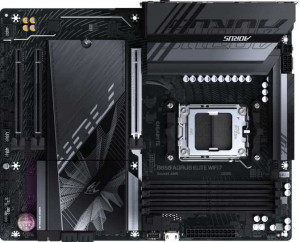
Gigabyte B850 Aorus Elite WiFi7
MSI MAG B850 Tomahawk Max WiFi

Gigabyte B850 Aorus Elite WiFi7 MSI MAG B850 Tomahawk Max WiFi

Overview

When building a high-performance AMD platform, choosing the right B850 motherboard can make all the difference. In this head-to-head comparison between the Gigabyte B850 Aorus Elite WiFi7 and the MSI MAG B850 Tomahawk Max WiFi, we examine the key battlegrounds — from memory speeds and expansion slots to port configurations and onboard connectivity — to help you find the best fit for your next build.

Common Features

  • Both motherboards use the AM5 CPU socket.
  • Both motherboards feature the B850 chipset.
  • Both boards have an ATX form factor.
  • Wi-Fi is supported on both boards, covering Wi-Fi 4, Wi-Fi 5, Wi-Fi 6, Wi-Fi 6E, and Wi-Fi 7.
  • Bluetooth 5.4 is available on both boards.
  • Both boards support overclocking.
  • Both boards support a maximum of 256GB of RAM.
  • Both boards have 4 memory slots.
  • Both boards use DDR5 memory.
  • Both boards operate with 2 memory channels.
  • ECC memory is not supported on either board.
  • Both boards have 2 USB 3.2 Gen 2 Type-A ports.
  • Neither board has USB 3.2 Gen 1 Type-C ports.
  • Both boards have 4 USB 2.0 ports.
  • Neither board has USB 3.2 Gen 2x2, USB 4, Thunderbolt 3, or Thunderbolt 4 ports.
  • Both boards provide 1 USB 3.2 Gen 2x2 port through expansion.
  • Both boards provide 4 USB 2.0 ports through expansion.
  • Both boards have 4 SATA 3 connectors and no SATA 2 connectors.
  • A TPM connector is present on both boards.
  • Neither board has an mSATA connector.
  • Both boards have 1 PCIe 5.0 x16 slot.
  • Neither board has PCIe 3.0 x16, PCIe 2.0 x16, PCI, PCIe x4, or PCIe x8 slots.
  • Both boards support 7.1 audio channels with 2 audio connectors.
  • An S/PDIF Out port is available on both boards.
  • Both boards support RAID 0, RAID 1, and RAID 10, but not RAID 0+1.

Main Differences

  • Easy BIOS reset is available on the MSI MAG B850 Tomahawk Max WiFi but not on the Gigabyte B850 Aorus Elite WiFi7.
  • The height is 244 mm on the Gigabyte B850 Aorus Elite WiFi7 and 243.8 mm on the MSI MAG B850 Tomahawk Max WiFi.
  • The width is 305 mm on the Gigabyte B850 Aorus Elite WiFi7 and 304.8 mm on the MSI MAG B850 Tomahawk Max WiFi.
  • Maximum native RAM speed is 5200 MHz on the Gigabyte B850 Aorus Elite WiFi7 and 5600 MHz on the MSI MAG B850 Tomahawk Max WiFi.
  • Maximum overclocked RAM speed is 8200 MHz on the Gigabyte B850 Aorus Elite WiFi7 and 8400 MHz on the MSI MAG B850 Tomahawk Max WiFi.
  • USB 3.2 Gen 1 Type-A ports number 5 on the Gigabyte B850 Aorus Elite WiFi7 and 1 on the MSI MAG B850 Tomahawk Max WiFi.
  • USB 3.2 Gen 2 Type-C ports number 1 on the Gigabyte B850 Aorus Elite WiFi7 and 3 on the MSI MAG B850 Tomahawk Max WiFi.
  • An HDMI output is present on the MSI MAG B850 Tomahawk Max WiFi but not available on the Gigabyte B850 Aorus Elite WiFi7.
  • DisplayPort outputs number 1 on the Gigabyte B850 Aorus Elite WiFi7 and 0 on the MSI MAG B850 Tomahawk Max WiFi.
  • USB 3.2 Gen 1 ports through expansion number 2 on the Gigabyte B850 Aorus Elite WiFi7 and 4 on the MSI MAG B850 Tomahawk Max WiFi.
  • Fan headers number 6 on the Gigabyte B850 Aorus Elite WiFi7 and 8 on the MSI MAG B850 Tomahawk Max WiFi.
  • M.2 sockets number 3 on the Gigabyte B850 Aorus Elite WiFi7 and 4 on the MSI MAG B850 Tomahawk Max WiFi.
  • PCIe 4.0 x16 slots number 0 on the Gigabyte B850 Aorus Elite WiFi7 and 1 on the MSI MAG B850 Tomahawk Max WiFi.
  • PCIe x1 slots number 2 on the Gigabyte B850 Aorus Elite WiFi7 and 1 on the MSI MAG B850 Tomahawk Max WiFi.
  • RAID 5 support is available on the Gigabyte B850 Aorus Elite WiFi7 but not on the MSI MAG B850 Tomahawk Max WiFi.
Specs Comparison
Gigabyte B850 Aorus Elite WiFi7

Gigabyte B850 Aorus Elite WiFi7

MSI MAG B850 Tomahawk Max WiFi

MSI MAG B850 Tomahawk Max WiFi

General info:
CPU socket AM5 AM5
chipset B850 B850
form factor ATX ATX
release date January 2025 January 2025
supports Wi-Fi
Wi-Fi version Wi-Fi 4 (802.11n), Wi-Fi 5 (802.11ac), Wi-Fi 6 (802.11ax), Wi-Fi 6E (802.11ax), Wi-Fi 7 (802.11be) Wi-Fi 4 (802.11n), Wi-Fi 5 (802.11ac), Wi-Fi 6 (802.11ax), Wi-Fi 6E (802.11ax), Wi-Fi 7 (802.11be)
Has Bluetooth
Bluetooth version 5.4 5.4
Easy to overclock
has RGB lighting
Easy to reset BIOS
Has dual BIOS
has aptX
CPU sockets 1 1
Has integrated graphics
warranty period 3 years 3 years
height 244 mm 243.8 mm
width 305 mm 304.8 mm
Has integrated CPU

Both the Gigabyte B850 Aorus Elite WiFi7 and the MSI MAG B850 Tomahawk Max WiFi share an identical foundational profile: the AM5 socket with a B850 chipset in a standard ATX form factor, with full Wi-Fi 7 support (backwards compatible through Wi-Fi 4), Bluetooth 5.4, RGB lighting, dual BIOS, and a 3-year warranty. For builders, this means both boards sit in the same platform tier, target the same AMD Ryzen CPU lineup, and offer the same cutting-edge wireless connectivity out of the box.

The only meaningful differentiator in this group is Easy to reset BIOS: the MSI Tomahawk Max supports it, while the Gigabyte Aorus Elite does not. In practice, this matters most when installing a new CPU that requires a BIOS update before it is recognized — a one-button or dedicated reset mechanism lets you recover from a bad flash or misconfiguration without needing a compatible CPU already installed. For less experienced builders or those future-proofing for next-gen Ryzen CPUs, this is a tangible convenience advantage. Physical dimensions are virtually identical and irrelevant to case compatibility decisions.

Overall, the MSI MAG B850 Tomahawk Max WiFi holds a modest but real edge in this group, solely due to its easier BIOS reset capability. All other general specs are a dead tie, so buyers who never expect to troubleshoot BIOS issues will find both boards equally matched at this level.

Memory:
maximum memory amount 256GB 256GB
RAM speed (max) 5200 MHz 5600 MHz
overclocked RAM speed 8200 MHz 8400 MHz
memory slots 4 4
DDR memory version 5 5
memory channels 2 2
Supports ECC memory

The Gigabyte B850 Aorus Elite WiFi7 and MSI MAG B850 Tomahawk Max WiFi both support a maximum memory amount of 256GB, with 4 memory slots each. Both motherboards also use DDR5 memory and support dual memory channels. Neither product supports ECC memory.

In terms of RAM speed, the Gigabyte board supports a maximum RAM speed of 5200 MHz, while the MSI board supports a slightly higher maximum of 5600 MHz. Both motherboards also offer overclocked RAM speeds, with the Gigabyte board supporting speeds up to 8200 MHz, while the MSI board supports up to 8400 MHz.

Overall, the memory specifications are quite similar, with only slight differences in the maximum supported RAM speeds and overclocked speeds, with the MSI board offering a bit higher performance in both areas.

Ports:
USB 3.2 Gen 2 ports (USB-A) 2 2
USB 3.2 Gen 1 ports (USB-A) 5 1
USB 3.2 Gen 2 ports (USB-C) 1 3
USB 3.2 Gen 1 ports (USB-C) 0 0
USB 2.0 ports 4 4
USB 3.2 Gen 2x2 ports 0 0
USB 4 40Gbps ports 0 0
USB 4 20Gbps ports 0 0
Thunderbolt 4 ports 0 0
Thunderbolt 3 ports 0 0
has an HDMI output
DisplayPort outputs 1 0
RJ45 ports 1 1
Has USB Type-C
eSATA ports 0 0
DVI outputs 0 0
has a VGA connector
PS/2 ports 0 0

The Gigabyte B850 Aorus Elite WiFi7 and MSI MAG B850 Tomahawk Max WiFi both offer a range of USB ports, but with some differences. Both motherboards feature 2 USB 3.2 Gen 2 USB-A ports, while the Gigabyte board has 5 USB 3.2 Gen 1 USB-A ports, whereas the MSI board has only 1. The Gigabyte board also includes 1 USB 3.2 Gen 2 USB-C port, compared to the MSI board's 3 USB 3.2 Gen 2 USB-C ports.

Both products include 4 USB 2.0 ports, but the Gigabyte board lacks USB 3.2 Gen 2x2, USB 4, or Thunderbolt ports, while the MSI board also lacks these features but does have 1 HDMI output, unlike the Gigabyte board, which has no HDMI output. Both motherboards include 1 RJ45 port and have USB Type-C support, but neither has eSATA, DVI, VGA, or PS/2 ports.

Overall, the MSI board offers more USB-C ports and an HDMI output, while the Gigabyte board provides more USB 3.2 Gen 1 USB-A ports. Both offer a similar range of essential ports, with only a few differences in specific types of connections available.

Connectors:
USB 3.2 Gen 1 ports (through expansion) 2 4
USB 3.2 Gen 2x2 ports (through expansion) 1 1
USB 2.0 ports (through expansion) 4 4
SATA 3 connectors 4 4
fan headers 6 8
USB 3.0 ports (through expansion) 2 4
M.2 sockets 3 4
Has TPM connector
U.2 sockets 0 0
Has mSATA connector
SATA 2 connectors 0 0

The Gigabyte B850 Aorus Elite WiFi7 and MSI MAG B850 Tomahawk Max WiFi have similar connector options, with both offering a variety of expansion possibilities. The Gigabyte board includes 2 USB 3.2 Gen 1 ports, 1 USB 3.2 Gen 2x2 port, and 4 USB 2.0 ports for expansion. In comparison, the MSI board provides more USB 3.2 Gen 1 ports (4) and the same number of USB 2.0 ports (4), along with 1 USB 3.2 Gen 2x2 port, matching the Gigabyte board in that regard.

Both motherboards offer 4 SATA 3 connectors, ensuring similar storage options. When it comes to fan headers, the MSI board has a total of 8, while the Gigabyte board offers 6, giving the MSI board a slight edge in fan connectivity. The number of USB 3.0 ports through expansion is also higher on the MSI board, with 4 compared to the Gigabyte's 2.

For M.2 slots, the Gigabyte board has 3, while the MSI board offers 4. Both motherboards include a TPM connector, but neither has a U.2 socket or mSATA connector, nor do they have SATA 2 connectors. Overall, while both boards are quite similar, the MSI board offers slightly more in terms of USB ports, fan headers, and M.2 sockets.

Expansion slots:
PCIe 4.0 x16 slots 0 1
PCIe 5.0 x16 slots 1 1
PCIe 3.0 x16 slots 0 0
PCIe x1 slots 2 1
PCI slots 0 0
PCIe 2.0 x16 slots 0 0
PCIe x4 slots 0 0
PCIe x8 slots 0 0

The Gigabyte B850 Aorus Elite WiFi7 and MSI MAG B850 Tomahawk Max WiFi offer similar expansion slot configurations, but with some differences in the number and types of available PCIe slots. The Gigabyte board features 1 PCIe 5.0 x16 slot and 2 PCIe x1 slots, but lacks any PCIe 4.0 x16, PCIe 3.0 x16, PCIe x4, PCIe x8, or PCI slots. In contrast, the MSI board includes 1 PCIe 4.0 x16 slot alongside 1 PCIe 5.0 x16 slot, and also offers 1 PCIe x1 slot. Both motherboards lack PCIe x4, PCIe x8, and PCI slots.

While both boards include a PCIe 5.0 x16 slot, the Gigabyte board does not offer a PCIe 4.0 x16 slot, unlike the MSI board. Additionally, the MSI board has 1 PCIe x1 slot, while the Gigabyte board offers 2.

In summary, the MSI board offers a more balanced expansion slot configuration with an additional PCIe 4.0 x16 slot, while the Gigabyte board provides more PCIe x1 slots for additional devices.

Audio:
audio channels 7.1 7.1
Has S/PDIF Out port
audio connectors 2 2

The Gigabyte B850 Aorus Elite WiFi7 and MSI MAG B850 Tomahawk Max WiFi both feature identical audio specifications. Both motherboards support 7.1 audio channels and include an S/PDIF Out port. Additionally, each motherboard has 2 audio connectors for external devices.

As the specifications match exactly in terms of audio channels, S/PDIF Out support, and audio connectors, there is no difference between the two products in this category.

In summary, both the Gigabyte and MSI boards offer the same audio capabilities, ensuring a similar audio experience on each motherboard.

Storage:
Supports RAID 1
Supports RAID 10 (1+0)
Supports RAID 5
Supports RAID 0
Supports RAID 0+1

The Gigabyte B850 Aorus Elite WiFi7 and MSI MAG B850 Tomahawk Max WiFi both offer support for RAID 1 and RAID 10 (1+0). However, there is a key difference between the two in terms of supported RAID configurations. The Gigabyte board supports RAID 5, while the MSI board does not. Both motherboards do not support RAID 0+1.

In summary, the main distinction is that the Gigabyte board offers RAID 5 support, which the MSI board lacks, but both motherboards offer RAID 1 and RAID 10 (1+0) support.

Comparison Summary & Verdict

Both boards share a strong foundation: AM5 socket, B850 chipset, DDR5 support up to 256GB, Wi-Fi 7, and robust RAID options. However, their differences reveal distinct personalities. The Gigabyte B850 Aorus Elite WiFi7 stands out with more USB 3.2 Gen 1 Type-A ports, a dedicated DisplayPort output, and RAID 5 support, making it a solid choice for users who rely on legacy USB-A peripherals and versatile storage configurations. The MSI MAG B850 Tomahawk Max WiFi counters with a higher maximum overclocked RAM speed of 8400 MHz, an extra M.2 socket, more fan headers, a PCIe 4.0 x16 slot, and an easy BIOS reset button — advantages that appeal to enthusiast builders and those managing complex cooling setups.

Gigabyte B850 Aorus Elite WiFi7
Buy Gigabyte B850 Aorus Elite WiFi7 if...

Buy the Gigabyte B850 Aorus Elite WiFi7 if you need more USB 3.2 Gen 1 Type-A ports for legacy peripherals, want a DisplayPort output, or require RAID 5 support for your storage setup.

MSI MAG B850 Tomahawk Max WiFi
Buy MSI MAG B850 Tomahawk Max WiFi if...

Buy the MSI MAG B850 Tomahawk Max WiFi if you want higher overclocked RAM speeds, an additional M.2 slot, more fan headers for advanced cooling, an extra PCIe 4.0 x16 slot, or a convenient easy BIOS reset feature.