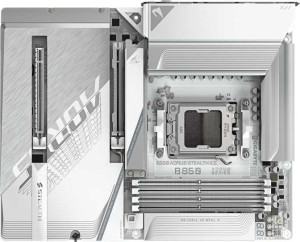
Gigabyte B850 Aorus Stealth Ice
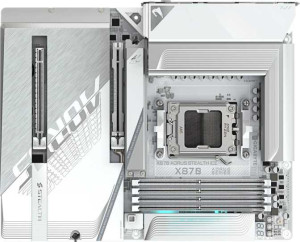
Gigabyte X870 Aorus Stealth Ice

Gigabyte B850 Aorus Stealth Ice Gigabyte X870 Aorus Stealth Ice

Overview

When choosing between the Gigabyte B850 Aorus Stealth Ice and the Gigabyte X870 Aorus Stealth Ice, buyers are looking at two premium AM5 motherboards that share a remarkably similar foundation yet diverge in a few targeted areas. Both boards bring Wi-Fi 7, DDR5 support, and PCIe 5.0 to the table, but the key battlegrounds come down to high-speed connectivity, platform chipset, and certain firmware and redundancy features that could tip the scales depending on your build goals.

Common Features

  • Both motherboards use the AM5 CPU socket.
  • Both boards come in the ATX form factor.
  • Wi-Fi is supported on both products.
  • Both support Wi-Fi 4 (802.11n), Wi-Fi 5 (802.11ac), Wi-Fi 6 (802.11ax), Wi-Fi 6E (802.11ax), and Wi-Fi 7 (802.11be).
  • Bluetooth is available on both products.
  • Both boards feature HDMI 2.1.
  • Overclocking is supported on both products.
  • RGB lighting is present on both products.
  • Both boards support a maximum memory amount of 256GB.
  • Both boards have a maximum RAM speed of 5200 MHz, with overclocked speeds reaching up to 8200 MHz.
  • Both products have 4 memory slots and support DDR5 memory across 2 channels.
  • ECC memory is not supported on either product.
  • Both boards provide 2 USB 3.2 Gen 2 Type-A ports, 4 USB 3.2 Gen 1 Type-A ports, 1 USB 3.2 Gen 2 Type-C port, and 4 USB 2.0 ports.
  • USB 3.2 Gen 2x2 ports and USB 4 20Gbps ports are not present on either product.
  • Thunderbolt 3 ports are not available on either product.
  • Both boards have 4 M.2 sockets, 2 SATA 3 connectors, and 8 fan headers.
  • Both products include 1 PCIe 5.0 x16 slot and 1 PCIe x4 slot.
  • Both boards deliver 7.1 audio channels with a 120 dB signal-to-noise ratio, an S/PDIF Out port, and 2 audio connectors.
  • Both products support RAID 0, RAID 1, RAID 5, and RAID 10 (1+0), but neither supports RAID 0+1.
  • A TPM connector is present on both products.

Main Differences

  • The chipset is B850 on the Gigabyte B850 Aorus Stealth Ice and X870 on the Gigabyte X870 Aorus Stealth Ice.
  • Bluetooth version is 5.4 on the Gigabyte B850 Aorus Stealth Ice and 5.3 on the Gigabyte X870 Aorus Stealth Ice.
  • Dual BIOS is present on the Gigabyte B850 Aorus Stealth Ice but not available on the Gigabyte X870 Aorus Stealth Ice.
  • USB 4 40Gbps ports are not present on the Gigabyte B850 Aorus Stealth Ice, while the Gigabyte X870 Aorus Stealth Ice provides 2 such ports.
  • Thunderbolt 4 ports are not available on the Gigabyte B850 Aorus Stealth Ice, whereas the Gigabyte X870 Aorus Stealth Ice includes 2 Thunderbolt 4 ports.
Specs Comparison
Gigabyte B850 Aorus Stealth Ice

Gigabyte B850 Aorus Stealth Ice

Gigabyte X870 Aorus Stealth Ice

Gigabyte X870 Aorus Stealth Ice

General info:
CPU socket AM5 AM5
chipset B850 X870
form factor ATX ATX
release date May 2025 May 2025
supports Wi-Fi
Wi-Fi version Wi-Fi 4 (802.11n), Wi-Fi 5 (802.11ac), Wi-Fi 6 (802.11ax), Wi-Fi 6E (802.11ax), Wi-Fi 7 (802.11be) Wi-Fi 4 (802.11n), Wi-Fi 5 (802.11ac), Wi-Fi 6 (802.11ax), Wi-Fi 6E (802.11ax), Wi-Fi 7 (802.11be)
Has Bluetooth
Bluetooth version 5.4 5.3
HDMI version HDMI 2.1 HDMI 2.1
Easy to overclock
has RGB lighting
Easy to reset BIOS
Has dual BIOS
has aptX
CPU sockets 1 1
Has integrated graphics
warranty period 3 years 3 years
height 244 mm 244 mm
width 305 mm 305 mm
Has integrated CPU

Both the B850 Aorus Stealth Ice and the X870 Aorus Stealth Ice share the same physical and platform foundation: identical ATX form factor (244 × 305 mm), the same AM5 socket, HDMI 2.1 output, full Wi-Fi 7 support, Bluetooth, RGB lighting, and a 3-year warranty. For most users evaluating platform compatibility or connectivity, these two boards are essentially identical on paper.

The meaningful differences lie in three areas. First, the chipset: the X870 uses a higher-tier X870 chipset versus the B850, which in AMD's hierarchy typically unlocks additional PCIe lanes, more overclocking headroom, and expanded I/O flexibility — though both boards are listed as easy to overclock. Second, Bluetooth: the B850 board ships with Bluetooth 5.4 versus 5.3 on the X870 — a minor but real advantage for the B850, as 5.4 brings improved channel sounding and minor efficiency gains. Third, and most practically significant: the B850 includes dual BIOS, a hardware redundancy feature that lets the board recover from a failed BIOS flash automatically — the X870 lacks this, which is a notable omission at what is typically a higher price tier.

In summary, the X870 holds the chipset-tier edge for users who need maximum expandability and PCIe bandwidth, but the B850 counters with a newer Bluetooth version and the reliability safety net of dual BIOS. For most mainstream builders, the B850 Aorus Stealth Ice offers a surprisingly competitive — and arguably more resilient — general feature set within this group.
Memory:
maximum memory amount 256GB 256GB
RAM speed (max) 5200 MHz 5200 MHz
overclocked RAM speed 8200 MHz 8200 MHz
memory slots 4 4
DDR memory version 5 5
memory channels 2 2
Supports ECC memory

When it comes to memory, the B850 Aorus Stealth Ice and the X870 Aorus Stealth Ice are a perfect match — every single specification is identical across both boards. Both support DDR5 memory with 4 slots, a maximum capacity of 256GB, dual-channel operation, and the same official and overclocked speed ceilings.

The practical takeaway is reassuring for either choice: a native speed ceiling of 5200 MHz covers the DDR5 JEDEC standard comfortably, while the 8200 MHz overclocked ceiling means enthusiasts running high-speed kits will have room to push performance well beyond the baseline. Four slots and 256GB max capacity provide ample headroom for both workstation-class workloads and future upgrades.

This group is a clear tie — memory configuration should play no role in deciding between these two boards. Any DDR5 kit you plan to use with one will work equally well with the other.

Ports:
USB 3.2 Gen 2 ports (USB-A) 2 2
USB 3.2 Gen 1 ports (USB-A) 4 4
USB 3.2 Gen 2 ports (USB-C) 1 1
USB 3.2 Gen 1 ports (USB-C) 0 0
USB 2.0 ports 4 4
USB 3.2 Gen 2x2 ports 0 0
USB 4 40Gbps ports 0 2
USB 4 20Gbps ports 0 0
Thunderbolt 4 ports 0 2
Thunderbolt 3 ports 0 0
has an HDMI output
DisplayPort outputs 0 0
RJ45 ports 1 1
Has USB Type-C
eSATA ports 0 0
DVI outputs 0 0
has a VGA connector
PS/2 ports 0 0

The standard USB lineup is identical on both boards — the same mix of USB 3.2 Gen 2 and Gen 1 Type-A ports, a single USB-C at Gen 2 speeds, and four USB 2.0 ports for legacy peripherals. For everyday connectivity, neither board has an advantage here.

Where the X870 Aorus Stealth Ice decisively pulls ahead is at the high-bandwidth end: it adds 2× USB 4 (40Gbps) ports and 2× Thunderbolt 4 ports — none of which appear on the B850. In practice, this is a substantial real-world differentiator. USB 4 at 40Gbps enables blazing-fast external SSDs and docking stations, while Thunderbolt 4 further opens the door to daisy-chaining high-resolution displays, eGPUs, and professional audio/video peripherals — all at full bandwidth. The B850 has no equivalent.

The X870 Aorus Stealth Ice holds a clear and significant edge in this group. Unless your workflow never involves high-speed external storage or Thunderbolt accessories, the X870's port selection is meaningfully more capable, and for content creators or power users it could be the deciding factor between the two boards.

Connectors:
USB 3.2 Gen 1 ports (through expansion) 2 2
USB 3.2 Gen 2x2 ports (through expansion) 1 1
USB 2.0 ports (through expansion) 4 4
SATA 3 connectors 2 2
fan headers 8 8
USB 3.0 ports (through expansion) 2 2
M.2 sockets 4 4
Has TPM connector
U.2 sockets 0 0
Has mSATA connector
SATA 2 connectors 0 0

Internal connectors tell the story of a build's expandability potential, and here the two boards are completely identical. Both offer 4× M.2 sockets — a generous allocation that lets builders run multiple NVMe SSDs simultaneously without sacrificing any SATA ports. The 2× SATA 3 connectors round out storage options for those still using 2.5″ or 3.5″ drives.

Thermal management gets equal treatment too, with 8 fan headers on each board — enough to support a well-ventilated case with multiple case fans, a CPU cooler, and a radiator pump without needing a separate fan controller. The shared TPM connector and identical expansion USB headers mean front-panel connectivity and security module support are also on equal footing.

This group is a complete tie. Every internal connector, socket count, and header is mirrored exactly between the B850 and X870 Aorus Stealth Ice, so internal build flexibility and storage configuration should not factor into the decision between them.

Expansion slots:
PCIe 4.0 x16 slots 0 0
PCIe 5.0 x16 slots 1 1
PCIe 3.0 x16 slots 0 0
PCIe x1 slots 0 0
PCI slots 0 0
PCIe 2.0 x16 slots 0 0
PCIe x4 slots 1 1
PCIe x8 slots 0 0

Expansion slot configurations are identical on both boards: a single PCIe 5.0 x16 slot for the primary GPU, complemented by one PCIe x4 slot for secondary cards or add-in devices. The PCIe 5.0 x16 slot is the headline here — it delivers double the bandwidth of PCIe 4.0, which future-proofs both boards for next-generation graphics cards that can fully utilize that headroom.

The solitary x4 slot is adequate for a capture card, NVMe add-in card, or network adapter, but neither board caters to multi-GPU or heavily expanded setups. That said, this slim slot layout is typical for modern AM5 ATX boards targeting mainstream and enthusiast single-GPU builds rather than workstation multi-card configurations.

With no differences to speak of, this group is a straight tie. GPU compatibility, bandwidth ceiling, and secondary expansion capacity are exactly the same on the B850 and X870 Aorus Stealth Ice.

Audio:
Signal-to-Noise ratio (DAC) 120 dB 120 dB
audio channels 7.1 7.1
Has S/PDIF Out port
audio connectors 2 2

Audio performance is evenly matched across both boards. A 120 dB signal-to-noise ratio on the DAC is a strong result for integrated motherboard audio — it sits at the upper end of what onboard solutions typically offer, meaning background hiss and interference are well suppressed, which translates to noticeably cleaner sound through quality headphones or speakers compared to lower-tier implementations.

Both boards support 7.1 surround sound, include an S/PDIF optical output for connecting to external DACs or AV receivers, and share the same rear audio connector count. This is a well-rounded onboard audio package that will satisfy most gamers and casual listeners without needing a discrete sound card.

Another clean tie — audio quality, output options, and channel support are identical. Neither the B850 nor the X870 Aorus Stealth Ice holds any advantage here, and audio preference should play no part in choosing between them.

Storage:
Supports RAID 1
Supports RAID 10 (1+0)
Supports RAID 5
Supports RAID 0
Supports RAID 0+1

RAID support is identical on both boards, covering the four configurations most relevant to home and prosumer builds: RAID 0 for striped performance, RAID 1 for mirrored redundancy, RAID 5 for a balanced mix of speed and fault tolerance across three or more drives, and RAID 10 for the combined benefits of striping and mirroring. Neither board supports RAID 0+1, though this omission is inconsequential in practice as RAID 10 accomplishes the same goals more efficiently.

For most builders this is more than sufficient. RAID 5 in particular is a meaningful inclusion — it allows a drive to fail without data loss while still delivering read performance gains, making it a practical option for small NAS-style or content storage setups built around these boards.

This group is a complete tie. RAID flexibility is equal on the B850 and X870 Aorus Stealth Ice, and storage configuration strategy will be exactly the same whichever board you choose.

Comparison Summary & Verdict

After a thorough side-by-side review, both boards prove to be strong contenders on a shared foundation of Wi-Fi 7, DDR5 with up to 256GB capacity, four M.2 sockets, and PCIe 5.0. The differences, while few, are meaningful. The Gigabyte B850 Aorus Stealth Ice stands out with its dual BIOS feature and a slightly newer Bluetooth 5.4, making it a reassuring choice for users who value firmware resilience. The Gigabyte X870 Aorus Stealth Ice, on the other hand, pulls ahead for power users and creative professionals by offering two USB 4 40Gbps ports and two Thunderbolt 4 ports, enabling blazing-fast external device connectivity. Your choice ultimately hinges on whether redundancy and cost-efficiency or maximum peripheral bandwidth defines your ideal build.

Gigabyte B850 Aorus Stealth Ice
Buy Gigabyte B850 Aorus Stealth Ice if...

Buy the Gigabyte B850 Aorus Stealth Ice if you want the added peace of mind of dual BIOS protection and prefer the latest Bluetooth 5.4 without needing high-speed Thunderbolt 4 or USB 4 40Gbps connectivity.

Gigabyte X870 Aorus Stealth Ice
Buy Gigabyte X870 Aorus Stealth Ice if...

Buy the Gigabyte X870 Aorus Stealth Ice if you rely on fast external peripherals and need the two USB 4 40Gbps ports and two Thunderbolt 4 ports for maximum connectivity bandwidth in your build.