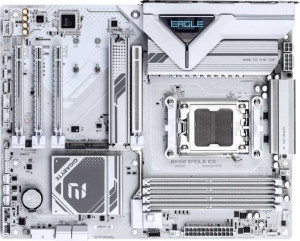
Gigabyte B850 Eagle Ice
Gigabyte B850M Aorus Elite WiFi6E Ice

Gigabyte B850 Eagle Ice Gigabyte B850M Aorus Elite WiFi6E Ice

Overview

Welcome to this head-to-head comparison between the Gigabyte B850 Eagle Ice and the Gigabyte B850M Aorus Elite WiFi6E Ice, two AM5 motherboards built on the B850 chipset that share a surprising amount of common ground. While both boards offer DDR5 support, PCIe 5.0, and robust RAID options, the real story lies in their form factor, wireless connectivity, and port configurations — differences that could make one a far better fit for your specific build than the other.

Common Features

  • Both products use the AM5 CPU socket.
  • Both products feature the B850 chipset.
  • Overclocking is supported on both products.
  • RGB lighting is present on both products.
  • BIOS reset is not easily available on either product.
  • Dual BIOS is available on both products.
  • Each product has a single CPU socket.
  • Integrated graphics are not available on either product.
  • Both products support a maximum memory amount of 256GB.
  • Both products support a maximum RAM speed of 5200 MHz.
  • Both products support an overclocked RAM speed of 8200 MHz.
  • Both products have 4 memory slots.
  • Both products use DDR5 memory.
  • Both products support 2 memory channels.
  • ECC memory is not supported on either product.
  • Both products have 2 USB 3.2 Gen 2 ports (USB-A).
  • Both products have 4 USB 2.0 ports.
  • USB 3.2 Gen 2x2 ports are not available on either product.
  • USB 4 40Gbps ports are not available on either product.
  • USB 4 20Gbps ports are not available on either product.
  • Thunderbolt 4 ports are not available on either product.
  • Thunderbolt 3 ports are not available on either product.
  • Both products have 1 DisplayPort output.
  • Both products have 2 USB 3.2 Gen 1 ports available through expansion.
  • Both products have 4 USB 2.0 ports available through expansion.
  • Both products have 4 SATA 3 connectors.
  • Both products have 6 fan headers.
  • Both products have 2 USB 3.0 ports through expansion.
  • A TPM connector is present on both products.
  • U.2 sockets are not available on either product.
  • An mSATA connector is not available on either product.
  • Both products have 1 PCIe 5.0 x16 slot.
  • PCIe 4.0 x16 slots are not available on either product.
  • PCIe 3.0 x16 slots are not available on either product.
  • PCI slots are not available on either product.
  • PCIe 2.0 x16 slots are not available on either product.
  • Both products have 1 PCIe x4 slot.
  • PCIe x8 slots are not available on either product.
  • Both products support 7.1 audio channels.
  • Both products support RAID 0, RAID 1, RAID 5, and RAID 10.
  • RAID 0+1 is not supported on either product.

Main Differences

  • The form factor is ATX on Gigabyte B850 Eagle Ice and Micro-ATX on Gigabyte B850M Aorus Elite WiFi6E Ice.
  • Wi-Fi support is present on Gigabyte B850M Aorus Elite WiFi6E Ice but not available on Gigabyte B850 Eagle Ice.
  • Bluetooth support is present on Gigabyte B850M Aorus Elite WiFi6E Ice but not available on Gigabyte B850 Eagle Ice.
  • The width is 305 mm on Gigabyte B850 Eagle Ice and 244 mm on Gigabyte B850M Aorus Elite WiFi6E Ice.
  • USB 3.2 Gen 1 ports (USB-A) number 2 on Gigabyte B850 Eagle Ice and 5 on Gigabyte B850M Aorus Elite WiFi6E Ice.
  • A USB 3.2 Gen 2 port (USB-C) is present on Gigabyte B850M Aorus Elite WiFi6E Ice but not available on Gigabyte B850 Eagle Ice.
  • A USB 3.2 Gen 1 port (USB-C) is present on Gigabyte B850 Eagle Ice but not available on Gigabyte B850M Aorus Elite WiFi6E Ice.
  • An HDMI output is present on Gigabyte B850 Eagle Ice but not available on Gigabyte B850M Aorus Elite WiFi6E Ice.
  • A PS/2 port is present on Gigabyte B850 Eagle Ice but not available on Gigabyte B850M Aorus Elite WiFi6E Ice.
  • M.2 sockets number 3 on Gigabyte B850 Eagle Ice and 2 on Gigabyte B850M Aorus Elite WiFi6E Ice.
  • PCIe x1 slots number 2 on Gigabyte B850 Eagle Ice while none are available on Gigabyte B850M Aorus Elite WiFi6E Ice.
  • An S/PDIF Out port is present on Gigabyte B850M Aorus Elite WiFi6E Ice but not available on Gigabyte B850 Eagle Ice.
  • Audio connectors number 3 on Gigabyte B850 Eagle Ice and 2 on Gigabyte B850M Aorus Elite WiFi6E Ice.
Specs Comparison
Gigabyte B850 Eagle Ice

Gigabyte B850 Eagle Ice

Gigabyte B850M Aorus Elite WiFi6E Ice

Gigabyte B850M Aorus Elite WiFi6E Ice

General info:
CPU socket AM5 AM5
chipset B850 B850
form factor ATX Micro-ATX
release date April 2025 January 2025
supports Wi-Fi
Has Bluetooth
Easy to overclock
has RGB lighting
Easy to reset BIOS
Has dual BIOS
CPU sockets 1 1
Has integrated graphics
warranty period 3 years 3 years
height 244 mm 244 mm
width 305 mm 244 mm
Has integrated CPU

Both boards share the same foundational platform: the AM5 socket with a B850 chipset, support for overclocking, dual BIOS, RGB lighting, and a 3-year warranty. For a user evaluating either board, these shared traits mean comparable core reliability, the same CPU compatibility, and identical recovery options if a BIOS update goes wrong — a reassuring baseline on both sides.

The most meaningful split between these two comes down to form factor and connectivity. The Eagle Ice is a full-size ATX board (305 × 244 mm), while the Aorus Elite is Micro-ATX (244 × 244 mm). The smaller footprint of the Aorus Elite opens up compatibility with compact mid-tower and mini-tower cases, making it the only viable option if case size is a constraint. However, the ATX format of the Eagle Ice typically offers more expansion slots and better layout breathing room — relevant for multi-GPU or multi-card storage builds. Critically, the Aorus Elite includes built-in Wi-Fi 6E and Bluetooth, while the Eagle Ice offers neither, meaning Eagle Ice users who need wireless connectivity must budget for and install a separate adapter.

For builders who need wireless out of the box or are working within a smaller chassis, the Aorus Elite has a clear advantage in this group. The Eagle Ice is the rational choice only if you are building in a full-ATX case, have no need for wireless, and prefer the larger board layout — but it offers no general spec advantage that would offset the Aorus Elite's added connectivity and size flexibility.
Memory:
maximum memory amount 256GB 256GB
RAM speed (max) 5200 MHz 5200 MHz
overclocked RAM speed 8200 MHz 8200 MHz
memory slots 4 4
DDR memory version 5 5
memory channels 2 2
Supports ECC memory

Across every memory specification in this group, the Eagle Ice and the Aorus Elite are in complete lockstep. Both feature DDR5 with 4 slots, a dual-channel configuration, a native JEDEC ceiling of 5200 MHz, and a maximum supported capacity of 256 GB. In practical terms, dual-channel DDR5 provides a significant bandwidth advantage over single-channel setups, and 256 GB of addressable memory is far beyond what any mainstream workload demands today — making both boards highly future-proof in this regard.

The overclocked ceiling of 8200 MHz is worth highlighting for enthusiasts. Reaching that figure requires compatible high-speed kits and careful XMP/EXPO profile tuning, but both boards support the same upper boundary, meaning neither has an architectural edge for memory overclocking. Neither board supports ECC memory, which is expected at this B850 tier and is only a meaningful omission for workstation or server use cases — irrelevant for the vast majority of desktop builders.

This group is a complete tie. There is no memory-related reason to choose one board over the other; any decision here should rest entirely on the differentiators found in other specification groups.

Ports:
USB 3.2 Gen 2 ports (USB-A) 2 2
USB 3.2 Gen 1 ports (USB-A) 2 5
USB 3.2 Gen 2 ports (USB-C) 0 1
USB 3.2 Gen 1 ports (USB-C) 1 0
USB 2.0 ports 4 4
USB 3.2 Gen 2x2 ports 0 0
USB 4 40Gbps ports 0 0
USB 4 20Gbps ports 0 0
Thunderbolt 4 ports 0 0
Thunderbolt 3 ports 0 0
has an HDMI output
DisplayPort outputs 1 1
RJ45 ports 1 1
Has USB Type-C
eSATA ports 0 0
DVI outputs 0 0
has a VGA connector
PS/2 ports 1 0

The rear I/O tells meaningfully different stories for each board. The Aorus Elite pulls ahead in raw USB density, offering 5 USB 3.2 Gen 1 USB-A ports versus just 2 on the Eagle Ice — a practical win for users who run multiple peripherals, external drives, or hubs without wanting to chain adapters. More importantly, the Aorus Elite's single USB-C port is a faster USB 3.2 Gen 2 (10 Gbps) connection, while the Eagle Ice offers only a USB 3.2 Gen 1 USB-C (5 Gbps) — half the throughput for high-speed storage or fast device charging.

The Eagle Ice counters with an HDMI output, which the Aorus Elite lacks entirely. The Eagle Ice also retains a PS/2 port, a legacy connector absent on the Aorus Elite — niche, but relevant for users with older input devices or specific low-latency keyboard setups. Both boards share a DisplayPort output and a single RJ45 ethernet jack, so display and wired network connectivity are equivalent on that front.

On balance, the Aorus Elite holds the edge in this group for most modern use cases: more total USB ports and a faster USB-C Gen 2 connection outweigh the Eagle Ice's HDMI addition for the majority of builders. The Eagle Ice's HDMI is the more compelling argument only for users who specifically need that output and lack a discrete GPU to provide it.

Connectors:
USB 3.2 Gen 1 ports (through expansion) 2 2
USB 2.0 ports (through expansion) 4 4
SATA 3 connectors 4 4
fan headers 6 6
USB 3.0 ports (through expansion) 2 2
M.2 sockets 3 2
Has TPM connector
U.2 sockets 0 0
Has mSATA connector
SATA 2 connectors 0 0

Internal connectors are nearly identical across these two boards, with one meaningful exception. Both offer 4 SATA 3 connectors, 6 fan headers, matched internal USB expansion headers, and a TPM connector — a solid and equivalent baseline for cable management, cooling control, and system expandability.

The single differentiator here is M.2 storage: the Eagle Ice provides 3 M.2 sockets versus 2 on the Aorus Elite. In practical terms, that extra slot allows the Eagle Ice to accommodate an additional NVMe SSD without consuming any SATA ports — relevant for users planning high-capacity NVMe arrays, tiered storage setups, or simply wanting room to grow without relying on slower SATA drives. On a Micro-ATX board like the Aorus Elite, physical space constraints make offering only 2 M.2 slots understandable, but it is a tangible limitation for storage-heavy builds.

The Eagle Ice has a clear edge in this group solely due to its additional M.2 slot. For users whose storage plans fit within two NVMe drives, the Aorus Elite's connector set remains entirely adequate — but anyone anticipating a third M.2 device will find the Eagle Ice the more accommodating platform.

Expansion slots:
PCIe 4.0 x16 slots 0 0
PCIe 5.0 x16 slots 1 1
PCIe 3.0 x16 slots 0 0
PCIe x1 slots 2 0
PCI slots 0 0
PCIe 2.0 x16 slots 0 0
PCIe x4 slots 1 1
PCIe x8 slots 0 0

At the core of both boards sits a single PCIe 5.0 x16 slot — the full-bandwidth connection used for a primary GPU. PCIe 5.0 doubles the theoretical throughput of PCIe 4.0, and while current consumer graphics cards do not yet saturate even PCIe 4.0 bandwidth, this slot ensures neither board creates a bottleneck for current or near-future GPU generations. Both also include a PCIe x4 slot, suitable for add-in cards like high-speed NVMe adapters or capture cards.

The one divergence is the Eagle Ice's two additional PCIe x1 slots, which the Aorus Elite entirely omits — a direct consequence of its smaller Micro-ATX footprint leaving less physical room for extra slot real estate. PCIe x1 slots serve a niche but genuine purpose: sound cards, additional USB controllers, network cards, and other low-bandwidth expansion cards all rely on them. Users who plan to populate those slots will find the Eagle Ice more accommodating.

For the overwhelming majority of single-GPU builds, this group is effectively a tie — the primary PCIe 5.0 x16 slot is identical on both. The Eagle Ice holds a modest edge specifically for builders who need one or more PCIe x1 expansion cards; the Aorus Elite's omission of those slots is a real constraint for that use case, though an entirely reasonable trade-off given its compact form factor.

Audio:
audio channels 7.1 7.1
Has S/PDIF Out port
audio connectors 3 2

Both boards deliver 7.1 surround sound through their integrated audio, which is the standard ceiling for onboard solutions at this tier — sufficient for multi-speaker setups, gaming headsets, and home theater configurations without requiring a discrete sound card.

The key split is in output options. The Aorus Elite includes an S/PDIF optical output, which the Eagle Ice lacks entirely. S/PDIF allows a direct digital audio signal to be passed to an external DAC, AV receiver, or soundbar, bypassing the motherboard's analog circuitry entirely — a meaningful advantage for users with optical-enabled audio equipment who want cleaner signal transmission. The Eagle Ice compensates slightly with 3 analog audio jacks versus the Aorus Elite's 2, offering one additional analog connector that can be useful for simultaneous front-panel and rear-panel audio routing or multi-device analog setups.

Which board holds the edge here depends entirely on the user's audio chain. For anyone with S/PDIF-capable receivers or DACs, the Aorus Elite has a clear advantage. For users relying purely on analog connections, the Eagle Ice's extra jack is a minor convenience win. Casual users and those using USB or Bluetooth audio will find both boards equivalent in practice.

Storage:
Supports RAID 1
Supports RAID 10 (1+0)
Supports RAID 5
Supports RAID 0
Supports RAID 0+1

RAID support is identical across both boards. Each supports RAID 0, RAID 1, RAID 5, and RAID 10 — covering the full practical spectrum from pure performance striping to mirrored redundancy and the balanced protection of parity-based arrays. Neither board supports RAID 0+1, but given that RAID 10 achieves similar outcomes more efficiently, this omission carries no real-world consequence for either platform.

This is a complete tie. Storage configuration flexibility is equivalent on both boards, and RAID capability should play no role in differentiating them for any buyer.

Comparison Summary & Verdict

After examining every specification, it is clear that both boards are strong B850 contenders sharing the same AM5 platform, DDR5 memory support up to 256GB, and identical RAID capabilities. The Gigabyte B850 Eagle Ice stands out as the better choice for builders who want an ATX form factor with more expansion flexibility — including 3 M.2 sockets, 2 PCIe x1 slots, an HDMI output, and a PS/2 port — but are comfortable handling wireless connectivity through an add-in card. On the other hand, the Gigabyte B850M Aorus Elite WiFi6E Ice is ideal for compact or small-footprint builds that still demand modern convenience, thanks to its built-in Wi-Fi 6E and Bluetooth, an additional USB 3.2 Gen 2 USB-C port, and a higher USB-A port count — all in a Micro-ATX package. Choose based on your case size and connectivity priorities.

Gigabyte B850 Eagle Ice
Buy Gigabyte B850 Eagle Ice if...

Buy the Gigabyte B850 Eagle Ice if you are building a full-size ATX system and want more expansion slots, an extra M.2 socket, and an HDMI output, and do not require built-in Wi-Fi or Bluetooth.

Gigabyte B850M Aorus Elite WiFi6E Ice
Buy Gigabyte B850M Aorus Elite WiFi6E Ice if...

Buy the Gigabyte B850M Aorus Elite WiFi6E Ice if you need a compact Micro-ATX board with integrated Wi-Fi 6E and Bluetooth, a USB 3.2 Gen 2 USB-C rear port, and more USB-A connectivity out of the box.