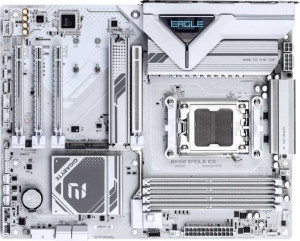
Gigabyte B850 Eagle Ice
MSI B840 Gaming Plus WiFi

Gigabyte B850 Eagle Ice MSI B840 Gaming Plus WiFi

Overview

When choosing between the Gigabyte B850 Eagle Ice and the MSI B840 Gaming Plus WiFi, AMD AM5 platform builders face a nuanced decision. Both ATX motherboards share strong DDR5 memory support, dual BIOS, RGB lighting, and overclocking capability, yet they diverge in meaningful ways across connectivity, expansion slots, storage options, and wireless features. This comparison breaks down every key specification to help you find the right board for your build.

Common Features

  • Both boards use the AM5 CPU socket.
  • Both boards have an ATX form factor.
  • Both boards support HDMI 2.1.
  • Overclocking is supported on both boards.
  • RGB lighting is present on both boards.
  • Dual BIOS is available on both boards.
  • Both boards have a single CPU socket.
  • Integrated graphics are not available on either board.
  • Both boards support up to 256GB of maximum memory.
  • Both boards have 4 memory slots.
  • Both boards use DDR5 memory.
  • Both boards have 2 memory channels.
  • ECC memory is not supported on either board.
  • Both boards have 2 USB 3.2 Gen 1 Type-A ports on the rear panel.
  • Both boards have 4 USB 2.0 rear ports.
  • USB 3.2 Gen 2x2, USB 4 40Gbps, USB 4 20Gbps, Thunderbolt 4, and Thunderbolt 3 ports are absent on both boards.
  • An HDMI output is present on both boards.
  • Both boards provide 2 USB 3.2 Gen 1 ports and 4 USB 2.0 ports through expansion headers.
  • Both boards have 4 SATA 3 connectors.
  • Both boards have 6 fan headers.
  • A TPM connector is present on both boards.
  • An mSATA connector is not available on either board.
  • Neither board has any PCI, PCIe 2.0 x16, or PCIe x8 slots.
  • Both boards offer 7.1 audio channels.
  • An S/PDIF Out port is not available on either board.
  • Both boards have 3 audio connectors.
  • Both boards support RAID 0 and RAID 1.
  • RAID 0+1 is not supported on either board.

Main Differences

  • The chipset is B850 on Gigabyte B850 Eagle Ice and B840 on MSI B840 Gaming Plus WiFi.
  • Wi-Fi support is present on MSI B840 Gaming Plus WiFi but not available on Gigabyte B850 Eagle Ice.
  • Bluetooth support is present on MSI B840 Gaming Plus WiFi but not available on Gigabyte B850 Eagle Ice.
  • Easy BIOS reset is available on MSI B840 Gaming Plus WiFi but not on Gigabyte B850 Eagle Ice.
  • The board height is 244 mm on Gigabyte B850 Eagle Ice and 243.8 mm on MSI B840 Gaming Plus WiFi.
  • The board width is 305 mm on Gigabyte B850 Eagle Ice and 304.8 mm on MSI B840 Gaming Plus WiFi.
  • Maximum standard RAM speed is 5200 MHz on Gigabyte B850 Eagle Ice and 5600 MHz on MSI B840 Gaming Plus WiFi.
  • Maximum overclocked RAM speed is 8200 MHz on Gigabyte B850 Eagle Ice and 8000 MHz on MSI B840 Gaming Plus WiFi.
  • USB 3.2 Gen 2 Type-A ports number 2 on Gigabyte B850 Eagle Ice and 1 on MSI B840 Gaming Plus WiFi.
  • A USB 3.2 Gen 2 Type-C port is present on MSI B840 Gaming Plus WiFi but not on Gigabyte B850 Eagle Ice.
  • A USB 3.2 Gen 1 Type-C port is present on Gigabyte B850 Eagle Ice but not on MSI B840 Gaming Plus WiFi.
  • A DisplayPort output is present on Gigabyte B850 Eagle Ice but not on MSI B840 Gaming Plus WiFi.
  • A PS/2 port is present on Gigabyte B850 Eagle Ice but not on MSI B840 Gaming Plus WiFi.
  • M.2 sockets number 3 on Gigabyte B850 Eagle Ice and 2 on MSI B840 Gaming Plus WiFi.
  • A PCIe 5.0 x16 slot is present on Gigabyte B850 Eagle Ice, while MSI B840 Gaming Plus WiFi has a PCIe 4.0 x16 slot instead.
  • A PCIe 3.0 x16 slot is available on MSI B840 Gaming Plus WiFi but not on Gigabyte B850 Eagle Ice.
  • PCIe x1 slots number 2 on Gigabyte B850 Eagle Ice and 3 on MSI B840 Gaming Plus WiFi.
  • A PCIe x4 slot is present on Gigabyte B850 Eagle Ice but not on MSI B840 Gaming Plus WiFi.
  • RAID 10 (1+0) support is available on Gigabyte B850 Eagle Ice but not on MSI B840 Gaming Plus WiFi.
  • RAID 5 support is available on Gigabyte B850 Eagle Ice but not on MSI B840 Gaming Plus WiFi.
Specs Comparison
Gigabyte B850 Eagle Ice

Gigabyte B850 Eagle Ice

MSI B840 Gaming Plus WiFi

MSI B840 Gaming Plus WiFi

General info:
CPU socket AM5 AM5
chipset B850 B840
form factor ATX ATX
release date April 2025 January 2025
supports Wi-Fi
Has Bluetooth
HDMI version HDMI 2.1 HDMI 2.1
Easy to overclock
has RGB lighting
Easy to reset BIOS
Has dual BIOS
CPU sockets 1 1
Has integrated graphics
warranty period 3 years 3 years
height 244 mm 243.8 mm
width 305 mm 304.8 mm
Has integrated CPU

Both boards share a strong common foundation: the AM5 socket, standard ATX form factor, and near-identical dimensions make them drop-in compatible with the same cases and Ryzen processors. They also match on HDMI 2.1 output, RGB lighting, dual BIOS protection, overclocking support, and a 3-year warranty — so neither has a structural or longevity edge over the other at a glance.

The most meaningful split comes down to connectivity and usability. The MSI B840 Gaming Plus WiFi includes built-in Wi-Fi and Bluetooth, which the Gigabyte B850 Eagle Ice entirely lacks. For a desktop build, the absence of wireless on the Gigabyte means you are either tethered to ethernet or must budget for a separate PCIe/USB wireless adapter — an added cost and hassle. The MSI also wins on BIOS convenience with its easy BIOS reset feature, which can be a genuine time-saver during troubleshooting or failed overclocks. The Gigabyte's B850 chipset, one tier above the B840, does offer broader overclocking headroom and more I/O flexibility in principle, but none of that advantage is reflected in any other spec within this group.

For general use, the MSI B840 Gaming Plus WiFi holds a clear practical edge here: integrated wireless connectivity and easier BIOS management address real day-to-day needs without requiring extras. The Gigabyte's higher chipset tier is a latent advantage that would need to be evaluated against the connectivity trade-off — and for most users, built-in Wi-Fi and Bluetooth tip the balance toward the MSI.
Memory:
maximum memory amount 256GB 256GB
RAM speed (max) 5200 MHz 5600 MHz
overclocked RAM speed 8200 MHz 8000 MHz
memory slots 4 4
DDR memory version 5 5
memory channels 2 2
Supports ECC memory

On paper, the memory configurations of these two boards are nearly identical: both support DDR5 RAM, offer 4 slots across 2 channels, cap out at 256GB maximum capacity, and exclude ECC support. For the vast majority of builders, this means the day-to-day memory experience will be functionally the same regardless of which board they choose.

The only differentiators lie in speed thresholds. The MSI B840 Gaming Plus WiFi edges ahead on native JEDEC support with a 5600 MHz rated maximum versus the Gigabyte's 5200 MHz — a difference that matters if you plan to run standard, non-overclocked DDR5 kits and want the highest certified baseline speed. Flip the script on overclocking, though, and the Gigabyte B850 Eagle Ice reclaims ground with a 8200 MHz overclocked ceiling compared to the MSI's 8000 MHz. In practice, the 200 MHz gap at the overclocked extreme is marginal and unlikely to produce a perceptible difference in real-world workloads.

The verdict here is essentially a wash with minor trade-offs depending on your use case. Casual builders using XMP/EXPO kits in the 5600 MHz range will find the MSI slightly better aligned out of the box, while extreme overclockers pushing DDR5 to its limits gain a tiny theoretical ceiling on the Gigabyte. Neither advantage is large enough to be a deciding factor on memory specs alone.

Ports:
USB 3.2 Gen 2 ports (USB-A) 2 1
USB 3.2 Gen 1 ports (USB-A) 2 2
USB 3.2 Gen 2 ports (USB-C) 0 1
USB 3.2 Gen 1 ports (USB-C) 1 0
USB 2.0 ports 4 4
USB 3.2 Gen 2x2 ports 0 0
USB 4 40Gbps ports 0 0
USB 4 20Gbps ports 0 0
Thunderbolt 4 ports 0 0
Thunderbolt 3 ports 0 0
has an HDMI output
DisplayPort outputs 1 0
RJ45 ports 1 1
Has USB Type-C
eSATA ports 0 0
DVI outputs 0 0
has a VGA connector
PS/2 ports 1 0

Rear I/O is where these two boards diverge most visibly in day-to-day use. The Gigabyte B850 Eagle Ice brings a stronger USB-A lineup with two USB 3.2 Gen 2 ports (10 Gbps each) compared to just one on the MSI — a tangible win for users frequently connecting fast external SSDs, high-speed hubs, or pro audio interfaces via Type-A. The MSI counters with a USB 3.2 Gen 2 Type-C port on the rear panel, versus the Gigabyte's slower Gen 1 Type-C (5 Gbps). So the choice here partly depends on your cable ecosystem: lots of USB-A peripherals favor the Gigabyte, while a modern USB-C workflow benefits from the MSI's faster Type-C throughput.

For display connectivity, the Gigabyte pulls ahead with both HDMI and a DisplayPort output, giving users two independent video outputs for multi-monitor setups or flexible display pairing. The MSI offers HDMI only, which limits display options without a discrete GPU. This matters primarily to users relying on integrated graphics — though neither board has an integrated GPU per earlier specs, it is still relevant for troubleshooting scenarios or low-power setups. The Gigabyte also retains a PS/2 port, a niche but occasionally useful legacy inclusion for specific peripherals or KVM switches.

Taken as a whole, the Gigabyte B850 Eagle Ice holds a meaningful edge in ports: more high-speed USB-A options, an additional display output, and comparable USB-C coverage even if its Type-C speed is a step behind. Unless your workflow is heavily centered on a fast USB-C connection, the Gigabyte's rear I/O is the more versatile and future-flexible of the two.

Connectors:
USB 3.2 Gen 1 ports (through expansion) 2 2
USB 2.0 ports (through expansion) 4 4
SATA 3 connectors 4 4
fan headers 6 6
USB 3.0 ports (through expansion) 2 2
M.2 sockets 3 2
Has TPM connector
U.2 sockets 0 0
Has mSATA connector
SATA 2 connectors 0 0

Strip away the one key differentiator and these boards are connector-twins: identical expansion USB headers, the same four SATA 3 ports, six fan headers apiece, and matching TPM connector support. For most builds, that shared baseline covers the essentials without compromise on either side.

The single but significant gap is M.2 socket count. The Gigabyte B850 Eagle Ice offers three M.2 slots versus the MSI's two. In practical terms, this means the Gigabyte can natively host an additional NVMe drive — useful for builders who want a dedicated OS drive, a high-speed scratch or game storage drive, and a third for bulk NVMe storage, all without touching the SATA ports. The MSI's two slots are sufficient for most users, but anyone planning a storage-dense build will hit that ceiling sooner.

The Gigabyte B850 Eagle Ice takes a clear, if narrow, edge in this category purely on the strength of that extra M.2 slot. It is not a dramatic advantage for everyday builds, but for users who prioritize fast NVMe storage expansion over multiple drives, it removes a real constraint that the MSI imposes.

Expansion slots:
PCIe 4.0 x16 slots 0 1
PCIe 5.0 x16 slots 1 0
PCIe 3.0 x16 slots 0 1
PCIe x1 slots 2 3
PCI slots 0 0
PCIe 2.0 x16 slots 0 0
PCIe x4 slots 1 0
PCIe x8 slots 0 0

The headline difference here is generational: the Gigabyte B850 Eagle Ice features a PCIe 5.0 x16 primary slot, while the MSI B840 Gaming Plus WiFi tops out at PCIe 4.0 x16. For current GPU generations this gap is largely academic — most graphics cards do not yet saturate PCIe 4.0 bandwidth — but PCIe 5.0 is the forward-looking standard, meaning the Gigabyte is better positioned to avoid a bottleneck as next-generation GPUs arrive without requiring a board upgrade.

The MSI compensates with a second full-size slot: a PCIe 3.0 x16 in addition to its primary 4.0 slot. This opens the door to running a secondary card, a high-bandwidth capture device, or a dedicated NVMe add-in card in that second x16 physical slot — something the Gigabyte cannot match since it has only one x16-capable slot. The Gigabyte does include a PCIe x4 slot that the MSI lacks, which is useful for certain NVMe adapters or specialized expansion cards, though it is a narrower bandwidth lane than a full x16. The MSI edges ahead on x1 count with three slots versus two, offering slightly more room for add-in cards like sound cards or USB controllers.

Which board wins depends entirely on the intended build. The Gigabyte B850 Eagle Ice is the stronger choice for a single-GPU build with an eye on longevity, thanks to its PCIe 5.0 primary slot. The MSI B840 Gaming Plus WiFi suits builders who need more simultaneous full-size expansion — two x16 physical slots give it a flexibility advantage for multi-card or hybrid configurations that the Gigabyte simply cannot accommodate.

Audio:
audio channels 7.1 7.1
Has S/PDIF Out port
audio connectors 3 3

Audio is a dead heat between these two boards. Both deliver 7.1 channel surround sound support with 3 analog audio connectors on the rear panel, and neither includes an S/PDIF optical output — meaning users who rely on digital audio passthrough to an AV receiver or external DAC via optical will need a separate solution on both boards equally.

For the typical gamer or general user, 7.1 channel onboard audio covers stereo headsets, 5.1 speaker systems, and surround headphones without issue. The absence of S/PDIF is a minor limitation shared by both, relevant only to a niche segment of users with home theater setups or audiophile-grade external hardware that requires a digital optical signal. Anyone in that camp should plan for a USB DAC or a dedicated sound card regardless of which board they choose.

This category is a complete tie. There is no audio-based reason to favor one board over the other — the specs are identical across every provided data point.

Storage:
Supports RAID 1
Supports RAID 10 (1+0)
Supports RAID 5
Supports RAID 0
Supports RAID 0+1

RAID support is one area where the two boards part ways meaningfully. Both cover the basics — RAID 0 for pure speed across striped drives and RAID 1 for mirrored redundancy — but the Gigabyte B850 Eagle Ice goes further by also supporting RAID 5 and RAID 10. These are not trivial additions: RAID 5 distributes parity data across three or more drives to balance performance, capacity efficiency, and fault tolerance, while RAID 10 combines mirroring and striping for both speed and redundancy using four drives. Together, they represent the configurations most valued in prosumer and small workstation environments where data integrity and throughput both matter.

The MSI B840 Gaming Plus WiFi, limited to RAID 0 and RAID 1, covers the needs of most home users and gamers — but anyone running a NAS-adjacent setup, a video editing workstation with large asset libraries, or any workflow that demands more sophisticated storage resilience will find the MSI's options insufficient without external solutions.

The Gigabyte B850 Eagle Ice holds a clear advantage here. For casual users RAID 0 and 1 may suffice, but the Gigabyte's broader support for RAID 5 and RAID 10 makes it the only viable choice of the two for anyone with serious multi-drive storage requirements.

Comparison Summary & Verdict

Both the Gigabyte B850 Eagle Ice and the MSI B840 Gaming Plus WiFi are capable AM5 ATX motherboards with solid DDR5 support and overclocking headroom, but they target slightly different builders. The Gigabyte B850 Eagle Ice stands out for enthusiasts who want a PCIe 5.0 x16 slot, more M.2 sockets (3 vs 2), advanced RAID options including RAID 5 and RAID 10, a DisplayPort output, and higher overclocked RAM speeds up to 8200 MHz. The MSI B840 Gaming Plus WiFi, on the other hand, appeals to users who need built-in Wi-Fi and Bluetooth, an easier BIOS reset experience, a USB 3.2 Gen 2 Type-C rear port, and a slightly higher standard RAM speed ceiling of 5600 MHz. Neither board is a clear-cut winner; your ideal choice depends on whether you prioritize raw expansion and storage versatility or out-of-the-box wireless convenience.

Gigabyte B850 Eagle Ice
Buy Gigabyte B850 Eagle Ice if...

Buy the Gigabyte B850 Eagle Ice if you want a PCIe 5.0 x16 slot, three M.2 sockets, advanced RAID 5 and RAID 10 support, and higher overclocked RAM speeds, and do not need built-in Wi-Fi or Bluetooth.

MSI B840 Gaming Plus WiFi
Buy MSI B840 Gaming Plus WiFi if...

Buy the MSI B840 Gaming Plus WiFi if built-in Wi-Fi and Bluetooth, easy BIOS reset, and a USB 3.2 Gen 2 Type-C rear port are priorities for your build.