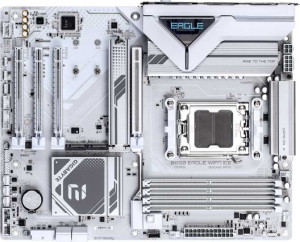
Gigabyte B850 Eagle Wi-Fi7 Ice
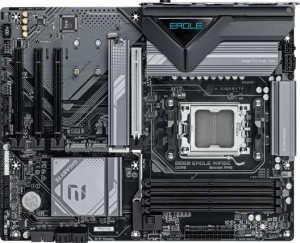
Gigabyte B850 Eagle WiFi6E

Gigabyte B850 Eagle Wi-Fi7 Ice Gigabyte B850 Eagle WiFi6E

Overview

When choosing between the Gigabyte B850 Eagle Wi-Fi7 Ice and the Gigabyte B850 Eagle WiFi6E, both AM5 motherboards share the same B850 chipset and ATX form factor, yet diverge in several meaningful areas. This comparison examines their key battlegrounds: wireless connectivity standards, RGB aesthetics, BIOS redundancy features, and PCIe slot configurations — helping you determine which board is the right fit for your next build.

Common Features

  • Both boards use the AM5 CPU socket.
  • Both boards feature the B850 chipset.
  • Both boards have an ATX form factor.
  • Wi-Fi connectivity is available on both products.
  • Bluetooth is available on both products.
  • Both boards include HDMI 2.1 output.
  • Overclocking support is available on both products.
  • Easy BIOS reset is not available on either product.
  • Both boards support a maximum of 256GB of RAM.
  • Both boards support a maximum native RAM speed of 5200 MHz.
  • Both boards support overclocked RAM speeds up to 8200 MHz.
  • Both boards have 4 memory slots across 2 memory channels.
  • Both boards use DDR5 memory.
  • ECC memory is not supported on either product.
  • Both boards offer 2 USB 3.2 Gen 2 Type-A ports, 2 USB 3.2 Gen 1 Type-A ports, 1 USB 3.2 Gen 1 Type-C port, and 4 USB 2.0 ports on the rear panel.
  • Both boards provide 4 SATA 3 connectors, 3 M.2 sockets, and 6 fan headers.
  • Both boards feature one PCIe 5.0 x16 slot.
  • Both boards deliver 7.1-channel audio with 3 audio connectors.
  • S/PDIF output is not available on either product.
  • Both boards support RAID 0, RAID 1, RAID 5, and RAID 10, but not RAID 0+1.

Main Differences

  • Wi-Fi 7 (802.11be) support is present on Gigabyte B850 Eagle Wi-Fi7 Ice but not available on Gigabyte B850 Eagle WiFi6E.
  • Bluetooth version is 5.4 on Gigabyte B850 Eagle Wi-Fi7 Ice and 5.3 on Gigabyte B850 Eagle WiFi6E.
  • RGB lighting is present on Gigabyte B850 Eagle Wi-Fi7 Ice but not available on Gigabyte B850 Eagle WiFi6E.
  • Dual BIOS is present on Gigabyte B850 Eagle WiFi6E but not available on Gigabyte B850 Eagle Wi-Fi7 Ice.
  • The number of PCIe x1 slots is 2 on Gigabyte B850 Eagle Wi-Fi7 Ice and 3 on Gigabyte B850 Eagle WiFi6E.
  • The number of PCIe x4 slots is 1 on Gigabyte B850 Eagle Wi-Fi7 Ice and 0 on Gigabyte B850 Eagle WiFi6E.
Specs Comparison
Gigabyte B850 Eagle Wi-Fi7 Ice

Gigabyte B850 Eagle Wi-Fi7 Ice

Gigabyte B850 Eagle WiFi6E

Gigabyte B850 Eagle WiFi6E

General info:
CPU socket AM5 AM5
chipset B850 B850
form factor ATX ATX
release date April 2025 January 2025
supports Wi-Fi
Wi-Fi version Wi-Fi 4 (802.11n), Wi-Fi 5 (802.11ac), Wi-Fi 6 (802.11ax), Wi-Fi 6E (802.11ax), Wi-Fi 7 (802.11be) Wi-Fi 4 (802.11n), Wi-Fi 5 (802.11ac), Wi-Fi 6 (802.11ax), Wi-Fi 6E (802.11ax)
Has Bluetooth
Bluetooth version 5.4 5.3
HDMI version HDMI 2.1 HDMI 2.1
Easy to overclock
has RGB lighting
Easy to reset BIOS
Has dual BIOS
has aptX
CPU sockets 1 1
Has integrated graphics
warranty period 3 years 3 years
height 244 mm 244 mm
width 305 mm 305 mm
Has integrated CPU

Both the Gigabyte B850 Eagle Wi-Fi7 Ice and the Gigabyte B850 Eagle WiFi6E share the same foundational platform: an AM5 socket, B850 chipset, and standard ATX form factor with identical dimensions of 305 × 244 mm. Both support overclocking, carry a 3-year warranty, include HDMI 2.1, and lack integrated graphics or an integrated CPU — making them straightforward, like-for-like competitors at the platform level.

The most meaningful differentiator in this group is wireless connectivity. The Wi-Fi7 Ice steps up to Wi-Fi 7 (802.11be) and Bluetooth 5.4, while the WiFi6E tops out at Wi-Fi 6E (802.11ax) and Bluetooth 5.3. Wi-Fi 7 delivers substantially higher theoretical throughput, lower latency, and multi-link operation — advantages that matter most in congested environments or for bandwidth-intensive tasks. Bluetooth 5.4 similarly refines stability and energy efficiency over 5.3, though the real-world gap there is minor. The other notable split is aesthetic and resilience-oriented: the Wi-Fi7 Ice adds RGB lighting, while the WiFi6E counters with a dual BIOS — a practical safety net that lets you recover from a failed firmware update without additional hardware.

For users who want the most future-proof wireless stack and don't mind trading BIOS redundancy, the Wi-Fi7 Ice has a clear edge. If you prioritize firmware resilience over cutting-edge wireless and have no use for RGB, the WiFi6E's dual BIOS is a meaningful practical advantage. Neither board wins outright on general specs alone — the right choice depends on whether next-gen Wi-Fi or BIOS failsafe protection matters more to you.
Memory:
maximum memory amount 256GB 256GB
RAM speed (max) 5200 MHz 5200 MHz
overclocked RAM speed 8200 MHz 8200 MHz
memory slots 4 4
DDR memory version 5 5
memory channels 2 2
Supports ECC memory

On memory, these two boards are in complete lockstep. Both support DDR5 across 4 slots in a dual-channel configuration, cap out at 256GB maximum capacity, and share identical native and overclocked speed ceilings of 5200 MHz and 8200 MHz respectively. Neither supports ECC memory, which is expected at this mainstream chipset tier.

The practical takeaway is that 256GB across four slots gives builders plenty of headroom — most users will run 32GB or 64GB kits and have room to expand later. The 8200 MHz overclocked ceiling is notably high for a B850 board, meaning enthusiasts chasing fast DDR5 kits via EXPO or XMP profiles won't hit an artificial wall here. Dual-channel keeps bandwidth competitive for gaming and content creation workloads alike.

This group is a complete tie. Every memory specification is identical across both boards, so memory capability should play no role in choosing between them.

Ports:
USB 3.2 Gen 2 ports (USB-A) 2 2
USB 3.2 Gen 1 ports (USB-A) 2 2
USB 3.2 Gen 2 ports (USB-C) 0 0
USB 3.2 Gen 1 ports (USB-C) 1 1
USB 2.0 ports 4 4
USB 3.2 Gen 2x2 ports 0 0
USB 4 40Gbps ports 0 0
USB 4 20Gbps ports 0 0
Thunderbolt 4 ports 0 0
Thunderbolt 3 ports 0 0
has an HDMI output
DisplayPort outputs 1 1
RJ45 ports 1 1
Has USB Type-C
eSATA ports 0 0
DVI outputs 0 0
has a VGA connector
PS/2 ports 1 1

The rear I/O layout on these two boards is identical in every respect. Both offer a total of 10 USB ports — comprising two USB 3.2 Gen 2 (Type-A), two USB 3.2 Gen 1 (Type-A), one USB 3.2 Gen 1 (Type-C), and four USB 2.0 — alongside a single RJ45 ethernet jack and a legacy PS/2 port for older peripherals.

Neither board reaches for higher-bandwidth options like USB 3.2 Gen 2x2 or USB 4, which would have been notable differentiators for fast external NVMe enclosures or docking stations. On the display side, both provide HDMI and one DisplayPort output — adequate for users leaning on integrated graphics temporarily, though neither board has integrated graphics per the general specs, so these outputs are primarily useful during initial setup or troubleshooting.

As with memory, this is a complete tie. The port selection is a carbon copy across both models, so connectivity requirements alone give no reason to favor one over the other.

Connectors:
USB 3.2 Gen 1 ports (through expansion) 2 2
USB 2.0 ports (through expansion) 4 4
SATA 3 connectors 4 4
fan headers 6 6
USB 3.0 ports (through expansion) 2 2
M.2 sockets 3 3
Has TPM connector
U.2 sockets 0 0
Has mSATA connector
SATA 2 connectors 0 0

Internal connectivity is another area where these two boards diverge not at all. Storage options are headlined by 3 M.2 sockets and 4 SATA 3 connectors, which together provide ample room for a mixed storage build — fast NVMe drives for the OS and applications, with SATA ports available for larger capacity drives or SSDs. The absence of any SATA 2 connectors is a non-issue in 2025, and the lack of U.2 or mSATA is equally expected at this mainstream tier.

Thermal management gets reasonable attention with 6 fan headers, enough to support a moderately complex cooling setup — CPU cooler, several case fans, and still have headers to spare for radiator pumps or AIO fans. Expansion USB is handled via internal headers covering USB 3.2 Gen 1 and USB 2.0, which feeds front-panel ports on most cases without any compromise. The inclusion of a TPM connector on both boards is a practical necessity for Windows 11 compliance and enterprise-adjacent use cases.

There is no differentiator to call out here — the internal connector spec is a complete tie across every data point. Builders can expect the same expansion ceiling and the same storage flexibility regardless of which model they choose.

Expansion slots:
PCIe 4.0 x16 slots 0 0
PCIe 5.0 x16 slots 1 1
PCIe 3.0 x16 slots 0 0
PCIe x1 slots 2 3
PCI slots 0 0
PCIe 2.0 x16 slots 0 0
PCIe x4 slots 1 0
PCIe x8 slots 0 0

The primary GPU slot is identical on both boards: a single PCIe 5.0 x16 connection, which is the current top-tier standard for discrete graphics cards and ensures full bandwidth compatibility with present and near-future GPUs. Neither board offers a secondary x16 slot, so multi-GPU configurations are off the table — a reasonable trade-off at this chipset tier.

Where they diverge is in the remaining expansion layout. The Wi-Fi7 Ice trades one of its smaller slots for a PCIe x4 slot alongside 2 PCIe x1 slots, while the WiFi6E instead offers 3 PCIe x1 slots and no x4. The x4 slot on the Wi-Fi7 Ice is meaningful for users who want to add a higher-bandwidth add-in card — such as a PCIe NVMe expansion card, a 10GbE network adapter, or a capture card with greater throughput requirements — since x1 bandwidth would bottleneck those devices. The WiFi6E's extra x1 slot is useful primarily for low-bandwidth cards like basic sound cards or additional USB controllers.

For most users running a single GPU and standard peripherals, the difference is negligible. But for builders planning to add a bandwidth-hungry expansion card, the Wi-Fi7 Ice holds a modest edge thanks to its PCIe x4 slot. The WiFi6E's three x1 slots only pull ahead if you specifically need three separate low-bandwidth add-in cards simultaneously.

Audio:
audio channels 7.1 7.1
Has S/PDIF Out port
audio connectors 3 3

Audio hardware is another area of parity between these two boards. Both deliver 7.1-channel onboard audio through 3 analog connectors — a typical rear-panel arrangement that covers stereo headphones, microphone input, and line-out, with software re-mapping handling the full surround configuration when a compatible speaker system is connected.

Neither board includes an S/PDIF optical output, which rules out a direct digital connection to AV receivers or DACs that rely on that interface. Users who need that pathway would require a dedicated sound card or external audio solution. For the majority of desktop users relying on headsets or 2.1 speaker setups, however, the onboard solution is entirely adequate.

This group is a complete tie — every audio specification is identical. If onboard audio quality or connectivity is a deciding factor for you, neither board offers any advantage over the other based on the available data.

Storage:
Supports RAID 1
Supports RAID 10 (1+0)
Supports RAID 5
Supports RAID 0
Supports RAID 0+1

RAID support is consistent across both boards. Each covers the four mainstream configurations: RAID 0 for pure striped performance, RAID 1 for mirrored redundancy, RAID 5 for the balance of parity-based protection with usable capacity across three or more drives, and RAID 10 for the combined speed and redundancy of a striped mirror array. Neither supports RAID 0+1, though this is rarely missed given that RAID 10 is its functional superior in most practical scenarios.

For the typical desktop builder, RAID support is a secondary consideration — most users run single drives or simple multi-drive setups without any array. Where it does matter, such as in small workstation or home server builds that need data redundancy or throughput aggregation, both boards offer the same meaningful options without any gaps.

Storage configuration is a complete tie. The RAID feature set is identical on both models, and neither holds any advantage for users whose storage strategy hinges on array support.

Comparison Summary & Verdict

Both the Gigabyte B850 Eagle Wi-Fi7 Ice and the Gigabyte B850 Eagle WiFi6E are well-matched AM5 motherboards that share identical memory, storage, audio, and rear-port specifications. The choice ultimately comes down to your build priorities. If you want future-proof wireless connectivity with full Wi-Fi 7 support, a newer Bluetooth 5.4 module, and the visual appeal of RGB lighting, the Wi-Fi7 Ice is the stronger pick. Conversely, if firmware resilience matters more to you, the WiFi6E brings a dual BIOS for added peace of mind, plus an extra PCIe x1 slot for builders who need more legacy expansion options. Neither board is an outright winner — your decision should hinge on whether cutting-edge wireless standards or built-in BIOS redundancy aligns better with your needs.

Gigabyte B850 Eagle Wi-Fi7 Ice
Buy Gigabyte B850 Eagle Wi-Fi7 Ice if...

Buy the Gigabyte B850 Eagle Wi-Fi7 Ice if you want the latest Wi-Fi 7 connectivity and RGB lighting for a visually striking, future-ready build.

Gigabyte B850 Eagle WiFi6E
Buy Gigabyte B850 Eagle WiFi6E if...

Choose the Gigabyte B850 Eagle WiFi6E if you prioritize dual BIOS protection for firmware reliability and need an extra PCIe x1 slot for additional expansion cards.