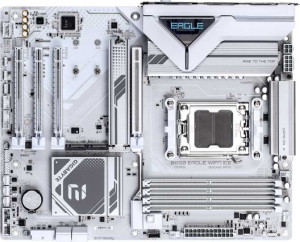
Gigabyte B850 Eagle Wi-Fi7 Ice
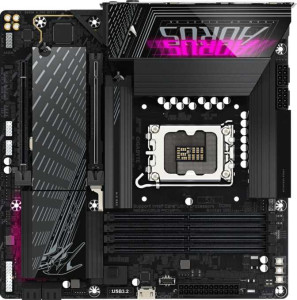
Gigabyte B860M Aorus Pro WiFi7

Gigabyte B850 Eagle Wi-Fi7 Ice Gigabyte B860M Aorus Pro WiFi7

Overview

When selecting a modern Wi-Fi 7 motherboard, platform and feature priorities can make all the difference. This head-to-head comparison of the Gigabyte B850 Eagle Wi-Fi7 Ice and the Gigabyte B860M Aorus Pro WiFi7 digs into the key battlegrounds: CPU platform compatibility, form factor, memory performance, and rear connectivity options, so you can make a fully informed decision before committing to your next build.

Common Features

  • Both boards support Wi-Fi, including Wi-Fi 4 (802.11n), Wi-Fi 5 (802.11ac), Wi-Fi 6 (802.11ax), Wi-Fi 6E (802.11ax), and Wi-Fi 7 (802.11be).
  • Bluetooth is available on both products at version 5.4.
  • Both boards feature an HDMI 2.1 output.
  • Overclocking is supported on both boards.
  • RGB lighting is present on both products.
  • Easy BIOS reset is not available on either product.
  • Both boards support up to 256GB of maximum memory.
  • Both products have 4 memory slots.
  • Both boards use DDR5 memory.
  • Both boards operate in dual-channel memory mode.
  • ECC memory is not supported on either product.
  • Both boards include 2 USB 3.2 Gen 2 Type-A ports.
  • Neither board has USB 3.2 Gen 2 Type-C ports.
  • Both boards include 4 USB 2.0 rear ports.
  • Neither board has USB 3.2 Gen 2x2 ports.
  • Neither board includes USB 4 20Gbps ports.
  • Neither board features Thunderbolt 3 ports.
  • Both boards have a DisplayPort output.
  • Both boards provide 2 USB 3.2 Gen 1 ports through expansion, 4 USB 2.0 ports through expansion, and 2 USB 3.0 ports through expansion.
  • Both boards include 4 SATA 3 connectors, 6 fan headers, 3 M.2 sockets, and a TPM connector.
  • Neither board has U.2 sockets.
  • Both boards have 1 PCIe 5.0 x16 slot, 1 PCIe x4 slot, and no PCIe 3.0, 2.0, or PCI slots.
  • Both boards support 7.1 audio channels.
  • Both boards support RAID 0, RAID 1, RAID 5, and RAID 10 (1+0).
  • RAID 0+1 is not supported on either board.

Main Differences

  • The CPU socket is AM5 on Gigabyte B850 Eagle Wi-Fi7 Ice and LGA 1851 on Gigabyte B860M Aorus Pro WiFi7.
  • The chipset is B850 on Gigabyte B850 Eagle Wi-Fi7 Ice and B860 on Gigabyte B860M Aorus Pro WiFi7.
  • The form factor is ATX on Gigabyte B850 Eagle Wi-Fi7 Ice and Micro-ATX on Gigabyte B860M Aorus Pro WiFi7.
  • Dual BIOS is present on Gigabyte B860M Aorus Pro WiFi7 but not available on Gigabyte B850 Eagle Wi-Fi7 Ice.
  • The board width is 305 mm on Gigabyte B850 Eagle Wi-Fi7 Ice and 244 mm on Gigabyte B860M Aorus Pro WiFi7.
  • The maximum native RAM speed is 5200 MHz on Gigabyte B850 Eagle Wi-Fi7 Ice and 6400 MHz on Gigabyte B860M Aorus Pro WiFi7.
  • The maximum overclocked RAM speed is 8200 MHz on Gigabyte B850 Eagle Wi-Fi7 Ice and 9200 MHz on Gigabyte B860M Aorus Pro WiFi7.
  • USB 3.2 Gen 1 Type-A ports number 2 on Gigabyte B850 Eagle Wi-Fi7 Ice and 4 on Gigabyte B860M Aorus Pro WiFi7.
  • A USB 3.2 Gen 1 Type-C port is present on Gigabyte B850 Eagle Wi-Fi7 Ice but not available on Gigabyte B860M Aorus Pro WiFi7.
  • A USB 4 40Gbps port is present on Gigabyte B860M Aorus Pro WiFi7 but not available on Gigabyte B850 Eagle Wi-Fi7 Ice.
  • A Thunderbolt 4 port is present on Gigabyte B860M Aorus Pro WiFi7 but not available on Gigabyte B850 Eagle Wi-Fi7 Ice.
  • A PS/2 port is present on Gigabyte B850 Eagle Wi-Fi7 Ice but not available on Gigabyte B860M Aorus Pro WiFi7.
  • PCIe x1 slots number 2 on Gigabyte B850 Eagle Wi-Fi7 Ice and 0 on Gigabyte B860M Aorus Pro WiFi7.
  • An S/PDIF Out port is present on Gigabyte B860M Aorus Pro WiFi7 but not available on Gigabyte B850 Eagle Wi-Fi7 Ice.
  • The number of audio connectors is 3 on Gigabyte B850 Eagle Wi-Fi7 Ice and 2 on Gigabyte B860M Aorus Pro WiFi7.
Specs Comparison
Gigabyte B850 Eagle Wi-Fi7 Ice

Gigabyte B850 Eagle Wi-Fi7 Ice

Gigabyte B860M Aorus Pro WiFi7

Gigabyte B860M Aorus Pro WiFi7

General info:
CPU socket AM5 LGA 1851
chipset B850 B860
form factor ATX Micro-ATX
release date April 2025 January 2025
supports Wi-Fi
Wi-Fi version Wi-Fi 4 (802.11n), Wi-Fi 5 (802.11ac), Wi-Fi 6 (802.11ax), Wi-Fi 6E (802.11ax), Wi-Fi 7 (802.11be) Wi-Fi 4 (802.11n), Wi-Fi 5 (802.11ac), Wi-Fi 6 (802.11ax), Wi-Fi 6E (802.11ax), Wi-Fi 7 (802.11be)
Has Bluetooth
Bluetooth version 5.4 5.4
HDMI version HDMI 2.1 HDMI 2.1
Easy to overclock
has RGB lighting
Easy to reset BIOS
Has dual BIOS
has aptX
CPU sockets 1 1
Has integrated graphics
warranty period 3 years 3 years
height 244 mm 244 mm
width 305 mm 244 mm
Has integrated CPU

The most fundamental split between these two boards is platform allegiance. The Gigabyte B850 Eagle Wi-Fi7 Ice uses an AM5 socket paired with the B850 chipset, targeting AMD Ryzen processors, while the Gigabyte B860M Aorus Pro WiFi7 uses an LGA 1851 socket with the B860 chipset, designed for Intel's current-generation CPUs. This means these boards are not cross-comparable by preference alone — your CPU choice makes the decision for you. Neither platform has an inherent advantage from the specs provided here.

Form factor is the second major differentiator. The Eagle Wi-Fi7 Ice is a full-size ATX board (305 × 244 mm), offering more room for expansion slots, VRM circuitry, and airflow routing inside a mid-tower or larger case. The Aorus Pro WiFi7 is Micro-ATX (244 × 244 mm), making it the better fit for compact builds — but that smaller footprint typically means fewer PCIe slots and a more constrained layout. One meaningful advantage the Aorus Pro WiFi7 holds is its dual BIOS feature, which the Eagle lacks. In practice, dual BIOS provides a hardware-level recovery fallback if a firmware update goes wrong, a genuinely useful safeguard for less experienced builders or anyone who updates firmware frequently.

Beyond those differences, the two boards are remarkably well-matched in this category: both support Wi-Fi 7 (including all prior Wi-Fi generations), Bluetooth 5.4, HDMI 2.1, RGB lighting, a 3-year warranty, and both are rated as easy to overclock. Neither offers an easy BIOS reset mechanism or aptX audio. Overall, if form factor is neutral for your build, the Aorus Pro WiFi7 earns a modest edge in this group thanks to its dual BIOS safety net — but the more decisive factor here is simply which CPU platform you are building on.
Memory:
maximum memory amount 256GB 256GB
RAM speed (max) 5200 MHz 6400 MHz
overclocked RAM speed 8200 MHz 9200 MHz
memory slots 4 4
DDR memory version 5 5
memory channels 2 2
Supports ECC memory

Both boards share the same physical memory foundation: 4 slots, DDR5, dual-channel architecture, and a 256GB capacity ceiling. For the vast majority of users — even those running memory-hungry workloads like video editing or virtualization — that ceiling is effectively irrelevant. What matters more in practice is how fast the memory can run.

This is where the Gigabyte B860M Aorus Pro WiFi7 pulls ahead. Its native maximum RAM speed of 6400 MHz versus the Eagle's 5200 MHz reflects a real architectural difference between Intel's B860 and AMD's B850 platforms at their respective JEDEC limits. More telling is the overclocked ceiling: the Aorus Pro WiFi7 reaches 9200 MHz versus the Eagle's 8200 MHz — a 1000 MHz gap that enthusiasts chasing maximum memory bandwidth for latency-sensitive tasks like competitive gaming or high-frequency simulation will notice. Higher memory clocks on DDR5 translate directly into improved bandwidth, which benefits CPU-bound workloads that rely heavily on fast data throughput between the processor and RAM.

Neither board supports ECC memory, so error-correcting use cases are off the table for both. On balance, the Aorus Pro WiFi7 holds a clear edge in this group purely on memory speed headroom, both at stock and when overclocked. If memory performance is a priority in your build, that gap is meaningful.

Ports:
USB 3.2 Gen 2 ports (USB-A) 2 2
USB 3.2 Gen 1 ports (USB-A) 2 4
USB 3.2 Gen 2 ports (USB-C) 0 0
USB 3.2 Gen 1 ports (USB-C) 1 0
USB 2.0 ports 4 4
USB 3.2 Gen 2x2 ports 0 0
USB 4 40Gbps ports 0 1
USB 4 20Gbps ports 0 0
Thunderbolt 4 ports 0 1
Thunderbolt 3 ports 0 0
has an HDMI output
DisplayPort outputs 1 1
RJ45 ports 1 1
Has USB Type-C
eSATA ports 0 0
DVI outputs 0 0
has a VGA connector
PS/2 ports 1 0

Rear I/O connectivity tells a revealing story here. On the surface, both boards look similar — matching counts of USB 3.2 Gen 2 Type-A ports, USB 2.0 ports, HDMI, DisplayPort, and a single RJ45 — but dig one level deeper and the Gigabyte B860M Aorus Pro WiFi7 makes a decisive move with its Thunderbolt 4 port and USB4 40Gbps port. Thunderbolt 4 at 40 Gbps is transformative for users who rely on high-speed external storage, daisy-chained peripherals, or external GPU enclosures — use cases where the Eagle's port selection simply cannot keep pace.

The B850 Eagle Wi-Fi7 Ice counters with a USB 3.2 Gen 1 Type-C port, which the Aorus Pro WiFi7 omits entirely. However, that Type-C port tops out at 5 Gbps — a fraction of the Thunderbolt 4 bandwidth on the competing board — so it doesn't meaningfully offset the gap. The Eagle also retains a legacy PS/2 port, which may matter to a narrow audience using older keyboards or mice that benefit from PS/2's interrupt-driven input. The Aorus Pro WiFi7 skips it entirely, reflecting a cleaner break from legacy I/O.

For anyone building a productivity or content-creation workstation where fast external connectivity matters, the Aorus Pro WiFi7 holds a clear and significant advantage in this group. The Thunderbolt 4 port alone is a premium feature that elevates its I/O tier well above the Eagle's offering.

Connectors:
USB 3.2 Gen 1 ports (through expansion) 2 2
USB 2.0 ports (through expansion) 4 4
SATA 3 connectors 4 4
fan headers 6 6
USB 3.0 ports (through expansion) 2 2
M.2 sockets 3 3
Has TPM connector
U.2 sockets 0 0
Has mSATA connector
SATA 2 connectors 0 0

Rarely does a spec group tell such a straightforward story: the internal connectors on the Gigabyte B850 Eagle Wi-Fi7 Ice and the Gigabyte B860M Aorus Pro WiFi7 are identical across every single data point provided. Both offer 3 M.2 sockets, 4 SATA 3 connectors, 6 fan headers, a TPM connector, and the same expansion-based USB layout. There is no differentiator to be found here.

In practical terms, both boards can accommodate the same internal storage configurations — up to three NVMe or M.2 SATA drives alongside four traditional SATA devices — and both provide the same thermal management headroom with six fan headers, enough to drive a comprehensive cooling setup including multiple case fans and a CPU cooler without needing an external fan controller. The TPM connector on each board is relevant for Windows 11 compliance and hardware-based security features, and its presence on both means neither has an edge there either.

This group is a clear tie. Regardless of which board you choose, you are getting an identical internal connectivity palette, and storage or cooling ambitions will not be the deciding factor between them.

Expansion slots:
PCIe 4.0 x16 slots 0 0
PCIe 5.0 x16 slots 1 1
PCIe 3.0 x16 slots 0 0
PCIe x1 slots 2 0
PCI slots 0 0
PCIe 2.0 x16 slots 0 0
PCIe x4 slots 1 1
PCIe x8 slots 0 0

Expansion slot configurations between these two boards are nearly identical, anchored by the same headline feature: a single PCIe 5.0 x16 slot for the primary GPU. PCIe 5.0 doubles the bandwidth of PCIe 4.0, and while current graphics cards don't yet saturate even PCIe 4.0 x16, this slot ensures both boards are positioned for next-generation GPU compatibility without requiring an upgrade. Both also include a PCIe x4 slot, useful for adding a high-speed NVMe controller card or other bandwidth-moderate expansion cards.

The one tangible difference is that the B850 Eagle Wi-Fi7 Ice adds two PCIe x1 slots, which the Aorus Pro WiFi7 omits entirely. These low-bandwidth slots serve a specific audience — users who want to add a dedicated sound card, extra USB controller, or a capture card without consuming the x4 slot. It's a modest but real advantage for builders who value that kind of peripheral flexibility. The Aorus Pro WiFi7's Micro-ATX form factor likely drove the decision to drop them, as physical space on a smaller PCB is at a premium.

Overall, the Eagle holds a slight edge in this group due to its additional PCIe x1 slots, giving it more expansion versatility for multi-card builds. For users who only need a GPU and nothing else in the expansion bay, however, both boards are functionally equivalent.

Audio:
audio channels 7.1 7.1
Has S/PDIF Out port
audio connectors 3 2

Audio is a compact spec group here, but it contains one meaningful divergence. Both boards deliver 7.1-channel surround sound support, which is the standard ceiling for onboard audio and sufficient for even high-end speaker setups and gaming headsets. Where they part ways is in output options: the B860M Aorus Pro WiFi7 includes an S/PDIF optical output, while the B850 Eagle Wi-Fi7 Ice does not.

S/PDIF matters to a specific but dedicated group of users — those routing audio to an AV receiver, a DAC, or a home theater system via a digital optical cable. It transmits audio as a clean digital signal, bypassing the analog circuitry on the motherboard entirely and handing decoding duties to an external device. For anyone with that kind of setup, its absence on the Eagle is a genuine limitation. The Eagle partially compensates with 3 analog audio connectors versus the Aorus Pro WiFi7's 2, offering slightly more flexibility for simultaneous analog connections such as front and rear speaker pairs alongside a microphone.

The verdict here depends on use case. For home theater or DAC-connected audio, the Aorus Pro WiFi7 has the clear edge with its S/PDIF output. For users relying purely on analog connections, the Eagle's extra jack offers marginally more convenience. Neither board has an overwhelming overall advantage, but S/PDIF is the rarer and more specialized feature, giving the Aorus Pro WiFi7 a slight lead for audiophile-adjacent builds.

Storage:
Supports RAID 1
Supports RAID 10 (1+0)
Supports RAID 5
Supports RAID 0
Supports RAID 0+1

Storage redundancy support is identical across both boards. The Gigabyte B850 Eagle Wi-Fi7 Ice and the Gigabyte B860M Aorus Pro WiFi7 both support RAID 0, 1, 5, and 10, covering the full practical spectrum of consumer and prosumer array configurations — neither supports RAID 0+1, but that mode is functionally superseded by RAID 10 in most implementations anyway.

In real-world terms, this means both boards can serve users who want pure performance striping via RAID 0, mirrored redundancy via RAID 1, the parity-based fault tolerance of RAID 5, or the combined performance and redundancy of RAID 10. Whether you are building a NAS-adjacent workstation, a content archive, or simply want drive redundancy as a safeguard, neither board imposes any limitation the other doesn't share.

This group is an unambiguous tie. RAID support is perfectly matched, and storage configuration choices will be entirely equal between the two builds.

Comparison Summary & Verdict

Both boards share a strong common foundation — Wi-Fi 7, DDR5, three M.2 sockets, PCIe 5.0, and full RAID support — but they cater to clearly different builders. The Gigabyte B850 Eagle Wi-Fi7 Ice is the right choice for AMD AM5 enthusiasts who want a full-size ATX layout with extra PCIe x1 slots, a rear USB 3.2 Gen 1 Type-C port, and more audio connectors. The Gigabyte B860M Aorus Pro WiFi7, however, shines for Intel LGA 1851 builds where space is at a premium, delivering a Micro-ATX footprint alongside standout connectivity features like Thunderbolt 4, a USB 4 40Gbps port, a higher overclocked RAM ceiling of 9200 MHz, and the extra resilience of dual BIOS. Your ideal pick hinges on your CPU platform, chassis size, and connectivity needs.

Gigabyte B850 Eagle Wi-Fi7 Ice
Buy Gigabyte B850 Eagle Wi-Fi7 Ice if...

Buy the Gigabyte B850 Eagle Wi-Fi7 Ice if you are building an AMD AM5 system and want a full-size ATX board with extra PCIe x1 expansion slots and a rear USB 3.2 Gen 1 Type-C port.

Gigabyte B860M Aorus Pro WiFi7
Buy Gigabyte B860M Aorus Pro WiFi7 if...

Choose the Gigabyte B860M Aorus Pro WiFi7 if you need an Intel LGA 1851 platform in a compact Micro-ATX form with Thunderbolt 4, USB 4 40Gbps connectivity, higher memory overclocking headroom, and dual BIOS protection.