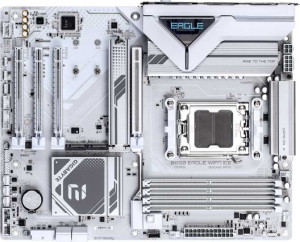
Gigabyte B850 Eagle Wi-Fi7 Ice
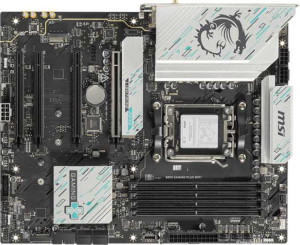
MSI B850 Gaming Plus WiFi

Gigabyte B850 Eagle Wi-Fi7 Ice MSI B850 Gaming Plus WiFi

Overview

Welcome to our in-depth spec comparison between the Gigabyte B850 Eagle Wi-Fi7 Ice and the MSI B850 Gaming Plus WiFi — two AM5 motherboards built on the B850 chipset. While they share the same ATX form factor, DDR5 support, and Wi-Fi 7 connectivity, key battlegrounds emerge around rear I/O flexibility, BIOS features, expansion slot configurations, and storage options. Read on to find out which board best suits your build.

Common Features

  • Both motherboards use the AM5 CPU socket.
  • Both motherboards feature the B850 chipset.
  • Both motherboards have an ATX form factor.
  • Wi-Fi is supported on both motherboards, covering Wi-Fi 4, 5, 6, 6E, and 7 standards.
  • Bluetooth 5.4 is available on both motherboards.
  • Overclocking is supported on both motherboards.
  • Both motherboards support a maximum memory amount of 256GB.
  • The maximum overclocked RAM speed is 8200 MHz on both motherboards.
  • Both motherboards have 4 memory slots.
  • Both motherboards use DDR5 memory.
  • Both motherboards have 2 memory channels.
  • ECC memory is not supported on either motherboard.
  • Both motherboards have 4 USB 2.0 ports.
  • Neither motherboard has USB 3.2 Gen 2x2, USB 4, Thunderbolt 3, or Thunderbolt 4 ports.
  • Both motherboards have 1 DisplayPort output.
  • Both motherboards have 1 RJ45 port.
  • Both motherboards have 4 USB 2.0 ports through expansion.
  • Both motherboards have 4 SATA 3 connectors.
  • Both motherboards have 6 fan headers.
  • Both motherboards have 3 M.2 sockets.
  • A TPM connector is present on both motherboards.
  • Neither motherboard has U.2 sockets or an mSATA connector.
  • Both motherboards have 1 PCIe 5.0 x16 slot and 2 PCIe x1 slots.
  • Neither motherboard has PCIe 3.0 x16, PCIe 2.0 x16, PCIe x8, or PCI slots.
  • Both motherboards support 7.1 audio channels.
  • RAID 0 and RAID 1 are supported on both motherboards.
  • RAID 0+1 is not supported on either motherboard.

Main Differences

  • Easy BIOS reset is available on MSI B850 Gaming Plus WiFi but not on Gigabyte B850 Eagle Wi-Fi7 Ice.
  • Dual BIOS is present on MSI B850 Gaming Plus WiFi but not on Gigabyte B850 Eagle Wi-Fi7 Ice.
  • Height is 244 mm on Gigabyte B850 Eagle Wi-Fi7 Ice and 243.8 mm on MSI B850 Gaming Plus WiFi.
  • Width is 305 mm on Gigabyte B850 Eagle Wi-Fi7 Ice and 304.8 mm on MSI B850 Gaming Plus WiFi.
  • Maximum native RAM speed is 5200 MHz on Gigabyte B850 Eagle Wi-Fi7 Ice and 5600 MHz on MSI B850 Gaming Plus WiFi.
  • USB 3.2 Gen 2 ports (USB-A) count is 2 on Gigabyte B850 Eagle Wi-Fi7 Ice and 1 on MSI B850 Gaming Plus WiFi.
  • USB 3.2 Gen 1 ports (USB-A) count is 2 on Gigabyte B850 Eagle Wi-Fi7 Ice and 1 on MSI B850 Gaming Plus WiFi.
  • USB 3.2 Gen 2 ports (USB-C) are present on MSI B850 Gaming Plus WiFi (2 ports) but absent on Gigabyte B850 Eagle Wi-Fi7 Ice.
  • USB 3.2 Gen 1 port (USB-C) is present on Gigabyte B850 Eagle Wi-Fi7 Ice (1 port) but absent on MSI B850 Gaming Plus WiFi.
  • An HDMI output is available on Gigabyte B850 Eagle Wi-Fi7 Ice but not on MSI B850 Gaming Plus WiFi.
  • A PS/2 port is present on Gigabyte B850 Eagle Wi-Fi7 Ice but absent on MSI B850 Gaming Plus WiFi.
  • USB 3.2 Gen 1 ports through expansion number 2 on Gigabyte B850 Eagle Wi-Fi7 Ice and 4 on MSI B850 Gaming Plus WiFi.
  • A PCIe 4.0 x16 slot is present on MSI B850 Gaming Plus WiFi but absent on Gigabyte B850 Eagle Wi-Fi7 Ice.
  • A PCIe x4 slot is present on Gigabyte B850 Eagle Wi-Fi7 Ice but absent on MSI B850 Gaming Plus WiFi.
  • An S/PDIF Out port is available on MSI B850 Gaming Plus WiFi but not on Gigabyte B850 Eagle Wi-Fi7 Ice.
  • Audio connectors number 3 on Gigabyte B850 Eagle Wi-Fi7 Ice and 2 on MSI B850 Gaming Plus WiFi.
  • RAID 10 (1+0) support is present on Gigabyte B850 Eagle Wi-Fi7 Ice but not available on MSI B850 Gaming Plus WiFi.
  • RAID 5 support is present on Gigabyte B850 Eagle Wi-Fi7 Ice but not available on MSI B850 Gaming Plus WiFi.
Specs Comparison
Gigabyte B850 Eagle Wi-Fi7 Ice

Gigabyte B850 Eagle Wi-Fi7 Ice

MSI B850 Gaming Plus WiFi

MSI B850 Gaming Plus WiFi

General info:
CPU socket AM5 AM5
chipset B850 B850
form factor ATX ATX
release date April 2025 January 2025
supports Wi-Fi
Wi-Fi version Wi-Fi 4 (802.11n), Wi-Fi 5 (802.11ac), Wi-Fi 6 (802.11ax), Wi-Fi 6E (802.11ax), Wi-Fi 7 (802.11be) Wi-Fi 4 (802.11n), Wi-Fi 5 (802.11ac), Wi-Fi 6 (802.11ax), Wi-Fi 6E (802.11ax), Wi-Fi 7 (802.11be)
Has Bluetooth
Bluetooth version 5.4 5.4
Easy to overclock
has RGB lighting
Easy to reset BIOS
Has dual BIOS
has aptX
CPU sockets 1 1
Has integrated graphics
warranty period 3 years 3 years
height 244 mm 243.8 mm
width 305 mm 304.8 mm
Has integrated CPU

Both boards share the same fundamental platform: the AM5 socket with a B850 chipset in a standard ATX form factor. They are virtually identical twins at the connectivity level — both support the full Wi-Fi 7 (802.11be) stack down to Wi-Fi 4, pair it with Bluetooth 5.4 for lower latency and improved range over older BT versions, and both carry a 3-year warranty. For a buyer focused purely on wireless capability or platform compatibility, there is nothing to separate them here.

The meaningful divergence appears in BIOS resilience features. The MSI B850 Gaming Plus WiFi offers both an easy BIOS reset mechanism and a dual BIOS chip, while the Gigabyte B850 Eagle Wi-Fi7 Ice has neither. In practice, dual BIOS acts as a safety net: if a firmware flash goes wrong or corruption occurs, the board can automatically fall back to the backup chip, avoiding a potentially unbootable system. An easy reset button further lowers the barrier for recovering from a bad overclock or misconfiguration without needing to dig for the clear-CMOS jumper. These are not exotic features, but they meaningfully reduce risk for users who push settings or update firmware frequently.

In this spec group, the MSI B850 Gaming Plus WiFi holds a clear practical edge. The shared strengths — Wi-Fi 7, Bluetooth 5.4, overclocking support, RGB, and identical warranty — make the platform parity a wash, but the addition of dual BIOS and an easy BIOS reset gives MSI a tangible reliability advantage that the Gigabyte simply does not offer at this tier.
Memory:
maximum memory amount 256GB 256GB
RAM speed (max) 5200 MHz 5600 MHz
overclocked RAM speed 8200 MHz 8200 MHz
memory slots 4 4
DDR memory version 5 5
memory channels 2 2
Supports ECC memory

The memory foundation is nearly identical across both boards: DDR5, four slots, a 256GB maximum capacity, and a dual-channel architecture. For most users — gaming, content creation, everyday workloads — these shared traits mean both boards are equally capable of handling large memory configurations without bottlenecking the platform.

The one point of separation is the native (non-overclocked) maximum RAM speed. The MSI B850 Gaming Plus WiFi supports up to 5600 MHz at stock, versus 5200 MHz on the Gigabyte B850 Eagle Wi-Fi7 Ice. This 400 MHz gap matters in a specific scenario: users who want faster memory without enabling XMP/EXPO profiles. Running memory at its rated speed without an overclock profile is simpler, more stable out of the box, and avoids potential compatibility friction. The overclocked ceiling is identical at 8200 MHz, so for enthusiasts willing to push XMP/EXPO, both boards reach the same upper limit.

On memory specs, the MSI B850 Gaming Plus WiFi has a narrow but genuine edge, primarily due to its higher native RAM speed ceiling. It is not a dramatic difference — most users will run XMP anyway — but for those who prefer plug-and-play simplicity at higher frequencies without touching BIOS profiles, MSI offers a slight advantage here.

Ports:
USB 3.2 Gen 2 ports (USB-A) 2 1
USB 3.2 Gen 1 ports (USB-A) 2 1
USB 3.2 Gen 2 ports (USB-C) 0 2
USB 3.2 Gen 1 ports (USB-C) 1 0
USB 2.0 ports 4 4
USB 3.2 Gen 2x2 ports 0 0
USB 4 40Gbps ports 0 0
USB 4 20Gbps ports 0 0
Thunderbolt 4 ports 0 0
Thunderbolt 3 ports 0 0
has an HDMI output
DisplayPort outputs 1 1
RJ45 ports 1 1
Has USB Type-C
eSATA ports 0 0
DVI outputs 0 0
has a VGA connector
PS/2 ports 1 0

The rear I/O panel is where these two boards diverge most visibly, and the split reflects different philosophies. The Gigabyte B850 Eagle Wi-Fi7 Ice leans toward legacy-friendly density: it offers a total of four high-speed USB-A ports (2× Gen 2 and 2× Gen 1), an HDMI output alongside DisplayPort, and even a PS/2 port for older peripherals. The MSI, by contrast, cuts USB-A to just two ports but counters with 2× USB-C Gen 2 — both running at 10 Gbps — making it meaningfully better suited for modern peripherals like high-speed external SSDs, recent smartphones, and USB-C displays or docks.

The display output difference is worth flagging for specific use cases. Gigabyte's inclusion of HDMI alongside DisplayPort gives it two usable video outputs for integrated graphics scenarios, which can matter for users running a Ryzen APU or simply wanting a backup display connection. MSI ships only a single DisplayPort output, which limits flexibility if HDMI is your primary monitor connection and you lack an adapter.

Neither board dominates outright — the right choice depends on your peripheral mix. Users with a USB-A-heavy setup and older devices will find the Gigabyte B850 Eagle Wi-Fi7 Ice more accommodating, while those building a modern, USB-C-centric workspace will get more practical value from the MSI B850 Gaming Plus WiFi's faster Type-C ports. On raw forward-looking connectivity, MSI has a slight edge; on breadth and legacy compatibility, Gigabyte leads.

Connectors:
USB 3.2 Gen 1 ports (through expansion) 2 4
USB 2.0 ports (through expansion) 4 4
SATA 3 connectors 4 4
fan headers 6 6
USB 3.0 ports (through expansion) 2 4
M.2 sockets 3 3
Has TPM connector
U.2 sockets 0 0
Has mSATA connector
SATA 2 connectors 0 0

Internal connectors tell the story of what a board can support once it's inside a case, and here the two boards are largely in lockstep. Both offer 3× M.2 sockets, 4× SATA 3 ports, 6 fan headers, a TPM connector, and four USB 2.0 expansion headers — a solid and well-balanced internal layout for a mid-range B850 build.

The single differentiator is internal USB 3.0/3.2 Gen 1 expansion. The MSI B850 Gaming Plus WiFi provides 4 ports through expansion on this front, while the Gigabyte B850 Eagle Wi-Fi7 Ice offers only 2. In practice, these headers feed front-panel USB ports on your case. If you're using a modern chassis with a multi-port USB 3.0 front panel, or plan to add an internal USB hub card, MSI gives you more headroom without resorting to splitters or sacrificing other headers.

This is a modest but real advantage for the MSI in connector flexibility. For users with straightforward cases and standard front-panel needs, Gigabyte's two Gen 1 headers will suffice — but for those building in larger enclosures with more front-panel I/O, the MSI B850 Gaming Plus WiFi edges ahead by removing a potential connectivity constraint before it arises.

Expansion slots:
PCIe 4.0 x16 slots 0 1
PCIe 5.0 x16 slots 1 1
PCIe 3.0 x16 slots 0 0
PCIe x1 slots 2 2
PCI slots 0 0
PCIe 2.0 x16 slots 0 0
PCIe x4 slots 1 0
PCIe x8 slots 0 0

For the primary GPU slot, both boards are equal: a single PCIe 5.0 x16 connection ensures neither will bottleneck current or near-future discrete graphics cards. Where they diverge is in what sits below that primary slot. The MSI B850 Gaming Plus WiFi adds a second physical x16-size slot running at PCIe 4.0, while the Gigabyte B850 Eagle Wi-Fi7 Ice replaces that with a PCIe x4 slot instead.

These are meaningfully different expansion philosophies. MSI's second PCIe 4.0 x16 slot is well-suited for bandwidth-hungry add-in cards — a capture card, a high-end NVMe expansion card, or a secondary GPU in a compute context — all while fitting standard dual-slot cards physically. Gigabyte's x4 slot offers less bandwidth but is still capable for most add-in cards like USB controllers, RAID cards, or 10GbE NICs; it just imposes a ceiling that MSI's x4-lane-minimum second slot does not.

For users who plan to populate more than one expansion slot with demanding cards, the MSI B850 Gaming Plus WiFi holds the advantage here, thanks to its additional PCIe 4.0 x16 slot. Gigabyte's x4 slot is not without utility, but in a head-to-head on expansion potential, MSI offers more flexibility for complex or multi-card builds.

Audio:
audio channels 7.1 7.1
Has S/PDIF Out port
audio connectors 3 2

Audio is one of the tighter battlegrounds between these two boards, with each holding one advantage over the other. Both deliver 7.1-channel surround support, so the underlying audio capability for immersive gaming or home-theater setups is identical.

The split comes down to connection type versus connection count. The MSI B850 Gaming Plus WiFi includes an S/PDIF optical output, which allows a direct digital signal path to AV receivers, soundbars, or DACs that accept optical input — a lossless, interference-free connection that analog jacks cannot replicate. The Gigabyte B850 Eagle Wi-Fi7 Ice skips S/PDIF entirely but compensates with 3 analog audio jacks versus MSI's 2. That extra jack on the Gigabyte means users can simultaneously connect more analog devices — for example, front headphones, rear speakers, and a microphone — without needing a splitter or external audio interface.

Which board wins here depends entirely on your audio setup. For anyone routing audio digitally to an external receiver or DAC, the MSI B850 Gaming Plus WiFi has a clear and meaningful edge with its S/PDIF out. For users relying purely on analog connections with multiple simultaneous outputs, the Gigabyte's extra jack offers more plug-in flexibility. On balance, S/PDIF is the less common but higher-value differentiator, giving MSI a slight overall edge in audio versatility.

Storage:
Supports RAID 1
Supports RAID 10 (1+0)
Supports RAID 5
Supports RAID 0
Supports RAID 0+1

RAID support is where the Gigabyte B850 Eagle Wi-Fi7 Ice pulls ahead noticeably. While both boards cover the basics — RAID 0 for pure speed and RAID 1 for mirroring — the Gigabyte goes further by also supporting RAID 5 and RAID 10, neither of which is available on the MSI B850 Gaming Plus WiFi.

This distinction matters for users who want more sophisticated data protection or performance-redundancy combinations. RAID 5 distributes parity across three or more drives, offering a balance of usable capacity, read performance, and fault tolerance that RAID 1 alone cannot match. RAID 10 combines striping and mirroring across four drives for both redundancy and elevated throughput — a common choice in small workstation or light server environments where both speed and data safety are priorities.

For a typical gaming or general-purpose desktop build, RAID 0 and RAID 1 cover most real-world needs, and the MSI's limitations won't be felt. But for users managing larger multi-drive arrays — content creators with high-capacity storage pools, or anyone running a home server or NAS-adjacent workload — the Gigabyte B850 Eagle Wi-Fi7 Ice holds a clear and practical advantage in storage configuration flexibility.

Comparison Summary & Verdict

Both the Gigabyte B850 Eagle Wi-Fi7 Ice and the MSI B850 Gaming Plus WiFi are capable AM5 platforms with strong shared foundations, but they diverge in meaningful ways. The Gigabyte B850 Eagle Wi-Fi7 Ice stands out for users who need more analog audio connectors, a legacy PS/2 port, an HDMI output, and broader RAID support including RAID 5 and RAID 10 — making it a better fit for enthusiasts with complex storage needs. The MSI B850 Gaming Plus WiFi, on the other hand, offers advantages like dual BIOS, an easy BIOS reset button, a higher native RAM speed of 5600 MHz, USB-C rear ports, a PCIe 4.0 x16 slot, and an S/PDIF Out port — making it the stronger choice for builders who prioritize system resilience, modern connectivity, and a more future-ready expansion layout.

Gigabyte B850 Eagle Wi-Fi7 Ice
Buy Gigabyte B850 Eagle Wi-Fi7 Ice if...

Buy the Gigabyte B850 Eagle Wi-Fi7 Ice if you need an HDMI output, more USB-A ports, broader RAID support (including RAID 5 and RAID 10), or rely on a PS/2 peripheral.

MSI B850 Gaming Plus WiFi
Buy MSI B850 Gaming Plus WiFi if...

Buy the MSI B850 Gaming Plus WiFi if you want dual BIOS protection, a higher native RAM speed, USB-C rear ports, a PCIe 4.0 x16 slot, or an S/PDIF Out port for digital audio.