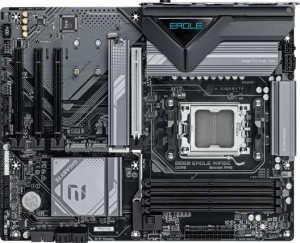
Gigabyte B850 Eagle WiFi6E
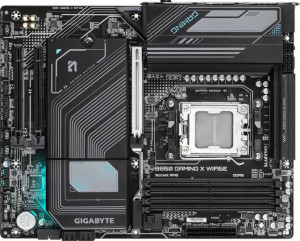
Gigabyte B850 Gaming X WiFi6E

Gigabyte B850 Eagle WiFi6E Gigabyte B850 Gaming X WiFi6E

Overview

Choosing between the Gigabyte B850 Eagle WiFi6E and the Gigabyte B850 Gaming X WiFi6E means deciding between two AMD AM5 motherboards that share a remarkably similar foundation — same B850 chipset, DDR5 memory support, and Wi-Fi 6E connectivity. Yet these boards diverge in meaningful ways around their rear I/O port layouts, expansion slot counts, and visual aesthetics, making the right choice highly dependent on your specific build requirements and priorities.

Common Features

  • Both products use the AM5 CPU socket.
  • Both products feature the B850 chipset.
  • Both products have an ATX form factor.
  • Wi-Fi is supported on both products.
  • Both products support Wi-Fi 4 (802.11n), Wi-Fi 5 (802.11ac), Wi-Fi 6 (802.11ax), and Wi-Fi 6E (802.11ax).
  • Bluetooth is available on both products.
  • Both products have Bluetooth version 5.3.
  • Both products include an HDMI 2.1 output.
  • Both products support a maximum memory amount of 256GB.
  • The maximum RAM speed is 5200 MHz on both products.
  • The maximum overclocked RAM speed is 8200 MHz on both products.
  • Both products have 4 memory slots.
  • Both products use DDR5 memory.
  • Both products support 2 memory channels.
  • ECC memory is not supported on either product.
  • Neither product includes USB 3.2 Gen 2x2, USB 4 40Gbps, USB 4 20Gbps, Thunderbolt 4, or Thunderbolt 3 ports.
  • Both products have 1 DisplayPort output and 1 RJ45 port.
  • Both products include 2 USB 3.2 Gen 1 ports through expansion, 4 USB 2.0 ports through expansion, 4 SATA 3 connectors, 6 fan headers, and 3 M.2 sockets.
  • A TPM connector is present on both products.
  • Both products feature 1 PCIe 5.0 x16 slot and no PCIe 4.0, 3.0, 2.0, x4, or x8 slots.
  • Both products support 7.1 audio channels with 3 audio connectors.
  • S/PDIF Out is not available on either product.
  • Both products support RAID 0, RAID 1, RAID 5, and RAID 10 (1+0), but neither supports RAID 0+1.

Main Differences

  • RGB lighting is present on the Gigabyte B850 Gaming X WiFi6E but not available on the Gigabyte B850 Eagle WiFi6E.
  • USB 3.2 Gen 2 ports (USB-A) count is 2 on the Gigabyte B850 Eagle WiFi6E and 1 on the Gigabyte B850 Gaming X WiFi6E.
  • USB 3.2 Gen 1 ports (USB-A) count is 2 on the Gigabyte B850 Eagle WiFi6E and 3 on the Gigabyte B850 Gaming X WiFi6E.
  • A USB 3.2 Gen 2 port (USB-C) is present on the Gigabyte B850 Gaming X WiFi6E but not available on the Gigabyte B850 Eagle WiFi6E.
  • A USB 3.2 Gen 1 port (USB-C) is present on the Gigabyte B850 Eagle WiFi6E but not available on the Gigabyte B850 Gaming X WiFi6E.
  • USB 2.0 ports count is 4 on the Gigabyte B850 Eagle WiFi6E and 3 on the Gigabyte B850 Gaming X WiFi6E.
  • PCIe x1 slots count is 3 on the Gigabyte B850 Eagle WiFi6E and 2 on the Gigabyte B850 Gaming X WiFi6E.
Specs Comparison
Gigabyte B850 Eagle WiFi6E

Gigabyte B850 Eagle WiFi6E

Gigabyte B850 Gaming X WiFi6E

Gigabyte B850 Gaming X WiFi6E

General info:
CPU socket AM5 AM5
chipset B850 B850
form factor ATX ATX
release date January 2025 January 2025
supports Wi-Fi
Wi-Fi version Wi-Fi 4 (802.11n), Wi-Fi 5 (802.11ac), Wi-Fi 6 (802.11ax), Wi-Fi 6E (802.11ax) Wi-Fi 4 (802.11n), Wi-Fi 5 (802.11ac), Wi-Fi 6 (802.11ax), Wi-Fi 6E (802.11ax)
Has Bluetooth
Bluetooth version 5.3 5.3
HDMI version HDMI 2.1 HDMI 2.1
Easy to overclock
has RGB lighting
Easy to reset BIOS
Has dual BIOS
has aptX
CPU sockets 1 1
Has integrated graphics
warranty period 3 years 3 years
height 244 mm 244 mm
width 305 mm 305 mm
Has integrated CPU

At their core, the Gigabyte B850 Eagle WiFi6E and Gigabyte B850 Gaming X WiFi6E share an identical hardware foundation: both use the AM5 socket with a B850 chipset, adopt the standard ATX form factor, and are dimensionally identical at 305 × 244 mm. Connectivity is also a carbon copy — both offer Wi-Fi 6E (backwards-compatible down to Wi-Fi 4), Bluetooth 5.3, and HDMI 2.1, ensuring modern wireless performance and full 4K/8K display output capability. For most builders, these shared fundamentals mean neither board has a platform-level advantage over the other.

Both boards support overclocking and feature dual BIOS — a meaningful safety net that allows recovery from a failed firmware flash without specialized tools. Neither board makes BIOS resets particularly easy, and neither includes integrated graphics or an integrated CPU, so a discrete GPU or a CPU with integrated graphics remains necessary in both cases. The 3-year warranty is identical, offering the same long-term coverage regardless of which model you choose.

The single differentiating spec in this group is RGB lighting: the Gaming X includes it, while the Eagle does not. This is purely an aesthetic consideration with no performance implications — builders who want visual customization or ecosystem sync (e.g., with RGB RAM or coolers) will find the Gaming X more accommodating, while those indifferent to aesthetics or preferring a cleaner look lose nothing by choosing the Eagle. Based solely on general specifications, these two boards are essentially tied — the ″winner″ comes down entirely to whether onboard RGB matters to you.

Memory:
maximum memory amount 256GB 256GB
RAM speed (max) 5200 MHz 5200 MHz
overclocked RAM speed 8200 MHz 8200 MHz
memory slots 4 4
DDR memory version 5 5
memory channels 2 2
Supports ECC memory

Memory capability is a complete dead heat between these two boards. Both support DDR5 RAM across 4 DIMM slots in a dual-channel configuration, with a maximum capacity of 256GB — ample headroom for even the most demanding workstation or enthusiast builds for the foreseeable future.

The speed story is equally matched. Native support tops out at 5200 MHz, which is the standard DDR5 baseline for AM5 platforms, but both boards push overclocked (EXPO/XMP) profiles up to an impressive 8200 MHz. That ceiling matters in practice: faster RAM meaningfully improves performance in memory-bandwidth-sensitive workloads like video editing, 3D rendering, and gaming on AMD's Ryzen architecture, where the CPU and memory subsystem are tightly coupled. Neither board gives you an advantage in chasing those high-frequency kits.

Neither board supports ECC memory, which rules them both out for mission-critical or professional server use cases — but that is expected at this chipset tier and unlikely to concern the target audience. With every single memory specification being identical, this group is a complete tie. Your choice between the Eagle and the Gaming X will not be influenced by memory capability in any way.

Ports:
USB 3.2 Gen 2 ports (USB-A) 2 1
USB 3.2 Gen 1 ports (USB-A) 2 3
USB 3.2 Gen 2 ports (USB-C) 0 1
USB 3.2 Gen 1 ports (USB-C) 1 0
USB 2.0 ports 4 3
USB 3.2 Gen 2x2 ports 0 0
USB 4 40Gbps ports 0 0
USB 4 20Gbps ports 0 0
Thunderbolt 4 ports 0 0
Thunderbolt 3 ports 0 0
has an HDMI output
DisplayPort outputs 1 1
RJ45 ports 1 1
Has USB Type-C
eSATA ports 0 0
DVI outputs 0 0
has a VGA connector
PS/2 ports 1 1

The rear I/O panel is where these two boards diverge in a subtle but meaningful way. The total USB port count is nearly identical, but the Gaming X makes a more forward-looking trade-off: it replaces one of the Eagle's USB 3.2 Gen 2 USB-A ports with a USB 3.2 Gen 2 USB-C port. That shift matters — Gen 2 over USB-C delivers 10Gbps throughput and directly supports the growing ecosystem of modern peripherals, fast external NVMe enclosures, and recent smartphones that rely on USB-C. The Eagle, by contrast, offers a USB-C port limited to Gen 1 speed (5Gbps), which is noticeably slower for bandwidth-hungry devices.

Beyond that swap, the Eagle edges out the Gaming X with one additional USB 2.0 port (4 vs. 3), which is useful for low-bandwidth staples like keyboards, mice, and dongles. Both boards share the same display output configuration — HDMI and one DisplayPort — along with a single RJ45 Ethernet jack and a legacy PS/2 port for older input devices. Neither board offers Thunderbolt, USB4, or eSATA, so neither has an advantage in high-speed peripheral expansion at the platform level.

On balance, the Gaming X holds a narrow edge in this category. The faster USB-C port is the more practically impactful differentiator — the speed jump from 5Gbps to 10Gbps on a USB-C connection is tangible when transferring large files or connecting modern docks, whereas the Eagle's extra USB 2.0 port is far less consequential given how rarely that bandwidth ceiling is reached.
Connectors:
USB 3.2 Gen 1 ports (through expansion) 2 2
USB 2.0 ports (through expansion) 4 4
SATA 3 connectors 4 4
fan headers 6 6
USB 3.0 ports (through expansion) 2 2
M.2 sockets 3 3
Has TPM connector
U.2 sockets 0 0
Has mSATA connector
SATA 2 connectors 0 0

Internal connectivity is identical across both boards, and the specs here tell a practical story about build flexibility. Three M.2 sockets allow for a full complement of fast NVMe SSDs without sacrificing any of the four SATA 3 ports — meaning builders can run high-speed storage alongside traditional drives or optical enclosures simultaneously, a genuinely useful combination for content creators and heavy storage users alike.

Thermal management is well-provisioned on both, with 6 fan headers giving builders enough control points for a multi-fan cooling setup — whether that's a large air cooler with multiple fans or a custom loop with pump and radiator fans. The shared TPM connector ensures Windows 11 compatibility and supports hardware-level security features without needing an add-in module. Expansion USB headers (Gen 1 and USB 2.0) are equally matched, covering front-panel connectivity needs for virtually any standard case.

There is no differentiator to call out here — every connector specification is a perfect match between the Eagle and the Gaming X. This group is a complete tie, and internal connectivity should play no role in deciding between these two boards.

Expansion slots:
PCIe 4.0 x16 slots 0 0
PCIe 5.0 x16 slots 1 1
PCIe 3.0 x16 slots 0 0
PCIe x1 slots 3 2
PCI slots 0 0
PCIe 2.0 x16 slots 0 0
PCIe x4 slots 0 0
PCIe x8 slots 0 0

For the primary GPU slot, both boards are equally equipped: a single PCIe 5.0 x16 slot provides the maximum available bandwidth for modern discrete graphics cards, ensuring neither board becomes a bottleneck for current or near-future GPU generations. This is the slot that matters most for the vast majority of builders, and it's identical on both.

The only divergence in this group is the number of PCIe x1 slots — the Eagle offers 3 versus the Gaming X's 2. These smaller slots are used for add-in cards such as capture cards, sound cards, additional USB or network controllers, and similar peripherals. For most users running a single GPU build, two x1 slots is entirely sufficient, but the Eagle's extra slot provides a meaningful advantage for enthusiasts who run multiple expansion cards simultaneously.

The Eagle takes a narrow edge here purely on account of that additional PCIe x1 slot. It's not a decisive advantage for the typical builder, but for anyone planning a more heavily expanded system, the extra slot offers real flexibility that the Gaming X cannot match.

Audio:
audio channels 7.1 7.1
Has S/PDIF Out port
audio connectors 3 3

Audio capability is identical on both boards. Each supports 7.1 surround sound via 3 analog audio connectors — a standard rear-panel arrangement that typically covers line-in, line-out, and microphone, with the full 7.1 channel mapping handled through software re-routing. This is adequate for most desktop audio setups including stereo speakers, headsets, and mid-range surround speaker systems.

Neither board includes an S/PDIF optical output, which rules out a direct digital connection to external DACs, AV receivers, or high-end speaker systems that rely on that interface. Users with such setups would need a discrete sound card or USB DAC regardless of which board they choose. This is a shared limitation rather than a differentiator.

With every audio specification matching exactly, this group is a complete tie. Neither the Eagle nor the Gaming X holds any advantage here, and audio requirements should not factor into the decision between these two boards.

Storage:
Supports RAID 1
Supports RAID 10 (1+0)
Supports RAID 5
Supports RAID 0
Supports RAID 0+1

RAID support is a perfect match between these two boards. Both cover the four configurations that matter most for desktop and prosumer use: RAID 0 for maximum throughput by striping data across drives, RAID 1 for mirrored redundancy, RAID 5 for a balanced mix of performance and fault tolerance across three or more drives, and RAID 10 for the combined benefits of striping and mirroring in larger arrays. This is a comprehensive set of options that satisfies the needs of content creators, NAS-adjacent workstation builds, and data-sensitive users alike.

Neither board supports RAID 0+1, though this is largely inconsequential in practice — RAID 10 achieves a functionally similar outcome and is generally considered the more robust implementation. The absence of RAID 0+1 is a shared characteristic rather than a meaningful limitation for either board.

With no differences whatsoever across the provided storage specs, this group is a complete tie. The Eagle and the Gaming X offer identical RAID capabilities, and storage configuration should play no part in choosing between them.

Comparison Summary & Verdict

Both the Gigabyte B850 Eagle WiFi6E and Gigabyte B850 Gaming X WiFi6E deliver a solid AMD AM5 platform with identical DDR5 support, Wi-Fi 6E, three M.2 sockets, and a PCIe 5.0 x16 slot. The differences are focused but meaningful. The Gigabyte B850 Gaming X WiFi6E stands out with its RGB lighting and a USB 3.2 Gen 2 Type-C port, making it the more appealing choice for builders who prioritize aesthetics and modern USB-C connectivity. Conversely, the Gigabyte B850 Eagle WiFi6E edges ahead with three PCIe x1 slots versus two, and an extra USB 3.2 Gen 2 Type-A port, benefiting users who require greater legacy expansion capacity and more high-speed USB-A outputs. Neither board is objectively superior — your ideal pick simply comes down to whether RGB and USB-C or broader PCIe expansion matters more to your build.

Gigabyte B850 Eagle WiFi6E
Buy Gigabyte B850 Eagle WiFi6E if...

Buy the Gigabyte B850 Eagle WiFi6E if you need more PCIe x1 expansion slots and an additional USB 3.2 Gen 2 Type-A port, and have no requirement for RGB lighting.

Gigabyte B850 Gaming X WiFi6E
Buy Gigabyte B850 Gaming X WiFi6E if...

Buy the Gigabyte B850 Gaming X WiFi6E if you want RGB lighting and a USB 3.2 Gen 2 Type-C port on the rear I/O, along with a higher count of USB 3.2 Gen 1 Type-A connections.