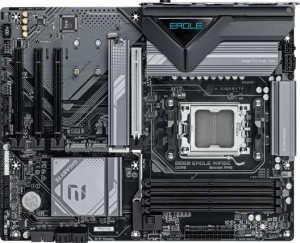
Gigabyte B850 Eagle WiFi6E
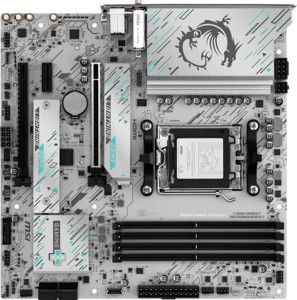
MSI B850M Gaming Plus Wi-Fi

Gigabyte B850 Eagle WiFi6E MSI B850M Gaming Plus Wi-Fi

Overview

Choosing between the Gigabyte B850 Eagle WiFi6E and the MSI B850M Gaming Plus Wi-Fi means weighing two capable AM5 motherboards that share the same B850 chipset foundation yet diverge in meaningful ways. This comparison explores their differences across form factor and connectivity, expansion potential, memory performance, and wireless capabilities to help you determine which board best suits your next build.

Common Features

  • Both products use the AM5 CPU socket.
  • Both products feature the B850 chipset.
  • Wi-Fi connectivity is available on both products.
  • Bluetooth is available on both products.
  • Both products support HDMI 2.1.
  • Both products support easy overclocking.
  • Dual BIOS is available on both products.
  • aptX support is not available on either product.
  • Both products support a maximum memory amount of 256GB.
  • Both products support overclocked RAM speeds up to 8200 MHz.
  • Both products have 4 memory slots.
  • Both products use DDR5 memory.
  • Both products feature 2 memory channels.
  • ECC memory support is not available on either product.
  • Neither product has USB 3.2 Gen 2x2, USB 4 40Gbps, USB 4 20Gbps, Thunderbolt 4, or Thunderbolt 3 ports.
  • Both products have an HDMI output.
  • Both products have 1 DisplayPort output.
  • Both products have 1 RJ45 port.
  • Both products provide 2 USB 3.2 Gen 1 ports and 4 USB 2.0 ports through expansion.
  • Both products have 4 SATA 3 connectors and no SATA 2 connectors.
  • Both products include a TPM connector.
  • Neither product has an mSATA connector or U.2 sockets.
  • Both products feature 1 PCIe 5.0 x16 slot and no PCIe 4.0, 3.0, 2.0 x16, PCI, or PCIe x8 slots.
  • Both products support 7.1 audio channels with 3 audio connectors.
  • S/PDIF Out port is not available on either product.
  • Both products support RAID 0, RAID 1, and RAID 10 (1+0).
  • RAID 0+1 support is not available on either product.

Main Differences

  • The Gigabyte B850 Eagle WiFi6E has an ATX form factor, while the MSI B850M Gaming Plus Wi-Fi has a Micro-ATX form factor.
  • The Gigabyte B850 Eagle WiFi6E supports up to Wi-Fi 6E (802.11ax), while the MSI B850M Gaming Plus Wi-Fi additionally supports Wi-Fi 7 (802.11be).
  • Bluetooth version is 5.3 on the Gigabyte B850 Eagle WiFi6E and 5.4 on the MSI B850M Gaming Plus Wi-Fi.
  • RGB lighting is present on the MSI B850M Gaming Plus Wi-Fi but not available on the Gigabyte B850 Eagle WiFi6E.
  • Easy BIOS reset is available on the MSI B850M Gaming Plus Wi-Fi but not on the Gigabyte B850 Eagle WiFi6E.
  • The height is 244 mm on the Gigabyte B850 Eagle WiFi6E and 243.8 mm on the MSI B850M Gaming Plus Wi-Fi.
  • The width is 305 mm on the Gigabyte B850 Eagle WiFi6E and 243.8 mm on the MSI B850M Gaming Plus Wi-Fi.
  • Maximum native RAM speed is 5200 MHz on the Gigabyte B850 Eagle WiFi6E and 5600 MHz on the MSI B850M Gaming Plus Wi-Fi.
  • USB 3.2 Gen 2 ports (USB-A) number 2 on the Gigabyte B850 Eagle WiFi6E and 3 on the MSI B850M Gaming Plus Wi-Fi.
  • USB 3.2 Gen 1 ports (USB-A) number 2 on the Gigabyte B850 Eagle WiFi6E and 3 on the MSI B850M Gaming Plus Wi-Fi.
  • USB 3.2 Gen 2 ports (USB-C) are absent on the Gigabyte B850 Eagle WiFi6E but number 2 on the MSI B850M Gaming Plus Wi-Fi.
  • USB 3.2 Gen 1 ports (USB-C) number 1 on the Gigabyte B850 Eagle WiFi6E and are absent on the MSI B850M Gaming Plus Wi-Fi.
  • USB 2.0 ports number 4 on the Gigabyte B850 Eagle WiFi6E and are absent on the MSI B850M Gaming Plus Wi-Fi.
  • A PS/2 port is present on the Gigabyte B850 Eagle WiFi6E but not available on the MSI B850M Gaming Plus Wi-Fi.
  • Fan headers number 6 on the Gigabyte B850 Eagle WiFi6E and 5 on the MSI B850M Gaming Plus Wi-Fi.
  • M.2 sockets number 3 on the Gigabyte B850 Eagle WiFi6E and 2 on the MSI B850M Gaming Plus Wi-Fi.
  • PCIe x1 slots number 3 on the Gigabyte B850 Eagle WiFi6E and 1 on the MSI B850M Gaming Plus Wi-Fi.
  • PCIe x4 slots are absent on the Gigabyte B850 Eagle WiFi6E but number 1 on the MSI B850M Gaming Plus Wi-Fi.
  • RAID 5 support is available on the Gigabyte B850 Eagle WiFi6E but not on the MSI B850M Gaming Plus Wi-Fi.
Specs Comparison
Gigabyte B850 Eagle WiFi6E

Gigabyte B850 Eagle WiFi6E

MSI B850M Gaming Plus Wi-Fi

MSI B850M Gaming Plus Wi-Fi

General info:
CPU socket AM5 AM5
chipset B850 B850
form factor ATX Micro-ATX
release date January 2025 January 2025
supports Wi-Fi
Wi-Fi version Wi-Fi 4 (802.11n), Wi-Fi 5 (802.11ac), Wi-Fi 6 (802.11ax), Wi-Fi 6E (802.11ax) Wi-Fi 4 (802.11n), Wi-Fi 5 (802.11ac), Wi-Fi 6 (802.11ax), Wi-Fi 6E (802.11ax), Wi-Fi 7 (802.11be)
Has Bluetooth
Bluetooth version 5.3 5.4
HDMI version HDMI 2.1 HDMI 2.1
Easy to overclock
has RGB lighting
Easy to reset BIOS
Has dual BIOS
has aptX
CPU sockets 1 1
Has integrated graphics
warranty period 3 years 3 years
height 244 mm 243.8 mm
width 305 mm 243.8 mm
Has integrated CPU

Both boards share the same AM5 socket and B850 chipset foundation, and both support overclocking, dual BIOS, and identical HDMI 2.1 output — so on paper they serve the same platform and use case. The most structural difference is form factor: the Gigabyte B850 Eagle WiFi6E is a full-size ATX board (305 × 244 mm), while the MSI B850M Gaming Plus Wi-Fi is a compact Micro-ATX (243.8 × 243.8 mm). This matters when choosing a case — the MSI fits smaller builds, while the Gigabyte offers more room for expansion slots and potentially better component spacing.

On wireless connectivity, the MSI has a tangible edge: it supports Wi-Fi 7 (802.11be), the latest standard offering significantly higher throughput and lower latency than Wi-Fi 6E, which is the ceiling on the Gigabyte. Its Bluetooth 5.4 also edges out the Gigabyte's 5.3, though the real-world difference there is minimal. More practically, the MSI also wins on usability features — it includes RGB lighting for those who care about aesthetics, and critically, it supports easy BIOS reset, which the Gigabyte does not. For less experienced builders or overclockers who may need to recover from a bad BIOS setting, that is a meaningful convenience advantage.

Overall, the MSI B850M Gaming Plus Wi-Fi holds a clear edge in this general category: it offers newer wireless technology, a more user-friendly BIOS reset mechanism, and added RGB — all while fitting into a smaller footprint. The Gigabyte's ATX size is only an advantage if you specifically need the extra expansion space that a larger board provides. For most users, the MSI delivers more features per square centimeter, with no meaningful trade-offs on the core specs both boards share equally.
Memory:
maximum memory amount 256GB 256GB
RAM speed (max) 5200 MHz 5600 MHz
overclocked RAM speed 8200 MHz 8200 MHz
memory slots 4 4
DDR memory version 5 5
memory channels 2 2
Supports ECC memory

Both the Gigabyte B850 Eagle WiFi6E and the MSI B850M Gaming Plus Wi-Fi support a maximum memory amount of 256GB and feature 4 memory slots with dual memory channels. Both motherboards also support DDR5 memory, with speeds of up to 5200 MHz on the Gigabyte model and 5600 MHz on the MSI model for standard RAM speeds. When it comes to overclocking, both boards can reach the same overclocked memory speed of 8200 MHz.

Neither motherboard supports ECC memory, as both are listed as having no support for it. So, in terms of memory specs, the main difference lies in the maximum supported RAM speed, with the MSI board offering slightly higher speeds for standard RAM (5600 MHz compared to 5200 MHz on the Gigabyte board).

In summary, both products offer similar memory configurations, but the MSI B850M Gaming Plus Wi-Fi has a slight advantage in maximum supported RAM speed under standard conditions, while both boards share the same overclocked RAM speed and lack ECC memory support.

Ports:
USB 3.2 Gen 2 ports (USB-A) 2 3
USB 3.2 Gen 1 ports (USB-A) 2 3
USB 3.2 Gen 2 ports (USB-C) 0 2
USB 3.2 Gen 1 ports (USB-C) 1 0
USB 2.0 ports 4 0
USB 3.2 Gen 2x2 ports 0 0
USB 4 40Gbps ports 0 0
USB 4 20Gbps ports 0 0
Thunderbolt 4 ports 0 0
Thunderbolt 3 ports 0 0
has an HDMI output
DisplayPort outputs 1 1
RJ45 ports 1 1
Has USB Type-C
eSATA ports 0 0
DVI outputs 0 0
has a VGA connector
PS/2 ports 1 0

The Gigabyte B850 Eagle WiFi6E and MSI B850M Gaming Plus Wi-Fi offer a range of USB and video output options, with some notable differences. Both boards have HDMI output and a DisplayPort output, but the Gigabyte model has 2 USB 3.2 Gen 2 (USB-A) ports, 2 USB 3.2 Gen 1 (USB-A) ports, and 1 USB 3.2 Gen 1 (USB-C) port. It also has 4 USB 2.0 ports and 1 PS/2 port. In contrast, the MSI board provides 3 USB 3.2 Gen 2 (USB-A) ports, 3 USB 3.2 Gen 1 (USB-A) ports, and 2 USB 3.2 Gen 2 (USB-C) ports. It does not include USB 2.0 ports or a PS/2 port.

One key difference is the number of USB-C ports: the MSI board offers 2 USB 3.2 Gen 2 (USB-C) ports, while the Gigabyte model only provides 1 USB 3.2 Gen 1 (USB-C) port. The Gigabyte board also includes 4 USB 2.0 ports, which the MSI model lacks.

Both motherboards feature 1 RJ45 port for Ethernet connectivity and do not include eSATA, DVI, VGA, Thunderbolt 3 or 4 ports. Neither model offers USB 4 or any high-speed 40Gbps USB ports. Overall, while the Gigabyte B850 Eagle WiFi6E provides more USB 2.0 ports and a PS/2 port, the MSI B850M Gaming Plus Wi-Fi provides more USB 3.2 Gen 2 (USB-A and USB-C) ports and omits older USB 2.0 ports.

Connectors:
USB 3.2 Gen 1 ports (through expansion) 2 2
USB 2.0 ports (through expansion) 4 4
SATA 3 connectors 4 4
fan headers 6 5
USB 3.0 ports (through expansion) 2 2
M.2 sockets 3 2
Has TPM connector
U.2 sockets 0 0
Has mSATA connector
SATA 2 connectors 0 0

The Gigabyte B850 Eagle WiFi6E and MSI B850M Gaming Plus Wi-Fi share similar connector options, but there are a few differences in their configurations. Both boards have 2 USB 3.2 Gen 1 ports (through expansion), 4 USB 2.0 ports (through expansion), and 4 SATA 3 connectors. However, the Gigabyte model has 6 fan headers, while the MSI board offers 5. Additionally, the Gigabyte board provides 3 M.2 sockets, whereas the MSI model has 2 M.2 sockets.

Both motherboards support a TPM connector, but neither has a U.2 socket or mSATA connector. Both also lack SATA 2 connectors, as indicated in their specs. The differences primarily lie in the number of fan headers and M.2 sockets, with the Gigabyte board offering a slight edge in both areas.

In summary, while the Gigabyte and MSI boards are very similar in terms of connectors, the Gigabyte B850 Eagle WiFi6E has more fan headers and M.2 sockets compared to the MSI B850M Gaming Plus Wi-Fi, but otherwise, their connector options are nearly identical.

Expansion slots:
PCIe 4.0 x16 slots 0 0
PCIe 5.0 x16 slots 1 1
PCIe 3.0 x16 slots 0 0
PCIe x1 slots 3 1
PCI slots 0 0
PCIe 2.0 x16 slots 0 0
PCIe x4 slots 0 1
PCIe x8 slots 0 0

The Gigabyte B850 Eagle WiFi6E and MSI B850M Gaming Plus Wi-Fi both feature a PCIe 5.0 x16 slot, with no PCIe 4.0 x16 slots available on either board. The Gigabyte model has 3 PCIe x1 slots, whereas the MSI board offers only 1 PCIe x1 slot. Additionally, the MSI board includes 1 PCIe x4 slot, while the Gigabyte board lacks any PCIe x4 slots. Neither motherboard has any PCI slots, PCIe 2.0 x16 slots, or PCIe x8 slots.

Overall, the Gigabyte B850 Eagle WiFi6E offers more PCIe x1 slots, while the MSI B850M Gaming Plus Wi-Fi provides a PCIe x4 slot, giving it a slight advantage in terms of expandability for devices that require x4 lanes.

Both motherboards offer similar core PCIe slot configurations, with the key differences being the number of PCIe x1 slots and the presence of the PCIe x4 slot on the MSI board.

Audio:
audio channels 7.1 7.1
Has S/PDIF Out port
audio connectors 3 3

Both the Gigabyte B850 Eagle WiFi6E and MSI B850M Gaming Plus Wi-Fi provide 7.1 audio channels, ensuring high-quality sound output for multi-channel audio setups. Neither motherboard includes an S/PDIF Out port, which would be useful for digital audio connections. Both boards also offer 3 audio connectors, providing basic options for connecting speakers, headphones, or microphones.

In summary, the audio features of both motherboards are identical, offering 7.1 audio channels, 3 audio connectors, and lacking an S/PDIF Out port.

Storage:
Supports RAID 1
Supports RAID 10 (1+0)
Supports RAID 5
Supports RAID 0
Supports RAID 0+1

The Gigabyte B850 Eagle WiFi6E and MSI B850M Gaming Plus Wi-Fi both support RAID 1 and RAID 10 (1+0), which are common RAID configurations for redundancy and performance. Both boards also support RAID 0 for striping, but there is a key difference when it comes to RAID 5. The Gigabyte model supports RAID 5, providing additional options for data redundancy and performance, while the MSI board does not support RAID 5.

Neither motherboard supports RAID 0+1, which is a combination of RAID 0 and RAID 1 for improved performance and redundancy.

In summary, the Gigabyte B850 Eagle WiFi6E has more RAID options with support for RAID 5, while the MSI B850M Gaming Plus Wi-Fi lacks RAID 5 support but still offers RAID 0, RAID 1, and RAID 10 (1+0).

Comparison Summary & Verdict

Both boards deliver a solid AM5 foundation with B850 chipset, dual BIOS, PCIe 5.0 x16, and 7.1 audio, but their strengths point to different builders. The Gigabyte B850 Eagle WiFi6E stands out with its ATX layout, three M.2 sockets, three PCIe x1 slots, six fan headers, and RAID 5 support, making it the stronger pick for users who need maximum expandability and storage flexibility in a full-size case. The MSI B850M Gaming Plus Wi-Fi counters with Wi-Fi 7, Bluetooth 5.4, a higher native RAM speed of 5600 MHz, RGB lighting, easy BIOS reset, and a richer USB rear-panel lineup including two USB-C Gen 2 ports, all packed into a Micro-ATX footprint. If compact builds, cutting-edge wireless, and modern USB connectivity are your priorities, the MSI is the smarter choice.

Gigabyte B850 Eagle WiFi6E
Buy Gigabyte B850 Eagle WiFi6E if...

Buy the Gigabyte B850 Eagle WiFi6E if you need maximum expandability with three M.2 sockets, six fan headers, and RAID 5 support inside a full ATX build.

MSI B850M Gaming Plus Wi-Fi
Buy MSI B850M Gaming Plus Wi-Fi if...

Buy the MSI B850M Gaming Plus Wi-Fi if you want Wi-Fi 7, faster native RAM speeds, a richer USB-C selection, and a compact Micro-ATX form factor with RGB lighting.