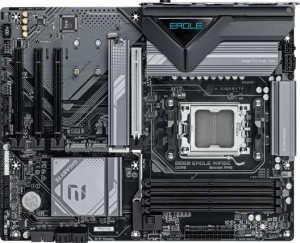
Gigabyte B850 Eagle WiFi6E
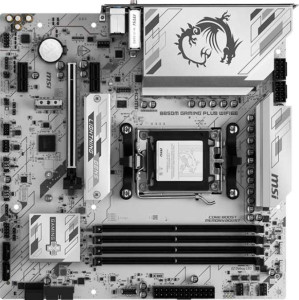
MSI B850M Gaming Plus Wi-Fi6E

Gigabyte B850 Eagle WiFi6E MSI B850M Gaming Plus Wi-Fi6E

Overview

Welcome to our in-depth spec comparison between the Gigabyte B850 Eagle WiFi6E and the MSI B850M Gaming Plus Wi-Fi6E — two B850-chipset motherboards targeting AMD AM5 builds. While they share a strong common foundation, key battlegrounds emerge around form factor and physical size, storage and expansion slot configurations, rear port selection, and notable extras like RGB lighting and BIOS reset convenience. Read on to see which board fits your build best.

Common Features

  • Both boards use the AM5 CPU socket.
  • Both boards feature the B850 chipset.
  • Wi-Fi is supported on both products.
  • Both support Wi-Fi 4 (802.11n), Wi-Fi 5 (802.11ac), Wi-Fi 6 (802.11ax), and Wi-Fi 6E (802.11ax).
  • Bluetooth is present on both products.
  • Both share Bluetooth version 5.3.
  • Both feature HDMI 2.1 output.
  • Overclocking is supported on both products.
  • Both boards support a maximum memory amount of 256GB.
  • Both support overclocked RAM speeds up to 8200 MHz.
  • Both boards have 4 memory slots.
  • Both use DDR5 memory.
  • Both operate in dual-channel memory mode.
  • ECC memory is not supported on either product.
  • Neither board has USB 3.2 Gen 2x2, USB 4 40Gbps, USB 4 20Gbps, Thunderbolt 4, or Thunderbolt 3 ports.
  • Both boards include one DisplayPort output and one RJ45 port.
  • Both provide 2 USB 3.2 Gen 1 ports and 4 USB 2.0 ports through internal expansion headers.
  • Both boards have 4 SATA 3 connectors and no SATA 2 connectors.
  • A TPM connector is present on both boards.
  • Neither board has an mSATA connector.
  • Both boards deliver 7.1 audio channels with 3 audio connectors.
  • An S/PDIF Out port is not available on either product.
  • Both support RAID 0, RAID 1, and RAID 10 (1+0).
  • RAID 0+1 is not supported on either product.

Main Differences

  • The form factor is ATX on Gigabyte B850 Eagle WiFi6E and Micro-ATX on MSI B850M Gaming Plus Wi-Fi6E.
  • RGB lighting is not available on Gigabyte B850 Eagle WiFi6E but is present on MSI B850M Gaming Plus Wi-Fi6E.
  • Easy BIOS reset is not available on Gigabyte B850 Eagle WiFi6E but is supported on MSI B850M Gaming Plus Wi-Fi6E.
  • The board height is 244 mm on Gigabyte B850 Eagle WiFi6E and 243.8 mm on MSI B850M Gaming Plus Wi-Fi6E.
  • The board width is 305 mm on Gigabyte B850 Eagle WiFi6E and 243.8 mm on MSI B850M Gaming Plus Wi-Fi6E.
  • Maximum native RAM speed is 5200 MHz on Gigabyte B850 Eagle WiFi6E and 5600 MHz on MSI B850M Gaming Plus Wi-Fi6E.
  • USB 3.2 Gen 2 ports (USB-A) count is 2 on Gigabyte B850 Eagle WiFi6E and 4 on MSI B850M Gaming Plus Wi-Fi6E.
  • USB 3.2 Gen 1 ports (USB-A) count is 2 on Gigabyte B850 Eagle WiFi6E and 4 on MSI B850M Gaming Plus Wi-Fi6E.
  • A USB 3.2 Gen 2 port (USB-C) is not present on Gigabyte B850 Eagle WiFi6E but is available on MSI B850M Gaming Plus Wi-Fi6E.
  • A USB 3.2 Gen 1 port (USB-C) is present on Gigabyte B850 Eagle WiFi6E but is not available on MSI B850M Gaming Plus Wi-Fi6E.
  • USB 2.0 rear ports number 4 on Gigabyte B850 Eagle WiFi6E and 0 on MSI B850M Gaming Plus Wi-Fi6E.
  • A PS/2 port is present on Gigabyte B850 Eagle WiFi6E but is not available on MSI B850M Gaming Plus Wi-Fi6E.
  • Fan headers number 6 on Gigabyte B850 Eagle WiFi6E and 5 on MSI B850M Gaming Plus Wi-Fi6E.
  • M.2 sockets number 3 on Gigabyte B850 Eagle WiFi6E and 2 on MSI B850M Gaming Plus Wi-Fi6E.
  • A PCIe 5.0 x16 slot is present on Gigabyte B850 Eagle WiFi6E, while MSI B850M Gaming Plus Wi-Fi6E features a PCIe 4.0 x16 slot instead.
  • PCIe x1 slots number 3 on Gigabyte B850 Eagle WiFi6E and 2 on MSI B850M Gaming Plus Wi-Fi6E.
  • RAID 5 is supported on Gigabyte B850 Eagle WiFi6E but is not supported on MSI B850M Gaming Plus Wi-Fi6E.
Specs Comparison
Gigabyte B850 Eagle WiFi6E

Gigabyte B850 Eagle WiFi6E

MSI B850M Gaming Plus Wi-Fi6E

MSI B850M Gaming Plus Wi-Fi6E

General info:
CPU socket AM5 AM5
chipset B850 B850
form factor ATX Micro-ATX
release date January 2025 June 2025
supports Wi-Fi
Wi-Fi version Wi-Fi 4 (802.11n), Wi-Fi 5 (802.11ac), Wi-Fi 6 (802.11ax), Wi-Fi 6E (802.11ax) Wi-Fi 4 (802.11n), Wi-Fi 5 (802.11ac), Wi-Fi 6 (802.11ax), Wi-Fi 6E (802.11ax)
Has Bluetooth
Bluetooth version 5.3 5.3
HDMI version HDMI 2.1 HDMI 2.1
Easy to overclock
has RGB lighting
Easy to reset BIOS
Has dual BIOS
has aptX
CPU sockets 1 1
Has integrated graphics
warranty period 3 years 3 years
height 244 mm 243.8 mm
width 305 mm 243.8 mm
Has integrated CPU

Both boards share the same AM5 socket and B850 chipset, meaning they target the same generation of AMD processors with identical platform-level capabilities. Wireless connectivity is also a wash: both offer the full Wi-Fi 6E (802.11ax) stack alongside Bluetooth 5.3, and both output video over HDMI 2.1. For buyers focused purely on platform features, neither board holds an advantage here.

The most consequential difference in this group is form factor. The Gigabyte B850 Eagle is a full ATX board (305 × 244 mm), while the MSI B850M Gaming Plus is Micro-ATX (243.8 × 243.8 mm). In practice, ATX means more PCIe slots, more room for VRM heatsinks, and compatibility with any standard mid or full tower case, whereas Micro-ATX trades that expansion headroom for a smaller footprint that fits compact builds. Neither is objectively superior — the right choice depends entirely on the target case and how many expansion cards the user plans to add.

On usability, the MSI board picks up two meaningful advantages: it includes RGB lighting for users who care about aesthetics, and — more practically — it supports easy BIOS reset, which simplifies recovery from a bad overclock or failed update without needing to clear the CMOS manually. The Gigabyte lacks both. Both boards carry a dual BIOS and a 3-year warranty, so resilience and long-term coverage are equal. Overall, the MSI B850M Gaming Plus has a slight edge in day-to-day convenience for this spec group, while the Gigabyte B850 Eagle is the better fit for users who need a full-size ATX platform.

Memory:
maximum memory amount 256GB 256GB
RAM speed (max) 5200 MHz 5600 MHz
overclocked RAM speed 8200 MHz 8200 MHz
memory slots 4 4
DDR memory version 5 5
memory channels 2 2
Supports ECC memory

The memory configurations here are nearly identical on paper: both boards support DDR5 across 4 slots in a dual-channel arrangement, max out at 256GB, and hit the same 8200 MHz ceiling when running overclocked memory. For most users, these shared traits are what matter most — four slots allow for a full 2×2 kit upgrade path, and DDR5 ensures compatibility with current high-speed modules.

The one concrete differentiator is the native (non-overclocked) maximum RAM speed: the MSI B850M Gaming Plus supports up to 5600 MHz, versus 5200 MHz on the Gigabyte B850 Eagle. This gap matters specifically to users who run JEDEC-rated DDR5 modules without enabling XMP/EXPO profiles — the MSI board will handle faster out-of-box speeds without requiring manual tuning. For anyone already planning to enable XMP/EXPO, however, both boards reach the same 8200 MHz peak, so the gap becomes irrelevant in practice.

The MSI B850M Gaming Plus holds a narrow but real edge in this category, purely due to its higher native RAM speed ceiling. It offers slightly more headroom for users who prefer plug-and-play memory configurations without diving into BIOS overclocking settings. That said, for enthusiasts comfortable enabling XMP/EXPO, the two boards are functionally equivalent.

Ports:
USB 3.2 Gen 2 ports (USB-A) 2 4
USB 3.2 Gen 1 ports (USB-A) 2 4
USB 3.2 Gen 2 ports (USB-C) 0 1
USB 3.2 Gen 1 ports (USB-C) 1 0
USB 2.0 ports 4 0
USB 3.2 Gen 2x2 ports 0 0
USB 4 40Gbps ports 0 0
USB 4 20Gbps ports 0 0
Thunderbolt 4 ports 0 0
Thunderbolt 3 ports 0 0
has an HDMI output
DisplayPort outputs 1 1
RJ45 ports 1 1
Has USB Type-C
eSATA ports 0 0
DVI outputs 0 0
has a VGA connector
PS/2 ports 1 0

Video output and wired networking are identical between the two boards — both offer HDMI, a single DisplayPort, and one RJ45 ethernet port. The real story here is in the USB rear panel, where the differences are substantial. The MSI B850M Gaming Plus delivers a total of 8 USB-A ports (4× Gen 2 at 10 Gbps + 4× Gen 1 at 5 Gbps) alongside a USB-C Gen 2 port, making it significantly more capable for connecting fast storage, docking stations, and modern peripherals right out of the box. The Gigabyte B850 Eagle, by contrast, offers only 4 high-speed USB-A ports and a slower USB-C Gen 1 (5 Gbps) — a meaningful gap for users with bandwidth-hungry devices.

Where the Gigabyte does differentiate itself is in legacy support. It retains 4 USB 2.0 ports and a PS/2 port, which will matter to users still running older keyboards, mice, or USB 2.0 devices that benefit from guaranteed compatibility and low-latency input. The MSI board drops both entirely, signaling a clean break from legacy hardware. Whether that trade-off is acceptable depends entirely on the user's peripheral lineup.

For users building a modern system with current-generation peripherals, the MSI B850M Gaming Plus holds a clear edge in this category — more high-speed ports, a faster USB-C, and a higher overall port count. The Gigabyte B850 Eagle is the better fit only if legacy device compatibility is a genuine requirement.

Connectors:
USB 3.2 Gen 1 ports (through expansion) 2 2
USB 2.0 ports (through expansion) 4 4
SATA 3 connectors 4 4
fan headers 6 5
USB 3.0 ports (through expansion) 2 2
M.2 sockets 3 2
Has TPM connector
U.2 sockets 0 0
Has mSATA connector
SATA 2 connectors 0 0

Internal connectivity is largely consistent across both boards: each provides 4 SATA 3 connectors, identical front-panel USB expansion headers, and a TPM connector — meaning drive compatibility and front-panel flexibility are equivalent. Where the two diverge is in M.2 and fan header counts, which carry real practical weight for certain build types.

The Gigabyte B850 Eagle offers 3 M.2 sockets compared to 2 on the MSI B850M Gaming Plus. That extra slot is meaningful for users who want to run multiple NVMe drives simultaneously — whether for a primary OS drive, a secondary storage drive, and a dedicated scratch or cache volume — without touching SATA ports at all. The MSI board can still serve two-NVMe builds without compromise, but a third drive would require falling back to SATA. Similarly, the Gigabyte edges ahead with 6 fan headers versus 5 on the MSI, giving builders with larger or more complex cooling setups one additional point of direct PWM or DC control without needing a fan hub.

Taken together, the Gigabyte B850 Eagle has a tangible advantage in this spec group for users planning storage-heavy or cooling-intensive builds. The MSI B850M Gaming Plus is well-equipped for mainstream configurations, but its lower M.2 count is a genuine limitation if three NVMe drives are on the agenda.

Expansion slots:
PCIe 4.0 x16 slots 0 1
PCIe 5.0 x16 slots 1 0
PCIe 3.0 x16 slots 0 0
PCIe x1 slots 3 2
PCI slots 0 0
PCIe 2.0 x16 slots 0 0
PCIe x4 slots 0 0
PCIe x8 slots 0 0

The primary GPU slot is where these two boards make a decisive and opposing choice. The Gigabyte B850 Eagle equips its main x16 slot with PCIe 5.0, while the MSI B850M Gaming Plus uses PCIe 4.0. In practical terms, PCIe 5.0 x16 doubles the theoretical bandwidth ceiling over PCIe 4.0 — from roughly 64 GB/s to 128 GB/s. Current consumer GPUs do not saturate even PCIe 4.0 bandwidth, so the difference has no measurable impact on gaming performance today. However, PCIe 5.0 is the more forward-looking choice, offering headroom for future GPU generations that may eventually leverage the additional bandwidth.

Beyond the primary slot, the Gigabyte also offers 3 PCIe x1 slots versus 2 on the MSI, consistent with its larger ATX footprint allowing more physical expansion room. That extra slot is useful for add-in cards such as sound cards, capture cards, or additional USB/SATA controllers — a minor but real advantage for users planning a more accessory-heavy build.

For expansion slots, the Gigabyte B850 Eagle holds the clearer advantage: a PCIe 5.0 primary slot offers greater longevity and future-proofing, and the additional x1 slot adds flexibility. The MSI B850M Gaming Plus is not deficient for today's hardware, but its PCIe 4.0 primary slot represents the older standard on a board otherwise positioned as a current-generation product.

Audio:
audio channels 7.1 7.1
Has S/PDIF Out port
audio connectors 3 3

Audio is a straight tie between these two boards. Both deliver 7.1-channel surround sound support with 3 analog audio connectors on the rear panel, and neither includes an S/PDIF optical output — meaning users who rely on optical passthrough to an AV receiver or DAC will need a separate add-in solution regardless of which board they choose.

The 7.1-channel configuration is well-suited for surround sound speaker setups and high-end headphone amplifiers, covering the needs of most gamers and home theater PC users. The absence of S/PDIF is a shared limitation worth noting for audiophiles, but it is a common omission at this motherboard tier and not a differentiator between the two products.

Based strictly on the provided specs, these boards are completely evenly matched in audio capability. Neither holds any advantage here — the decision between them should rest entirely on the differentiators found in other specification groups.

Storage:
Supports RAID 1
Supports RAID 10 (1+0)
Supports RAID 5
Supports RAID 0
Supports RAID 0+1

RAID support is nearly identical across both boards, with one targeted exception. Both handle the most common consumer configurations — RAID 0 for striped performance, RAID 1 for mirrored redundancy, and RAID 10 for a combined stripe-and-mirror array across four drives. These three modes cover the vast majority of home and prosumer use cases, so most users will find either board equally capable.

The single differentiator is RAID 5 support, which the Gigabyte B850 Eagle offers and the MSI B850M Gaming Plus does not. RAID 5 distributes parity data across three or more drives, offering a balance of storage efficiency, read performance, and fault tolerance that RAID 1 and RAID 10 cannot match at the same usable-capacity-to-drive-count ratio. It is primarily relevant for NAS-style builds or workstation setups where maximizing usable capacity across multiple drives while retaining single-drive failure protection is a priority.

For the niche of users who specifically need RAID 5, the Gigabyte B850 Eagle is the only viable choice here. For everyone else running standard RAID 0, 1, or 10 configurations, the two boards are functionally equivalent in this category.

Comparison Summary & Verdict

Both boards deliver a solid B850 AM5 platform with Wi-Fi 6E, Bluetooth 5.3, DDR5 support up to 256 GB, and 7.1 audio — making either a capable choice for a modern AMD build. However, their differences point each board toward a distinct audience. The Gigabyte B850 Eagle WiFi6E suits builders who need a full ATX layout, more M.2 slots (3 vs 2), a cutting-edge PCIe 5.0 x16 slot, and RAID 5 support for advanced storage setups. Meanwhile, the MSI B850M Gaming Plus Wi-Fi6E is the better pick for compact Micro-ATX cases, offering RGB lighting, an easy BIOS reset button, a higher native RAM speed of 5600 MHz, and a significantly more generous rear USB layout with more USB-A ports and an additional USB-C port.

Gigabyte B850 Eagle WiFi6E
Buy Gigabyte B850 Eagle WiFi6E if...

Buy the Gigabyte B850 Eagle WiFi6E if you need a full ATX board with a PCIe 5.0 x16 slot, three M.2 sockets, and RAID 5 storage support for a high-end or storage-intensive build.

MSI B850M Gaming Plus Wi-Fi6E
Buy MSI B850M Gaming Plus Wi-Fi6E if...

Buy the MSI B850M Gaming Plus Wi-Fi6E if you are building in a compact Micro-ATX case and want RGB lighting, an easy BIOS reset, more rear USB ports, and a slightly higher native RAM speed.