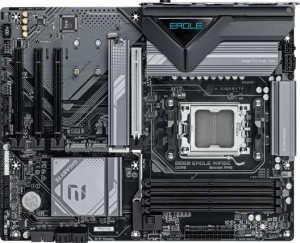
Gigabyte B850 Eagle WiFi6E
MSI MAG B850 Tomahawk Max WiFi

Gigabyte B850 Eagle WiFi6E MSI MAG B850 Tomahawk Max WiFi

Overview

When choosing a B850 motherboard for your next AMD AM5 build, the Gigabyte B850 Eagle WiFi6E and the MSI MAG B850 Tomahawk Max WiFi are two compelling ATX contenders worth a close look. Both share a strong foundation with PCIe 5.0 support, DDR5 memory, and built-in wireless connectivity, but they diverge in meaningful ways across USB port configuration, M.2 storage capacity, wireless standards, and expansion flexibility. Read on to see how every specification stacks up.

Common Features

  • Both motherboards use the AM5 CPU socket.
  • Both motherboards feature the B850 chipset.
  • Both motherboards have an ATX form factor.
  • Both motherboards include Wi-Fi support.
  • Both motherboards include Bluetooth.
  • Both motherboards support HDMI 2.1.
  • Both motherboards support overclocking.
  • Both motherboards have a dual BIOS feature.
  • Both motherboards support up to 256GB of maximum memory.
  • Both motherboards have 4 memory slots.
  • Both motherboards use DDR5 memory.
  • Both motherboards support 2 memory channels.
  • ECC memory is not supported on either motherboard.
  • Both motherboards have 2 USB 3.2 Gen 2 ports (USB-A).
  • Both motherboards have 4 USB 2.0 ports.
  • USB 3.2 Gen 2x2, USB 4, and Thunderbolt ports are absent on both motherboards.
  • Both motherboards have an HDMI output.
  • Both motherboards have 4 USB 2.0 ports available through expansion.
  • Both motherboards have 4 SATA 3 connectors.
  • Both motherboards include a TPM connector.
  • Neither motherboard has an mSATA connector.
  • Both motherboards have 0 SATA 2 connectors.
  • Both motherboards have 1 PCIe 5.0 x16 slot.
  • Neither motherboard has PCIe 3.0 x16, PCI, PCIe 2.0 x16, PCIe x4, or PCIe x8 slots.
  • Both motherboards support 7.1 audio channels.
  • Both motherboards support RAID 0, RAID 1, and RAID 10.
  • RAID 0+1 is not supported on either motherboard.

Main Differences

  • Wi-Fi version reaches up to Wi-Fi 6E on Gigabyte B850 Eagle WiFi6E, while the MSI MAG B850 Tomahawk Max WiFi additionally supports Wi-Fi 7 (802.11be).
  • Bluetooth version is 5.3 on Gigabyte B850 Eagle WiFi6E and 5.4 on MSI MAG B850 Tomahawk Max WiFi.
  • RGB lighting is not present on Gigabyte B850 Eagle WiFi6E but is available on MSI MAG B850 Tomahawk Max WiFi.
  • Easy BIOS reset is not available on Gigabyte B850 Eagle WiFi6E but is available on MSI MAG B850 Tomahawk Max WiFi.
  • Height is 244 mm on Gigabyte B850 Eagle WiFi6E and 243.8 mm on MSI MAG B850 Tomahawk Max WiFi.
  • Width is 305 mm on Gigabyte B850 Eagle WiFi6E and 304.8 mm on MSI MAG B850 Tomahawk Max WiFi.
  • Maximum RAM speed is 5200 MHz on Gigabyte B850 Eagle WiFi6E and 5600 MHz on MSI MAG B850 Tomahawk Max WiFi.
  • Overclocked RAM speed reaches 8200 MHz on Gigabyte B850 Eagle WiFi6E and 8400 MHz on MSI MAG B850 Tomahawk Max WiFi.
  • USB 3.2 Gen 1 ports (USB-A) count is 2 on Gigabyte B850 Eagle WiFi6E and 1 on MSI MAG B850 Tomahawk Max WiFi.
  • USB 3.2 Gen 2 ports (USB-C) count is 0 on Gigabyte B850 Eagle WiFi6E and 3 on MSI MAG B850 Tomahawk Max WiFi.
  • USB 3.2 Gen 1 ports (USB-C) count is 1 on Gigabyte B850 Eagle WiFi6E and 0 on MSI MAG B850 Tomahawk Max WiFi.
  • DisplayPort output is present on Gigabyte B850 Eagle WiFi6E but absent on MSI MAG B850 Tomahawk Max WiFi.
  • A PS/2 port is present on Gigabyte B850 Eagle WiFi6E but absent on MSI MAG B850 Tomahawk Max WiFi.
  • USB 3.2 Gen 1 ports available through expansion number 2 on Gigabyte B850 Eagle WiFi6E and 4 on MSI MAG B850 Tomahawk Max WiFi.
  • Fan headers count is 6 on Gigabyte B850 Eagle WiFi6E and 8 on MSI MAG B850 Tomahawk Max WiFi.
  • M.2 sockets count is 3 on Gigabyte B850 Eagle WiFi6E and 4 on MSI MAG B850 Tomahawk Max WiFi.
  • PCIe 4.0 x16 slots count is 0 on Gigabyte B850 Eagle WiFi6E and 1 on MSI MAG B850 Tomahawk Max WiFi.
  • PCIe x1 slots count is 3 on Gigabyte B850 Eagle WiFi6E and 1 on MSI MAG B850 Tomahawk Max WiFi.
  • S/PDIF Out port is absent on Gigabyte B850 Eagle WiFi6E but present on MSI MAG B850 Tomahawk Max WiFi.
  • Audio connectors count is 3 on Gigabyte B850 Eagle WiFi6E and 2 on MSI MAG B850 Tomahawk Max WiFi.
  • RAID 5 support is available on Gigabyte B850 Eagle WiFi6E but not on MSI MAG B850 Tomahawk Max WiFi.
Specs Comparison
Gigabyte B850 Eagle WiFi6E

Gigabyte B850 Eagle WiFi6E

MSI MAG B850 Tomahawk Max WiFi

MSI MAG B850 Tomahawk Max WiFi

General info:
CPU socket AM5 AM5
chipset B850 B850
form factor ATX ATX
release date January 2025 January 2025
supports Wi-Fi
Wi-Fi version Wi-Fi 4 (802.11n), Wi-Fi 5 (802.11ac), Wi-Fi 6 (802.11ax), Wi-Fi 6E (802.11ax) Wi-Fi 4 (802.11n), Wi-Fi 5 (802.11ac), Wi-Fi 6 (802.11ax), Wi-Fi 6E (802.11ax), Wi-Fi 7 (802.11be)
Has Bluetooth
Bluetooth version 5.3 5.4
HDMI version HDMI 2.1 HDMI 2.1
Easy to overclock
has RGB lighting
Easy to reset BIOS
Has dual BIOS
has aptX
CPU sockets 1 1
Has integrated graphics
warranty period 3 years 3 years
height 244 mm 243.8 mm
width 305 mm 304.8 mm
Has integrated CPU

Both boards share the same foundational DNA: the AM5 socket, B850 chipset, and standard ATX form factor, meaning they target the same platform and fit the same cases. Overclocking support, a dual BIOS, HDMI 2.1 output, and a 3-year warranty are also common to both — so for core platform compatibility, neither board has an edge.

The meaningful differences emerge in the details. The MSI MAG B850 Tomahawk Max WiFi supports Wi-Fi 7 (802.11be), while the Gigabyte tops out at Wi-Fi 6E. In practice, Wi-Fi 7 delivers significantly higher theoretical throughput and lower latency, particularly on congested networks, and is future-proof for routers that are only now entering the mainstream. The MSI also edges ahead on Bluetooth 5.4 versus 5.3 on the Gigabyte — a minor but real improvement in connection stability and energy efficiency. Additionally, the MSI includes an easy BIOS reset mechanism and RGB lighting, whereas the Gigabyte offers neither; the former is a genuine convenience during troubleshooting, while the latter is purely aesthetic.

Overall, the MSI MAG B850 Tomahawk Max WiFi holds a clear advantage in this category. Wi-Fi 7 support alone is a substantive, future-oriented differentiator, and the easier BIOS reset adds practical value. The Gigabyte B850 Eagle WiFi6E is not deficient in any critical way, but it offers less connectivity headroom and fewer quality-of-life features for what is likely a comparable price tier.
Memory:
maximum memory amount 256GB 256GB
RAM speed (max) 5200 MHz 5600 MHz
overclocked RAM speed 8200 MHz 8400 MHz
memory slots 4 4
DDR memory version 5 5
memory channels 2 2
Supports ECC memory

Both the Gigabyte B850 Eagle WiFi6E and MSI MAG B850 Tomahawk Max WiFi support a maximum memory amount of 256GB and are equipped with 4 memory slots and 2 memory channels. Both motherboards are compatible with DDR5 memory, but the maximum RAM speeds differ slightly: the Gigabyte B850 Eagle supports a maximum RAM speed of 5200 MHz, while the MSI MAG B850 Tomahawk Max WiFi supports a higher maximum of 5600 MHz.

For overclocked RAM speeds, the Gigabyte B850 Eagle can reach up to 8200 MHz, whereas the MSI MAG B850 Tomahawk Max WiFi can go slightly higher at 8400 MHz. Neither motherboard supports ECC memory, so they are geared towards standard consumer-grade memory configurations.

Overall, both boards offer similar memory configurations, with only minor differences in their maximum RAM speeds and overclocked RAM capabilities.

Ports:
USB 3.2 Gen 2 ports (USB-A) 2 2
USB 3.2 Gen 1 ports (USB-A) 2 1
USB 3.2 Gen 2 ports (USB-C) 0 3
USB 3.2 Gen 1 ports (USB-C) 1 0
USB 2.0 ports 4 4
USB 3.2 Gen 2x2 ports 0 0
USB 4 40Gbps ports 0 0
USB 4 20Gbps ports 0 0
Thunderbolt 4 ports 0 0
Thunderbolt 3 ports 0 0
has an HDMI output
DisplayPort outputs 1 0
RJ45 ports 1 1
Has USB Type-C
eSATA ports 0 0
DVI outputs 0 0
has a VGA connector
PS/2 ports 1 0

The Gigabyte B850 Eagle WiFi6E and MSI MAG B850 Tomahawk Max WiFi share several similar ports, but there are some differences. Both motherboards include two USB 3.2 Gen 2 ports (USB-A) and four USB 2.0 ports. However, the MSI MAG B850 Tomahawk Max WiFi offers three USB 3.2 Gen 2 ports (USB-C), whereas the Gigabyte B850 Eagle has none. The Gigabyte board does include one USB 3.2 Gen 1 port (USB-C), but the MSI board does not.

Both motherboards have an HDMI output and one RJ45 port for Ethernet connectivity. The Gigabyte B850 Eagle features a DisplayPort output, while the MSI MAG B850 Tomahawk Max WiFi does not. The MSI board lacks PS/2 ports, while the Gigabyte B850 Eagle includes one.

Neither motherboard includes any eSATA ports, DVI outputs, USB 4 ports, or Thunderbolt ports. Both support USB Type-C, though the MSI board offers a higher number of USB 3.2 Gen 2 (USB-C) ports.

Connectors:
USB 3.2 Gen 1 ports (through expansion) 2 4
USB 2.0 ports (through expansion) 4 4
SATA 3 connectors 4 4
fan headers 6 8
USB 3.0 ports (through expansion) 2 4
M.2 sockets 3 4
Has TPM connector
U.2 sockets 0 0
Has mSATA connector
SATA 2 connectors 0 0

The Gigabyte B850 Eagle WiFi6E and MSI MAG B850 Tomahawk Max WiFi differ in several connector features. Both boards provide 4 SATA 3 connectors and 4 USB 2.0 ports (through expansion). However, the MSI MAG B850 Tomahawk Max WiFi offers more USB 3.2 Gen 1 ports (through expansion) with 4 compared to the Gigabyte B850 Eagle’s 2. The MSI board also provides 4 USB 3.0 ports (through expansion), while the Gigabyte board has 2.

In terms of M.2 sockets, the Gigabyte B850 Eagle has 3, while the MSI MAG B850 Tomahawk Max WiFi has 4. The fan header count also varies, with the Gigabyte B850 Eagle supporting 6 fan headers, while the MSI board has 8.

Both boards support a TPM connector, but neither has mSATA connectors. Additionally, both motherboards lack U.2 sockets and SATA 2 connectors.

Expansion slots:
PCIe 4.0 x16 slots 0 1
PCIe 5.0 x16 slots 1 1
PCIe 3.0 x16 slots 0 0
PCIe x1 slots 3 1
PCI slots 0 0
PCIe 2.0 x16 slots 0 0
PCIe x4 slots 0 0
PCIe x8 slots 0 0

The Gigabyte B850 Eagle WiFi6E and MSI MAG B850 Tomahawk Max WiFi differ in their expansion slot configurations. The Gigabyte B850 Eagle has one PCIe 5.0 x16 slot, while the MSI MAG B850 Tomahawk Max WiFi also has one PCIe 5.0 x16 slot, but it additionally features one PCIe 4.0 x16 slot, which the Gigabyte board lacks.

Both motherboards have no PCI slots, PCIe 2.0 x16 slots, or PCIe x4/x8 slots. The Gigabyte B850 Eagle provides three PCIe x1 slots, while the MSI MAG B850 Tomahawk Max WiFi has only one PCIe x1 slot.

In summary, the MSI board offers an additional PCIe 4.0 x16 slot and has fewer PCIe x1 slots compared to the Gigabyte B850 Eagle.

Audio:
audio channels 7.1 7.1
Has S/PDIF Out port
audio connectors 3 2

Both the Gigabyte B850 Eagle WiFi6E and MSI MAG B850 Tomahawk Max WiFi offer 7.1 audio channels, providing high-quality surround sound support. However, the MSI board has an S/PDIF Out port, while the Gigabyte B850 Eagle does not offer this feature.

In terms of audio connectors, the Gigabyte B850 Eagle has 3 connectors, whereas the MSI MAG B850 Tomahawk Max WiFi has 2 connectors. This means the Gigabyte board offers one more audio connector than the MSI board.

In summary, while both motherboards provide 7.1 audio channels, the MSI board includes the S/PDIF Out port, while the Gigabyte board has more audio connectors.

Storage:
Supports RAID 1
Supports RAID 10 (1+0)
Supports RAID 5
Supports RAID 0
Supports RAID 0+1

The Gigabyte B850 Eagle WiFi6E and MSI MAG B850 Tomahawk Max WiFi both support RAID 1 (mirroring) and RAID 10 (1+0, a combination of mirroring and striping). However, the Gigabyte B850 Eagle offers support for RAID 5 (striping with parity), while the MSI MAG B850 Tomahawk Max WiFi does not support this RAID level.

Both motherboards do not support RAID 0+1 (a combination of striping and mirroring) which can offer redundancy and performance benefits in certain configurations. In terms of RAID 0 (striping), both products support this setup for performance improvement.

In summary, the main difference in RAID support is that the Gigabyte B850 Eagle supports RAID 5, while the MSI MAG B850 Tomahawk Max WiFi does not.

Comparison Summary & Verdict

After examining every specification, both boards share the same AM5 socket, B850 chipset, and ATX form factor, making them equally capable starting points for a modern AMD build. The Gigabyte B850 Eagle WiFi6E stands out with its DisplayPort output, three PCIe x1 slots, RAID 5 support, and a PS/2 port, making it a solid pick for users who value legacy connectivity and broader expansion options. The MSI MAG B850 Tomahawk Max WiFi edges ahead with Wi-Fi 7, Bluetooth 5.4, a fourth M.2 socket, 8 fan headers, three USB-C 3.2 Gen 2 ports, and an additional PCIe 4.0 x16 slot, catering to builders who prioritize cutting-edge wireless, richer cooling control, and future-ready storage. Both support overclocking up to 8200 and 8400 MHz respectively, with the MSI offering a slight memory speed advantage.

Gigabyte B850 Eagle WiFi6E
Buy Gigabyte B850 Eagle WiFi6E if...

Buy the Gigabyte B850 Eagle WiFi6E if you need a DisplayPort output, RAID 5 support, or broader PCIe x1 expansion alongside a PS/2 port for legacy peripherals.

MSI MAG B850 Tomahawk Max WiFi
Buy MSI MAG B850 Tomahawk Max WiFi if...

Buy the MSI MAG B850 Tomahawk Max WiFi if you want Wi-Fi 7, more M.2 slots, additional USB-C ports, more fan headers, and faster maximum RAM speeds for a more future-proof build.