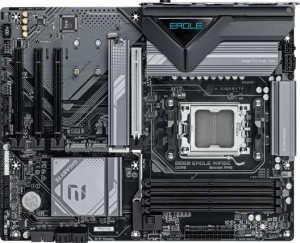
Gigabyte B850 Eagle WiFi6E
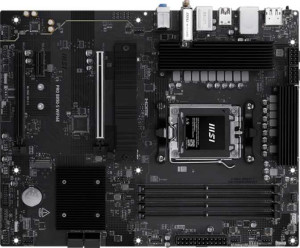
MSI Pro B850-S Wi-Fi6E

Gigabyte B850 Eagle WiFi6E MSI Pro B850-S Wi-Fi6E

Overview

When picking a B850 chipset motherboard for an AM5 build, the details matter, and the Gigabyte B850 Eagle WiFi6E and MSI Pro B850-S Wi-Fi6E present two genuinely different visions of what a mid-range board should be. Both deliver Wi-Fi 6E, Bluetooth 5.3, DDR5 support, and a solid shared feature set, yet they diverge sharply when it comes to expansion slots, storage capacity, and rear port selection. Dig into the full breakdown below to see which board is the right fit for your next build.

Common Features

  • Both boards use the AM5 CPU socket.
  • Both boards feature the B850 chipset.
  • Both boards use the ATX form factor.
  • Wi-Fi is supported on both boards, covering Wi-Fi 4, Wi-Fi 5, Wi-Fi 6, and Wi-Fi 6E.
  • Bluetooth 5.3 is available on both boards.
  • Both boards include an HDMI 2.1 output.
  • Both boards support a maximum memory amount of 256GB.
  • Both boards support overclocked RAM speeds up to 8200 MHz.
  • Both boards have 4 memory slots.
  • Both boards use DDR5 memory.
  • Both boards support 2 memory channels.
  • ECC memory is not supported on either board.
  • Neither board includes USB 3.2 Gen 2x2, USB 4, or Thunderbolt ports.
  • Both boards include one DisplayPort output.
  • Both boards include one RJ45 port.
  • Both boards provide 2 USB 3.2 Gen 1 ports through expansion and 4 USB 2.0 ports through expansion.
  • Both boards include 4 SATA 3 connectors.
  • Both boards have 6 fan headers.
  • Both boards include a TPM connector.
  • Both boards support 7.1 audio channels with 3 audio connectors.
  • Both boards support RAID 0, RAID 1, and RAID 10.
  • Neither board supports RAID 0+1.
  • Both boards support HDMI output.

Main Differences

  • RGB lighting is present on the MSI Pro B850-S Wi-Fi6E but not available on the Gigabyte B850 Eagle WiFi6E.
  • Easy BIOS reset is available on the MSI Pro B850-S Wi-Fi6E but not on the Gigabyte B850 Eagle WiFi6E.
  • Dual BIOS is present on the Gigabyte B850 Eagle WiFi6E but not available on the MSI Pro B850-S Wi-Fi6E.
  • Height is 244 mm on the Gigabyte B850 Eagle WiFi6E and 243.8 mm on the MSI Pro B850-S Wi-Fi6E.
  • Width is 305 mm on the Gigabyte B850 Eagle WiFi6E and 304.8 mm on the MSI Pro B850-S Wi-Fi6E.
  • Maximum native RAM speed is 5200 MHz on the Gigabyte B850 Eagle WiFi6E and 5600 MHz on the MSI Pro B850-S Wi-Fi6E.
  • USB 3.2 Gen 2 ports (USB-A) number 2 on the Gigabyte B850 Eagle WiFi6E and 3 on the MSI Pro B850-S Wi-Fi6E.
  • USB 3.2 Gen 1 ports (USB-A) number 2 on the Gigabyte B850 Eagle WiFi6E and 4 on the MSI Pro B850-S Wi-Fi6E.
  • A USB 3.2 Gen 2 port (USB-C) is present on the MSI Pro B850-S Wi-Fi6E but not on the Gigabyte B850 Eagle WiFi6E.
  • A USB 3.2 Gen 1 port (USB-C) is present on the Gigabyte B850 Eagle WiFi6E but not on the MSI Pro B850-S Wi-Fi6E.
  • USB 2.0 ports number 4 on the Gigabyte B850 Eagle WiFi6E and none on the MSI Pro B850-S Wi-Fi6E.
  • A PS/2 port is present on the Gigabyte B850 Eagle WiFi6E but not on the MSI Pro B850-S Wi-Fi6E.
  • M.2 sockets number 3 on the Gigabyte B850 Eagle WiFi6E and 2 on the MSI Pro B850-S Wi-Fi6E.
  • A PCIe 5.0 x16 slot is present on the Gigabyte B850 Eagle WiFi6E, while the MSI Pro B850-S Wi-Fi6E instead offers a PCIe 4.0 x16 slot.
  • PCIe x1 slots number 3 on the Gigabyte B850 Eagle WiFi6E and 1 on the MSI Pro B850-S Wi-Fi6E.
  • A PCIe x4 slot is present on the MSI Pro B850-S Wi-Fi6E but not on the Gigabyte B850 Eagle WiFi6E.
  • RAID 5 support is available on the Gigabyte B850 Eagle WiFi6E but not on the MSI Pro B850-S Wi-Fi6E.
Specs Comparison
Gigabyte B850 Eagle WiFi6E

Gigabyte B850 Eagle WiFi6E

MSI Pro B850-S Wi-Fi6E

MSI Pro B850-S Wi-Fi6E

General info:
CPU socket AM5 AM5
chipset B850 B850
form factor ATX ATX
release date January 2025 June 2025
supports Wi-Fi
Wi-Fi version Wi-Fi 4 (802.11n), Wi-Fi 5 (802.11ac), Wi-Fi 6 (802.11ax), Wi-Fi 6E (802.11ax) Wi-Fi 4 (802.11n), Wi-Fi 5 (802.11ac), Wi-Fi 6 (802.11ax), Wi-Fi 6E (802.11ax)
Has Bluetooth
Bluetooth version 5.3 5.3
HDMI version HDMI 2.1 HDMI 2.1
Easy to overclock
has RGB lighting
Easy to reset BIOS
Has dual BIOS
has aptX
CPU sockets 1 1
Has integrated graphics
warranty period 3 years 3 years
height 244 mm 243.8 mm
width 305 mm 304.8 mm
Has integrated CPU

Both the Gigabyte B850 Eagle WiFi6E and the MSI Pro B850-S WiFi6E share the same foundational platform: an AM5 socket with a B850 chipset in a standard ATX form factor. They match identically on connectivity credentials — full Wi-Fi 6E support across all generations back to Wi-Fi 4, Bluetooth 5.3, and an HDMI 2.1 output. Both also support overclocking and carry a 3-year warranty, making the platform fundamentals a complete tie.

The real differentiators emerge in usability and reliability features. The Gigabyte board includes dual BIOS, which is a meaningful safety net: if a firmware update goes wrong or the primary BIOS becomes corrupted, the board can automatically fall back to a backup chip, protecting the system from becoming unbootable. The MSI, by contrast, lacks dual BIOS but counters with an easy BIOS reset mechanism, which simplifies recovery from a bad overclock or misconfiguration without needing to physically clear the CMOS. On aesthetics, the MSI includes RGB lighting while the Gigabyte does not — a minor point for pure performance builders, but relevant for those building in a windowed case.

Overall, neither board has a sweeping advantage in this category. The Gigabyte B850 Eagle edges ahead for users who prioritize long-term firmware resilience thanks to its dual BIOS, making it the safer pick for enthusiasts who update firmware frequently or push overclocks hard. The MSI Pro B850-S is the better fit for users who value easier day-to-day system recovery and want integrated aesthetics with its RGB implementation.
Memory:
maximum memory amount 256GB 256GB
RAM speed (max) 5200 MHz 5600 MHz
overclocked RAM speed 8200 MHz 8200 MHz
memory slots 4 4
DDR memory version 5 5
memory channels 2 2
Supports ECC memory

The memory configurations on these two boards are nearly identical in structure: both feature 4 DDR5 slots, dual-channel architecture, a 256GB maximum capacity, and a shared overclocked ceiling of 8200 MHz. For most builds, these commonalities matter more than any difference — four slots allow for a full 2×2 configuration that preserves upgrade headroom, and DDR5 dual-channel delivers the wide memory bandwidth that modern AM5 processors are designed to exploit.

The one concrete differentiator is the native (non-overclocked) RAM speed ceiling: the MSI Pro B850-S supports up to 5600 MHz natively, while the Gigabyte B850 Eagle tops out at 5200 MHz without overclocking. In practice, this means the MSI can run higher-speed DDR5 kits at their rated JEDEC or XMP profile speeds without requiring manual tuning, which is a tangible convenience advantage for users pairing the board with faster out-of-the-box memory kits.

The MSI holds a modest but clear edge here. The 400 MHz gap in native speed support is unlikely to produce dramatic real-world performance differences in most workloads, but it does mean the MSI offers slightly more flexibility when selecting off-the-shelf DDR5 kits without having to rely on overclocking profiles. For users who plan to push memory speeds toward that shared 8200 MHz overclock ceiling, both boards are on equal footing.

Ports:
USB 3.2 Gen 2 ports (USB-A) 2 3
USB 3.2 Gen 1 ports (USB-A) 2 4
USB 3.2 Gen 2 ports (USB-C) 0 1
USB 3.2 Gen 1 ports (USB-C) 1 0
USB 2.0 ports 4 0
USB 3.2 Gen 2x2 ports 0 0
USB 4 40Gbps ports 0 0
USB 4 20Gbps ports 0 0
Thunderbolt 4 ports 0 0
Thunderbolt 3 ports 0 0
has an HDMI output
DisplayPort outputs 1 1
RJ45 ports 1 1
Has USB Type-C
eSATA ports 0 0
DVI outputs 0 0
has a VGA connector
PS/2 ports 1 0

On rear I/O, the MSI Pro B850-S pulls ahead in both quantity and modernity. It offers 7 USB-A ports in total (3× Gen 2 at 10Gbps and 4× Gen 1 at 5Gbps) alongside a USB-C Gen 2 port, giving it a denser and faster rear panel suited to users with many peripherals or external drives. The Gigabyte B850 Eagle, by comparison, provides just 4 USB-A ports and a slower USB-C Gen 1 (5Gbps) — meaningful if you intend to connect a fast external SSD or high-speed device directly to that Type-C port, where the MSI's 10Gbps ceiling doubles the available throughput.

Where the Gigabyte takes a different philosophical approach is in legacy support. It includes 4 USB 2.0 ports and a PS/2 port — features the MSI omits entirely. USB 2.0 remains perfectly adequate for keyboards, mice, and dongles, and having dedicated 2.0 ports frees up the faster ports for bandwidth-hungry devices. The PS/2 port is a niche inclusion that some enthusiasts still value for low-latency input devices or KVM setups, but for the majority of modern builds it is inconsequential.

The MSI Pro B850-S holds a clear edge for contemporary use cases, delivering more high-speed USB-A ports and a faster USB-C connection. The Gigabyte's stronger legacy port selection is a narrow advantage only for users with specific older hardware dependencies — for everyone else, the MSI's rear I/O is the more practical and future-leaning layout.

Connectors:
USB 3.2 Gen 1 ports (through expansion) 2 2
USB 2.0 ports (through expansion) 4 4
SATA 3 connectors 4 4
fan headers 6 6
USB 3.0 ports (through expansion) 2 2
M.2 sockets 3 2
Has TPM connector
U.2 sockets 0 0
Has mSATA connector
SATA 2 connectors 0 0

Strip away the one meaningful difference and these two boards are mirror images internally: identical expansion USB headers, 4 SATA 3 connectors, 6 fan headers, and TPM support on both. That fan header count is worth noting — six headers provides enough dedicated control points for a serious cooling setup without relying on splitters, which benefits both air-cooled and custom liquid-cooled builds equally.

The single differentiator in this group carries real weight for storage-focused builds: the Gigabyte B850 Eagle provides 3 M.2 sockets versus just 2 on the MSI Pro B850-S. M.2 NVMe drives are now the default choice for both primary OS drives and fast secondary storage, and that third slot on the Gigabyte means a user can run a boot drive, a game/application drive, and a dedicated scratch or capture drive simultaneously — all at NVMe speeds — without consuming any SATA ports.

For users building a storage-rich system, the Gigabyte holds a clear advantage here. The extra M.2 slot adds meaningful flexibility that is difficult to replicate without add-in cards. The MSI's two M.2 slots are sufficient for the majority of mainstream builds, but anyone planning to run three or more fast NVMe drives will find the Gigabyte's internal connector layout the more accommodating option.

Expansion slots:
PCIe 4.0 x16 slots 0 1
PCIe 5.0 x16 slots 1 0
PCIe 3.0 x16 slots 0 0
PCIe x1 slots 3 1
PCI slots 0 0
PCIe 2.0 x16 slots 0 0
PCIe x4 slots 0 1
PCIe x8 slots 0 0

The primary GPU slot is where these two boards take meaningfully different positions. The Gigabyte B850 Eagle equips its main slot with PCIe 5.0 x16, while the MSI Pro B850-S uses a PCIe 4.0 x16 slot instead. For current-generation graphics cards, this distinction is largely theoretical — no consumer GPU as of now saturates PCIe 4.0 x16 bandwidth — but the Gigabyte's PCIe 5.0 slot is a forward-looking advantage, ensuring the board remains compatible with next-generation GPUs or high-bandwidth PCIe 5.0 devices without any bottleneck at the slot level.

Beyond the primary x16 slot, the expansion philosophies diverge again. The Gigabyte adds 3 PCIe x1 slots, useful for adding capture cards, sound cards, networking cards, or other low-bandwidth peripherals. The MSI counters with a more versatile secondary layout: 1 PCIe x4 slot alongside a single x1, which is the more practical choice for users looking to add an NVMe expansion card, a faster network adapter, or any add-in device that benefits from greater lane bandwidth than x1 can offer.

Neither configuration is strictly superior — the choice depends on use case. The Gigabyte is the stronger pick for users prioritizing GPU future-proofing and needing multiple low-bandwidth expansion cards simultaneously. The MSI is better suited to those who want flexibility through that PCIe x4 slot for a single higher-bandwidth add-in card. On the primary slot generation alone, the Gigabyte holds the longer-term hardware compatibility edge.

Audio:
audio channels 7.1 7.1
Has S/PDIF Out port
audio connectors 3 3

Audio is a clean draw between these two boards. Both deliver 7.1 channel onboard audio through 3 analog connectors, and neither includes an S/PDIF optical output. The 7.1 channel support means the onboard codec can drive a full surround sound speaker setup or output the channel data to a compatible receiver, which covers the needs of most gaming and multimedia use cases without requiring a discrete sound card.

The absence of S/PDIF on both is worth flagging for users who rely on optical connections to an external DAC, AV receiver, or home theater system — that pathway is unavailable on either board. Anyone with that specific requirement would need to factor in a dedicated sound card or USB DAC regardless of which board they choose.

Based strictly on the provided data, this category is a complete tie. Both boards offer identical audio specifications, so audio capability should carry no weight in the decision between the Gigabyte B850 Eagle and the MSI Pro B850-S.

Storage:
Supports RAID 1
Supports RAID 10 (1+0)
Supports RAID 5
Supports RAID 0
Supports RAID 0+1

RAID support is largely consistent across both boards, with shared compatibility for RAID 0 (striping for performance), RAID 1 (mirroring for redundancy), and RAID 10 (a combined stripe-and-mirror configuration). These three modes cover the most common use cases for consumer and prosumer multi-drive setups, so the majority of users will find either board sufficient for their storage redundancy needs.

The single point of divergence is RAID 5 support, which the Gigabyte B850 Eagle offers and the MSI Pro B850-S does not. RAID 5 distributes parity data across three or more drives, allowing the array to survive a single drive failure while using storage capacity more efficiently than RAID 1 mirroring — making it a meaningful option for users managing larger multi-drive arrays who want fault tolerance without sacrificing as much usable space.

For standard two-drive or performance-focused setups, this difference is irrelevant. But for anyone planning a three-drive or larger RAID array with an emphasis on storage efficiency and redundancy, the Gigabyte holds a clear advantage by virtue of its RAID 5 support — a capability the MSI simply does not provide.

Comparison Summary & Verdict

Both boards share a strong B850 foundation, but their distinct strengths point them toward different builders. The Gigabyte B850 Eagle WiFi6E is the stronger choice for power users who demand maximum expandability, offering a PCIe 5.0 x16 slot, three M.2 sockets, RAID 5 support, and a dual BIOS for added system resilience. The MSI Pro B850-S Wi-Fi6E caters to builders who prioritize ease of use and connectivity variety, with its higher native RAM speed of 5600 MHz, RGB lighting, easy BIOS reset button, a USB 3.2 Gen 2 Type-C rear port, and a greater number of USB-A ports overall. Neither board is an outright winner; the best pick comes down to whether your priority is raw expandability and redundancy, or a more user-friendly, connectivity-rich daily driver.

Gigabyte B850 Eagle WiFi6E
Buy Gigabyte B850 Eagle WiFi6E if...

Buy the Gigabyte B850 Eagle WiFi6E if you want three M.2 slots, a PCIe 5.0 x16 slot, RAID 5 support, and the added reliability of a dual BIOS for a storage-heavy or redundancy-focused build.

MSI Pro B850-S Wi-Fi6E
Buy MSI Pro B850-S Wi-Fi6E if...

Choose the MSI Pro B850-S Wi-Fi6E if you value a higher native RAM speed, RGB lighting, an easy BIOS reset, and a more versatile rear USB layout that includes a USB 3.2 Gen 2 Type-C port.