Gigabyte B850 Eagle WiFi6E
Sapphire Pulse B850M Wi-Fi

Gigabyte B850 Eagle WiFi6E Sapphire Pulse B850M Wi-Fi

Overview

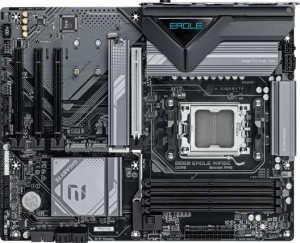
Welcome to our in-depth spec comparison between the Gigabyte B850 Eagle WiFi6E and the Sapphire Pulse B850M Wi-Fi — two AM5 motherboards built on the B850 chipset that share a strong foundation yet diverge in meaningful ways. Whether you are evaluating form factor and expansion potential, wireless connectivity standards, memory overclocking headroom, or rear-panel port variety, this side-by-side breakdown covers every key battleground to help you make the right choice for your build.

Common Features

  • Both boards use the AM5 CPU socket.
  • Both boards feature the B850 chipset.
  • Wi-Fi connectivity is available on both products.
  • Bluetooth is present on both products.
  • Both boards use Bluetooth version 5.3.
  • Both products support overclocking.
  • RGB lighting is not present on either product.
  • Easy BIOS reset is not available on either product.
  • Both boards support a maximum memory capacity of 256 GB.
  • Both boards have 4 memory slots.
  • Both boards use DDR5 memory.
  • Both boards operate with 2 memory channels.
  • ECC memory is not supported on either product.
  • Both boards include 2 USB 3.2 Gen 1 Type-A ports on the rear panel.
  • An HDMI output is available on both products.
  • Both boards provide 4 SATA 3 connectors.
  • Both boards offer 2 USB 3.2 Gen 1 ports and 4 USB 2.0 ports through internal expansion headers.
  • S/PDIF output is not present on either product.
  • Both boards have 3 audio connectors.
  • RAID 0+1 support is not available on either product.

Main Differences

  • The form factor is ATX on the Gigabyte B850 Eagle WiFi6E and Micro-ATX on the Sapphire Pulse B850M Wi-Fi.
  • The Gigabyte B850 Eagle WiFi6E supports Wi-Fi 6E (802.11ax) in addition to Wi-Fi 4, 5, and 6, while the Sapphire Pulse B850M Wi-Fi supports only up to Wi-Fi 6 (802.11ax).
  • Dual BIOS is present on the Gigabyte B850 Eagle WiFi6E but not available on the Sapphire Pulse B850M Wi-Fi.
  • The board height is 244 mm on the Gigabyte B850 Eagle WiFi6E and 235 mm on the Sapphire Pulse B850M Wi-Fi.
  • The board width is 305 mm on the Gigabyte B850 Eagle WiFi6E and 244 mm on the Sapphire Pulse B850M Wi-Fi.
  • The maximum overclocked RAM speed is 8200 MHz on the Gigabyte B850 Eagle WiFi6E and 7600 MHz on the Sapphire Pulse B850M Wi-Fi.
  • The number of USB 3.2 Gen 2 Type-A ports is 2 on the Gigabyte B850 Eagle WiFi6E and 0 on the Sapphire Pulse B850M Wi-Fi.
  • The number of USB 3.2 Gen 1 Type-C ports is 1 on the Gigabyte B850 Eagle WiFi6E and 0 on the Sapphire Pulse B850M Wi-Fi.
  • The number of USB 2.0 ports is 4 on the Gigabyte B850 Eagle WiFi6E and 6 on the Sapphire Pulse B850M Wi-Fi.
  • A USB Type-C port is present on the Gigabyte B850 Eagle WiFi6E but not available on the Sapphire Pulse B850M Wi-Fi.
  • A PS/2 port is present on the Gigabyte B850 Eagle WiFi6E but not available on the Sapphire Pulse B850M Wi-Fi.
  • The number of M.2 sockets is 3 on the Gigabyte B850 Eagle WiFi6E and 2 on the Sapphire Pulse B850M Wi-Fi.
  • A PCIe 5.0 x16 slot is present on the Gigabyte B850 Eagle WiFi6E, while the Sapphire Pulse B850M Wi-Fi includes a PCIe 4.0 x16 slot instead.
  • The number of PCIe x1 slots is 3 on the Gigabyte B850 Eagle WiFi6E and 0 on the Sapphire Pulse B850M Wi-Fi.
  • A PCIe x4 slot is available on the Sapphire Pulse B850M Wi-Fi but not on the Gigabyte B850 Eagle WiFi6E.
  • The audio output supports 7.1 channels on the Gigabyte B850 Eagle WiFi6E and 5.1 channels on the Sapphire Pulse B850M Wi-Fi.
Specs Comparison
Gigabyte B850 Eagle WiFi6E

Gigabyte B850 Eagle WiFi6E

Sapphire Pulse B850M Wi-Fi

Sapphire Pulse B850M Wi-Fi

General info:
CPU socket AM5 AM5
chipset B850 B850
form factor ATX Micro-ATX
release date January 2025 September 2025
supports Wi-Fi
Wi-Fi version Wi-Fi 4 (802.11n), Wi-Fi 5 (802.11ac), Wi-Fi 6 (802.11ax), Wi-Fi 6E (802.11ax) Wi-Fi 4 (802.11n), Wi-Fi 5 (802.11ac), Wi-Fi 6 (802.11ax)
Has Bluetooth
Bluetooth version 5.3 5.3
Easy to overclock
has RGB lighting
Easy to reset BIOS
Has dual BIOS
has aptX
CPU sockets 1 1
Has integrated graphics
warranty period 3 years 3 years
height 244 mm 235 mm
width 305 mm 244 mm
Has integrated CPU

Both boards share the same AM5 socket and B850 chipset foundation, meaning they target the same generation of AMD processors with identical platform-level overclocking support. Connectivity basics are also aligned: both include Bluetooth 5.3 and Wi-Fi as standard, and carry a 3-year warranty. Neither board features RGB lighting or an easy BIOS reset mechanism, so users looking for those conveniences will need to look elsewhere regardless of which they choose.

The most meaningful divergence in this group is threefold. First, form factor: the Gigabyte B850 Eagle WiFi6E is a full ATX board (305 × 244 mm), while the Sapphire Pulse B850M Wi-Fi is Micro-ATX (244 × 235 mm). This directly determines case compatibility — the Gigabyte requires a mid-tower or larger, whereas the Sapphire fits in smaller Micro-ATX enclosures, making it the only viable option for compact builds. Second, the Gigabyte supports Wi-Fi 6E (802.11ax), adding access to the 6 GHz band for reduced congestion and potentially lower latency in dense wireless environments, while the Sapphire tops out at Wi-Fi 6. Third, the Gigabyte includes a dual BIOS feature — a hardware-level safety net that lets the board recover from a failed firmware update automatically — which the Sapphire lacks entirely.

In terms of general platform specs, these two boards are closely matched, but the Gigabyte holds a clear edge for users who prioritize resilience (dual BIOS) and future-ready wireless (Wi-Fi 6E), provided they have the case space for an ATX build. The Sapphire is the logical pick for anyone working within a compact chassis constraint, accepting the trade-offs on wireless range and BIOS redundancy in exchange for a smaller footprint.
Memory:
maximum memory amount 256GB 256GB
overclocked RAM speed 8200 MHz 7600 MHz
memory slots 4 4
DDR memory version 5 5
memory channels 2 2
Supports ECC memory

On the memory front, both boards share an identical structural foundation: 4 DIMM slots, dual-channel DDR5 architecture, a 256 GB maximum capacity ceiling, and no ECC support. For the vast majority of desktop users — including gamers, content creators, and workstation builders — this configuration is more than sufficient, and the dual-channel setup ensures full bandwidth utilization when kits are installed in pairs.

The single differentiator here is overclocked RAM support. The Gigabyte B850 Eagle WiFi6E accommodates speeds up to 8200 MHz, while the Sapphire Pulse B850M Wi-Fi caps at 7600 MHz. In practical terms, this gap matters primarily to enthusiast overclockers chasing the highest-binned DDR5 kits — the kind that push well beyond standard JEDEC and even typical XMP/EXPO profiles. For everyday use, or even high-performance gaming and creative workloads, the real-world difference between these two ceilings is negligible; latency tuning and kit quality tend to matter more than raw frequency at these levels.

For most users, this group is effectively a tie. However, if squeezing the absolute maximum from premium, high-frequency DDR5 memory is a priority, the Gigabyte holds a narrow but clear edge with its higher 8200 MHz ceiling — a spec that becomes relevant only once you invest in top-tier memory hardware to match it.

Ports:
USB 3.2 Gen 2 ports (USB-A) 2 0
USB 3.2 Gen 1 ports (USB-A) 2 2
USB 3.2 Gen 2 ports (USB-C) 0 0
USB 3.2 Gen 1 ports (USB-C) 1 0
USB 2.0 ports 4 6
USB 3.2 Gen 2x2 ports 0 0
USB 4 40Gbps ports 0 0
USB 4 20Gbps ports 0 0
Thunderbolt 4 ports 0 0
Thunderbolt 3 ports 0 0
has an HDMI output
DisplayPort outputs 1 1
RJ45 ports 1 1
Has USB Type-C
eSATA ports 0 0
DVI outputs 0 0
has a VGA connector
PS/2 ports 1 0

Display and networking outputs are identical between the two boards — both offer HDMI, a single DisplayPort, and one RJ45 ethernet jack, making them equivalent for monitor connectivity and wired networking. Neither board features Thunderbolt or high-speed USB 4, so users dependent on those interfaces will need to add an expansion card regardless of which board they choose.

Where things diverge meaningfully is in rear USB provisioning. The Gigabyte B850 Eagle WiFi6E includes two USB 3.2 Gen 2 (10 Gbps) Type-A ports alongside a USB 3.2 Gen 1 Type-C — giving it faster throughput options for external SSDs, high-speed peripherals, and modern accessories that use USB-C. The Sapphire Pulse B850M Wi-Fi, by contrast, offers no Gen 2 ports and no USB-C whatsoever at the rear I/O, relying instead on six USB 2.0 and two USB 3.2 Gen 1 Type-A ports. That USB 2.0 count is higher in raw numbers, but these 480 Mbps ports are only suitable for low-bandwidth devices like keyboards, mice, and dongles — they offer no advantage for storage or data-heavy peripherals.

The Gigabyte holds a clear edge in port quality. The combination of 10 Gbps USB-A and a rear USB-C port makes it significantly more versatile for users who regularly connect fast external drives or modern devices, while the Sapphire's rear I/O feels comparatively limited for a current-generation platform.

Connectors:
USB 3.2 Gen 1 ports (through expansion) 2 2
USB 2.0 ports (through expansion) 4 4
SATA 3 connectors 4 4
USB 3.0 ports (through expansion) 2 2
M.2 sockets 3 2
U.2 sockets 0 0
Has mSATA connector
SATA 2 connectors 0 0

Internal connectivity is nearly identical across these two boards. Both provide 4 SATA 3 connectors for traditional drives, matching expansion USB headers, and no legacy SATA 2 or U.2 sockets — a clean, modern storage layout in either case.

The single differentiator is M.2 socket count. The Gigabyte B850 Eagle WiFi6E offers 3 M.2 sockets versus 2 on the Sapphire Pulse B850M Wi-Fi. In practical terms, M.2 is the dominant interface for modern NVMe SSDs, and an extra slot means the Gigabyte can accommodate an additional high-speed drive without consuming any SATA ports. For users planning a primary NVMe boot drive plus a secondary NVMe storage drive and a third for backup, dedicated game libraries, or creative project scratch space, that third slot eliminates the need to fall back on SATA — keeping the build cleaner and faster.

The Gigabyte has a tangible advantage here for storage-hungry builds. The Sapphire's 2 M.2 sockets will satisfy most mainstream users, but anyone anticipating an all-NVMe multi-drive setup will find the Gigabyte's extra slot a meaningful practical benefit rather than a spec on paper.

Expansion slots:
PCIe 4.0 x16 slots 0 1
PCIe 5.0 x16 slots 1 0
PCIe 3.0 x16 slots 0 0
PCIe x1 slots 3 0
PCI slots 0 0
PCIe 2.0 x16 slots 0 0
PCIe x4 slots 0 1
PCIe x8 slots 0 0

The primary GPU slot tells very different stories on each board. The Gigabyte B850 Eagle WiFi6E provides a PCIe 5.0 x16 slot, while the Sapphire Pulse B850M Wi-Fi offers a PCIe 4.0 x16 slot. PCIe 5.0 doubles the theoretical bandwidth of PCIe 4.0 — from roughly 32 GB/s to 64 GB/s at x16 — which matters most for current and next-generation discrete GPUs designed to exploit that headroom. For users pairing the board with a high-end graphics card today or planning to upgrade to future PCIe 5.0-native GPUs, the Gigabyte's slot is the more forward-looking choice.

Beyond the primary GPU slot, the expansion philosophy diverges sharply. The Gigabyte adds 3 PCIe x1 slots, which are the standard home for low-profile add-in cards — capture cards, dedicated audio cards, additional networking, or USB expansion. The Sapphire, constrained by its Micro-ATX footprint, trades those x1 slots entirely for a single PCIe x4 slot, which offers higher bandwidth per slot than x1 but fewer total expansion options. In a compact chassis this is a reasonable trade-off, but it does limit simultaneous add-in card installations compared to the Gigabyte.

For expansion flexibility and GPU bandwidth headroom, the Gigabyte holds a clear advantage. The PCIe 5.0 x16 slot gives it a generational lead on the primary GPU interface, and three x1 slots offer meaningful room to grow with peripheral cards — neither of which the Sapphire can match given its form factor constraints.

Audio:
audio channels 7.1 5.1
Has S/PDIF Out port
audio connectors 3 3

Analog audio output is where these two boards quietly part ways. Both share the same physical setup — 3 audio connectors on the rear I/O and no S/PDIF optical output — but the Gigabyte B850 Eagle WiFi6E supports 7.1-channel surround audio, while the Sapphire Pulse B850M Wi-Fi tops out at 5.1-channel. In practice, 7.1 adds a dedicated rear surround pair on top of the 5.1 configuration, which matters for home theater setups using analog multi-channel speaker systems routed directly through the motherboard's audio jacks.

It is worth noting that with only 3 physical connectors on both boards, accessing the full channel count in either case requires the audio codec to multiplex channels across those jacks — a standard approach for onboard audio. Neither board offers S/PDIF output, so users wanting to pass a digital audio signal to an external receiver or DAC over optical will need a workaround on both platforms.

For the specific use case of a multi-speaker analog surround setup, the Gigabyte holds a clear advantage with its 7.1-channel support. For users relying on a stereo setup, headphones, or a USB/external DAC, the difference is entirely irrelevant and this group can be considered a practical tie.

Storage:
Supports RAID 0+1

The storage group presents a single shared data point: neither the Gigabyte B850 Eagle WiFi6E nor the Sapphire Pulse B850M Wi-Fi supports RAID 0+1. This is a combined mirroring and striping configuration that simultaneously delivers redundancy and performance — typically a feature sought in workstation or small server environments where data protection and speed are both critical priorities.

For the overwhelming majority of desktop users, the absence of RAID 0+1 is inconsequential. Standard RAID 0 (striping for performance) and RAID 1 (mirroring for redundancy) configurations, as well as simple multi-drive setups managed at the OS level, remain unaffected by this limitation. Users with genuine RAID 0+1 requirements would typically look toward higher-tier chipsets in any case.

This group is a complete tie — both boards are identically positioned, and neither offers an advantage over the other on this spec.

Comparison Summary & Verdict

Both boards deliver a solid B850 platform with DDR5 support, four memory slots, a 256 GB memory ceiling, and built-in Wi-Fi and Bluetooth 5.3 — but their differences define who each one is truly built for. The Gigabyte B850 Eagle WiFi6E stands out with its full ATX form factor, a PCIe 5.0 x16 slot, three M.2 sockets, Wi-Fi 6E support, 7.1-channel audio, dual BIOS, and a richer rear-panel including USB 3.2 Gen 2 Type-A, a USB-C port, and a PS/2 connector — making it the stronger pick for enthusiasts who want maximum expandability and future-ready connectivity. The Sapphire Pulse B850M Wi-Fi, by contrast, embraces a compact Micro-ATX footprint with a PCIe 4.0 x16 slot, two M.2 sockets, and a cleaner, more affordable profile suited to space-constrained builds where simplicity is a priority. Choose according to your chassis, expansion needs, and wireless requirements.

Gigabyte B850 Eagle WiFi6E
Buy Gigabyte B850 Eagle WiFi6E if...

Buy the Gigabyte B850 Eagle WiFi6E if you want a full ATX board with Wi-Fi 6E, a PCIe 5.0 x16 slot, three M.2 sockets, dual BIOS, 7.1-channel audio, and a more versatile rear-panel port selection including USB 3.2 Gen 2 and USB-C.

Sapphire Pulse B850M Wi-Fi
Buy Sapphire Pulse B850M Wi-Fi if...

Buy the Sapphire Pulse B850M Wi-Fi if you are building in a compact Micro-ATX case and do not need Wi-Fi 6E, prioritizing a smaller footprint over maximum expansion slots and port variety.