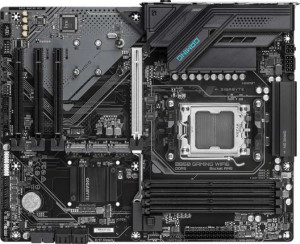
Gigabyte B850 Gaming WiFi6
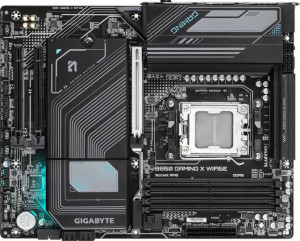
Gigabyte B850 Gaming X WiFi6E

Gigabyte B850 Gaming WiFi6 Gigabyte B850 Gaming X WiFi6E

Overview

When choosing between the Gigabyte B850 Gaming WiFi6 and the Gigabyte B850 Gaming X WiFi6E, builders will find two AM5 motherboards that share the same B850 chipset and ATX form factor, yet diverge in meaningful ways. Both boards target the performance-minded PC enthusiast, but key differences in wireless connectivity, RGB lighting, and rear USB port configuration make each one a better fit for a different kind of user. Read on to see how every spec stacks up.

Common Features

  • Both motherboards use the AM5 CPU socket.
  • Both boards are built on the B850 chipset.
  • Both boards use the ATX form factor.
  • Wi-Fi support is available on both products.
  • Bluetooth is available on both products, with version 5.3.
  • Both boards support HDMI 2.1 output.
  • Overclocking is supported on both products.
  • Both boards support a maximum of 256GB of RAM.
  • Both boards have a maximum RAM speed of 5200 MHz, or up to 8200 MHz when overclocked.
  • Both boards have 4 memory slots and use DDR5 memory in a dual-channel configuration.
  • ECC memory support is not available on either product.
  • Neither board has USB 3.2 Gen 2x2, USB 4, or Thunderbolt ports.
  • Both boards include one DisplayPort output and one RJ45 port.
  • Both boards have 2 USB 3.2 Gen 1 ports available through expansion, and 4 USB 2.0 ports through expansion.
  • Both boards include 4 SATA 3 connectors, 3 M.2 sockets, and 6 fan headers.
  • A TPM connector is present on both products.
  • Both boards have one PCIe 5.0 x16 slot and no PCIe 4.0 x16 or PCIe 3.0 x16 slots.
  • Both boards support 7.1 audio channels with 3 audio connectors, and neither has an S/PDIF Out port.
  • Both boards support RAID 0, RAID 1, RAID 5, and RAID 10, but neither supports RAID 0+1.

Main Differences

  • Wi-Fi 6E (802.11ax) support is present on the Gigabyte B850 Gaming X WiFi6E but not available on the Gigabyte B850 Gaming WiFi6.
  • RGB lighting is present on the Gigabyte B850 Gaming X WiFi6E but not available on the Gigabyte B850 Gaming WiFi6.
  • USB 3.2 Gen 2 ports (USB-A) count is 2 on the Gigabyte B850 Gaming WiFi6 and 1 on the Gigabyte B850 Gaming X WiFi6E.
  • USB 3.2 Gen 1 ports (USB-A) count is 2 on the Gigabyte B850 Gaming WiFi6 and 3 on the Gigabyte B850 Gaming X WiFi6E.
  • A USB 3.2 Gen 2 port (USB-C) is present on the Gigabyte B850 Gaming X WiFi6E but not available on the Gigabyte B850 Gaming WiFi6.
  • A USB 3.2 Gen 1 port (USB-C) is present on the Gigabyte B850 Gaming WiFi6 but not available on the Gigabyte B850 Gaming X WiFi6E.
  • USB 2.0 port count is 4 on the Gigabyte B850 Gaming WiFi6 and 3 on the Gigabyte B850 Gaming X WiFi6E.
  • PCIe x1 slot count is 3 on the Gigabyte B850 Gaming WiFi6 and 2 on the Gigabyte B850 Gaming X WiFi6E.
Specs Comparison
Gigabyte B850 Gaming WiFi6

Gigabyte B850 Gaming WiFi6

Gigabyte B850 Gaming X WiFi6E

Gigabyte B850 Gaming X WiFi6E

General info:
CPU socket AM5 AM5
chipset B850 B850
form factor ATX ATX
release date January 2025 January 2025
supports Wi-Fi
Wi-Fi version Wi-Fi 4 (802.11n), Wi-Fi 5 (802.11ac), Wi-Fi 6 (802.11ax) Wi-Fi 4 (802.11n), Wi-Fi 5 (802.11ac), Wi-Fi 6 (802.11ax), Wi-Fi 6E (802.11ax)
Has Bluetooth
Bluetooth version 5.3 5.3
HDMI version HDMI 2.1 HDMI 2.1
Easy to overclock
has RGB lighting
Easy to reset BIOS
Has dual BIOS
has aptX
CPU sockets 1 1
Has integrated graphics
warranty period 3 years 3 years
height 244 mm 244 mm
width 305 mm 305 mm
Has integrated CPU

Both the Gigabyte B850 Gaming WiFi6 and the Gigabyte B850 Gaming X WiFi6E share a nearly identical foundation: the same AM5 socket, B850 chipset, ATX form factor, and identical physical dimensions of 244 × 305 mm. They both support overclocking, carry a 3-year warranty, feature dual BIOS, Bluetooth 5.3, and HDMI 2.1. For most buyers, this shared core means either board delivers the same platform-level experience.

The meaningful differences come down to two points. First, wireless connectivity: the Gaming X WiFi6E adds support for Wi-Fi 6E (802.11ax on 6 GHz), which unlocks a less congested spectrum band for lower latency and higher throughput in environments with many competing networks — a real advantage in dense apartments or offices. The standard Gaming WiFi6 tops out at Wi-Fi 6 on the 5 GHz band, which is solid but increasingly crowded. Second, the Gaming X WiFi6E includes RGB lighting, while the base model does not — a purely aesthetic distinction that matters only if visual customization is part of the build.

The Gaming X WiFi6E has a clear edge in this group, driven entirely by its superior wireless standard. If you are in a congested wireless environment or want future-ready connectivity, the 6E version is the stronger choice. If Wi-Fi 6E coverage is unavailable in your area and aesthetics are irrelevant, the two boards are functionally equivalent on every other general specification.

Memory:
maximum memory amount 256GB 256GB
RAM speed (max) 5200 MHz 5200 MHz
overclocked RAM speed 8200 MHz 8200 MHz
memory slots 4 4
DDR memory version 5 5
memory channels 2 2
Supports ECC memory

On memory, these two boards are completely identical across every specified parameter. Both support DDR5 with four slots, a maximum capacity of 256 GB, dual-channel operation, a native speed of 5200 MHz, and an overclocked ceiling of 8200 MHz — and neither supports ECC memory.

The practical significance of these shared specs is worth noting. The 8200 MHz overclocked ceiling is competitive for a B850 platform, giving enthusiasts meaningful headroom beyond the DDR5 standard baseline. Four slots with 256 GB maximum capacity is generous enough for demanding workstation-style workloads, though the absence of ECC support keeps both boards firmly in the consumer rather than professional-server category. Dual-channel configuration is the expected standard here and delivers the bandwidth needed for modern AM5 processors.

This group is a complete tie. No differentiation exists between the Gaming WiFi6 and the Gaming X WiFi6E on memory specifications — a buyer whose decision hinges on RAM capability, upgrade path, or overclocking headroom will find no reason to choose one over the other on these grounds alone.

Ports:
USB 3.2 Gen 2 ports (USB-A) 2 1
USB 3.2 Gen 1 ports (USB-A) 2 3
USB 3.2 Gen 2 ports (USB-C) 0 1
USB 3.2 Gen 1 ports (USB-C) 1 0
USB 2.0 ports 4 3
USB 3.2 Gen 2x2 ports 0 0
USB 4 40Gbps ports 0 0
USB 4 20Gbps ports 0 0
Thunderbolt 4 ports 0 0
Thunderbolt 3 ports 0 0
has an HDMI output
DisplayPort outputs 1 1
RJ45 ports 1 1
Has USB Type-C
eSATA ports 0 0
DVI outputs 0 0
has a VGA connector
PS/2 ports 1 1

The rear I/O layouts of these two boards are more similar than different, sharing the same video output configuration (HDMI 2.1 and one DisplayPort), a single RJ45 ethernet port, a legacy PS/2 port, and no Thunderbolt or USB 4 on either. The real divergence is in how each board distributes its high-speed USB bandwidth.

The Gaming WiFi6 offers two USB 3.2 Gen 2 Type-A ports (10 Gbps each) alongside one Gen 1 Type-C (5 Gbps) and four USB 2.0 ports — a layout that favors users with multiple high-speed peripherals in traditional Type-A form. The Gaming X WiFi6E trades one of those Gen 2 Type-A slots for a USB 3.2 Gen 2 Type-C port (10 Gbps), giving up raw Type-A count but gaining a faster and more modern connector type — relevant for newer external SSDs, docks, and smartphones that increasingly rely on USB-C. It also has one fewer USB 2.0 port, though that is unlikely to matter in practice.

The Gaming X WiFi6E holds a slight edge here for forward-looking builds. Its Gen 2 USB-C port is more versatile for contemporary devices than the extra Gen 2 Type-A on the base model. Users with many legacy USB-A peripherals may prefer the Gaming WiFi6's layout, but for most modern setups, the X's port mix is the more practical choice.

Connectors:
USB 3.2 Gen 1 ports (through expansion) 2 2
USB 2.0 ports (through expansion) 4 4
SATA 3 connectors 4 4
fan headers 6 6
USB 3.0 ports (through expansion) 2 2
M.2 sockets 3 3
Has TPM connector
U.2 sockets 0 0
Has mSATA connector
SATA 2 connectors 0 0

Internal connectors tell a lot about a board's real-world build flexibility, and here the two boards are completely mirror images of each other. Both offer three M.2 sockets, four SATA 3 connectors, and six fan headers — a well-rounded set that comfortably supports a high-performance gaming or workstation build without requiring expansion cards for basic storage or cooling needs.

The three M.2 slots deserve particular attention: they allow a builder to run multiple NVMe SSDs simultaneously, which is increasingly relevant for content creators or anyone who wants to separate OS, scratch, and storage drives without touching the SATA ports. The four SATA 3 connectors add room for traditional HDDs or SSDs, and six fan headers provide enough control points for a thorough cooling setup. The TPM connector is present on both, keeping Windows 11 compliance and security use cases covered.

This group is a complete tie. Every internal connector spec is identical between the Gaming WiFi6 and the Gaming X WiFi6E, so storage capacity, expansion potential, and cooling flexibility are equal. Buyers should look to other spec groups to differentiate between these two boards.

Expansion slots:
PCIe 4.0 x16 slots 0 0
PCIe 5.0 x16 slots 1 1
PCIe 3.0 x16 slots 0 0
PCIe x1 slots 3 2
PCI slots 0 0
PCIe 2.0 x16 slots 0 0
PCIe x4 slots 0 0
PCIe x8 slots 0 0

Both boards are built around a single PCIe 5.0 x16 slot as their primary GPU interface — the current top-tier standard that doubles the bandwidth of PCIe 4.0 and ensures compatibility with the latest and next-generation graphics cards without any bottlenecking at the slot level. Neither board offers any additional x16 slots, so multi-GPU configurations are off the table on both, which is consistent with the B850 chipset's market positioning.

Where they diverge is in secondary expansion: the Gaming WiFi6 provides three PCIe x1 slots, while the Gaming X WiFi6E offers two. In practical terms, x1 slots accommodate add-in cards like sound cards, additional USB controllers, or capture cards. Having three versus two is a minor but real distinction — a builder planning to populate multiple expansion cards simultaneously will have more flexibility on the base model.

The Gaming WiFi6 holds a narrow edge in this group solely due to its extra PCIe x1 slot. For the vast majority of users running a single GPU with no additional expansion cards, the difference is inconsequential. But for niche builds requiring multiple add-in cards, that third x1 slot on the Gaming WiFi6 is a genuine advantage.

Audio:
audio channels 7.1 7.1
Has S/PDIF Out port
audio connectors 3 3

Audio is another category where these two boards offer no grounds for differentiation. Both feature 7.1-channel onboard audio with three analog connectors and no S/PDIF optical output — an identical configuration across the board.

The 7.1-channel capability is a reasonable offering for a gaming-oriented motherboard, supporting full surround sound setups when paired with a compatible speaker system or headset. The absence of S/PDIF Out on both boards means users who rely on optical connections to an external DAC, AV receiver, or soundbar will need to look elsewhere — a dedicated sound card or USB DAC would be the practical workaround on either board.

This group is a complete tie. Audio hardware is identical on both the Gaming WiFi6 and the Gaming X WiFi6E, and neither holds any advantage here. Buyers with serious audio requirements will find the onboard solution equally limiting — or equally sufficient — regardless of which board they choose.

Storage:
Supports RAID 1
Supports RAID 10 (1+0)
Supports RAID 5
Supports RAID 0
Supports RAID 0+1

RAID support is identical across both boards. Each one covers the four most practically relevant configurations: RAID 0 for striped performance, RAID 1 for mirrored redundancy, RAID 5 for distributed parity, and RAID 10 for the combined speed-and-redundancy approach. Neither board supports RAID 0+1, though this omission is inconsequential given that RAID 10 serves the same fundamental purpose and is generally the preferred standard.

The presence of RAID 5 is worth noting for buyers considering NAS-adjacent or small workstation setups — it allows efficient storage pooling with fault tolerance across three or more drives, using capacity more efficiently than RAID 1. Combined with the four SATA 3 connectors and three M.2 slots available on both boards (as seen in the Connectors group), the RAID support here is genuinely usable rather than just a checkbox feature.

This group is a complete tie. Storage configuration flexibility is equivalent on both the Gaming WiFi6 and the Gaming X WiFi6E, and neither board offers an advantage in this category.

Comparison Summary & Verdict

Both boards deliver a strong, well-rounded foundation with DDR5 support up to 256GB, a PCIe 5.0 x16 slot, three M.2 sockets, and solid RAID and audio capabilities. The Gigabyte B850 Gaming WiFi6 edges ahead in USB-A Gen 2 ports (offering two versus one) and adds a USB-C Gen 1 rear port, making it a practical choice for users with a variety of existing peripherals who do not need the latest wireless standard. The Gigabyte B850 Gaming X WiFi6E, on the other hand, stands out with Wi-Fi 6E support, a USB-C Gen 2 rear port for faster accessory throughput, and RGB lighting for those who want a more visually expressive build. If aesthetics and cutting-edge wireless performance matter to you, the X WiFi6E is the stronger pick; if you value a broader USB-A selection and simpler aesthetics, the standard WiFi6 model is a capable and focused choice.

Gigabyte B850 Gaming WiFi6
Buy Gigabyte B850 Gaming WiFi6 if...

Buy the Gigabyte B850 Gaming WiFi6 if you need more USB 3.2 Gen 2 Type-A ports on the rear panel and do not require Wi-Fi 6E or RGB lighting in your build.

Gigabyte B850 Gaming X WiFi6E
Buy Gigabyte B850 Gaming X WiFi6E if...

Buy the Gigabyte B850 Gaming X WiFi6E if you want Wi-Fi 6E connectivity, a USB 3.2 Gen 2 Type-C rear port, and RGB lighting for a more feature-rich and visually expressive system.