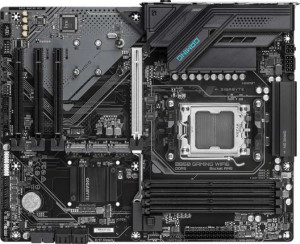
Gigabyte B850 Gaming WiFi6
MSI Pro H810M-C EX

Gigabyte B850 Gaming WiFi6 MSI Pro H810M-C EX

Overview

Welcome to our detailed spec breakdown of the Gigabyte B850 Gaming WiFi6 versus the MSI Pro H810M-C EX. These two motherboards target very different builders: one is a full-size ATX board aimed at AMD enthusiasts, the other a compact Micro-ATX solution built around Intel's latest platform. In this comparison, we examine their key battlegrounds, including memory capacity and expansion, wireless connectivity, port selection, and overall platform flexibility.

Common Features

  • Both boards use DDR5 memory.
  • Both support a dual-channel memory configuration.
  • Neither board supports ECC memory.
  • Both feature an HDMI 2.1 output.
  • Both include one DisplayPort output.
  • Both include one RJ45 network port.
  • Neither board has USB 3.2 Gen 2x2 ports.
  • Neither board has USB 4 ports of any speed.
  • Neither board has Thunderbolt 3 or Thunderbolt 4 ports.
  • Both provide 2 USB ports through expansion at USB 3.2 Gen 1 speeds.
  • Both provide 4 USB 2.0 ports through expansion.
  • Both include 4 SATA 3 connectors.
  • Neither board has a SATA 2 connector.
  • Both include a TPM connector.
  • Neither board has an mSATA connector.
  • Neither board has a U.2 socket.
  • Both feature one PCIe 5.0 x16 slot.
  • Neither board has any PCIe 4.0 or PCIe 3.0 x16 slots.
  • Both deliver 7.1-channel audio with 3 audio connectors.
  • Neither board has an S/PDIF Out port.
  • Neither board supports RAID 0+1.
  • Both carry a 3-year warranty.
  • RGB lighting is not present on either board.
  • Neither board has an easy BIOS reset mechanism.
  • Each board has a single CPU socket.
  • Neither board has integrated graphics or an integrated CPU.

Main Differences

  • The CPU socket is AM5 on Gigabyte B850 Gaming WiFi6 and LGA 1851 on MSI Pro H810M-C EX.
  • The form factor is ATX on Gigabyte B850 Gaming WiFi6 and Micro-ATX on MSI Pro H810M-C EX.
  • Wi-Fi is built into Gigabyte B850 Gaming WiFi6 but is not available on MSI Pro H810M-C EX.
  • Bluetooth is built into Gigabyte B850 Gaming WiFi6 but is not available on MSI Pro H810M-C EX.
  • Overclocking support is present on Gigabyte B850 Gaming WiFi6 but not available on MSI Pro H810M-C EX.
  • Dual BIOS is present on Gigabyte B850 Gaming WiFi6 but not available on MSI Pro H810M-C EX.
  • Board height is 244 mm on Gigabyte B850 Gaming WiFi6 and 220 mm on MSI Pro H810M-C EX.
  • Board width is 305 mm on Gigabyte B850 Gaming WiFi6 and 244 mm on MSI Pro H810M-C EX.
  • Maximum memory capacity is 256 GB on Gigabyte B850 Gaming WiFi6 and 128 GB on MSI Pro H810M-C EX.
  • Maximum native RAM speed is 5200 MHz on Gigabyte B850 Gaming WiFi6 and 6400 MHz on MSI Pro H810M-C EX.
  • Maximum overclocked RAM speed is 8200 MHz on Gigabyte B850 Gaming WiFi6 and 8800 MHz on MSI Pro H810M-C EX.
  • Memory slots number 4 on Gigabyte B850 Gaming WiFi6 and 2 on MSI Pro H810M-C EX.
  • USB 3.2 Gen 2 Type-A ports number 2 on Gigabyte B850 Gaming WiFi6 and 0 on MSI Pro H810M-C EX.
  • USB 3.2 Gen 1 Type-A ports number 2 on Gigabyte B850 Gaming WiFi6 and 3 on MSI Pro H810M-C EX.
  • USB 3.2 Gen 2 Type-C ports number 0 on Gigabyte B850 Gaming WiFi6 and 1 on MSI Pro H810M-C EX.
  • USB 3.2 Gen 1 Type-C ports number 1 on Gigabyte B850 Gaming WiFi6 and 0 on MSI Pro H810M-C EX.
  • USB 2.0 ports number 4 on Gigabyte B850 Gaming WiFi6 and 2 on MSI Pro H810M-C EX.
  • A DVI output is absent on Gigabyte B850 Gaming WiFi6 but present on MSI Pro H810M-C EX.
  • A VGA connector is absent on Gigabyte B850 Gaming WiFi6 but present on MSI Pro H810M-C EX.
  • Fan headers number 6 on Gigabyte B850 Gaming WiFi6 and 2 on MSI Pro H810M-C EX.
  • M.2 sockets number 3 on Gigabyte B850 Gaming WiFi6 and 2 on MSI Pro H810M-C EX.
  • PCIe x1 slots number 3 on Gigabyte B850 Gaming WiFi6 and 1 on MSI Pro H810M-C EX.
  • A legacy PCI slot is absent on Gigabyte B850 Gaming WiFi6 but present on MSI Pro H810M-C EX.
Specs Comparison
Gigabyte B850 Gaming WiFi6

Gigabyte B850 Gaming WiFi6

MSI Pro H810M-C EX

MSI Pro H810M-C EX

General info:
CPU socket AM5 LGA 1851
form factor ATX Micro-ATX
release date January 2025 February 2025
supports Wi-Fi
Has Bluetooth
HDMI version HDMI 2.1 HDMI 2.1
Easy to overclock
has RGB lighting
Easy to reset BIOS
Has dual BIOS
CPU sockets 1 1
Has integrated graphics
warranty period 3 years 3 years
height 244 mm 220 mm
width 305 mm 244 mm
Has integrated CPU

The most fundamental difference here is platform: the Gigabyte B850 Gaming WiFi6 targets the AMD AM5 ecosystem, while the MSI Pro H810M-C EX is built for Intel LGA 1851. This means these two boards are not interchangeable — your CPU choice dictates which board is even relevant to you. Beyond platform, the Gigabyte ships in a full ATX form factor (305 × 244 mm), giving it more room for expansion slots and power delivery components, whereas the MSI adopts a compact Micro-ATX footprint (244 × 220 mm), which is better suited for smaller chassis builds where space is at a premium.

Where the Gigabyte pulls ahead in practical usability is connectivity and resilience. It includes Wi-Fi 6 and Bluetooth out of the box — a significant convenience for users who cannot easily run an Ethernet cable or want to pair peripherals wirelessly — while the MSI offers neither, requiring separate adapters if wireless is needed. The Gigabyte also supports overclocking and includes a dual BIOS chip, meaning you can push your CPU and RAM beyond stock speeds, and if a firmware update goes wrong, the board can recover automatically from a backup chip. The MSI lacks both of these, reflecting its more conservative, business-oriented design.

Both boards share HDMI 2.1, a single CPU socket, a 3-year warranty, and neither integrates a CPU or onboard graphics. Overall, the Gigabyte B850 Gaming WiFi6 holds a clear advantage in this category for enthusiast and gaming use cases — it offers more built-in connectivity, overclocking headroom, and fault tolerance. The MSI Pro H810M-C EX is the better fit only when a smaller footprint and a simpler, no-frills Intel platform are explicit priorities.
Memory:
maximum memory amount 256GB 128GB
RAM speed (max) 5200 MHz 6400 MHz
overclocked RAM speed 8200 MHz 8800 MHz
memory slots 4 2
DDR memory version 5 5
memory channels 2 2
Supports ECC memory

Both boards run DDR5 memory in dual-channel configuration, so the generational baseline is identical. The divergence lies in capacity and slot count: the Gigabyte B850 Gaming WiFi6 offers 4 memory slots and supports up to 256GB, while the MSI Pro H810M-C EX provides only 2 slots and caps out at 128GB. In practice, four slots give builders far more flexibility — you can start with two sticks and upgrade later without replacing existing modules, and workloads like video editing, 3D rendering, or heavy virtualization that genuinely benefit from 192GB or 256GB simply cannot be addressed by the MSI at all.

On raw speed, the picture is more nuanced. The MSI edges ahead on both native and overclocked frequencies — 6400 MHz stock versus 5200 MHz on the Gigabyte, and 8800 MHz overclocked versus 8200 MHz. These differences are real but narrow; in most gaming and productivity scenarios the performance gap between these frequencies is marginal, typically measured in single-digit percentage gains in memory-bandwidth-sensitive tasks. Neither board supports ECC memory, so error-correcting use cases are off the table for both.

On balance, the Gigabyte holds a clear practical advantage here. The doubling of both slot count and maximum capacity is a meaningful, tangible differentiator for anyone building a future-proof or high-memory workstation, whereas the MSI's slight frequency headroom is unlikely to translate into a noticeable real-world edge for the vast majority of users.

Ports:
USB 3.2 Gen 2 ports (USB-A) 2 0
USB 3.2 Gen 1 ports (USB-A) 2 3
USB 3.2 Gen 2 ports (USB-C) 0 1
USB 3.2 Gen 1 ports (USB-C) 1 0
USB 2.0 ports 4 2
USB 3.2 Gen 2x2 ports 0 0
USB 4 40Gbps ports 0 0
USB 4 20Gbps ports 0 0
Thunderbolt 4 ports 0 0
Thunderbolt 3 ports 0 0
has an HDMI output
DisplayPort outputs 1 1
RJ45 ports 1 1
Has USB Type-C
eSATA ports 0 0
DVI outputs 0 1
has a VGA connector
PS/2 ports 1 1

Counting total rear USB ports alone tells a meaningful story: the Gigabyte B850 Gaming WiFi6 offers 9 USB ports across all standards, versus 6 on the MSI Pro H810M-C EX. More importantly, the Gigabyte delivers two USB 3.2 Gen 2 (10Gbps) Type-A ports where the MSI has none on that standard — a practical win for anyone connecting fast external SSDs or modern peripherals that can actually saturate that bandwidth. The MSI counters with a USB 3.2 Gen 2 Type-C port (also 10Gbps), compared to the Gigabyte's slower Gen 1 Type-C, so if your primary high-speed device uses USB-C, the MSI holds a narrow edge on that specific connection.

The sharpest differentiator in display connectivity is the MSI's inclusion of both a DVI output and a VGA port alongside the shared HDMI and DisplayPort. These are legacy standards largely absent from modern hardware, but they serve a genuine purpose in corporate or institutional environments where older monitors are still in rotation. For a mainstream or gaming build, however, they add little value. Neither board offers Thunderbolt or USB4, so high-bandwidth external GPU enclosures or daisy-chained storage arrays are off the table on both.

On balance, the Gigabyte has the stronger port configuration for a modern consumer build — more total USB outputs, faster Type-A speeds, and a cleaner display selection. The MSI's advantage is narrower and more situational: its faster USB-C and legacy video outputs make it a better fit for managed IT environments with older display infrastructure, but for most users those extras are unnecessary.

Connectors:
USB 3.2 Gen 1 ports (through expansion) 2 2
USB 2.0 ports (through expansion) 4 4
SATA 3 connectors 4 4
fan headers 6 2
USB 3.0 ports (through expansion) 2 2
M.2 sockets 3 2
Has TPM connector
U.2 sockets 0 0
Has mSATA connector
SATA 2 connectors 0 0

Much of the internal connector landscape is identical between these two boards: both provide 4 SATA 3 ports, matching internal USB expansion headers, and a TPM connector — a requirement for Windows 11 compliance and hardware-based security. For a standard build with a few drives and front-panel USB, neither board constrains you on these fundamentals.

The meaningful gaps emerge in M.2 storage and thermal management. The Gigabyte B850 Gaming WiFi6 includes 3 M.2 sockets versus 2 on the MSI Pro H810M-C EX — a relevant difference for anyone wanting to run multiple NVMe SSDs simultaneously without consuming SATA ports. More striking is the fan header count: the Gigabyte offers 6 fan headers compared to just 2 on the MSI. With only two headers, a multi-fan cooling setup on the MSI requires a separate fan hub or splitter cables, adding cost and complexity and reducing per-fan control granularity. The Gigabyte's six headers allow direct, individually addressable control of a full case fan array plus CPU cooler, which matters for both noise tuning and thermal performance.

The Gigabyte holds a clear advantage in this category. The extra M.2 slot expands future storage options, but the fan header disparity is the more impactful differentiator — six independently managed headers versus two is a significant practical gap for anyone building a well-cooled, quiet system.

Expansion slots:
PCIe 4.0 x16 slots 0 0
PCIe 5.0 x16 slots 1 1
PCIe 3.0 x16 slots 0 0
PCIe x1 slots 3 1
PCI slots 0 1
PCIe 2.0 x16 slots 0 0
PCIe x4 slots 0 0
PCIe x8 slots 0 0

At the primary GPU slot, these two boards are evenly matched — both feature a single PCIe 5.0 x16 slot, which is the current top-tier interface for discrete graphics cards and high-end NVMe add-in cards. Any modern GPU will run at full bandwidth on either board, so there is no differentiation here.

The divergence comes in the secondary slots. The Gigabyte B850 Gaming WiFi6 includes 3 PCIe x1 slots and no legacy PCI, while the MSI Pro H810M-C EX offers just 1 PCIe x1 slot but adds a legacy PCI slot. For most modern builders the three x1 slots on the Gigabyte are the more useful arrangement — they accommodate add-in cards like capture cards, sound cards, 10GbE NICs, or USB expansion cards without competition. The MSI's legacy PCI slot is a niche asset: it only matters if you have older peripheral cards — think parallel port controllers, legacy audio hardware, or certain industrial interfaces — that have no modern PCIe equivalent.

For a contemporary build with no legacy hardware requirements, the Gigabyte has the edge in this category purely on the strength of its three x1 slots versus one. The MSI's PCI slot is a genuine advantage only in very specific scenarios involving older add-in cards; outside of that narrow use case, it trades useful modern expansion capacity for backward compatibility most users will never need.

Audio:
audio channels 7.1 7.1
Has S/PDIF Out port
audio connectors 3 3

Audio is a straight tie between these two boards. Both deliver 7.1-channel surround sound support with 3 analog audio connectors and no S/PDIF optical output on either. There is nothing to separate them on paper in this category.

The practical implication of the shared spec set is worth noting: 7.1-channel onboard audio covers the full range of surround sound configurations used in gaming and home theater setups, while the 3-jack analog layout handles the standard line-in, line-out, and microphone arrangement found on most desktops. The absence of S/PDIF on both boards means users who want to pass a lossless digital audio signal to an AV receiver or external DAC via optical will need a dedicated sound card or USB audio interface on either platform.

This group is a complete draw — neither board offers any audio advantage over the other based on the provided specifications.

Storage:
Supports RAID 0+1

The only storage spec provided for this category is RAID 0+1 support, and both the Gigabyte B850 Gaming WiFi6 and the MSI Pro H810M-C EX come up the same: neither supports it. RAID 0+1 combines striping and mirroring across drives to deliver both speed and redundancy simultaneously — a feature more relevant to workstation and server environments than typical consumer or gaming builds, so its absence is unlikely to matter to most users on either platform.

This group is a complete tie. Based solely on the data provided, there is no storage-related differentiator between these two boards.

Comparison Summary & Verdict

After reviewing all available specifications, these two boards serve clearly distinct audiences. The Gigabyte B850 Gaming WiFi6 is the stronger choice for power users who want a feature-rich AMD AM5 platform: it offers four memory slots with up to 256 GB of DDR5, built-in Wi-Fi 6 and Bluetooth, dual BIOS for peace of mind, six fan headers for thorough thermal management, and three M.2 sockets for fast NVMe storage. Its full ATX footprint also gives builders more PCIe x1 expansion room. The MSI Pro H810M-C EX, on the other hand, is a practical Intel LGA 1851 option that fits smaller cases thanks to its Micro-ATX form factor, and it edges ahead on maximum supported RAM speed and overclocked RAM ceiling. Its legacy DVI and VGA outputs also make it a sensible pick for environments still relying on older display hardware. Choose the Gigabyte for a versatile, connectivity-rich build; choose the MSI when space constraints, Intel compatibility, or legacy display support are the priority.

Gigabyte B850 Gaming WiFi6
Buy Gigabyte B850 Gaming WiFi6 if...

Buy the Gigabyte B850 Gaming WiFi6 if you are building an AMD AM5 system and need built-in Wi-Fi and Bluetooth, more memory slots and capacity, greater storage expansion with three M.2 sockets, and overclocking support in a full ATX layout.

MSI Pro H810M-C EX
Buy MSI Pro H810M-C EX if...

Buy the MSI Pro H810M-C EX if you need a compact Intel LGA 1851 Micro-ATX board that fits smaller cases, supports higher native and overclocked RAM speeds, or requires legacy DVI and VGA display outputs.