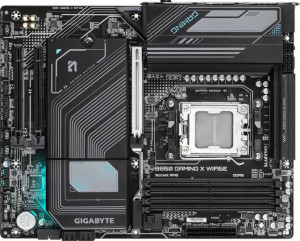
Gigabyte B850 Gaming X WiFi6E
Gigabyte B850M Aorus Elite WiFi6E Ice

Gigabyte B850 Gaming X WiFi6E Gigabyte B850M Aorus Elite WiFi6E Ice

Overview

Welcome to our in-depth specification comparison between the Gigabyte B850 Gaming X WiFi6E and the Gigabyte B850M Aorus Elite WiFi6E Ice. Both boards share the same AM5 socket and B850 chipset foundation, yet they diverge in meaningful ways across form factor, rear-panel connectivity, and expansion slot configurations. Whether you are building a full-sized tower or a compact system, understanding these distinctions will help you choose the right board for your build.

Common Features

  • Both boards use the AM5 CPU socket.
  • Both boards feature the B850 chipset.
  • Wi-Fi is supported on both products.
  • Both support Wi-Fi 4 (802.11n), Wi-Fi 5 (802.11ac), Wi-Fi 6 (802.11ax), and Wi-Fi 6E (802.11ax).
  • Bluetooth is present on both products.
  • Both share Bluetooth version 5.3.
  • Overclocking is supported on both products.
  • RGB lighting is present on both products.
  • Both support a maximum memory amount of 256GB.
  • Both have a maximum RAM speed of 5200 MHz and an overclocked RAM speed of 8200 MHz.
  • Both feature 4 memory slots and 2 memory channels.
  • Both use DDR5 memory.
  • ECC memory is not supported on either product.
  • Both include 1 USB 3.2 Gen 2 port (USB-C) on the rear panel.
  • Neither product has USB 3.2 Gen 1 (USB-C), USB 3.2 Gen 2x2, USB 4, or Thunderbolt ports.
  • Both feature 1 DisplayPort output.
  • Both provide 4 SATA 3 connectors, 6 fan headers, and a TPM connector.
  • Both offer 2 USB 3.0 ports and 2 USB 3.2 Gen 1 ports through expansion, along with 4 USB 2.0 ports and 1 USB 3.2 Gen 2x2 port through expansion.
  • Both have 1 PCIe 5.0 x16 slot and no PCIe 4.0 x16, PCIe 3.0 x16, PCIe 2.0 x16, PCIe x8, or PCI slots.
  • Both support 7.1 audio channels.
  • Both support RAID 0, RAID 1, RAID 5, and RAID 10 (1+0), but neither supports RAID 0+1.

Main Differences

  • The form factor is ATX on Gigabyte B850 Gaming X WiFi6E and Micro-ATX on Gigabyte B850M Aorus Elite WiFi6E Ice.
  • The width is 305 mm on Gigabyte B850 Gaming X WiFi6E and 244 mm on Gigabyte B850M Aorus Elite WiFi6E Ice.
  • USB 3.2 Gen 2 ports (USB-A) count is 1 on Gigabyte B850 Gaming X WiFi6E and 2 on Gigabyte B850M Aorus Elite WiFi6E Ice.
  • USB 3.2 Gen 1 ports (USB-A) count is 3 on Gigabyte B850 Gaming X WiFi6E and 5 on Gigabyte B850M Aorus Elite WiFi6E Ice.
  • USB 2.0 port count is 3 on Gigabyte B850 Gaming X WiFi6E and 4 on Gigabyte B850M Aorus Elite WiFi6E Ice.
  • An HDMI output is present on Gigabyte B850 Gaming X WiFi6E but not available on Gigabyte B850M Aorus Elite WiFi6E Ice.
  • A PS/2 port is present on Gigabyte B850 Gaming X WiFi6E but not available on Gigabyte B850M Aorus Elite WiFi6E Ice.
  • M.2 socket count is 3 on Gigabyte B850 Gaming X WiFi6E and 2 on Gigabyte B850M Aorus Elite WiFi6E Ice.
  • PCIe x1 slot count is 2 on Gigabyte B850 Gaming X WiFi6E and 0 on Gigabyte B850M Aorus Elite WiFi6E Ice.
  • PCIe x4 slot count is 0 on Gigabyte B850 Gaming X WiFi6E and 1 on Gigabyte B850M Aorus Elite WiFi6E Ice.
  • An S/PDIF Out port is present on Gigabyte B850M Aorus Elite WiFi6E Ice but not available on Gigabyte B850 Gaming X WiFi6E.
  • The number of audio connectors is 3 on Gigabyte B850 Gaming X WiFi6E and 2 on Gigabyte B850M Aorus Elite WiFi6E Ice.
Specs Comparison
Gigabyte B850 Gaming X WiFi6E

Gigabyte B850 Gaming X WiFi6E

Gigabyte B850M Aorus Elite WiFi6E Ice

Gigabyte B850M Aorus Elite WiFi6E Ice

General info:
CPU socket AM5 AM5
chipset B850 B850
form factor ATX Micro-ATX
release date January 2025 January 2025
supports Wi-Fi
Wi-Fi version Wi-Fi 4 (802.11n), Wi-Fi 5 (802.11ac), Wi-Fi 6 (802.11ax), Wi-Fi 6E (802.11ax) Wi-Fi 4 (802.11n), Wi-Fi 5 (802.11ac), Wi-Fi 6 (802.11ax), Wi-Fi 6E (802.11ax)
Has Bluetooth
Bluetooth version 5.3 5.3
Easy to overclock
has RGB lighting
Easy to reset BIOS
Has dual BIOS
has aptX
CPU sockets 1 1
Has integrated graphics
warranty period 3 years 3 years
height 244 mm 244 mm
width 305 mm 244 mm
Has integrated CPU

At their core, the Gigabyte B850 Gaming X WiFi6E and the B850M Aorus Elite WiFi6E Ice share the same foundational platform: both use the AM5 socket with the B850 chipset, support overclocking, include dual BIOS, RGB lighting, and identical wireless connectivity — Wi-Fi 6E and Bluetooth 5.3. Both carry a 3-year warranty and lack integrated graphics or an integrated CPU, as expected for desktop boards. For a user evaluating these two on platform capability alone, they are effectively tied.

The single meaningful differentiator in this group is form factor. The Gaming X WiFi6E is a full-size ATX board (305 × 244 mm), while the Aorus Elite Ice is Micro-ATX (244 × 244 mm) — roughly 20% smaller in footprint. In practice this means the Aorus Elite Ice fits into smaller mid-tower and compact cases that do not accommodate ATX, giving it a clear advantage in space-constrained or smaller-form-factor builds. The Gaming X WiFi6E, by contrast, requires a standard ATX-compatible case but in return typically offers more physical space for expansion slots, VRM layout, and cable management.

Edge: Aorus Elite Ice for builders prioritizing a compact build; Edge: Gaming X WiFi6E for those who want a full ATX board for maximum case compatibility and expansion headroom. If form factor is not a constraint, this group is essentially a tie — all other general specs are identical between the two boards.

Memory:
maximum memory amount 256GB 256GB
RAM speed (max) 5200 MHz 5200 MHz
overclocked RAM speed 8200 MHz 8200 MHz
memory slots 4 4
DDR memory version 5 5
memory channels 2 2
Supports ECC memory

When it comes to memory, the Gaming X WiFi6E and the Aorus Elite WiFi6E Ice are carbon copies of each other. Both boards offer 4 DDR5 slots across 2 memory channels, support up to 256 GB of total RAM, and cap native JEDEC speeds at 5200 MHz. Neither supports ECC memory, which is expected for consumer B850 boards aimed at gaming and prosumer workloads rather than server or workstation use cases.

The more interesting figure is the overclocked ceiling of 8200 MHz, achievable via XMP/EXPO profiles on both boards. Pushing DDR5 to that range can yield meaningful gains in memory-bandwidth-sensitive workloads — think large dataset processing, high-resolution texture streaming in games, or content creation pipelines — though real-world gains depend heavily on the specific kit installed. The 4-slot configuration also matters: it allows users to start with a 2-stick kit and expand later without replacing existing modules, which is a practical long-term upgrade advantage over 2-slot Micro-ATX designs (though both boards here offer the full four slots).

Verdict: a complete tie. Every memory specification is identical across these two boards. Memory capability should play no part in choosing between them.

Ports:
USB 3.2 Gen 2 ports (USB-A) 1 2
USB 3.2 Gen 1 ports (USB-A) 3 5
USB 3.2 Gen 2 ports (USB-C) 1 1
USB 3.2 Gen 1 ports (USB-C) 0 0
USB 2.0 ports 3 4
USB 3.2 Gen 2x2 ports 0 0
USB 4 40Gbps ports 0 0
USB 4 20Gbps ports 0 0
Thunderbolt 4 ports 0 0
Thunderbolt 3 ports 0 0
has an HDMI output
DisplayPort outputs 1 1
RJ45 ports 1 1
Has USB Type-C
eSATA ports 0 0
DVI outputs 0 0
has a VGA connector
PS/2 ports 1 0

USB port count is where these two boards diverge most noticeably. The Aorus Elite WiFi6E Ice offers a total of 12 rear USB ports — including 2 Gen 2 USB-A (10 Gbps) and 5 Gen 1 USB-A (5 Gbps) — compared to the Gaming X WiFi6E's 8 rear USB ports, with only 1 Gen 2 USB-A and 3 Gen 1 USB-A. For users with multiple peripherals, external drives, controllers, or USB hubs, the Aorus Elite Ice's broader port roster meaningfully reduces reliance on add-in cards or front-panel headers.

Two notable distinctions run in the opposite direction. The Gaming X WiFi6E includes an HDMI output — absent on the Aorus Elite Ice — which provides a display connection option directly from the board. It also retains a PS/2 port, a legacy input that some users with older keyboards or mice, or specific KVM setups, may still find useful. The Aorus Elite Ice omits both entirely.

Edge: Aorus Elite Ice for users who prioritize USB density and peripheral connectivity. The Gaming X WiFi6E holds an advantage for anyone who needs an onboard HDMI output or relies on PS/2 legacy input — two features the Aorus Elite Ice simply does not provide.

Connectors:
USB 3.2 Gen 1 ports (through expansion) 2 2
USB 3.2 Gen 2x2 ports (through expansion) 1 1
USB 2.0 ports (through expansion) 4 4
SATA 3 connectors 4 4
fan headers 6 6
USB 3.0 ports (through expansion) 2 2
M.2 sockets 3 2
Has TPM connector
U.2 sockets 0 0
Has mSATA connector
SATA 2 connectors 0 0

Internal connectors tell a story of near-identical storage and expansion capability — with one meaningful exception. Both boards deliver 4 SATA 3 connectors, 6 fan headers, a TPM connector, and the same internal USB expansion headers, making them equivalent for cooling management, legacy storage, and front-panel connectivity. The shared 6 fan headers is worth highlighting: it provides ample control over case and CPU cooler fans without needing an add-in fan controller, which is practical for builds with larger cooling setups.

The standout difference is M.2 socket count. The Gaming X WiFi6E provides 3 M.2 sockets versus 2 on the Aorus Elite Ice. In a storage landscape increasingly dominated by NVMe SSDs — used for OS drives, game libraries, and fast scratch storage — that extra slot has real value. It allows a third NVMe drive to be added without consuming any of the 4 SATA ports, keeping the full SATA bandwidth available for additional drives or optical devices.

Edge: Gaming X WiFi6E, solely on the strength of its additional M.2 socket. For storage-heavy configurations — content creators, gamers with large libraries, or anyone planning a multi-drive NVMe setup — this single difference is a practical advantage. Builders who only need one or two NVMe drives will find the Aorus Elite Ice equally sufficient.

Expansion slots:
PCIe 4.0 x16 slots 0 0
PCIe 5.0 x16 slots 1 1
PCIe 3.0 x16 slots 0 0
PCIe x1 slots 2 0
PCI slots 0 0
PCIe 2.0 x16 slots 0 0
PCIe x4 slots 0 1
PCIe x8 slots 0 0

Both boards anchor their expansion layout around a single PCIe 5.0 x16 slot — the primary GPU slot — which is the right call for a modern AM5 platform. PCIe 5.0 doubles the bandwidth of PCIe 4.0, ensuring current and next-generation graphics cards have all the headroom they need without any bottleneck at the slot level. On this critical point, the Gaming X WiFi6E and Aorus Elite Ice are fully equal.

The secondary slot is where they diverge in an interesting way. The Gaming X WiFi6E includes 2 PCIe x1 slots, while the Aorus Elite Ice replaces those with a single PCIe x4 slot. PCIe x1 slots suit compact add-in cards — think sound cards, USB controllers, or Wi-Fi adapters — while a PCIe x4 slot offers four times the bandwidth, accommodating more demanding cards such as NVMe add-in cards, capture cards, or 10GbE network adapters that would be bottlenecked by x1 bandwidth.

Neither configuration is objectively superior — the right choice depends on the user's expansion needs. The Gaming X WiFi6E has an edge for users adding multiple low-bandwidth peripherals via x1 cards, while the Aorus Elite Ice is the stronger pick for a single higher-bandwidth expansion device. For the majority of builds that use the secondary slot only occasionally, this difference will be inconsequential.

Audio:
audio channels 7.1 7.1
Has S/PDIF Out port
audio connectors 3 2

Onboard audio is a tale of two trade-offs here. Both boards support 7.1 surround sound, which is the standard for immersive gaming and home theater setups, so channel capability is not a differentiator. Where they part ways is in output options and analog connector count.

The Aorus Elite WiFi6E Ice includes an S/PDIF optical output, which the Gaming X WiFi6E lacks entirely. S/PDIF allows a direct digital connection to AV receivers, soundbars, or DACs that accept optical input — bypassing the analog circuitry on the board and potentially delivering cleaner audio to an external audio system. For users with a dedicated receiver or high-fidelity audio chain, this is a meaningful addition. The Gaming X WiFi6E, by contrast, offers 3 analog audio jacks versus 2 on the Aorus Elite Ice, giving it slightly more flexibility for analog multi-channel speaker setups without a separate splitter or adapter.

Edge: Aorus Elite Ice for users with an external audio system capable of accepting digital input — the S/PDIF port is the more functionally significant differentiator here. The Gaming X WiFi6E's extra analog connector is a minor convenience for analog-only setups, but for most users the digital output option carries greater real-world value.

Storage:
Supports RAID 1
Supports RAID 10 (1+0)
Supports RAID 5
Supports RAID 0
Supports RAID 0+1

RAID support is identical across both boards. The Gaming X WiFi6E and the Aorus Elite WiFi6E Ice each support RAID 0, 1, 5, and 10 — covering the full practical range for consumer and prosumer use cases. Neither supports RAID 0+1, but this is not a meaningful omission since RAID 10 achieves functionally equivalent results in a more efficient and widely supported implementation.

The supported modes cover the key real-world scenarios: RAID 0 for striped performance gains across multiple drives, RAID 1 for straightforward mirrored redundancy, RAID 5 for distributed parity with a balance of storage efficiency and fault tolerance, and RAID 10 for users who want both speed and redundancy simultaneously. This range is well-suited to home NAS-style setups, content creation workflows requiring fast bulk storage, or anyone building local backup redundancy without a dedicated NAS device.

Verdict: a complete tie. Storage configuration capability is fully matched between these two boards and should carry no weight in the buying decision.

Comparison Summary & Verdict

After a thorough comparison, both motherboards prove to be capable AM5 platforms with identical memory support, Wi-Fi 6E, and storage options. The Gigabyte B850 Gaming X WiFi6E stands out for builders who need an ATX form factor, a third M.2 slot, two PCIe x1 slots, an HDMI output, a PS/2 port, and more analog audio connectors, making it the stronger choice for versatile, full-tower desktop builds. The Gigabyte B850M Aorus Elite WiFi6E Ice, on the other hand, excels in compact builds thanks to its Micro-ATX footprint, while offering more USB-A ports across Gen 2 and Gen 1 standards, an S/PDIF Out for digital audio, and a PCIe x4 slot for additional expansion flexibility. Choose the Gaming X WiFi6E for a feature-rich full-size build, and the Aorus Elite Ice for a space-efficient system with superior USB and digital audio connectivity.

Gigabyte B850 Gaming X WiFi6E
Buy Gigabyte B850 Gaming X WiFi6E if...

Buy the Gigabyte B850 Gaming X WiFi6E if you are building a full ATX tower and need three M.2 slots, an HDMI output, a PS/2 port, and more analog audio connectors.

Gigabyte B850M Aorus Elite WiFi6E Ice
Buy Gigabyte B850M Aorus Elite WiFi6E Ice if...

Buy the Gigabyte B850M Aorus Elite WiFi6E Ice if you want a compact Micro-ATX board with more USB-A ports, S/PDIF digital audio output, and a PCIe x4 expansion slot.