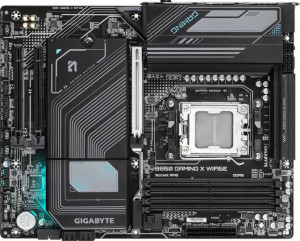
Gigabyte B850 Gaming X WiFi6E
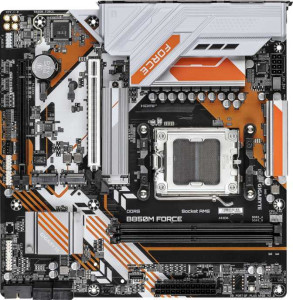
Gigabyte B850M Force

Gigabyte B850 Gaming X WiFi6E Gigabyte B850M Force

Overview

Welcome to our in-depth specification comparison between the Gigabyte B850 Gaming X WiFi6E and the Gigabyte B850M Force — two AM5 motherboards built on the B850 chipset that take very different approaches to form factor, connectivity, and memory support. Whether you are building a full-sized desktop rig or a compact workstation, understanding the key battlegrounds of wireless connectivity, memory capacity, and expansion options will help you make the right choice for your build.

Common Features

  • Both motherboards use the AM5 CPU socket.
  • Both motherboards feature the B850 chipset.
  • Both motherboards support HDMI 2.1.
  • Both motherboards are easy to overclock.
  • Both motherboards include RGB lighting.
  • Neither motherboard supports easy BIOS reset.
  • Both motherboards feature dual BIOS.
  • Both motherboards have a single CPU socket.
  • Both motherboards support a maximum RAM speed of 5200 MHz.
  • Both motherboards use DDR5 memory.
  • Both motherboards have 2 memory channels.
  • Both motherboards include 1 USB 3.2 Gen 2 USB-A port on the rear.
  • Neither motherboard includes USB 3.2 Gen 2x2, USB 4 40Gbps, USB 4 20Gbps, Thunderbolt 4, or Thunderbolt 3 ports.
  • Both motherboards have an HDMI output.
  • Both motherboards include 1 DisplayPort output.
  • Both motherboards provide 2 USB 3.2 Gen 1 ports through expansion, 4 USB 2.0 ports through expansion, and 2 USB 3.0 ports through expansion.
  • Both motherboards include 4 SATA 3 connectors and 3 M.2 sockets.
  • Both motherboards have a TPM connector.
  • Neither motherboard includes a U.2 socket or mSATA connector.
  • Both motherboards feature 1 PCIe 5.0 x16 slot and no PCIe 4.0 x16, PCIe 3.0 x16, PCIe 2.0 x16, PCIe x8, or PCI slots.
  • Both motherboards support 7.1 audio channels with 3 audio connectors.
  • Neither motherboard includes an S/PDIF Out port.
  • Both motherboards support RAID 0, RAID 1, RAID 5, and RAID 10, but neither supports RAID 0+1.

Main Differences

  • The Gigabyte B850 Gaming X WiFi6E has an ATX form factor, while the Gigabyte B850M Force has a Micro-ATX form factor.
  • Wi-Fi support is present on the Gigabyte B850 Gaming X WiFi6E but not available on the Gigabyte B850M Force.
  • Bluetooth support is present on the Gigabyte B850 Gaming X WiFi6E but not available on the Gigabyte B850M Force.
  • The width is 305 mm on the Gigabyte B850 Gaming X WiFi6E and 244 mm on the Gigabyte B850M Force.
  • Maximum memory amount is 256 GB on the Gigabyte B850 Gaming X WiFi6E and 128 GB on the Gigabyte B850M Force.
  • Overclocked RAM speed reaches 8200 MHz on the Gigabyte B850 Gaming X WiFi6E and 9600 MHz on the Gigabyte B850M Force.
  • Memory slots number 4 on the Gigabyte B850 Gaming X WiFi6E and 2 on the Gigabyte B850M Force.
  • ECC memory support is present on the Gigabyte B850M Force but not available on the Gigabyte B850 Gaming X WiFi6E.
  • USB 3.2 Gen 1 USB-A ports number 3 on the Gigabyte B850 Gaming X WiFi6E and 2 on the Gigabyte B850M Force.
  • A USB 3.2 Gen 2 USB-C port is present on the Gigabyte B850 Gaming X WiFi6E but not on the Gigabyte B850M Force.
  • A USB 3.2 Gen 1 USB-C port is present on the Gigabyte B850M Force but not on the Gigabyte B850 Gaming X WiFi6E.
  • USB 2.0 ports number 3 on the Gigabyte B850 Gaming X WiFi6E and 2 on the Gigabyte B850M Force.
  • Fan headers number 6 on the Gigabyte B850 Gaming X WiFi6E and 4 on the Gigabyte B850M Force.
  • PCIe x1 slots number 2 on the Gigabyte B850 Gaming X WiFi6E and 0 on the Gigabyte B850M Force.
  • The Gigabyte B850M Force includes 1 PCIe x4 slot, while the Gigabyte B850 Gaming X WiFi6E has none.
Specs Comparison
Gigabyte B850 Gaming X WiFi6E

Gigabyte B850 Gaming X WiFi6E

Gigabyte B850M Force

Gigabyte B850M Force

General info:
CPU socket AM5 AM5
chipset B850 B850
form factor ATX Micro-ATX
release date January 2025 June 2025
supports Wi-Fi
Has Bluetooth
HDMI version HDMI 2.1 HDMI 2.1
Easy to overclock
has RGB lighting
Easy to reset BIOS
Has dual BIOS
CPU sockets 1 1
Has integrated graphics
warranty period 3 years 3 years
height 244 mm 244 mm
width 305 mm 244 mm
Has integrated CPU

Both boards share the same core platform: an AM5 socket with a B850 chipset, meaning they support the same range of AMD processors and offer identical overclocking headroom. They also match on HDMI 2.1 output, dual BIOS protection, RGB lighting, and a 3-year warranty — so the fundamental build quality and feature safety net are equivalent.

The most significant real-world difference lies in form factor and connectivity. The Gaming X WiFi6E is a full ATX board (305 mm wide), offering more PCIe slots and expansion room for multi-GPU or high-card-count builds. The B850M Force is Micro-ATX (244 mm wide), making it the right pick for compact or small-tower cases where physical space is a constraint. More critically, the Gaming X WiFi6E includes built-in Wi-Fi and Bluetooth, while the Force has neither — meaning Force owners who need wireless connectivity must budget for a separate adapter, adding cost and occupying a PCIe slot.

The Gaming X WiFi6E has a clear edge in this group for users building a standard or larger system: the ATX layout provides more expansion flexibility, and integrated wireless saves both cost and slots. The B850M Force makes sense strictly for compact builds where the Micro-ATX footprint is the priority and wireless connectivity is not needed — otherwise, the tradeoffs lean against it.

Memory:
maximum memory amount 256GB 128GB
RAM speed (max) 5200 MHz 5200 MHz
overclocked RAM speed 8200 MHz 9600 MHz
memory slots 4 2
DDR memory version 5 5
memory channels 2 2
Supports ECC memory

On the shared fundamentals, both boards run DDR5 memory across dual channels with a native speed ceiling of 5200 MHz — so out-of-the-box performance with a standard DDR5 kit is identical. The real divergence appears when you look at slots and capacity: the Gaming X WiFi6E provides 4 DIMM slots and supports up to 256 GB, while the B850M Force is limited to 2 slots and a 128 GB maximum. For most gaming or everyday workloads this gap is irrelevant, but for memory-intensive tasks like video editing, 3D rendering, or running multiple virtual machines, the Gaming X WiFi6E's headroom is a tangible long-term advantage — you can start with two sticks and expand later without replacing anything.

The overclocking picture is more nuanced. The B850M Force posts a notably higher maximum overclocked speed of 9600 MHz versus 8200 MHz on the Gaming X WiFi6E. In practice, reaching those top-end figures requires carefully selected memory kits and careful tuning, and real-world gains at those frequencies are marginal for most use cases — but enthusiasts chasing peak memory bandwidth will find the Force's ceiling more ambitious. Offsetting this, the Force is the only one of the two to support ECC memory, which provides error-correcting capability valuable in workstation or light server contexts where data integrity is critical.

The verdict here depends entirely on use case. The Gaming X WiFi6E holds the edge for expandability and raw capacity, making it the stronger long-term platform for power users. The B850M Force counters with a higher overclock ceiling and ECC support, which targets a narrower but distinct audience — memory tuners and reliability-focused workstation builders who can live within the two-slot constraint.
Ports:
USB 3.2 Gen 2 ports (USB-A) 1 1
USB 3.2 Gen 1 ports (USB-A) 3 2
USB 3.2 Gen 2 ports (USB-C) 1 0
USB 3.2 Gen 1 ports (USB-C) 0 1
USB 2.0 ports 3 2
USB 3.2 Gen 2x2 ports 0 0
USB 4 40Gbps ports 0 0
USB 4 20Gbps ports 0 0
Thunderbolt 4 ports 0 0
Thunderbolt 3 ports 0 0
has an HDMI output
DisplayPort outputs 1 1
RJ45 ports 1 1
Has USB Type-C
eSATA ports 0 0
DVI outputs 0 0
has a VGA connector
PS/2 ports 1 1

The rear I/O on these two boards is closely matched in layout — both offer HDMI and DisplayPort video outputs, a single RJ45 ethernet port, and a legacy PS/2 connector. For the vast majority of users, the display and networking connectivity will feel identical in day-to-day use.

Where the Gaming X WiFi6E pulls ahead is in USB quality and quantity. It ships with a USB 3.2 Gen 2 Type-C port (10 Gbps), versus the B850M Force's slower USB 3.2 Gen 1 Type-C (5 Gbps) — a meaningful difference when connecting modern external SSDs or high-speed peripherals that can saturate that bandwidth. The Gaming X also edges out on total port count, with 3 USB-A Gen 1 and 3 USB 2.0 ports compared to the Force's 2 of each, giving it one extra connection for keyboards, mice, or dongles before you reach for a hub.

The Gaming X WiFi6E has the clear advantage here: more ports overall and a faster USB-C implementation make it the stronger choice for users with dense peripheral setups or fast external storage. The Force's port selection is functional but noticeably leaner, and its slower Type-C throughput is a real-world step down for bandwidth-sensitive devices.

Connectors:
USB 3.2 Gen 1 ports (through expansion) 2 2
USB 2.0 ports (through expansion) 4 4
SATA 3 connectors 4 4
fan headers 6 4
USB 3.0 ports (through expansion) 2 2
M.2 sockets 3 3
Has TPM connector
U.2 sockets 0 0
Has mSATA connector
SATA 2 connectors 0 0

Internal connectors on these two boards are remarkably similar. Both provide 4 SATA 3 ports for traditional drives, 3 M.2 sockets for NVMe storage, identical internal USB expansion headers, and a TPM connector — meaning storage build-out flexibility is essentially the same regardless of which board you choose.

The only meaningful differentiator in this group is fan headers: the Gaming X WiFi6E includes 6 fan headers versus 4 on the B850M Force. In a compact Micro-ATX case, 4 headers is typically sufficient since smaller enclosures rarely accommodate more than 3–4 fans. But in a larger ATX build with a full tower or mid-tower chassis, 6 headers allows direct motherboard control of more fans and radiator pumps without needing a separate fan hub — a convenience that matters for builders who prioritize clean cable management and granular thermal control.

This is a near-tie, with a minor edge to the Gaming X WiFi6E solely on thermal management flexibility. For the target use case of each board — the Force in a compact build, the Gaming X in a larger chassis — the fan header counts are actually well-matched to expectation. Neither board is disadvantaged within its intended context.

Expansion slots:
PCIe 4.0 x16 slots 0 0
PCIe 5.0 x16 slots 1 1
PCIe 3.0 x16 slots 0 0
PCIe x1 slots 2 0
PCI slots 0 0
PCIe 2.0 x16 slots 0 0
PCIe x4 slots 0 1
PCIe x8 slots 0 0

At the top of the slot hierarchy, both boards are equal where it counts most: a single PCIe 5.0 x16 slot for the primary GPU. This is the current-generation standard, offering double the bandwidth of PCIe 4.0 x16, and ensures neither board creates a bottleneck for even the most demanding modern graphics cards.

The secondary slot configuration is where they diverge. The Gaming X WiFi6E adds two PCIe x1 slots, which are useful for add-in cards like sound cards, additional USB controllers, or capture cards. The B850M Force instead offers a PCIe x4 slot, which provides more bandwidth per slot than x1 — better suited for cards that can actually use that throughput, such as a 10GbE network adapter or an NVMe expansion card, but useless for x1-only peripherals.

Neither layout is strictly superior — they serve different expansion philosophies. The Gaming X WiFi6E suits users who need to add multiple low-bandwidth peripherals, while the B850M Force is the better pick for a single high-bandwidth add-in card. For most builders who simply slot in a GPU and nothing else, both are functionally identical.

Audio:
audio channels 7.1 7.1
Has S/PDIF Out port
audio connectors 3 3

Audio is a clean draw between these two boards. Both deliver 7.1-channel surround sound support with 3 analog audio connectors and no S/PDIF optical output — the configuration is identical in every measurable way provided here.

The 7.1 channel capability means both boards can drive a full surround sound speaker setup or a high-end headset with virtualized surround, which is the practical ceiling for onboard audio in this segment. The absence of S/PDIF on both means users who want a lossless digital audio path to an external DAC or AV receiver will need an alternative — but this omission is equally shared and therefore not a differentiator.

This group is a complete tie. Neither board offers any audio advantage over the other based on the available data, and the choice between them should rest entirely on the differentiators found in other specification groups.

Storage:
Supports RAID 1
Supports RAID 10 (1+0)
Supports RAID 5
Supports RAID 0
Supports RAID 0+1

Storage configuration is identical across both boards. Each supports RAID 0, 1, 5, and 10, covering the full spectrum of common array types — from pure performance striping (RAID 0) to mirrored redundancy (RAID 1) to the parity-based protection of RAID 5 and the combined striping and mirroring of RAID 10. Neither supports RAID 0+1, but that omission is shared and largely inconsequential given that RAID 10 achieves a comparable outcome more efficiently.

This is a complete tie. Both boards provide the same RAID toolkit, meaning NAS-adjacent home server builders, content creators running redundant drive arrays, or performance-focused users will find no reason to choose one over the other based on storage configuration alone. As with the audio group, the decision should be driven by the differentiators established in other categories.

Comparison Summary & Verdict

Both the Gigabyte B850 Gaming X WiFi6E and the Gigabyte B850M Force share a solid B850 foundation with PCIe 5.0, DDR5 memory, triple M.2 sockets, and comprehensive RAID support, making either a capable choice for a modern AM5 build. However, their differences are meaningful. The Gigabyte B850 Gaming X WiFi6E stands out with its ATX form factor, built-in Wi-Fi 6E and Bluetooth, up to 256 GB RAM across four slots, and six fan headers — making it ideal for enthusiast desktop builders who need wireless connectivity and room to grow. The Gigabyte B850M Force, on the other hand, offers a more compact Micro-ATX footprint, ECC memory support, and a higher overclocked RAM ceiling of 9600 MHz, making it a strong pick for small-form-factor builders or those needing error-correcting memory for reliability-sensitive workloads.

Gigabyte B850 Gaming X WiFi6E
Buy Gigabyte B850 Gaming X WiFi6E if...

Buy the Gigabyte B850 Gaming X WiFi6E if you want a full ATX board with built-in Wi-Fi 6E and Bluetooth, four memory slots for up to 256 GB of RAM, and more fan headers for a larger, well-connected desktop build.

Gigabyte B850M Force
Buy Gigabyte B850M Force if...

Buy the Gigabyte B850M Force if you need a compact Micro-ATX board with ECC memory support and a higher overclocked RAM speed ceiling, especially for smaller builds or reliability-focused workloads where a wired network connection is acceptable.