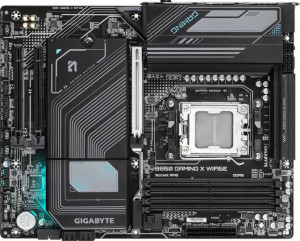
Gigabyte B850 Gaming X WiFi6E
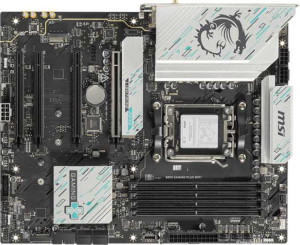
MSI B850 Gaming Plus WiFi

Gigabyte B850 Gaming X WiFi6E MSI B850 Gaming Plus WiFi

Overview

Welcome to our in-depth spec comparison between the Gigabyte B850 Gaming X WiFi6E and the MSI B850 Gaming Plus WiFi — two AM5 motherboards built on the B850 chipset that share a surprising amount of common ground. While both target enthusiast builders with DDR5 support, overclocking capability, and RGB lighting, they diverge in meaningful ways across wireless connectivity, rear port layout, expansion slots, and storage flexibility. Read on to find out which board fits your build best.

Common Features

  • Both boards use the AM5 CPU socket.
  • Both boards feature the B850 chipset.
  • Both boards have an ATX form factor.
  • Wi-Fi support is available on both products.
  • Bluetooth is available on both products.
  • Overclocking support is available on both products.
  • RGB lighting is present on both products.
  • Dual BIOS is available on both products.
  • Both boards support a maximum memory amount of 256GB.
  • Both boards support overclocked RAM speeds up to 8200 MHz.
  • Both boards have 4 memory slots.
  • Both boards use DDR5 memory.
  • Both boards have 2 memory channels.
  • ECC memory support is not available on either product.
  • Both boards have 1 USB 3.2 Gen 2 port (USB-A).
  • Neither board has USB 3.2 Gen 1 ports (USB-C), USB 3.2 Gen 2x2 ports, USB 4 40Gbps ports, USB 4 20Gbps ports, Thunderbolt 4 ports, or Thunderbolt 3 ports.
  • Both boards have 1 DisplayPort output.
  • Both boards have 4 USB 2.0 expansion ports, 4 SATA 3 connectors, 6 fan headers, and 3 M.2 sockets.
  • A TPM connector is present on both products.
  • Neither board has U.2 sockets or mSATA connectors.
  • Both boards have 1 PCIe 5.0 x16 slot and 2 PCIe x1 slots.
  • Neither board has PCIe 3.0 x16 slots, PCIe 2.0 x16 slots, PCIe x4 slots, PCIe x8 slots, or PCI slots.
  • Both boards support 7.1 audio channels.
  • Both boards support RAID 0 and RAID 1.
  • RAID 0+1 support is not available on either product.

Main Differences

  • Wi-Fi version goes up to Wi-Fi 6E on Gigabyte B850 Gaming X WiFi6E, while the MSI B850 Gaming Plus WiFi also adds Wi-Fi 7 (802.11be) support.
  • Bluetooth version is 5.3 on Gigabyte B850 Gaming X WiFi6E and 5.4 on MSI B850 Gaming Plus WiFi.
  • Easy BIOS reset is not available on Gigabyte B850 Gaming X WiFi6E but is present on MSI B850 Gaming Plus WiFi.
  • Height is 244 mm on Gigabyte B850 Gaming X WiFi6E and 243.8 mm on MSI B850 Gaming Plus WiFi.
  • Width is 305 mm on Gigabyte B850 Gaming X WiFi6E and 304.8 mm on MSI B850 Gaming Plus WiFi.
  • Maximum native RAM speed is 5200 MHz on Gigabyte B850 Gaming X WiFi6E and 5600 MHz on MSI B850 Gaming Plus WiFi.
  • USB 3.2 Gen 1 ports (USB-A) count is 3 on Gigabyte B850 Gaming X WiFi6E and 1 on MSI B850 Gaming Plus WiFi.
  • USB 3.2 Gen 2 ports (USB-C) count is 1 on Gigabyte B850 Gaming X WiFi6E and 2 on MSI B850 Gaming Plus WiFi.
  • USB 2.0 rear ports count is 3 on Gigabyte B850 Gaming X WiFi6E and 4 on MSI B850 Gaming Plus WiFi.
  • An HDMI output is present on Gigabyte B850 Gaming X WiFi6E but not available on MSI B850 Gaming Plus WiFi.
  • A PS/2 port is present on Gigabyte B850 Gaming X WiFi6E but not available on MSI B850 Gaming Plus WiFi.
  • USB 3.2 Gen 1 expansion ports count is 2 on Gigabyte B850 Gaming X WiFi6E and 4 on MSI B850 Gaming Plus WiFi.
  • USB 3.0 expansion ports count is 2 on Gigabyte B850 Gaming X WiFi6E and 4 on MSI B850 Gaming Plus WiFi.
  • A PCIe 4.0 x16 slot is not present on Gigabyte B850 Gaming X WiFi6E but is available on MSI B850 Gaming Plus WiFi.
  • S/PDIF Out port is not present on Gigabyte B850 Gaming X WiFi6E but is available on MSI B850 Gaming Plus WiFi.
  • Audio connector count is 3 on Gigabyte B850 Gaming X WiFi6E and 2 on MSI B850 Gaming Plus WiFi.
  • RAID 10 (1+0) support is present on Gigabyte B850 Gaming X WiFi6E but not available on MSI B850 Gaming Plus WiFi.
  • RAID 5 support is present on Gigabyte B850 Gaming X WiFi6E but not available on MSI B850 Gaming Plus WiFi.
Specs Comparison
Gigabyte B850 Gaming X WiFi6E

Gigabyte B850 Gaming X WiFi6E

MSI B850 Gaming Plus WiFi

MSI B850 Gaming Plus WiFi

General info:
CPU socket AM5 AM5
chipset B850 B850
form factor ATX ATX
release date January 2025 January 2025
supports Wi-Fi
Wi-Fi version Wi-Fi 4 (802.11n), Wi-Fi 5 (802.11ac), Wi-Fi 6 (802.11ax), Wi-Fi 6E (802.11ax) Wi-Fi 4 (802.11n), Wi-Fi 5 (802.11ac), Wi-Fi 6 (802.11ax), Wi-Fi 6E (802.11ax), Wi-Fi 7 (802.11be)
Has Bluetooth
Bluetooth version 5.3 5.4
Easy to overclock
has RGB lighting
Easy to reset BIOS
Has dual BIOS
has aptX
CPU sockets 1 1
Has integrated graphics
warranty period 3 years 3 years
height 244 mm 243.8 mm
width 305 mm 304.8 mm
Has integrated CPU

Both boards share the same foundational platform: the AM5 socket with a B850 chipset in a standard ATX form factor, with virtually identical dimensions (a negligible 0.2 mm difference). They both support overclocking, include RGB lighting, feature dual BIOS, and carry a 3-year warranty — so on the fundamentals, neither board has a structural advantage.

The real differentiators emerge in wireless connectivity. The MSI B850 Gaming Plus WiFi steps ahead with support for Wi-Fi 7 (802.11be), while the Gigabyte tops out at Wi-Fi 6E. Wi-Fi 7 delivers substantially higher theoretical throughput and lower latency — relevant today if you have a Wi-Fi 7 router, and increasingly important as that hardware becomes mainstream. The MSI also edges ahead on Bluetooth 5.4 versus 5.3 on the Gigabyte, offering marginally improved connection stability and reduced power consumption for peripherals. A second meaningful gap is BIOS accessibility: the MSI supports easy BIOS reset, while the Gigabyte does not — a practical convenience during overclocking or troubleshooting sessions.

For this spec group, the MSI B850 Gaming Plus WiFi holds a clear edge. Its Wi-Fi 7 support is the standout advantage — it is a genuinely future-proof feature absent from the Gigabyte — and the easier BIOS reset adds day-to-day usability. The Gigabyte is not deficient in any critical area, but if wireless performance and ease of maintenance matter to you, the MSI is the stronger pick based strictly on these specs.

Memory:
maximum memory amount 256GB 256GB
RAM speed (max) 5200 MHz 5600 MHz
overclocked RAM speed 8200 MHz 8200 MHz
memory slots 4 4
DDR memory version 5 5
memory channels 2 2
Supports ECC memory

The memory configurations on these two boards are nearly identical at a structural level: both offer 4 DIMM slots, dual-channel DDR5, a 256 GB maximum capacity, and a matched overclocking ceiling of 8200 MHz. Neither supports ECC memory, which is expected for consumer B850 boards. For most users — whether building a gaming rig or a content creation workstation — this shared foundation is more than adequate.

The only numerical gap lies in the native (non-overclocked) RAM speed ceiling: the MSI supports up to 5600 MHz out of the box, compared to 5200 MHz on the Gigabyte. That 400 MHz difference matters in a specific scenario — if you install DDR5-5600 kit and want it to run at its rated speed without touching XMP/EXPO profiles, the MSI accommodates it natively while the Gigabyte would require enabling an overclocking profile. In practice, the real-world performance delta between these speeds is modest, but the MSI offers slightly more headroom before you need to rely on manual tuning.

Overall, this category is nearly a wash. The MSI B850 Gaming Plus WiFi holds a narrow edge due to its higher native RAM speed support, which provides a small but tangible convenience advantage for users with faster DDR5 kits. However, since both boards share the same overclocking ceiling and slot configuration, neither meaningfully outclasses the other for memory flexibility.

Ports:
USB 3.2 Gen 2 ports (USB-A) 1 1
USB 3.2 Gen 1 ports (USB-A) 3 1
USB 3.2 Gen 2 ports (USB-C) 1 2
USB 3.2 Gen 1 ports (USB-C) 0 0
USB 2.0 ports 3 4
USB 3.2 Gen 2x2 ports 0 0
USB 4 40Gbps ports 0 0
USB 4 20Gbps ports 0 0
Thunderbolt 4 ports 0 0
Thunderbolt 3 ports 0 0
has an HDMI output
DisplayPort outputs 1 1
RJ45 ports 1 1
Has USB Type-C
eSATA ports 0 0
DVI outputs 0 0
has a VGA connector
PS/2 ports 1 0

Port selection is where these two boards diverge most visibly, and the differences reflect genuinely different design philosophies. The Gigabyte B850 Gaming X WiFi6E leans toward legacy-friendly breadth: it offers three USB 3.2 Gen 1 Type-A ports alongside one Gen 2 Type-A, giving it a stronger total count of high-speed USB-A connections — practical for users with mice, keyboards, headsets, and hubs that still rely on the standard Type-A form factor. It also includes a PS/2 port, a niche but occasionally valued feature for enthusiasts using older input devices or those who need interrupt-driven input during BIOS operations.

The MSI B850 Gaming Plus WiFi makes a different trade-off, cutting back to just one USB 3.2 Gen 1 Type-A port but doubling the modern USB-C presence to two Gen 2 Type-C ports. That second USB-C connector is increasingly useful as peripherals, external drives, and displays shift toward the format. More notably, the Gigabyte includes an HDMI output on the rear I/O while the MSI does not — a meaningful distinction for users who want a secondary display connection option alongside the shared single DisplayPort output.

Neither board includes USB4 or Thunderbolt, so both sit at the same high-end ceiling. On balance, the Gigabyte holds a modest edge here: the additional USB-A ports reduce the need for hubs in typical desktop setups, and the HDMI output adds a display flexibility that the MSI simply lacks. The MSI's dual USB-C is a genuine plus for modern workflows, but it does not fully offset the overall connectivity advantage the Gigabyte offers.
Connectors:
USB 3.2 Gen 1 ports (through expansion) 2 4
USB 2.0 ports (through expansion) 4 4
SATA 3 connectors 4 4
fan headers 6 6
USB 3.0 ports (through expansion) 2 4
M.2 sockets 3 3
Has TPM connector
U.2 sockets 0 0
Has mSATA connector
SATA 2 connectors 0 0

Internal connectors tell a lot about how a board handles expansion, and for the most part these two are closely matched. Both provide 3 M.2 sockets, 4 SATA 3 connectors, 6 fan headers, and a TPM connector — a well-rounded internal layout that suits builds ranging from compact single-drive setups to more storage-intensive configurations.

The one meaningful gap is in internal USB expansion headers. The MSI B850 Gaming Plus WiFi offers four USB 3.2 Gen 1 internal headers compared to the Gigabyte's two. This matters specifically when connecting front-panel USB hubs, all-in-one cooler controllers, or USB-based RGB controllers that consume internal headers rather than rear I/O ports. In a heavily accessorized build with multiple such devices, running out of internal USB 3.0 headers is a genuine bottleneck — and the MSI provides twice the headroom. USB 2.0 internal headers are identical at four each, so that side of the equation is balanced.

This category goes to the MSI B850 Gaming Plus WiFi, and specifically for builders who plan to populate their cases with modern components that rely on internal USB 3.0 connectivity. For a simpler build, the difference is negligible — but the MSI's doubled internal USB 3.2 Gen 1 header count is a tangible advantage in complex, feature-rich systems.

Expansion slots:
PCIe 4.0 x16 slots 0 1
PCIe 5.0 x16 slots 1 1
PCIe 3.0 x16 slots 0 0
PCIe x1 slots 2 2
PCI slots 0 0
PCIe 2.0 x16 slots 0 0
PCIe x4 slots 0 0
PCIe x8 slots 0 0

Expansion slot layout is a practical consideration that becomes relevant as soon as you think beyond a single GPU. Both boards lead with a PCIe 5.0 x16 slot — the current standard for high-end discrete graphics cards — and both include two PCIe x1 slots for add-in cards like capture cards or network adapters. For a straightforward single-GPU build, these two boards are effectively identical.

The distinction emerges when you need a second full-bandwidth slot. The MSI B850 Gaming Plus WiFi adds a PCIe 4.0 x16 slot, which the Gigabyte entirely omits. That second slot is valuable for users who want to run a dedicated capture card at x16 physical with more bandwidth than x1 allows, install a high-throughput add-in storage controller, or future-proof for a secondary GPU or accelerator in a non-gaming workload. PCIe 4.0 x16 still delivers substantial bandwidth — more than enough for any current single-device use case in that slot.

The MSI holds a clear advantage here. The additional PCIe 4.0 x16 slot meaningfully expands what you can install without compromising bandwidth, and it costs the MSI nothing in terms of the primary PCIe 5.0 slot. For users who know they will only ever seat a GPU, this gap is irrelevant — but for anyone planning a more complex build, the MSI offers noticeably more flexibility.

Audio:
audio channels 7.1 7.1
Has S/PDIF Out port
audio connectors 3 2

Audio is a category where both boards share the same core capability — 7.1-channel surround sound output — but diverge in how they route that audio. The Gigabyte B850 Gaming X WiFi6E provides 3 analog audio jacks, which is the standard complement for a full 7.1 analog setup, accommodating front, rear, and center/subwoofer channels without requiring any switching or sharing of ports. The MSI B850 Gaming Plus WiFi offers 2 analog jacks, which technically still supports 7.1 but may require software-based audio splitting for a full multi-speaker analog configuration.

Where the MSI compensates is with an S/PDIF optical output, absent on the Gigabyte. This matters for users feeding audio into an AV receiver, a DAC, or a home theater system — S/PDIF carries a clean digital signal that bypasses the motherboard's analog circuitry entirely, resulting in better noise isolation and compatibility with external audio hardware. It is a feature that appeals to a specific but discerning audience.

This category is genuinely a trade-off rather than a clean win for either side. The Gigabyte edges ahead for analog multi-speaker setups thanks to its additional jack, while the MSI is the stronger choice for anyone with digital audio equipment thanks to S/PDIF. Your preference here should be driven directly by how you plan to connect your audio hardware.

Storage:
Supports RAID 1
Supports RAID 10 (1+0)
Supports RAID 5
Supports RAID 0
Supports RAID 0+1

RAID support is a niche but telling spec — it reveals how much flexibility a board offers for users who want redundancy or performance striping across multiple drives. Both boards support RAID 0 (striping for speed) and RAID 1 (mirroring for redundancy), which covers the needs of the vast majority of consumer users who venture into RAID at all.

Beyond that baseline, the Gigabyte B850 Gaming X WiFi6E pulls ahead by also supporting RAID 5 and RAID 10. RAID 5 distributes parity data across drives to offer a balance of redundancy and storage efficiency — particularly useful for small NAS-like setups or workstations holding large media libraries. RAID 10 combines striping and mirroring for both speed and fault tolerance, making it the preferred choice for performance-sensitive workloads that also require data protection. The MSI B850 Gaming Plus WiFi supports neither of these configurations.

For anyone planning a multi-drive storage setup that goes beyond basic striping or simple mirroring, the Gigabyte holds a decisive advantage in this category. That said, the practical relevance depends heavily on the user: gamers and typical desktop builders rarely touch RAID at all, and both boards handle that common case equally. But for power users and prosumers who value storage flexibility, the Gigabyte's broader RAID support is a meaningful differentiator.

Comparison Summary & Verdict

Both the Gigabyte B850 Gaming X WiFi6E and the MSI B850 Gaming Plus WiFi are capable AM5 platforms, but each serves a subtly different builder. The Gigabyte B850 Gaming X WiFi6E stands out with its HDMI output, a PS/2 port, more USB-A ports, and broader RAID support including RAID 5 and RAID 10, making it a stronger pick for users who need legacy connectivity or advanced storage configurations. The MSI B850 Gaming Plus WiFi, on the other hand, pulls ahead with Wi-Fi 7, Bluetooth 5.4, a higher native RAM speed of 5600 MHz, an extra PCIe 4.0 x16 slot, more USB-C ports, an S/PDIF output, and easier BIOS reset functionality — advantages that benefit future-focused builders and content creators alike. Choose based on your connectivity priorities and expansion needs.

Gigabyte B850 Gaming X WiFi6E
Buy Gigabyte B850 Gaming X WiFi6E if...

Buy the Gigabyte B850 Gaming X WiFi6E if you need an HDMI output, a PS/2 port, more USB-A rear ports, or advanced RAID configurations including RAID 5 and RAID 10.

MSI B850 Gaming Plus WiFi
Buy MSI B850 Gaming Plus WiFi if...

Buy the MSI B850 Gaming Plus WiFi if you want cutting-edge Wi-Fi 7, faster native RAM speeds, an extra PCIe 4.0 x16 slot, more USB-C ports, and an S/PDIF output for a more future-proof and expandable build.