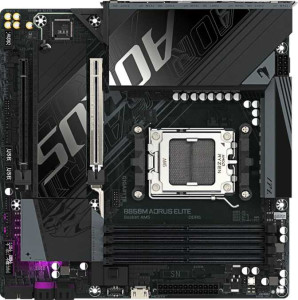
Gigabyte B850M Aorus Elite
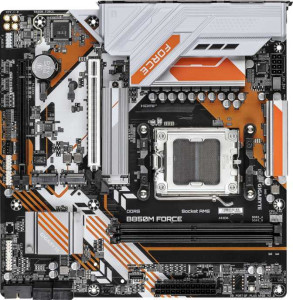
Gigabyte B850M Force

Gigabyte B850M Aorus Elite Gigabyte B850M Force

Overview

Welcome to our in-depth specification comparison between the Gigabyte B850M Aorus Elite and the Gigabyte B850M Force — two Micro-ATX motherboards sharing the same AM5 socket and B850 chipset foundation. While they agree on many fundamentals, key battlegrounds emerge around memory capacity and slot count, connectivity options, and board-level features like dual BIOS and ECC support. Read on to discover which board best suits your build.

Common Features

  • Both products use the AM5 CPU socket.
  • Both products feature the B850 chipset.
  • Both products have a Micro-ATX form factor.
  • Wi-Fi is not available on either product.
  • Bluetooth is not available on either product.
  • Overclocking is supported on both products.
  • RGB lighting is present on both products.
  • Easy BIOS reset is not available on either product.
  • Both products support a maximum RAM speed of 5200 MHz.
  • Both products use DDR5 memory.
  • Both products have 2 memory channels.
  • Neither product has USB 3.2 Gen 2x2, USB 4 40Gbps, USB 4 20Gbps, Thunderbolt 4, or Thunderbolt 3 ports.
  • Both products have 1 DisplayPort output.
  • Both products have 1 RJ45 port.
  • USB Type-C connectivity is available on both products.
  • Both products provide 2 USB 3.2 Gen 1 ports through expansion and 4 USB 2.0 ports through expansion.
  • Both products have 4 SATA 3 connectors.
  • A TPM connector is present on both products.
  • Neither product has an mSATA connector.
  • Both products have 1 PCIe 5.0 x16 slot and 1 PCIe x4 slot.
  • Both products support 7.1 audio channels.
  • Both products support RAID 0, RAID 1, RAID 5, and RAID 10.

Main Differences

  • Dual BIOS is present on Gigabyte B850M Force but not available on Gigabyte B850M Aorus Elite.
  • Maximum memory amount is 256GB on Gigabyte B850M Aorus Elite and 128GB on Gigabyte B850M Force.
  • Overclocked RAM speed reaches 8200 MHz on Gigabyte B850M Aorus Elite and 9600 MHz on Gigabyte B850M Force.
  • Memory slots number 4 on Gigabyte B850M Aorus Elite and 2 on Gigabyte B850M Force.
  • ECC memory support is present on Gigabyte B850M Force but not available on Gigabyte B850M Aorus Elite.
  • USB 3.2 Gen 2 ports (USB-A) number 2 on Gigabyte B850M Aorus Elite and 1 on Gigabyte B850M Force.
  • USB 3.2 Gen 1 ports (USB-A) number 5 on Gigabyte B850M Aorus Elite and 2 on Gigabyte B850M Force.
  • USB 3.2 Gen 2 ports (USB-C) number 1 on Gigabyte B850M Aorus Elite and 0 on Gigabyte B850M Force.
  • USB 3.2 Gen 1 ports (USB-C) number 0 on Gigabyte B850M Aorus Elite and 1 on Gigabyte B850M Force.
  • USB 2.0 ports number 4 on Gigabyte B850M Aorus Elite and 2 on Gigabyte B850M Force.
  • An HDMI output is present on Gigabyte B850M Force but not available on Gigabyte B850M Aorus Elite.
  • PS/2 ports number 0 on Gigabyte B850M Aorus Elite and 1 on Gigabyte B850M Force.
  • Fan headers number 6 on Gigabyte B850M Aorus Elite and 4 on Gigabyte B850M Force.
  • M.2 sockets number 2 on Gigabyte B850M Aorus Elite and 3 on Gigabyte B850M Force.
  • An S/PDIF Out port is present on Gigabyte B850M Aorus Elite but not available on Gigabyte B850M Force.
  • Audio connectors number 2 on Gigabyte B850M Aorus Elite and 3 on Gigabyte B850M Force.
Specs Comparison
Gigabyte B850M Aorus Elite

Gigabyte B850M Aorus Elite

Gigabyte B850M Force

Gigabyte B850M Force

General info:
CPU socket AM5 AM5
chipset B850 B850
form factor Micro-ATX Micro-ATX
release date January 2025 June 2025
supports Wi-Fi
Has Bluetooth
Easy to overclock
has RGB lighting
Easy to reset BIOS
Has dual BIOS
CPU sockets 1 1
Has integrated graphics
warranty period 3 years 3 years
height 244 mm 244 mm
width 244 mm 244 mm
Has integrated CPU

At their core, the Gigabyte B850M Aorus Elite and Gigabyte B850M Force share an identical foundation: both use the AM5 socket with a B850 chipset, adopt a Micro-ATX form factor at exactly 244 × 244 mm, support overclocking, feature RGB lighting, and carry a 3-year warranty. Neither board includes Wi-Fi, Bluetooth, integrated graphics, or an integrated CPU, and both lack an easy BIOS reset mechanism. For users evaluating platform fundamentals, these two boards are effectively identical in every meaningful general specification.

The sole differentiator in this group is that the B850M Force includes dual BIOS, while the Aorus Elite does not. In practice, dual BIOS means a backup firmware chip is present on the board — if a BIOS update goes wrong or the primary chip becomes corrupted, the system can automatically recover using the secondary chip. For overclockers or enthusiasts who frequently flash firmware, this is a meaningful safety net that can prevent a bricked board scenario requiring an RMA.

Within this spec group, the B850M Force holds a clear edge solely due to its dual BIOS feature. All other general characteristics are identical between the two boards. If BIOS resilience and firmware recovery safety matter to you — particularly given that overclocking is supported on both — the Force offers a more forgiving platform at no architectural cost.

Memory:
maximum memory amount 256GB 128GB
RAM speed (max) 5200 MHz 5200 MHz
overclocked RAM speed 8200 MHz 9600 MHz
memory slots 4 2
DDR memory version 5 5
memory channels 2 2
Supports ECC memory

The memory configurations of these two boards diverge significantly despite sharing the same DDR5 standard and a native 5200 MHz base speed. The Aorus Elite offers 4 memory slots with a maximum capacity of 256 GB, making it far more expandable for users who run memory-intensive workloads like video editing, virtualization, or large datasets. The Force, by contrast, is limited to 2 slots and a ceiling of 128 GB — half the capacity — which constrains long-term upgradeability.

Where the Force pushes back is in overclocked memory speed. Its overclocked ceiling of 9600 MHz is notably higher than the Aorus Elite's 8200 MHz, meaning enthusiasts chasing peak memory bandwidth for benchmarking or latency-sensitive tasks will find more headroom on the Force. Additionally, the Force uniquely supports ECC memory, which provides error-correcting capability useful in workstation or near-professional environments where data integrity is critical — a feature entirely absent on the Aorus Elite.

Neither board holds a clean sweep here: the Aorus Elite wins on capacity and slot count, making it the better choice for users who need to scale up RAM over time. The Force wins on overclocked speed ceiling and ECC support, appealing to enthusiasts and users with reliability-focused workloads. The right pick depends squarely on whether raw expandability or peak memory performance matters more to you.

Ports:
USB 3.2 Gen 2 ports (USB-A) 2 1
USB 3.2 Gen 1 ports (USB-A) 5 2
USB 3.2 Gen 2 ports (USB-C) 1 0
USB 3.2 Gen 1 ports (USB-C) 0 1
USB 2.0 ports 4 2
USB 3.2 Gen 2x2 ports 0 0
USB 4 40Gbps ports 0 0
USB 4 20Gbps ports 0 0
Thunderbolt 4 ports 0 0
Thunderbolt 3 ports 0 0
has an HDMI output
DisplayPort outputs 1 1
RJ45 ports 1 1
Has USB Type-C
eSATA ports 0 0
DVI outputs 0 0
has a VGA connector
PS/2 ports 0 1

Raw USB connectivity heavily favors the Aorus Elite. It provides a total of 12 rear USB ports across USB 2.0, Gen 1, and Gen 2 standards, compared to just 6 on the Force. More importantly, the Aorus Elite includes a USB 3.2 Gen 2 Type-C port (10 Gbps), while the Force only offers a slower USB 3.2 Gen 1 Type-C (5 Gbps) — a meaningful difference for users connecting modern external SSDs or high-speed peripherals via USB-C.

On video output, the two boards swap advantages. The Force adds an HDMI port alongside its DisplayPort, giving it dual video output options — useful for users relying on AMD integrated graphics or plugging in a second display without a dedicated GPU. The Aorus Elite has only a single DisplayPort output, which limits flexibility in integrated graphics scenarios. The Force also carries a PS/2 port, a legacy connector that occasionally matters for specific input devices or KVM setups, though it is largely irrelevant to most modern builds.

Overall, the Aorus Elite holds the stronger position in this group for most users — its significantly higher USB port count and faster USB-C standard make it more practical for peripheral-heavy desks. The Force partially compensates with dual video output, but that advantage is narrow and situational. Users who prioritize connectivity breadth will find the Aorus Elite the more capable board here.

Connectors:
USB 3.2 Gen 1 ports (through expansion) 2 2
USB 2.0 ports (through expansion) 4 4
SATA 3 connectors 4 4
fan headers 6 4
USB 3.0 ports (through expansion) 2 2
M.2 sockets 2 3
Has TPM connector
U.2 sockets 0 0
Has mSATA connector
SATA 2 connectors 0 0

Internal connector parity is strong between these two boards — both offer identical expansion USB headers, 4 SATA 3 connectors, and a TPM header. The real divergence comes down to two specs that reflect different build priorities: M.2 socket count and fan header count.

The Force pulls ahead with 3 M.2 sockets versus the Aorus Elite's 2. That extra slot is genuinely useful for users building NVMe-heavy systems — think a dedicated OS drive, a fast scratch or game storage drive, and a third for backup or additional capacity, all without touching any SATA ports. For storage-focused builds, this is a meaningful structural advantage. The Aorus Elite, meanwhile, counters with 6 fan headers compared to the Force's 4. Two additional headers may seem minor, but in a well-cooled system with multiple case fans, a CPU cooler, and a radiator pump, running out of headers forces users toward fan hubs or splitters — added complexity the Aorus Elite sidesteps natively.

This group is a genuine split decision: the Force is the stronger choice for storage-heavy configurations, while the Aorus Elite better serves builds with elaborate cooling setups. Neither board dominates outright — the right advantage depends entirely on whether your build is bottlenecked by drive slots or fan control flexibility.

Expansion slots:
PCIe 4.0 x16 slots 0 0
PCIe 5.0 x16 slots 1 1
PCIe 3.0 x16 slots 0 0
PCIe x1 slots 0 0
PCI slots 0 0
PCIe 2.0 x16 slots 0 0
PCIe x4 slots 1 1
PCIe x8 slots 0 0

Expansion slot configuration is identical across both boards, leaving no room for differentiation here. Each provides one PCIe 5.0 x16 slot for a primary GPU and one PCIe x4 slot for secondary expansion — a layout typical of Micro-ATX B850 designs that prioritizes simplicity over multi-GPU or multi-card flexibility.

The PCIe 5.0 x16 slot is worth noting as a shared strength: it delivers double the bandwidth of PCIe 4.0, ensuring neither board will bottleneck current or near-future discrete GPUs. The secondary x4 slot can accommodate add-in cards such as additional NVMe controllers, capture cards, or network adapters, though its bandwidth ceiling means it is unsuited for a second full-performance GPU.

This group is a complete tie — there is no distinction between the Aorus Elite and the Force in expansion slot configuration. Buyers for whom multi-slot expansion is a priority should note that the Micro-ATX form factor itself is the limiting factor here, not a difference between these two specific boards.

Audio:
audio channels 7.1 7.1
Has S/PDIF Out port
audio connectors 2 3

Both boards support 7.1 surround sound, so the underlying audio capability is equivalent for anyone running a multi-speaker setup. The split comes down to how that audio is delivered. The Aorus Elite includes an S/PDIF optical output, which allows a direct digital audio connection to external receivers, soundbars, or DACs — keeping the signal clean and free from analog interference inside the case. The Force omits S/PDIF entirely, closing off that option for users with optical-equipped audio equipment.

The Force responds with 3 analog audio connectors versus the Aorus Elite's 2, offering an extra 3.5mm jack on the rear panel. In a 7.1 analog setup, more connectors mean less reliance on a front panel header to complete the full speaker configuration, which can simplify cable management and reduce signal path length for rear-panel connections.

The verdict here hinges on use case: users with a digital audio receiver or optical DAC will find the Aorus Elite the more capable board thanks to its S/PDIF output. For those running a purely analog multi-speaker or headphone setup, the Force's extra connector offers a marginal convenience advantage. Neither board dominates unconditionally, but the S/PDIF port represents a more distinctive and harder-to-replicate feature, giving the Aorus Elite a slight overall edge in audio connectivity flexibility.

Storage:
Supports RAID 1
Supports RAID 10 (1+0)
Supports RAID 5
Supports RAID 0
Supports RAID 0+1

Storage configuration is a straightforward tie. Both the Aorus Elite and the Force support the same set of RAID modes — RAID 0, RAID 1, RAID 5, and RAID 10 — and neither supports RAID 0+1. This covers the full range of practical RAID use cases for a consumer or prosumer build: RAID 0 for striped performance, RAID 1 for mirrored redundancy, RAID 5 for parity-based fault tolerance, and RAID 10 for a combined performance-and-redundancy configuration.

There is no differentiator to analyze here — every supported and unsupported RAID mode is identical across both boards. Users planning any of the four supported configurations can proceed with either board without compromise.

Comparison Summary & Verdict

Both the Gigabyte B850M Aorus Elite and the Gigabyte B850M Force are capable B850 Micro-ATX boards, but they serve distinctly different builders. The Gigabyte B850M Aorus Elite stands out with four memory slots and up to 256GB of RAM, more USB ports across the rear panel, six fan headers, and an S/PDIF output — making it the stronger choice for enthusiasts who need maximum expandability and connectivity. The Gigabyte B850M Force, on the other hand, appeals to users who value dual BIOS reliability, ECC memory support, a higher overclocked RAM ceiling of 9600 MHz, three M.2 sockets, and an HDMI output for convenient display connectivity. If raw expansion and port variety matter most, the Aorus Elite wins out; if stability features and storage flexibility are your priority, the Force is the smarter pick.

Gigabyte B850M Aorus Elite
Buy Gigabyte B850M Aorus Elite if...

Buy the Gigabyte B850M Aorus Elite if you need four memory slots with up to 256GB of RAM, more USB connectivity, and a larger number of fan headers for a fully equipped enthusiast build.

Gigabyte B850M Force
Buy Gigabyte B850M Force if...

Buy the Gigabyte B850M Force if you prioritize dual BIOS protection, ECC memory support, three M.2 sockets, and a higher overclocked RAM speed ceiling of 9600 MHz.