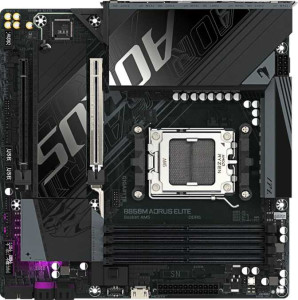
Gigabyte B850M Aorus Elite
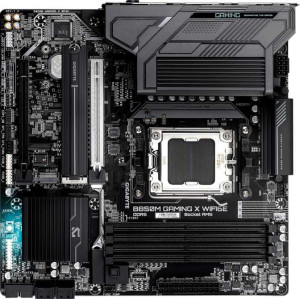
Gigabyte B850M Gaming X WiFi6E

Gigabyte B850M Aorus Elite Gigabyte B850M Gaming X WiFi6E

Overview

Welcome to our detailed spec comparison between the Gigabyte B850M Aorus Elite and the Gigabyte B850M Gaming X WiFi6E. Both are Micro-ATX motherboards built on the B850 chipset with AM5 socket support, sharing a strong common foundation in memory, storage, and expansion capabilities. Yet they diverge in meaningful ways, particularly around connectivity options, rear I/O port counts, and audio features — making the choice between them far from trivial for the discerning builder.

Common Features

  • Both products use the AM5 CPU socket.
  • Both products feature the B850 chipset.
  • Both products have a Micro-ATX form factor.
  • Overclocking is supported on both products.
  • RGB lighting is present on both products.
  • Easy BIOS reset is not available on either product.
  • Both products have a single CPU socket.
  • Integrated graphics are not available on either product.
  • Both products support a maximum memory amount of 256GB.
  • Both products have a maximum RAM speed of 5200 MHz and an overclocked RAM speed of 8200 MHz.
  • Both products have 4 memory slots and support DDR5 memory across 2 channels.
  • ECC memory support is not available on either product.
  • Both products have 1 USB 3.2 Gen 2 USB-C port, 4 USB 2.0 ports, and no USB 3.2 Gen 1 USB-C ports.
  • Neither product has USB 3.2 Gen 2x2, USB 4, Thunderbolt 3, or Thunderbolt 4 ports.
  • Both products have 2 M.2 sockets, 4 SATA 3 connectors, and no U.2 or mSATA connectors.
  • Both products include a TPM connector.
  • Both products provide 2 USB 3.2 Gen 1 and 4 USB 2.0 ports through expansion.
  • Both products have 1 PCIe 5.0 x16 slot and 1 PCIe x4 slot, with no other PCIe slot types.
  • Both products support 7.1 audio channels.
  • Both products support RAID 0, RAID 1, RAID 5, and RAID 10, but neither supports RAID 0+1.

Main Differences

  • Wi-Fi support is present on the Gigabyte B850M Gaming X WiFi6E but not available on the Gigabyte B850M Aorus Elite.
  • Bluetooth support is present on the Gigabyte B850M Gaming X WiFi6E but not available on the Gigabyte B850M Aorus Elite.
  • Dual BIOS is present on the Gigabyte B850M Gaming X WiFi6E but not available on the Gigabyte B850M Aorus Elite.
  • USB 3.2 Gen 2 USB-A ports number 2 on the Gigabyte B850M Aorus Elite and 1 on the Gigabyte B850M Gaming X WiFi6E.
  • USB 3.2 Gen 1 USB-A ports number 5 on the Gigabyte B850M Aorus Elite and 2 on the Gigabyte B850M Gaming X WiFi6E.
  • HDMI output is present on the Gigabyte B850M Gaming X WiFi6E but not available on the Gigabyte B850M Aorus Elite.
  • DisplayPort outputs number 1 on the Gigabyte B850M Aorus Elite and 2 on the Gigabyte B850M Gaming X WiFi6E.
  • Fan headers number 6 on the Gigabyte B850M Aorus Elite and 4 on the Gigabyte B850M Gaming X WiFi6E.
  • S/PDIF Out port is present on the Gigabyte B850M Aorus Elite but not available on the Gigabyte B850M Gaming X WiFi6E.
  • Audio connectors number 2 on the Gigabyte B850M Aorus Elite and 3 on the Gigabyte B850M Gaming X WiFi6E.
Specs Comparison
Gigabyte B850M Aorus Elite

Gigabyte B850M Aorus Elite

Gigabyte B850M Gaming X WiFi6E

Gigabyte B850M Gaming X WiFi6E

General info:
CPU socket AM5 AM5
chipset B850 B850
form factor Micro-ATX Micro-ATX
release date January 2025 January 2025
supports Wi-Fi
Has Bluetooth
Easy to overclock
has RGB lighting
Easy to reset BIOS
Has dual BIOS
CPU sockets 1 1
Has integrated graphics
warranty period 3 years 3 years
height 244 mm 244 mm
width 244 mm 244 mm
Has integrated CPU

At their core, both boards share the same fundamental platform: the AM5 socket with a B850 chipset in a Micro-ATX (244 × 244 mm) form factor, backed by an identical 3-year warranty. Both support overclocking and feature RGB lighting, making them competitive options for budget-to-mid-range AMD Ryzen builds where physical footprint and platform compatibility matter equally.

The meaningful separation between these two boards lies in connectivity and resilience features. The Gigabyte B850M Gaming X WiFi6E includes built-in Wi-Fi 6E and Bluetooth, which the Aorus Elite completely lacks. In practical terms, this means the Gaming X WiFi6E can be placed anywhere without routing an Ethernet cable — a real advantage in living-room builds, small offices, or cases where cable management is a concern. On top of that, the Gaming X WiFi6E adds dual BIOS, a backup firmware chip that can recover the board from a failed or corrupted BIOS flash — a meaningful safety net for users who plan to update firmware regularly or push overclocking boundaries.

For this spec group, the Gaming X WiFi6E holds a clear advantage. It delivers every feature the Aorus Elite offers, and adds wireless connectivity and dual BIOS protection on top. The Aorus Elite is only the better pick if the buyer already has a wired network setup and wants to save money — but purely on general specs, the Gaming X WiFi6E is the more capable and versatile board.
Memory:
maximum memory amount 256GB 256GB
RAM speed (max) 5200 MHz 5200 MHz
overclocked RAM speed 8200 MHz 8200 MHz
memory slots 4 4
DDR memory version 5 5
memory channels 2 2
Supports ECC memory

When it comes to memory, these two boards are indistinguishable on paper. Both support DDR5 across 4 slots in a dual-channel configuration, with a maximum capacity of 256 GB — enough headroom for even the most demanding workstation use cases, far beyond what typical gaming or productivity builds require.

The bandwidth story is equally matched: a native 5200 MHz ceiling with overclocked support reaching up to 8200 MHz. That headroom matters for enthusiasts who want to push fast DDR5 kits via EXPO or XMP profiles, as higher memory speeds on Ryzen platforms can meaningfully improve CPU-bound performance in gaming and content creation by reducing memory latency. The fact that both boards reach the same 8200 MHz ceiling means neither offers a competitive edge for memory tuning.

This group is a clean tie. Every single memory specification is shared between the Aorus Elite and the Gaming X WiFi6E, so memory capability should play no role in choosing between them. The decision should rest entirely on the differentiators found in other spec groups.

Ports:
USB 3.2 Gen 2 ports (USB-A) 2 1
USB 3.2 Gen 1 ports (USB-A) 5 2
USB 3.2 Gen 2 ports (USB-C) 1 1
USB 3.2 Gen 1 ports (USB-C) 0 0
USB 2.0 ports 4 4
USB 3.2 Gen 2x2 ports 0 0
USB 4 40Gbps ports 0 0
USB 4 20Gbps ports 0 0
Thunderbolt 4 ports 0 0
Thunderbolt 3 ports 0 0
has an HDMI output
DisplayPort outputs 1 2
RJ45 ports 1 1
Has USB Type-C
eSATA ports 0 0
DVI outputs 0 0
has a VGA connector
PS/2 ports 0 0

USB connectivity is where the Aorus Elite pulls ahead in a meaningful way. It offers a total of 7 high-speed USB-A ports (2× Gen 2 at 10 Gbps and 5× Gen 1 at 5 Gbps), compared to just 3 on the Gaming X WiFi6E (1× Gen 2 and 2× Gen 1). For users with dense peripheral setups — multiple external drives, input devices, audio interfaces, or capture cards — this difference is immediately felt in day-to-day usability, especially given that both boards share the same four USB 2.0 ports and a single Gen 2 USB-C.

Display output tells the opposite story. The Gaming X WiFi6E supports two DisplayPort outputs plus HDMI, enabling up to three simultaneous displays when using a CPU with integrated graphics — or at minimum offering broader compatibility across monitor types. The Aorus Elite is limited to a single DisplayPort with no HDMI at all, which is a real constraint for multi-monitor productivity setups or users who rely on HDMI for TV connectivity.

Neither board dominates outright — the advantage depends entirely on the use case. The Aorus Elite is the stronger pick for peripheral-heavy builds where USB port count is at a premium, while the Gaming X WiFi6E suits multi-display or mixed-connector environments better. Users who need both should factor in a USB hub or DisplayPort adapter as part of their build budget.

Connectors:
USB 3.2 Gen 1 ports (through expansion) 2 2
USB 2.0 ports (through expansion) 4 4
SATA 3 connectors 4 4
fan headers 6 4
USB 3.0 ports (through expansion) 2 2
M.2 sockets 2 2
Has TPM connector
U.2 sockets 0 0
Has mSATA connector
SATA 2 connectors 0 0

Internal connectors are nearly identical across both boards. Storage capacity is the same — 2× M.2 sockets and 4× SATA 3 ports — providing enough flexibility for a fast NVMe boot drive alongside additional SSDs or HDDs. Expansion USB headers, TPM support, and the absence of legacy connectors like mSATA or U.2 are all shared, so neither board offers a meaningful edge in storage or security connectivity.

The one concrete differentiator in this group is fan headers. The Aorus Elite provides 6 fan headers versus 4 on the Gaming X WiFi6E. While four headers is adequate for a basic build, the extra two on the Aorus Elite matter in thermally demanding setups — think radiator-heavy all-in-one coolers, multi-fan cases, or configurations where a dedicated pump header and several chassis fans all need direct motherboard control. Relying on splitter cables as a workaround sacrifices individual fan speed control, which can impact both noise levels and cooling performance.

For this group, the Aorus Elite has a clear edge — and specifically for builders who prioritize robust thermal management. For a simple single-fan cooler and two or three case fans, the Gaming X WiFi6E's four headers are sufficient, but anyone planning a more elaborate cooling setup will genuinely benefit from the Aorus Elite's additional headers.

Expansion slots:
PCIe 4.0 x16 slots 0 0
PCIe 5.0 x16 slots 1 1
PCIe 3.0 x16 slots 0 0
PCIe x1 slots 0 0
PCI slots 0 0
PCIe 2.0 x16 slots 0 0
PCIe x4 slots 1 1
PCIe x8 slots 0 0

Expansion slot configurations are identical on both boards: one PCIe 5.0 x16 slot for the primary GPU and one PCIe x4 slot for secondary cards or adapters. The PCIe 5.0 x16 slot is the headline feature here — it doubles the theoretical bandwidth of PCIe 4.0, ensuring these boards are ready for current high-end graphics cards and next-generation GPUs without becoming a bottleneck.

The secondary PCIe x4 slot adds practical versatility for add-in cards such as capture cards, additional NVMe adapters, or network cards — though its bandwidth is naturally more constrained than a full x16 lane. Notably, neither board includes any PCIe x1 slots, which could be a minor limitation for users who still rely on legacy low-profile expansion cards.

This group is a complete tie. Every slot type, generation, and count is shared between the Aorus Elite and the Gaming X WiFi6E, so expansion capability offers no basis for differentiation here. Buyers focused on GPU and add-in card flexibility will find both boards equally capable.

Audio:
audio channels 7.1 7.1
Has S/PDIF Out port
audio connectors 2 3

Both boards deliver 7.1 surround sound support, which is the standard ceiling for onboard audio and covers the full range of surround speaker configurations and high-fidelity headphone setups. For the majority of users, this shared foundation means neither board is at a disadvantage in terms of audio quality potential.

The differences lie in output flexibility. The Aorus Elite includes an S/PDIF optical output — a digital connection that passes audio bitstream directly to an external DAC, AV receiver, or soundbar, bypassing the motherboard's analog circuitry entirely. This is particularly valuable for home theater setups or users with dedicated external audio hardware. The Gaming X WiFi6E drops S/PDIF entirely but compensates with 3 analog audio connectors versus the Aorus Elite's 2, offering more simultaneous analog connections for multi-device or front/rear/side speaker arrangements without a splitter.

Which board has the edge here depends on the audio setup. The Aorus Elite is better suited for users with external digital audio equipment, where S/PDIF is a meaningful quality upgrade path. The Gaming X WiFi6E caters better to analog multi-speaker configurations. Neither is strictly superior — they simply serve different audio priorities.

Storage:
Supports RAID 1
Supports RAID 10 (1+0)
Supports RAID 5
Supports RAID 0
Supports RAID 0+1

RAID support is identical across both boards. Each offers RAID 0, 1, 5, and 10 — the four configurations that cover virtually every practical use case, from pure performance striping (RAID 0) to mirrored redundancy (RAID 1), distributed parity for a balance of speed and fault tolerance (RAID 5), and the combined stripe-and-mirror approach of RAID 10 for demanding workloads.

Neither board supports RAID 0+1, but this is rarely a meaningful omission — RAID 10 achieves a functionally similar result and is generally preferred in practice due to its superior rebuild behavior. The presence of RAID 5 is worth noting for users building small NAS-style storage arrays, as it allows for single-drive fault tolerance without sacrificing as much total capacity as RAID 1 or 10.

This is another complete tie. Storage redundancy and array configuration options are an exact match on both boards, making this group irrelevant to the buying decision. Users with specific RAID requirements will find either board equally capable.

Comparison Summary & Verdict

After examining the full specification set, both boards deliver identical performance foundations — DDR5 support up to 8200 MHz overclocked, dual M.2 sockets, a PCIe 5.0 x16 slot, and comprehensive RAID support. The Gigabyte B850M Gaming X WiFi6E pulls ahead for users who need built-in Wi-Fi 6E and Bluetooth, dual BIOS protection, more DisplayPort outputs, and an HDMI port — making it the stronger pick for compact, wireless-first builds. The Gigabyte B850M Aorus Elite, on the other hand, wins on wired USB connectivity with more USB 3.2 Gen 1 and Gen 2 Type-A ports, a higher fan header count of 6, and an S/PDIF optical audio output — suiting enthusiasts who prioritize cable management, cooling control, and a dedicated home-theater audio chain.

Gigabyte B850M Aorus Elite
Buy Gigabyte B850M Aorus Elite if...

Buy the Gigabyte B850M Aorus Elite if you want more wired USB ports, greater fan header control with 6 headers, and an S/PDIF optical audio output for a home-theater setup.

Gigabyte B850M Gaming X WiFi6E
Buy Gigabyte B850M Gaming X WiFi6E if...

Buy the Gigabyte B850M Gaming X WiFi6E if you need built-in Wi-Fi 6E and Bluetooth, dual BIOS redundancy, and more display outputs including HDMI.