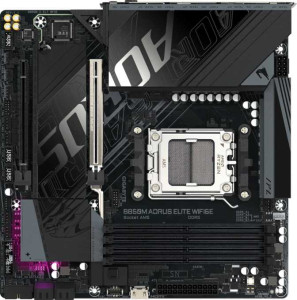
Gigabyte B850M Aorus Elite Wi-Fi6E
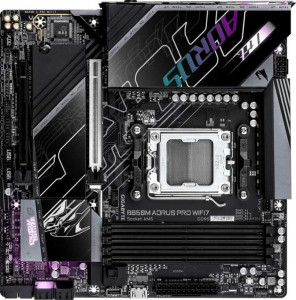
Gigabyte B850M Aorus Pro Wi-Fi7

Gigabyte B850M Aorus Elite Wi-Fi6E Gigabyte B850M Aorus Pro Wi-Fi7

Overview

Welcome to our head-to-head comparison of the Gigabyte B850M Aorus Elite Wi-Fi6E and the Gigabyte B850M Aorus Pro Wi-Fi7 — two Micro-ATX motherboards built on the same AM5 socket and B850 chipset foundation. While these boards share a surprisingly large set of specifications, the real story lies in their differences: wireless connectivity generations, overclocked memory headroom, and display output options each play a role in setting them apart. Read on to discover which board fits your build.

Common Features

  • Both motherboards use the AM5 CPU socket.
  • Both boards are built on the B850 chipset.
  • Both adopt the Micro-ATX form factor.
  • Wi-Fi connectivity is supported on both products.
  • Bluetooth is available on both products.
  • RGB lighting is present on both products.
  • Overclocking is supported on both products.
  • Easy BIOS reset is not available on either product.
  • Both boards support a maximum of 256GB of RAM.
  • The maximum standard RAM speed is 5200 MHz on both products.
  • Both boards have 4 memory slots.
  • Both use DDR5 memory.
  • Both operate in dual-channel memory mode.
  • ECC memory is not supported on either product.
  • Both boards provide 2 USB 3.2 Gen 2 Type-A ports.
  • Both boards provide 5 USB 3.2 Gen 1 Type-A ports.
  • Both boards provide 1 USB 3.2 Gen 2 Type-C port.
  • Both boards provide 4 USB 2.0 ports.
  • USB 3.2 Gen 2x2 ports are not present on either product.
  • USB 4 ports are not available on either product.
  • Both boards include 2 USB 3.2 Gen 1 ports through expansion.
  • Both boards include 1 USB 3.2 Gen 2x2 port through expansion.
  • Both boards include 4 USB 2.0 ports through expansion.
  • Both boards have 4 SATA 3 connectors.
  • Both boards feature 6 fan headers.
  • Both boards have 2 M.2 sockets.
  • A TPM connector is present on both products.
  • Both boards have 1 PCIe 5.0 x16 slot.
  • Both boards have 1 PCIe x4 slot.
  • Both boards deliver a 120 dB signal-to-noise ratio on the DAC.
  • Both boards support 7.1 audio channels.
  • An S/PDIF Out port is available on both products.
  • Both boards have 2 audio connectors.
  • RAID 0 is supported on both products.
  • RAID 1 is supported on both products.
  • RAID 5 is supported on both products.
  • RAID 10 is supported on both products.
  • RAID 0+1 is not supported on either product.

Main Differences

  • Wi-Fi 7 (802.11be) support is present on Gigabyte B850M Aorus Pro Wi-Fi7 but not available on Gigabyte B850M Aorus Elite Wi-Fi6E.
  • Bluetooth version is 5.4 on Gigabyte B850M Aorus Pro Wi-Fi7 and 5.3 on Gigabyte B850M Aorus Elite Wi-Fi6E.
  • The maximum overclocked RAM speed is 8600 MHz on Gigabyte B850M Aorus Pro Wi-Fi7 and 8200 MHz on Gigabyte B850M Aorus Elite Wi-Fi6E.
  • An HDMI output is present on Gigabyte B850M Aorus Pro Wi-Fi7 but not available on Gigabyte B850M Aorus Elite Wi-Fi6E.
  • DisplayPort output is available on Gigabyte B850M Aorus Elite Wi-Fi6E (1 port) but not present on Gigabyte B850M Aorus Pro Wi-Fi7.
Specs Comparison
Gigabyte B850M Aorus Elite Wi-Fi6E

Gigabyte B850M Aorus Elite Wi-Fi6E

Gigabyte B850M Aorus Pro Wi-Fi7

Gigabyte B850M Aorus Pro Wi-Fi7

General info:
CPU socket AM5 AM5
chipset B850 B850
form factor Micro-ATX Micro-ATX
release date January 2025 January 2025
supports Wi-Fi
Wi-Fi version Wi-Fi 4 (802.11n), Wi-Fi 5 (802.11ac), Wi-Fi 6 (802.11ax), Wi-Fi 6E (802.11ax) Wi-Fi 4 (802.11n), Wi-Fi 5 (802.11ac), Wi-Fi 6 (802.11ax), Wi-Fi 6E (802.11ax), Wi-Fi 7 (802.11be)
Has Bluetooth
Bluetooth version 5.3 5.4
Easy to overclock
has RGB lighting
Easy to reset BIOS
Has dual BIOS
has aptX
CPU sockets 1 1
Has integrated graphics
warranty period 3 years 3 years
height 244 mm 244 mm
width 244 mm 244 mm
Has integrated CPU

At their core, the Gigabyte B850M Aorus Elite Wi-Fi6E and the Gigabyte B850M Aorus Pro Wi-Fi7 are built on the same foundation: both use the AM5 socket with a B850 chipset, share the compact Micro-ATX form factor (identical at 244 × 244 mm), support overclocking, include RGB lighting, and come with a 3-year warranty. For the vast majority of general use cases, these two boards are functionally indistinguishable on paper.

The only meaningful differences in this group come down to wireless connectivity. The Pro steps up to Wi-Fi 7 (802.11be), while the Elite tops out at Wi-Fi 6E (802.11ax). In practice, Wi-Fi 7 introduces multi-link operation and significantly higher theoretical throughput — relevant if you own a Wi-Fi 7 router and work with large file transfers or low-latency streaming. Similarly, the Pro carries Bluetooth 5.4 versus 5.3 on the Elite; the gap here is marginal for most users, offering only minor improvements in connection stability and power efficiency.

The Aorus Pro Wi-Fi7 holds a clear, if narrow, edge in this group solely due to its superior wireless stack. If you already have or plan to upgrade to a Wi-Fi 7 router, the Pro is the forward-looking choice. Otherwise, the Elite's wireless capabilities are entirely adequate for current real-world demands, and the two boards are otherwise evenly matched across every other general specification.

Memory:
maximum memory amount 256GB 256GB
RAM speed (max) 5200 MHz 5200 MHz
overclocked RAM speed 8200 MHz 8600 MHz
memory slots 4 4
DDR memory version 5 5
memory channels 2 2
Supports ECC memory

Memory configurations are nearly identical across both boards. Each supports DDR5 RAM across 4 slots in a dual-channel arrangement, with a maximum capacity of 256GB and a native rated speed of 5200 MHz. For everyday builds, this shared baseline means both boards will handle gaming, content creation, and multitasking workloads equally well.

Where a subtle difference emerges is in overclocked memory headroom. The Aorus Pro Wi-Fi7 supports RAM overclocking up to 8600 MHz, while the Aorus Elite Wi-Fi6E caps at 8200 MHz. That 400 MHz gap matters only to enthusiasts who plan to push high-frequency DDR5 kits to their absolute limits — in real-world applications like gaming or productivity, performance differences at those extremes are rarely perceptible.

Overall, memory is essentially a tie for mainstream users. The Pro holds a slim technical edge for overclockers chasing the highest possible DDR5 frequencies, but the practical impact of that advantage is limited to a narrow audience. Anyone not planning aggressive memory overclocking will find both boards equally capable in this category.

Ports:
USB 3.2 Gen 2 ports (USB-A) 2 2
USB 3.2 Gen 1 ports (USB-A) 5 5
USB 3.2 Gen 2 ports (USB-C) 1 1
USB 3.2 Gen 1 ports (USB-C) 0 0
USB 2.0 ports 4 4
USB 3.2 Gen 2x2 ports 0 0
USB 4 40Gbps ports 0 0
USB 4 20Gbps ports 0 0
Thunderbolt 4 ports 0 0
Thunderbolt 3 ports 0 0
has an HDMI output
DisplayPort outputs 1 0
RJ45 ports 1 1
Has USB Type-C
eSATA ports 0 0
DVI outputs 0 0
has a VGA connector
PS/2 ports 0 0

Both boards offer an identical USB layout — a well-rounded mix of 2 USB 3.2 Gen 2 Type-A, 5 USB 3.2 Gen 1 Type-A, 1 USB 3.2 Gen 2 Type-C, and 4 USB 2.0 ports — alongside a single RJ45 ethernet jack. Neither board offers USB4, Thunderbolt, or eSATA, which is typical for B850-tier motherboards. For connectivity breadth on the USB side, these two are completely evenly matched.

The only divergence in this group is the display output, and it comes down to connector preference rather than capability. The Aorus Elite Wi-Fi6E provides a DisplayPort output, while the Aorus Pro Wi-Fi7 opts for an HDMI output instead. Neither board includes both. This matters primarily for users leveraging AMD's integrated graphics on compatible CPUs — DisplayPort is generally favored in professional and multi-monitor desktop setups, whereas HDMI is more universally compatible with consumer displays and TVs out of the box.

Declared a tie for most builders, but the display output choice could tip the scales depending on your monitor. If your display only has HDMI, the Pro is immediately plug-and-play; if you're running a DisplayPort panel, the Elite wins by default. Neither board holds a broader advantage in this category.

Connectors:
USB 3.2 Gen 1 ports (through expansion) 2 2
USB 3.2 Gen 2x2 ports (through expansion) 1 1
USB 2.0 ports (through expansion) 4 4
SATA 3 connectors 4 4
fan headers 6 6
USB 3.0 ports (through expansion) 2 2
M.2 sockets 2 2
Has TPM connector
U.2 sockets 0 0
Has mSATA connector
SATA 2 connectors 0 0

Internal connectors tell a lot about a board's expandability potential, and here the two boards are point-for-point identical. Both offer 2 M.2 sockets for NVMe storage, 4 SATA 3 connectors for traditional drives, and 6 fan headers — a generous count for a Micro-ATX board that gives builders solid cooling control without needing an external fan hub in most configurations.

Expansion USB headers follow the same pattern: each board provides internal headers supporting USB 3.2 Gen 2x2, USB 3.2 Gen 1, and USB 2.0 passthrough to the case, which covers front-panel connectivity for virtually any modern chassis. The presence of a TPM connector on both is a practical checkbox for Windows 11 compliance and enterprise security needs.

This group is a complete tie — every internal connector spec is shared between the two boards without exception. Storage capacity, cooling headroom, and case connectivity will be identical whichever model you choose, so this category carries no weight in the buying decision.

Expansion slots:
PCIe 4.0 x16 slots 0 0
PCIe 5.0 x16 slots 1 1
PCIe 3.0 x16 slots 0 0
PCIe x1 slots 0 0
PCI slots 0 0
PCIe 2.0 x16 slots 0 0
PCIe x4 slots 1 1
PCIe x8 slots 0 0

Expansion slot layouts are identical on both boards. Each features a single PCIe 5.0 x16 slot as the primary GPU lane — the current gold standard for discrete graphics and future-proofing, capable of delivering double the bandwidth of PCIe 4.0 x16. An additional PCIe x4 slot rounds out the layout, useful for add-in cards such as capture cards, additional NVMe controllers, or networking adapters.

Notably absent on both boards are any PCIe x1 slots, which is a trade-off common to Micro-ATX designs where physical space is at a premium. For most single-GPU builds, this is a non-issue. However, users who rely on multiple low-profile expansion cards should factor this into their planning.

No advantage exists for either board here — the expansion slot configuration is a complete match. Both offer the same forward-looking PCIe 5.0 primary slot, making this category irrelevant to the buying decision.

Audio:
Signal-to-Noise ratio (DAC) 120 dB 120 dB
audio channels 7.1 7.1
Has S/PDIF Out port
audio connectors 2 2

Audio is a clean sweep tie. Both boards deliver a 120 dB signal-to-noise ratio from their onboard DAC — a figure that sits comfortably in the range where most listeners cannot perceive distortion or noise during playback, making it more than adequate for gaming headsets, studio monitors, and general multimedia use. Full 7.1 surround sound support is present on both, catering to home theater setups and immersive gaming audio alike.

Output flexibility is also matched: each board includes S/PDIF optical out for connecting to external receivers or DACs digitally, alongside 2 analog audio connectors on the rear panel. The S/PDIF output in particular is a meaningful inclusion for users who want to bypass the onboard DAC entirely and route audio to a dedicated external system.

There is no differentiator to call out in this category — every audio specification is shared identically. Audio quality and connectivity will be indistinguishable between the two boards in any real-world listening scenario.

Storage:
Supports RAID 1
Supports RAID 10 (1+0)
Supports RAID 5
Supports RAID 0
Supports RAID 0+1

RAID support is perfectly mirrored across both boards. Each covers the four most practical configurations: RAID 0 for striped performance gains, RAID 1 for mirrored redundancy, RAID 5 for distributed parity balancing speed and fault tolerance, and RAID 10 for the combined benefits of striping and mirroring. This range satisfies the needs of home NAS setups, content creators wanting data protection, and power users seeking throughput boosts.

Neither board supports RAID 0+1, though this omission is largely inconsequential — RAID 10 is functionally superior to RAID 0+1 in most real-world scenarios and is the preferred choice among system builders anyway.

Storage configuration is a complete tie. Users planning RAID arrays will have identical options and limitations on either board, so this category has no bearing on which product to choose.

Comparison Summary & Verdict

The Gigabyte B850M Aorus Elite Wi-Fi6E and the Gigabyte B850M Aorus Pro Wi-Fi7 are closely matched boards that share the same B850 chipset, DDR5 support, PCIe 5.0 slot, and an identical port lineup — making the decision come down to a handful of targeted differences. The Pro Wi-Fi7 stands out with Wi-Fi 7 (802.11be) support, Bluetooth 5.4, a higher overclocked RAM ceiling of 8600 MHz, and a built-in HDMI output, giving it the edge for users who demand cutting-edge wireless and integrated display flexibility. The Elite Wi-Fi6E responds with a dedicated DisplayPort output and an 8200 MHz overclocked RAM limit, making it the right fit for those connecting to DisplayPort monitors and content with Wi-Fi 6E speeds. Choose the Pro Wi-Fi7 for a more future-ready platform; choose the Elite Wi-Fi6E if DisplayPort connectivity is your priority and the latest wireless standards are not a requirement.

Gigabyte B850M Aorus Elite Wi-Fi6E
Buy Gigabyte B850M Aorus Elite Wi-Fi6E if...

Buy the Gigabyte B850M Aorus Elite Wi-Fi6E if your monitor requires a DisplayPort connection and Wi-Fi 6E meets your wireless needs.

Gigabyte B850M Aorus Pro Wi-Fi7
Buy Gigabyte B850M Aorus Pro Wi-Fi7 if...

Choose the Gigabyte B850M Aorus Pro Wi-Fi7 if you want Wi-Fi 7, Bluetooth 5.4, a higher overclocked RAM ceiling of 8600 MHz, and the added convenience of an HDMI output.