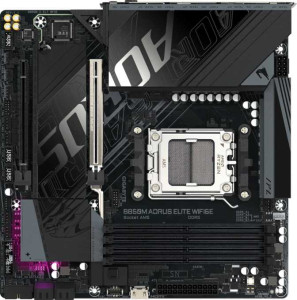
Gigabyte B850M Aorus Elite Wi-Fi6E
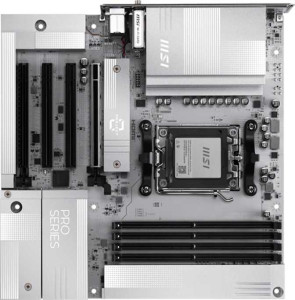
MSI Pro B850M-A Wi-Fi PZ

Gigabyte B850M Aorus Elite Wi-Fi6E MSI Pro B850M-A Wi-Fi PZ

Overview

Welcome to our in-depth specification comparison between the Gigabyte B850M Aorus Elite Wi-Fi6E and the MSI Pro B850M-A Wi-Fi PZ. Both are Micro-ATX motherboards built on the AM5 platform with the B850 chipset, making them strong contenders in the mid-range segment. The key battlegrounds in this matchup include wireless connectivity, rear I/O port variety, storage and expansion options, and audio features — areas where these two boards take notably different approaches.

Common Features

  • Both boards use the AM5 CPU socket.
  • Both boards feature the B850 chipset.
  • Both boards share the Micro-ATX form factor.
  • Wi-Fi connectivity is available on both products.
  • Bluetooth is available on both products.
  • Overclocking support is available on both products.
  • RGB lighting is present on both products.
  • Dual BIOS is not available on either product.
  • Both boards support a maximum memory amount of 256GB.
  • Both boards support an overclocked RAM speed of up to 8200 MHz.
  • Both boards have 4 memory slots.
  • Both boards use DDR5 memory.
  • Both boards support 2 memory channels.
  • ECC memory is not supported on either product.
  • Neither board has USB 3.2 Gen 2x2 ports, USB 4 ports, or Thunderbolt ports on the rear I/O.
  • Both boards offer 1 DisplayPort output.
  • Both boards have 1 RJ45 port.
  • Both boards provide 2 USB 3.2 Gen 1 ports and 4 USB 2.0 ports through expansion headers.
  • Both boards include 4 SATA 3 connectors and 2 M.2 sockets.
  • Both boards have a TPM connector and no mSATA connector.
  • Both boards feature 1 PCIe 5.0 x16 slot and 1 PCIe x4 slot.
  • Both boards deliver 7.1 audio channels.
  • Both boards support RAID 0, RAID 1, and RAID 10, but not RAID 0+1.

Main Differences

  • Wi-Fi 7 (802.11be) support is present on MSI Pro B850M-A Wi-Fi PZ but not available on Gigabyte B850M Aorus Elite Wi-Fi6E.
  • Bluetooth version is 5.3 on Gigabyte B850M Aorus Elite Wi-Fi6E and 5.4 on MSI Pro B850M-A Wi-Fi PZ.
  • Easy BIOS reset is available on MSI Pro B850M-A Wi-Fi PZ but not on Gigabyte B850M Aorus Elite Wi-Fi6E.
  • Board height is 244 mm on Gigabyte B850M Aorus Elite Wi-Fi6E and 243.8 mm on MSI Pro B850M-A Wi-Fi PZ.
  • Board width is 244 mm on Gigabyte B850M Aorus Elite Wi-Fi6E and 243.8 mm on MSI Pro B850M-A Wi-Fi PZ.
  • Maximum native RAM speed is 5200 MHz on Gigabyte B850M Aorus Elite Wi-Fi6E and 5600 MHz on MSI Pro B850M-A Wi-Fi PZ.
  • USB 3.2 Gen 2 ports (USB-A) count is 2 on Gigabyte B850M Aorus Elite Wi-Fi6E and 3 on MSI Pro B850M-A Wi-Fi PZ.
  • USB 3.2 Gen 1 ports (USB-A) count is 5 on Gigabyte B850M Aorus Elite Wi-Fi6E and 3 on MSI Pro B850M-A Wi-Fi PZ.
  • USB 3.2 Gen 2 ports (USB-C) count is 1 on Gigabyte B850M Aorus Elite Wi-Fi6E and 2 on MSI Pro B850M-A Wi-Fi PZ.
  • USB 2.0 ports count is 4 on Gigabyte B850M Aorus Elite Wi-Fi6E and 0 on MSI Pro B850M-A Wi-Fi PZ.
  • HDMI output is present on MSI Pro B850M-A Wi-Fi PZ but not available on Gigabyte B850M Aorus Elite Wi-Fi6E.
  • A USB 3.2 Gen 2x2 expansion header is present on Gigabyte B850M Aorus Elite Wi-Fi6E but not on MSI Pro B850M-A Wi-Fi PZ.
  • Fan header count is 6 on Gigabyte B850M Aorus Elite Wi-Fi6E and 5 on MSI Pro B850M-A Wi-Fi PZ.
  • PCIe x1 slot count is 0 on Gigabyte B850M Aorus Elite Wi-Fi6E and 2 on MSI Pro B850M-A Wi-Fi PZ.
  • S/PDIF Out port is present on Gigabyte B850M Aorus Elite Wi-Fi6E but not available on MSI Pro B850M-A Wi-Fi PZ.
  • Audio connector count is 2 on Gigabyte B850M Aorus Elite Wi-Fi6E and 3 on MSI Pro B850M-A Wi-Fi PZ.
  • RAID 5 support is present on Gigabyte B850M Aorus Elite Wi-Fi6E but not available on MSI Pro B850M-A Wi-Fi PZ.
Specs Comparison
Gigabyte B850M Aorus Elite Wi-Fi6E

Gigabyte B850M Aorus Elite Wi-Fi6E

MSI Pro B850M-A Wi-Fi PZ

MSI Pro B850M-A Wi-Fi PZ

General info:
CPU socket AM5 AM5
chipset B850 B850
form factor Micro-ATX Micro-ATX
release date January 2025 September 2025
supports Wi-Fi
Wi-Fi version Wi-Fi 4 (802.11n), Wi-Fi 5 (802.11ac), Wi-Fi 6 (802.11ax), Wi-Fi 6E (802.11ax) Wi-Fi 4 (802.11n), Wi-Fi 5 (802.11ac), Wi-Fi 6 (802.11ax), Wi-Fi 6E (802.11ax), Wi-Fi 7 (802.11be)
Has Bluetooth
Bluetooth version 5.3 5.4
Easy to overclock
has RGB lighting
Easy to reset BIOS
Has dual BIOS
has aptX
CPU sockets 1 1
Has integrated graphics
warranty period 3 years 3 years
height 244 mm 243.8 mm
width 244 mm 243.8 mm
Has integrated CPU

Both the Gigabyte B850M Aorus Elite Wi-Fi 6E and the MSI Pro B850M-A Wi-Fi PZ share a strong common foundation: the AM5 socket, B850 chipset, and Micro-ATX form factor, making them near-identical in their core platform compatibility and physical footprint. They both support overclocking, include RGB lighting, and carry a 3-year warranty, so neither stands out on those fronts.

The clearest differentiator in this group is wireless connectivity. The MSI supports Wi-Fi 7 (802.11be), the latest standard offering significantly higher theoretical throughput and lower latency compared to the Gigabyte, which tops out at Wi-Fi 6E. While Wi-Fi 7 routers are still not widespread, this is a meaningful future-proofing advantage for the MSI. Its Bluetooth edge is slimmer — version 5.4 versus 5.3 on the Gigabyte — which in practice translates to marginally improved connection stability and energy efficiency, though most users are unlikely to notice a real-world difference.

A more practical differentiator is BIOS usability: the MSI offers an easy BIOS reset feature, while the Gigabyte does not. For builders who frequently tweak settings or recover from unstable overclocks, this is a genuine convenience advantage. Overall, the MSI Pro B850M-A Wi-Fi PZ holds a clear edge in this group, driven by its newer wireless standard and easier BIOS management — without giving anything up on the fundamentals.

Memory:
maximum memory amount 256GB 256GB
RAM speed (max) 5200 MHz 5600 MHz
overclocked RAM speed 8200 MHz 8200 MHz
memory slots 4 4
DDR memory version 5 5
memory channels 2 2
Supports ECC memory

On paper, these two boards are nearly identical in memory configuration: both support DDR5, offer 4 slots across 2 channels, cap out at 256GB maximum capacity, and reach the same 8200 MHz ceiling under overclocked XMP/EXPO profiles. For the vast majority of builds — including high-end gaming and content creation rigs — none of those shared specs will ever be a limiting factor.

The one tangible difference lies in the native (non-overclocked) RAM speed ceiling: the MSI supports up to 5600 MHz natively, compared to 5200 MHz on the Gigabyte. In practice, this means the MSI can run faster DDR5 kits at their rated speeds without technically engaging XMP/EXPO, which can matter for stability in certain workloads or when configuring memory on a fresh build without profile tuning. The gap is not dramatic, but it does give the MSI a slight edge for users pairing the board with faster stock-speed DDR5 modules.

Neither board supports ECC memory, which is expected at this chipset tier and a non-issue for the consumer audience these products target. Overall, the MSI Pro B850M-A Wi-Fi PZ holds a narrow advantage here due to its higher native RAM speed support, though for most users who rely on XMP/EXPO profiles anyway, the real-world difference will be minimal.

Ports:
USB 3.2 Gen 2 ports (USB-A) 2 3
USB 3.2 Gen 1 ports (USB-A) 5 3
USB 3.2 Gen 2 ports (USB-C) 1 2
USB 3.2 Gen 1 ports (USB-C) 0 0
USB 2.0 ports 4 0
USB 3.2 Gen 2x2 ports 0 0
USB 4 40Gbps ports 0 0
USB 4 20Gbps ports 0 0
Thunderbolt 4 ports 0 0
Thunderbolt 3 ports 0 0
has an HDMI output
DisplayPort outputs 1 1
RJ45 ports 1 1
Has USB Type-C
eSATA ports 0 0
DVI outputs 0 0
has a VGA connector
PS/2 ports 0 0

Counting raw port totals here would be misleading — what matters is the quality of the connectivity on offer. The Gigabyte Aorus Elite tallies more USB ports overall, but 4 of those are USB 2.0, a legacy standard that tops out at 480 Mbps and is increasingly irrelevant for modern peripherals. Strip those out, and the Gigabyte actually offers fewer high-speed ports than the MSI. The MSI Pro B850M-A ships with no USB 2.0 at all, instead front-loading with 3 USB 3.2 Gen 2 Type-A and 2 USB 3.2 Gen 2 Type-C ports — giving it five 10 Gbps connections on the rear panel alone, versus three on the Gigabyte.

For display output, the MSI again holds a practical edge: it includes both an HDMI port and a DisplayPort, while the Gigabyte offers only a DisplayPort. This matters specifically for users running integrated graphics through the CPU — the MSI gives them more monitor compatibility out of the box without needing an adapter.

Taken together, the MSI Pro B850M-A Wi-Fi PZ has a clear advantage in this category. Its port selection prioritizes modern, high-bandwidth connectivity over sheer quantity, and the addition of HDMI adds real-world flexibility for display hookups. The Gigabyte's higher port count is offset by the inclusion of slower USB 2.0 ports that most current peripherals don't need.

Connectors:
USB 3.2 Gen 1 ports (through expansion) 2 2
USB 3.2 Gen 2x2 ports (through expansion) 1 0
USB 2.0 ports (through expansion) 4 4
SATA 3 connectors 4 4
fan headers 6 5
USB 3.0 ports (through expansion) 2 2
M.2 sockets 2 2
Has TPM connector
U.2 sockets 0 0
Has mSATA connector
SATA 2 connectors 0 0

Internal connectors tell the story of what a board can actually support once it's inside a case, and here the two boards are largely in lockstep. Both offer 4 SATA 3 connectors, 2 M.2 sockets, matching front-panel USB expansion headers, and a TPM connector — a solid, if unspectacular, baseline for a Micro-ATX board targeting mainstream builders.

Two differences are worth flagging. The Gigabyte Aorus Elite includes a USB 3.2 Gen 2x2 internal header, which supports front-panel Type-C ports at 20 Gbps — double the speed of a standard Gen 2 header. This is a meaningful advantage for users with a modern case that features a high-speed front USB-C port, enabling fast device charging and rapid file transfers right from the front of the chassis. The MSI lacks this header entirely. On the other hand, the Gigabyte also edges ahead with 6 fan headers versus 5 on the MSI, giving builders with larger or more complex cooling setups one extra header before needing a splitter or fan hub.

Neither difference is a deal-breaker, but for builders prioritizing internal expandability and cooling headroom, the Gigabyte B850M Aorus Elite holds a modest but clear advantage in this category — particularly the Gen 2x2 header, which future-proofs the build for cases with next-gen front-panel I/O.

Expansion slots:
PCIe 4.0 x16 slots 0 0
PCIe 5.0 x16 slots 1 1
PCIe 3.0 x16 slots 0 0
PCIe x1 slots 0 2
PCI slots 0 0
PCIe 2.0 x16 slots 0 0
PCIe x4 slots 1 1
PCIe x8 slots 0 0

The primary slot on both boards is a PCIe 5.0 x16, which is the current gold standard for GPU connectivity — delivering double the bandwidth of PCIe 4.0 and ensuring full compatibility with the latest graphics cards. That's a strong shared foundation, and for most users building around a discrete GPU, it's the only slot that will see regular use.

Where the two boards diverge is in secondary expansion. The MSI Pro B850M-A includes 2 PCIe x1 slots, while the Gigabyte Aorus Elite has none. These smaller slots are useful for add-in cards such as sound cards, additional USB controllers, or capture cards. The Gigabyte instead offers a PCIe x4 slot, which both boards share — suited for expansion cards that need more bandwidth, like certain NVMe adapters or networking cards. However, having no x1 slots at all limits the Gigabyte's flexibility for users who want to add low-profile expansion cards without burning the x4 slot on them.

For most single-GPU builds the difference is academic, but for users planning a more accessory-heavy configuration, the MSI Pro B850M-A offers greater flexibility with its additional x1 slots — giving it a slight edge in this category.

Audio:
audio channels 7.1 7.1
Has S/PDIF Out port
audio connectors 2 3

Audio is a rare category where each board holds a distinct advantage over the other, making this a genuine trade-off depending on how a user plans to connect their audio gear. Both support 7.1 surround sound, so the underlying capability is equivalent for home theater and gaming setups alike.

The Gigabyte Aorus Elite includes an S/PDIF optical output, which the MSI entirely lacks. This digital output is essential for users connecting to an external DAC, AV receiver, or soundbar via optical cable — it bypasses the motherboard's analog circuitry entirely, often resulting in cleaner audio with less electrical interference. For audiophiles or home theater enthusiasts routing audio through dedicated external hardware, this is a meaningful advantage. The MSI counters with 3 analog audio jacks versus just 2 on the Gigabyte, giving it more simultaneous analog connection options — useful for users who want to run headphones, speakers, and a microphone from the rear panel without an adapter or splitter.

Neither board is strictly superior here — the winner depends entirely on the user's setup. The Gigabyte B850M Aorus Elite is the better fit for anyone routing audio digitally through external hardware, while the MSI Pro B850M-A better serves users who rely on multiple analog connections. For the average user with standard headphones and speakers, the MSI's extra jack offers slightly more day-to-day flexibility.

Storage:
Supports RAID 1
Supports RAID 10 (1+0)
Supports RAID 5
Supports RAID 0
Supports RAID 0+1

RAID support at the consumer motherboard level is a niche but important spec for users building small NAS-style systems, workstations with redundancy requirements, or any setup where data protection across multiple drives matters. For the typical gaming or general-purpose build, this entire category is irrelevant — but for those who need it, the differences here are worth understanding.

Both boards support RAID 0 (striping for performance), RAID 1 (mirroring for redundancy), and RAID 10 (a combination of both). The sole differentiator is that the Gigabyte Aorus Elite also supports RAID 5, while the MSI does not. RAID 5 uses distributed parity across three or more drives, offering a balance of storage efficiency, read performance, and fault tolerance that RAID 1 and RAID 10 cannot match at the same capacity cost. It's the preferred configuration for small multi-drive arrays where maximizing usable storage while retaining redundancy is the goal.

For the narrow audience that actually configures multi-drive RAID arrays on a consumer board, the Gigabyte B850M Aorus Elite holds a clear advantage here. For everyone else, this category is effectively a tie.

Comparison Summary & Verdict

Both the Gigabyte B850M Aorus Elite Wi-Fi6E and the MSI Pro B850M-A Wi-Fi PZ share a solid foundation: AM5 socket, B850 chipset, DDR5 support up to 256GB, PCIe 5.0, and dual-band wireless. However, the differences reveal two distinct personalities. The MSI Pro B850M-A Wi-Fi PZ pulls ahead with Wi-Fi 7, Bluetooth 5.4, a higher native RAM speed of 5600 MHz, more USB-C ports, an HDMI output, and easy BIOS reset — making it the stronger pick for users who value cutting-edge connectivity and a cleaner rear I/O. The Gigabyte B850M Aorus Elite Wi-Fi6E, on the other hand, counters with more fan headers, a USB 3.2 Gen 2x2 expansion header, S/PDIF Out, RAID 5 support, and a greater number of USB-A ports — appealing to builders who prioritize thermal control, legacy audio, and advanced storage configurations. Choose MSI for future-proofing; choose Gigabyte for granular system control.

Gigabyte B850M Aorus Elite Wi-Fi6E
Buy Gigabyte B850M Aorus Elite Wi-Fi6E if...

Buy the Gigabyte B850M Aorus Elite Wi-Fi6E if you need more fan headers for advanced cooling setups, want S/PDIF Out for digital audio, require RAID 5 support, or rely on a USB 3.2 Gen 2x2 internal expansion header.

MSI Pro B850M-A Wi-Fi PZ
Buy MSI Pro B850M-A Wi-Fi PZ if...

Buy the MSI Pro B850M-A Wi-Fi PZ if you want Wi-Fi 7, a faster native RAM speed, more USB-C ports, an HDMI output, or the convenience of an easy BIOS reset button.