Gigabyte B850M Aorus Elite WiFi6E Ice
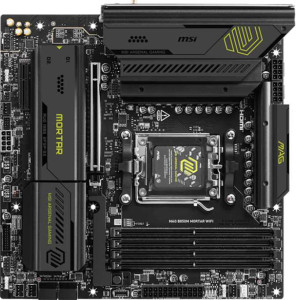
MSI MAG B850M Mortar WiFI

Gigabyte B850M Aorus Elite WiFi6E Ice MSI MAG B850M Mortar WiFI

Overview

Welcome to our detailed specification face-off between the Gigabyte B850M Aorus Elite WiFi6E Ice and the MSI MAG B850M Mortar WiFi. Both are Micro-ATX motherboards built on the B850 chipset with AM5 socket support, but they diverge in meaningful ways across wireless connectivity, rear port selection, storage expansion, and BIOS convenience features. Read on to discover which board better matches your build requirements.

Common Features

  • Both boards use the AM5 CPU socket.
  • Both boards feature the B850 chipset.
  • Both boards come in a Micro-ATX form factor.
  • Wi-Fi connectivity is available on both boards.
  • Bluetooth is available on both boards.
  • Overclocking support is available on both boards.
  • RGB lighting is present on both boards.
  • Dual BIOS is available on both boards.
  • Both boards support a maximum memory amount of 256GB.
  • Both boards support an overclocked RAM speed of up to 8200 MHz.
  • Both boards have 4 memory slots.
  • Both boards use DDR5 memory.
  • Both boards feature 2 memory channels.
  • ECC memory is not supported on either board.
  • Both boards include 1 USB 3.2 Gen 2 port (USB-C).
  • Both boards include 1 RJ45 port.
  • USB Type-C connectivity is present on both boards.
  • Both boards provide 4 USB 2.0 ports and 2 USB 3.2 Gen 1 ports through expansion headers.
  • Both boards have 4 SATA 3 connectors.
  • Both boards include 6 fan headers.
  • A TPM connector is present on both boards.
  • Neither board includes a U.2 socket or an mSATA connector.
  • Both boards feature 1 PCIe 5.0 x16 slot and 1 PCIe x4 slot.
  • Both boards support 7.1 audio channels, an S/PDIF Out port, and 2 audio connectors.
  • Both boards support RAID 0, RAID 1, RAID 5, and RAID 10, but neither supports RAID 0+1.

Main Differences

  • The MSI MAG B850M Mortar WiFi supports up to Wi-Fi 7 (802.11be), while the Gigabyte B850M Aorus Elite WiFi6E Ice tops out at Wi-Fi 6E (802.11ax).
  • Bluetooth version is 5.4 on the MSI MAG B850M Mortar WiFi and 5.3 on the Gigabyte B850M Aorus Elite WiFi6E Ice.
  • Easy BIOS reset capability is available on the MSI MAG B850M Mortar WiFi but not on the Gigabyte B850M Aorus Elite WiFi6E Ice.
  • Maximum native RAM speed is 5600 MHz on the MSI MAG B850M Mortar WiFi and 5200 MHz on the Gigabyte B850M Aorus Elite WiFi6E Ice.
  • USB 3.2 Gen 2 ports (USB-A) number 3 on the MSI MAG B850M Mortar WiFi and 2 on the Gigabyte B850M Aorus Elite WiFi6E Ice.
  • USB 3.2 Gen 1 ports (USB-A) number 5 on the Gigabyte B850M Aorus Elite WiFi6E Ice and 4 on the MSI MAG B850M Mortar WiFi.
  • The Gigabyte B850M Aorus Elite WiFi6E Ice includes 4 USB 2.0 ports, while the MSI MAG B850M Mortar WiFi has none.
  • A USB 3.2 Gen 2x2 port is present on the MSI MAG B850M Mortar WiFi but not on the Gigabyte B850M Aorus Elite WiFi6E Ice.
  • An HDMI output is available on the MSI MAG B850M Mortar WiFi but not on the Gigabyte B850M Aorus Elite WiFi6E Ice.
  • The Gigabyte B850M Aorus Elite WiFi6E Ice includes 1 DisplayPort output, while the MSI MAG B850M Mortar WiFi has none.
  • M.2 sockets number 3 on the MSI MAG B850M Mortar WiFi and 2 on the Gigabyte B850M Aorus Elite WiFi6E Ice.
Specs Comparison
Gigabyte B850M Aorus Elite WiFi6E Ice

Gigabyte B850M Aorus Elite WiFi6E Ice

MSI MAG B850M Mortar WiFI

MSI MAG B850M Mortar WiFI

General info:
CPU socket AM5 AM5
chipset B850 B850
form factor Micro-ATX Micro-ATX
release date January 2025 March 2025
supports Wi-Fi
Wi-Fi version Wi-Fi 4 (802.11n), Wi-Fi 5 (802.11ac), Wi-Fi 6 (802.11ax), Wi-Fi 6E (802.11ax) Wi-Fi 4 (802.11n), Wi-Fi 5 (802.11ac), Wi-Fi 6 (802.11ax), Wi-Fi 6E (802.11ax), Wi-Fi 7 (802.11be)
Has Bluetooth
Bluetooth version 5.3 5.4
Easy to overclock
has RGB lighting
Easy to reset BIOS
Has dual BIOS
has aptX
CPU sockets 1 1
Has integrated graphics
warranty period 3 years 3 years
height 244 mm 244 mm
width 244 mm 244 mm
Has integrated CPU

At their core, both the Gigabyte B850M Aorus Elite WiFi6E Ice and the MSI MAG B850M Mortar WiFi share an identical structural foundation: the same AM5 socket, B850 chipset, Micro-ATX form factor, and identical 244 × 244 mm dimensions. Both boards support overclocking, feature RGB lighting, include a dual BIOS for recovery safety, and carry a 3-year warranty. For the majority of build considerations in this category, these two boards are effectively tied.

The meaningful separations emerge in wireless connectivity and usability. The MSI Mortar supports Wi-Fi 7 (802.11be), while the Gigabyte tops out at Wi-Fi 6E. In practice, Wi-Fi 7 offers significantly higher theoretical throughput and lower latency, and while real-world gains depend on having a compatible router, it is a more future-proof standard. Similarly, the Mortar's Bluetooth 5.4 brings incremental improvements in connection stability and efficiency over the Gigabyte's Bluetooth 5.3. The Mortar also wins on a quality-of-life front: it supports easy BIOS reset, whereas the Gigabyte does not — a small but tangible advantage during troubleshooting or after a failed overclock.

Overall, the MSI MAG B850M Mortar WiFi holds a clear edge in this group. Its Wi-Fi 7 support is the standout differentiator — more relevant as next-gen networking hardware becomes mainstream — and its easier BIOS reset adds practical convenience. The Gigabyte is by no means deficient, but on general specifications alone, the Mortar is the more forward-looking choice.

Memory:
maximum memory amount 256GB 256GB
RAM speed (max) 5200 MHz 5600 MHz
overclocked RAM speed 8200 MHz 8200 MHz
memory slots 4 4
DDR memory version 5 5
memory channels 2 2
Supports ECC memory

Both boards share the same fundamental memory architecture: 4 slots, dual-channel DDR5, a 256GB maximum capacity, and an identical overclocked ceiling of 8200 MHz. For most users, this means the hands-on building experience and long-term upgrade path are virtually identical across both boards.

The one concrete differentiator is the native (non-overclocked) RAM speed ceiling — the MSI Mortar supports up to 5600 MHz without overclocking, compared to 5200 MHz on the Gigabyte Aorus. In practice, this means the Mortar can run faster DDR5 kits at their rated JEDEC speed out of the box, without requiring XMP/EXPO profiles to be manually enabled. For users who prefer a plug-and-play setup or are using mid-range DDR5 kits in the 5200–5600 MHz range, this distinction is tangible. Beyond that threshold, both boards reach the same 8200 MHz overclocked maximum, so enthusiasts pushing high-speed kits are on equal footing.

The MSI MAG B850M Mortar WiFi holds a narrow but real advantage here, specifically for users running DDR5 memory rated between 5200 and 5600 MHz who want native compatibility without tweaking BIOS settings. For overclockers chasing the upper limits, the two boards are evenly matched.

Ports:
USB 3.2 Gen 2 ports (USB-A) 2 3
USB 3.2 Gen 1 ports (USB-A) 5 4
USB 3.2 Gen 2 ports (USB-C) 1 1
USB 3.2 Gen 1 ports (USB-C) 0 0
USB 2.0 ports 4 0
USB 3.2 Gen 2x2 ports 0 1
USB 4 40Gbps ports 0 0
USB 4 20Gbps ports 0 0
Thunderbolt 4 ports 0 0
Thunderbolt 3 ports 0 0
has an HDMI output
DisplayPort outputs 1 0
RJ45 ports 1 1
Has USB Type-C
eSATA ports 0 0
DVI outputs 0 0
has a VGA connector
PS/2 ports 0 0

The Gigabyte B850M Aorus Elite WiFi6E Ice and MSI MAG B850M Mortar WiFi have some differences in their port offerings. Both motherboards feature USB 3.2 Gen 2 ports (USB-A) and USB 3.2 Gen 2 ports (USB-C), but the Gigabyte model has 2 USB 3.2 Gen 2 (USB-A) ports, while the MSI board offers 3. The Gigabyte board has 5 USB 3.2 Gen 1 (USB-A) ports, compared to the MSI board’s 4, and it includes 4 USB 2.0 ports, while the MSI model does not have any USB 2.0 ports. The MSI board stands out with its inclusion of a USB 3.2 Gen 2x2 port, which the Gigabyte board lacks.

In terms of video outputs, the Gigabyte motherboard features a DisplayPort output, while the MSI model has an HDMI output. Neither board includes DVI outputs or a VGA connector. Both motherboards support USB Type-C, with the Gigabyte board having 1 USB 3.2 Gen 2 (USB-C) port and the MSI board matching that with 1 USB 3.2 Gen 2 (USB-C) port.

Both motherboards also include a single RJ45 port for networking, but neither offers Thunderbolt 3 or 4 ports, nor do they include eSATA or PS/2 ports. The MSI model does include an HDMI output, while the Gigabyte board does not provide this option.

Connectors:
USB 3.2 Gen 1 ports (through expansion) 2 2
USB 2.0 ports (through expansion) 4 4
SATA 3 connectors 4 4
fan headers 6 6
USB 3.0 ports (through expansion) 2 2
M.2 sockets 2 3
Has TPM connector
U.2 sockets 0 0
Has mSATA connector
SATA 2 connectors 0 0

The Gigabyte B850M Aorus Elite WiFi6E Ice and MSI MAG B850M Mortar WiFi have similar connector options, though there are a few differences. Both motherboards offer 2 USB 3.2 Gen 1 ports, 4 USB 2.0 ports, and 2 USB 3.0 ports through expansion. Each also has 4 SATA 3 connectors and 6 fan headers. The key difference in this area is that the MSI board offers 3 M.2 sockets, while the Gigabyte board includes only 2. Both motherboards include a TPM connector, but neither includes a U.2 socket or an mSATA connector, and neither has SATA 2 connectors.

Overall, both boards offer similar connector setups, with the MSI board providing an additional M.2 socket, which could be useful for those looking to add more storage devices.

Expansion slots:
PCIe 4.0 x16 slots 0 0
PCIe 5.0 x16 slots 1 1
PCIe 3.0 x16 slots 0 0
PCIe x1 slots 0 0
PCI slots 0 0
PCIe 2.0 x16 slots 0 0
PCIe x4 slots 1 1
PCIe x8 slots 0 0

The Gigabyte B850M Aorus Elite WiFi6E Ice and MSI MAG B850M Mortar WiFi have identical configurations when it comes to expansion slots. Both motherboards feature 1 PCIe 5.0 x16 slot, 1 PCIe x4 slot, and no PCIe 4.0 x16, PCIe 3.0 x16, PCIe x1, or PCI slots. Additionally, neither board includes PCIe 2.0 x16 slots or PCIe x8 slots. This means that both motherboards are quite similar in terms of expansion options, offering a PCIe 5.0 x16 slot for high-speed GPU support and a PCIe x4 slot for additional expansion cards.

Overall, there are no differences in the expansion slot configurations between the two models—they both provide the same slot setup for users needing high-speed connectivity and expansion capabilities.

Audio:
audio channels 7.1 7.1
Has S/PDIF Out port
audio connectors 2 2

The Gigabyte B850M Aorus Elite WiFi6E Ice and MSI MAG B850M Mortar WiFi have identical audio specifications. Both motherboards feature 7.1 audio channels, an S/PDIF Out port, and 2 audio connectors. There are no differences between the two models in terms of their audio capabilities.

These features ensure that both boards offer a similar experience for users seeking high-quality audio output, supporting multi-channel audio and digital audio output through S/PDIF.

Storage:
Supports RAID 1
Supports RAID 10 (1+0)
Supports RAID 5
Supports RAID 0
Supports RAID 0+1

The Gigabyte B850M Aorus Elite WiFi6E Ice and MSI MAG B850M Mortar WiFi have identical RAID support capabilities. Both motherboards support RAID 1, RAID 10 (1+0), RAID 5, and RAID 0, but neither supports RAID 0+1. The RAID options offered by both boards provide flexibility for users looking to configure their storage in various ways, including redundancy and performance enhancement.

There are no differences between the two models in terms of storage configuration and RAID support, making them equally capable in this area.

Comparison Summary & Verdict

Both boards share a strong foundation: B850 chipset, AM5 socket, DDR5 support up to 256GB, PCIe 5.0, and solid audio and RAID capabilities. However, their differences point each product toward a distinct audience. The MSI MAG B850M Mortar WiFi stands out with Wi-Fi 7, Bluetooth 5.4, an extra M.2 slot, a USB 3.2 Gen 2x2 port, more Gen 2 USB-A ports, a built-in HDMI output, and a convenient easy BIOS reset button, making it the stronger choice for users who want the latest connectivity standards and maximum expandability. The Gigabyte B850M Aorus Elite WiFi6E Ice counters with a dedicated DisplayPort output, more USB 3.2 Gen 1 ports, and four USB 2.0 ports, which may appeal to users with legacy peripherals. Both boards are competent platforms, but the MSI edges ahead on modern features.

Gigabyte B850M Aorus Elite WiFi6E Ice
Buy Gigabyte B850M Aorus Elite WiFi6E Ice if...

Buy the Gigabyte B850M Aorus Elite WiFi6E Ice if you rely on legacy USB 2.0 peripherals or need a DisplayPort output directly from the motherboard.

MSI MAG B850M Mortar WiFI
Buy MSI MAG B850M Mortar WiFI if...

Buy the MSI MAG B850M Mortar WiFi if you want cutting-edge Wi-Fi 7, an extra M.2 slot, more high-speed USB ports, and a hassle-free BIOS reset button.