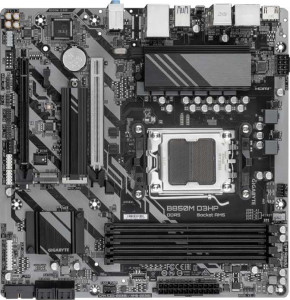
Gigabyte B850M D3HP
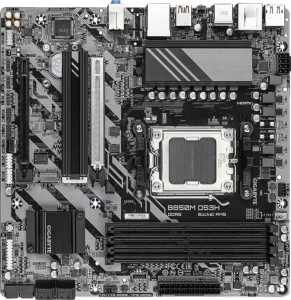
Gigabyte B850M DS3H

Gigabyte B850M D3HP Gigabyte B850M DS3H

Overview

When choosing between two B850 Micro-ATX motherboards for an AMD AM5 platform build, the differences can be subtle yet meaningful. The Gigabyte B850M D3HP and the Gigabyte B850M DS3H share a remarkably similar foundation, from DDR5 memory support and PCIe 5.0 connectivity to their storage and audio capabilities. However, a closer look at their rear USB port configurations reveals distinctions that could influence your decision depending on your peripheral needs and desired transfer speeds.

Common Features

  • Both products use the AM5 CPU socket.
  • Both products feature the B850 chipset.
  • Both products have a Micro-ATX form factor.
  • Neither product supports Wi-Fi.
  • Neither product has Bluetooth.
  • Both products have an HDMI 2.1 output.
  • Both products support overclocking.
  • Neither product has RGB lighting.
  • Both products support a maximum memory amount of 256GB.
  • Both products support a maximum RAM speed of 5200 MHz and an overclocked RAM speed of 8200 MHz.
  • Both products have 4 memory slots with 2 memory channels and DDR5 support.
  • Neither product supports ECC memory.
  • Neither product has USB 2.0, USB 3.2 Gen 2x2, USB 4 40Gbps, USB 4 20Gbps, Thunderbolt 4, or Thunderbolt 3 ports.
  • Both products have an HDMI output and 2 DisplayPort outputs.
  • Both products provide 2 USB 3.2 Gen 1 ports through expansion and 2 USB 3.0 ports through expansion.
  • Both products provide 4 USB 2.0 ports through expansion.
  • Both products have 4 SATA 3 connectors, 4 fan headers, and 2 M.2 sockets.
  • Both products include a TPM connector and no U.2 sockets.
  • Both products have 1 PCIe 5.0 x16 slot and 1 PCIe x4 slot, with no PCIe 4.0, 3.0, 2.0, x1, x8, or PCI slots.
  • Both products support 7.1 audio channels with 3 audio connectors, and neither has an S/PDIF Out port.
  • Both products support RAID 0, RAID 1, RAID 5, and RAID 10, but neither supports RAID 0+1.

Main Differences

  • USB 3.2 Gen 2 ports (USB-A) count is 0 on Gigabyte B850M D3HP and 1 on Gigabyte B850M DS3H.
  • USB 3.2 Gen 1 ports (USB-A) count is 3 on Gigabyte B850M D3HP and 2 on Gigabyte B850M DS3H.
  • USB 3.2 Gen 2 ports (USB-C) are absent on Gigabyte B850M D3HP but 1 is present on Gigabyte B850M DS3H.
  • USB 3.2 Gen 1 ports (USB-C) count is 1 on Gigabyte B850M D3HP and 0 on Gigabyte B850M DS3H.
Specs Comparison
Gigabyte B850M D3HP

Gigabyte B850M D3HP

Gigabyte B850M DS3H

Gigabyte B850M DS3H

General info:
CPU socket AM5 AM5
chipset B850 B850
form factor Micro-ATX Micro-ATX
release date January 2025 January 2025
supports Wi-Fi
Has Bluetooth
HDMI version HDMI 2.1 HDMI 2.1
Easy to overclock
has RGB lighting
Easy to reset BIOS
Has dual BIOS
CPU sockets 1 1
Has integrated graphics
warranty period 3 years 3 years
height 244 mm 244 mm
width 244 mm 244 mm
Has integrated CPU

In terms of general specifications, the Gigabyte B850M D3HP and the Gigabyte B850M DS3H are effectively identical across every tracked attribute in this group. Both boards share the same AM5 socket, B850 chipset, and Micro-ATX form factor at identical dimensions of 244 × 244 mm, meaning they will fit the same cases and support the same AMD processor lineup without any distinction.

Key platform features are also mirrored: both support overclocking, include a dual BIOS for recovery safety, output via HDMI 2.1, and carry a 3-year warranty. Neither board offers Wi-Fi, Bluetooth, RGB lighting, an easy BIOS reset mechanism, integrated graphics, or an integrated CPU — so buyers requiring wireless connectivity will need to budget for an add-in card or adapter regardless of which model they choose.

Based strictly on the general info specs provided, these two boards are in a complete tie. There is no differentiating factor in this category that would give either model an advantage over the other. A meaningful comparison will depend entirely on how they differ in other specification groups such as memory support, connectivity, or power delivery.

Memory:
maximum memory amount 256GB 256GB
RAM speed (max) 5200 MHz 5200 MHz
overclocked RAM speed 8200 MHz 8200 MHz
memory slots 4 4
DDR memory version 5 5
memory channels 2 2
Supports ECC memory

Both the B850M D3HP and the B850M DS3H share an identical memory configuration. Running DDR5 across 4 slots in a dual-channel arrangement, each board supports up to 256GB of RAM — a ceiling that is more than sufficient for any consumer workload, including heavy content creation and virtualization.

The native DDR5 speed cap of 5200 MHz is solid for everyday use, but the more interesting figure is the overclocked ceiling of 8200 MHz, which leaves meaningful headroom for enthusiasts who want to push performance through EXPO or XMP profiles. That said, neither board supports ECC memory, so they remain firmly in the consumer/prosumer space rather than workstation or server territory — an expected trade-off at this chipset tier.

Once again, the two boards land in a complete tie across every memory specification. No advantage exists for either model in this category; the decision between them must rest on other spec groups.

Ports:
USB 3.2 Gen 2 ports (USB-A) 0 1
USB 3.2 Gen 1 ports (USB-A) 3 2
USB 3.2 Gen 2 ports (USB-C) 0 1
USB 3.2 Gen 1 ports (USB-C) 1 0
USB 2.0 ports 0 0
USB 3.2 Gen 2x2 ports 0 0
USB 4 40Gbps ports 0 0
USB 4 20Gbps ports 0 0
Thunderbolt 4 ports 0 0
Thunderbolt 3 ports 0 0
has an HDMI output
DisplayPort outputs 2 2
RJ45 ports 1 1
Has USB Type-C
eSATA ports 0 0
DVI outputs 0 0
has a VGA connector
PS/2 ports 1 1

The port layouts of the B850M D3HP and B850M DS3H are nearly identical in count and variety — both offer the same display outputs (HDMI + dual DisplayPort), a single RJ45 Ethernet port, a PS/2 port for legacy peripherals, and a total of four rear USB ports. The meaningful difference, however, lies in the quality of those USB connections rather than the quantity.

The DS3H upgrades one USB-A port to USB 3.2 Gen 2 (10 Gbps) and its USB-C to USB 3.2 Gen 2 (10 Gbps) as well, doubling the throughput ceiling on those connectors compared to the Gen 1 (5 Gbps) equivalents found on the D3HP. In practice, this matters most when connecting fast external SSDs or high-speed hubs — Gen 2 can sustain real-world transfers that Gen 1 simply cannot keep up with. The D3HP's USB-C, by contrast, is limited to Gen 1 speeds, which is a noticeable step down for anyone relying on that port for storage or docking.

The DS3H holds a clear edge in this category. With faster USB-A and USB-C ports at no apparent trade-off in total port count, it offers meaningfully better connectivity for users who move large files or use modern peripherals that can take advantage of 10 Gbps bandwidth.

Connectors:
USB 3.2 Gen 1 ports (through expansion) 2 2
USB 2.0 ports (through expansion) 4 4
SATA 3 connectors 4 4
fan headers 4 4
USB 3.0 ports (through expansion) 2 2
M.2 sockets 2 2
Has TPM connector
U.2 sockets 0 0
Has mSATA connector
SATA 2 connectors 0 0

Internal connector specs tell a similar story to what has emerged across previous groups: the B850M D3HP and B850M DS3H are carbon copies of each other here. Both boards provide 4 SATA 3 connectors and 2 M.2 sockets, which together offer a practical and flexible storage configuration — enough to run a primary NVMe drive alongside a secondary M.2, while still leaving SATA ports free for HDDs or SSDs in a home or small office build.

Fan management is equally matched, with 4 fan headers on each board — adequate for a Micro-ATX system with a CPU cooler and two or three case fans. The shared TPM connector is a useful inclusion for users enabling Windows 11 security features or working in environments that require hardware-based encryption. Neither board offers U.2 or mSATA, but those are niche interfaces rarely missed in mainstream builds.

With every connector spec lining up exactly, this category is a complete tie. There is no internal connectivity advantage to be found on either side; both boards offer the same expandability and storage potential for a builder working within the Micro-ATX form factor.

Expansion slots:
PCIe 4.0 x16 slots 0 0
PCIe 5.0 x16 slots 1 1
PCIe 3.0 x16 slots 0 0
PCIe x1 slots 0 0
PCI slots 0 0
PCIe 2.0 x16 slots 0 0
PCIe x4 slots 1 1
PCIe x8 slots 0 0

Expansion slot configurations are identical on the B850M D3HP and B850M DS3H. Each board provides a single PCIe 5.0 x16 slot as its primary GPU interface — the latest generation, delivering up to 128 GB/s of bidirectional bandwidth and ensuring full compatibility with current and near-future discrete graphics cards without any bottlenecking at the slot level.

Alongside that, a PCIe x4 slot offers room for an additional card — useful for a capture card, NVMe add-in card, or networking adapter. The absence of PCIe x1 slots is a minor limitation for builders who rely on small add-in cards, though in a compact Micro-ATX build this trade-off is common and rarely impactful in practice. There are no legacy PCI or older PCIe generation slots, which keeps the layout clean and modern.

As has been the pattern across most categories, this group ends in a complete tie. Neither board offers any expansion slot advantage over the other; both are equally well-suited for a single high-end GPU build with one additional low-bandwidth card.

Audio:
audio channels 7.1 7.1
Has S/PDIF Out port
audio connectors 3 3

Audio capabilities are matched exactly across both boards. The B850M D3HP and B850M DS3H each support 7.1-channel surround sound output — a solid offering for users with multi-speaker setups or high-quality headphone amplifiers that can take advantage of the full channel configuration. Three analog audio connectors on the rear I/O is a standard arrangement for this channel count, typically covering line-in, line-out, and microphone inputs.

Neither board includes an S/PDIF optical output, which means users who want to connect to an AV receiver or DAC via digital optical will need a dedicated sound card or USB audio interface. For the majority of desktop users relying on analog headsets or powered speakers, however, this omission is unlikely to be a dealbreaker.

No differentiation exists between the two models here — audio is a complete tie. Buyers with demanding audio requirements will find both boards equally limited by the same constraints, and should factor in an add-in solution regardless of which model they choose.

Storage:
Supports RAID 1
Supports RAID 10 (1+0)
Supports RAID 5
Supports RAID 0
Supports RAID 0+1

RAID support is a feature that often separates entry-level boards from more capable ones, and on this front both the B850M D3HP and B850M DS3H hold their own. Each board supports RAID 0, 1, 5, and 10 — covering the most practically useful configurations for desktop and small workstation use. RAID 1 provides straightforward mirroring for data redundancy, RAID 0 stripes drives for maximum throughput, and RAID 10 combines both for a balance of speed and fault tolerance. The inclusion of RAID 5 is a meaningful addition, offering distributed parity across three or more drives — useful for users who want redundancy without sacrificing as much usable capacity as RAID 1 would require.

Neither board supports RAID 0+1, though this is rarely a significant omission — RAID 10 is generally considered a more efficient and resilient implementation of the same underlying concept, and its presence makes the absence of 0+1 a non-issue for virtually all users.

Storage configuration parity is absolute here: this group is a complete tie. Both boards offer the same RAID flexibility, making them equally suitable for users who want to build redundant or performance-oriented multi-drive arrays within a Micro-ATX footprint.

Comparison Summary & Verdict

Both the Gigabyte B850M D3HP and the Gigabyte B850M DS3H are well-matched B850 Micro-ATX motherboards on the AM5 platform, sharing DDR5 support up to 256GB, a PCIe 5.0 x16 slot, dual M.2 sockets, four SATA 3 connectors, and 7.1-channel audio. Their distinction lies entirely in the rear USB panel layout. The D3HP delivers three USB 3.2 Gen 1 Type-A ports plus one USB 3.2 Gen 1 Type-C port, making it a practical choice for users with several standard USB-A peripherals. The DS3H, by contrast, reduces Gen 1 Type-A to two ports but upgrades the lineup with a USB 3.2 Gen 2 Type-A and a USB 3.2 Gen 2 Type-C port, providing faster 10Gbps connectivity for modern devices. If your setup centers on legacy USB-A accessories, the D3HP covers you well; if you value higher-speed USB or a rear Type-C Gen 2 connection, the DS3H is the stronger fit.

Gigabyte B850M D3HP
Buy Gigabyte B850M D3HP if...

Buy the Gigabyte B850M D3HP if your setup relies on multiple standard USB-A peripherals, as it offers three USB 3.2 Gen 1 Type-A ports on the rear panel.

Gigabyte B850M DS3H
Buy Gigabyte B850M DS3H if...

Buy the Gigabyte B850M DS3H if you need faster rear-panel USB connectivity, since it provides both a USB 3.2 Gen 2 Type-A and a USB 3.2 Gen 2 Type-C port for 10Gbps transfers.