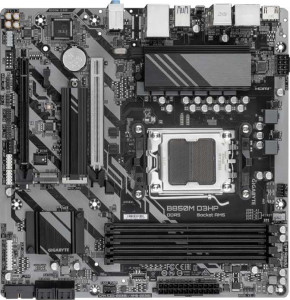
Gigabyte B850M D3HP
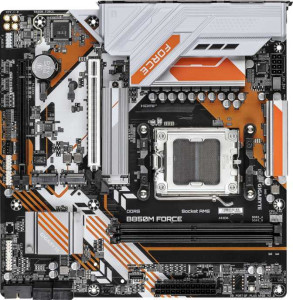
Gigabyte B850M Force

Gigabyte B850M D3HP Gigabyte B850M Force

Overview

When choosing between the Gigabyte B850M D3HP and the Gigabyte B850M Force, both Micro-ATX motherboards share the same AM5 socket and B850 chipset foundation, yet they diverge in meaningful ways. This comparison explores their key battlegrounds, including memory capacity and slot count, M.2 storage options, USB connectivity, and display output configurations, to help you decide which board best fits your build.

Common Features

  • Both boards use the AM5 CPU socket.
  • Both use the B850 chipset.
  • Both have a Micro-ATX form factor.
  • Neither board includes Wi-Fi support.
  • Neither board includes Bluetooth support.
  • Both feature HDMI 2.1 output.
  • Both boards support overclocking.
  • Neither board has an easy BIOS reset feature.
  • Both support a maximum RAM speed of 5200 MHz.
  • Both use DDR5 memory.
  • Both boards have 2 memory channels.
  • Both have 1 USB 3.2 Gen 1 USB-C port.
  • Neither board has any USB 3.2 Gen 2 USB-C ports.
  • Both provide 4 SATA 3 connectors.
  • Both have 4 fan headers.
  • Both have a TPM connector.
  • Both boards have 1 PCIe 5.0 x16 slot.
  • Both support 7.1 audio channels with 3 audio connectors.
  • Both support RAID 0, RAID 1, RAID 5, and RAID 10.
  • Neither board supports RAID 0+1.

Main Differences

  • RGB lighting is present on the Gigabyte B850M Force but not available on the Gigabyte B850M D3HP.
  • Maximum memory capacity is 256 GB on the Gigabyte B850M D3HP and 128 GB on the Gigabyte B850M Force.
  • Maximum overclocked RAM speed is 8200 MHz on the Gigabyte B850M D3HP and 9600 MHz on the Gigabyte B850M Force.
  • The Gigabyte B850M D3HP has 4 memory slots, while the Gigabyte B850M Force has 2.
  • ECC memory support is present on the Gigabyte B850M Force but not available on the Gigabyte B850M D3HP.
  • USB 3.2 Gen 2 USB-A ports number 0 on the Gigabyte B850M D3HP and 1 on the Gigabyte B850M Force.
  • USB 3.2 Gen 1 USB-A ports number 3 on the Gigabyte B850M D3HP and 2 on the Gigabyte B850M Force.
  • USB 2.0 ports number 0 on the Gigabyte B850M D3HP and 2 on the Gigabyte B850M Force.
  • DisplayPort outputs number 2 on the Gigabyte B850M D3HP and 1 on the Gigabyte B850M Force.
  • M.2 sockets number 2 on the Gigabyte B850M D3HP and 3 on the Gigabyte B850M Force.
Specs Comparison
Gigabyte B850M D3HP

Gigabyte B850M D3HP

Gigabyte B850M Force

Gigabyte B850M Force

General info:
CPU socket AM5 AM5
chipset B850 B850
form factor Micro-ATX Micro-ATX
release date January 2025 June 2025
supports Wi-Fi
Has Bluetooth
HDMI version HDMI 2.1 HDMI 2.1
Easy to overclock
has RGB lighting
Easy to reset BIOS
Has dual BIOS
CPU sockets 1 1
Has integrated graphics
warranty period 3 years 3 years
height 244 mm 244 mm
width 244 mm 244 mm
Has integrated CPU

At the platform level, the Gigabyte B850M D3HP and Gigabyte B850M Force are built on an identical foundation: both use the AM5 socket with a B850 chipset, share the same Micro-ATX form factor at 244 × 244 mm, support HDMI 2.1 for display output, offer overclocking capability, include dual BIOS for firmware recovery, and carry a 3-year warranty. Neither board integrates Wi-Fi, Bluetooth, onboard graphics, or an integrated CPU, so buyers needing wireless connectivity will need to budget for an add-in card or adapter regardless of which model they choose.

The sole differentiator within this spec group is RGB lighting: the Force includes it, while the D3HP does not. In practical terms, this means the Force is aimed at users building inside windowed cases who want aesthetic customization, whereas the D3HP is the no-frills option for those who prioritize function over visual flair — or who simply prefer a cleaner, understated look. RGB has no bearing on performance, stability, or longevity.

For general platform considerations, these two boards are essentially tied. The decision within this group comes down entirely to whether RGB lighting matters to the buyer. If it does, the Force has the edge; if it doesn't, the D3HP is the leaner choice without giving up anything meaningful.

Memory:
maximum memory amount 256GB 128GB
RAM speed (max) 5200 MHz 5200 MHz
overclocked RAM speed 8200 MHz 9600 MHz
memory slots 4 2
DDR memory version 5 5
memory channels 2 2
Supports ECC memory

Both boards run DDR5 in dual-channel configuration with a native speed ceiling of 5200 MHz, so out-of-the-box memory performance is identical. The divergence appears at the extremes. The D3HP ships with 4 memory slots and supports up to 256 GB of RAM, making it the stronger candidate for heavily multitasking workstations, content creation rigs, or anyone who wants room to grow with a full four-stick kit. The Force offers only 2 slots and caps at 128 GB — half the headroom — which is more than sufficient for gaming or general productivity, but leaves no upgrade path beyond two DIMMs.

Where the Force pushes back is in overclocked memory headroom: it reaches up to 9600 MHz via XMP/EXPO profiles, compared to the D3HP's 8200 MHz ceiling. That 1400 MHz gap is meaningful for memory-sensitive workloads and enthusiasts chasing peak bandwidth, though real-world gains above 7000–7600 MHz tend to be incremental rather than transformative. The Force also uniquely supports ECC memory, which provides error-correction useful in data-integrity-critical environments — a feature the D3HP entirely lacks.

The verdict here depends sharply on use case. The D3HP holds the advantage for capacity and expandability, fitting users who need or anticipate needing large memory pools across four slots. The Force counters with a higher overclocking ceiling and ECC support, making it better suited to enthusiast overclockers or light professional workloads where data reliability matters more than raw capacity.

Ports:
USB 3.2 Gen 2 ports (USB-A) 0 1
USB 3.2 Gen 1 ports (USB-A) 3 2
USB 3.2 Gen 2 ports (USB-C) 0 0
USB 3.2 Gen 1 ports (USB-C) 1 1
USB 2.0 ports 0 2
USB 3.2 Gen 2x2 ports 0 0
USB 4 40Gbps ports 0 0
USB 4 20Gbps ports 0 0
Thunderbolt 4 ports 0 0
Thunderbolt 3 ports 0 0
has an HDMI output
DisplayPort outputs 2 1
RJ45 ports 1 1
Has USB Type-C
eSATA ports 0 0
DVI outputs 0 0
has a VGA connector
PS/2 ports 1 1

Display connectivity is where the D3HP pulls ahead most visibly: it offers two DisplayPort outputs alongside HDMI, enabling a three-monitor setup directly from the rear I/O. The Force is limited to one DisplayPort plus HDMI — fine for a dual-display configuration, but it closes off that third-screen option without adding a discrete GPU. For users relying on integrated display output for productivity or multi-monitor work, this is a meaningful distinction.

On the USB front, the two boards make different trade-offs. The D3HP delivers three USB 3.2 Gen 1 Type-A ports (5 Gbps each), while the Force trades one of those for a single USB 3.2 Gen 2 Type-A port running at 10 Gbps — better for fast external SSDs or high-speed peripherals. The Force also adds two USB 2.0 ports, which may seem like a step back but serves legacy peripherals like older keyboards, mice, or dongles without occupying faster ports. Both boards share a USB 3.2 Gen 1 Type-C on the rear panel, so Type-C parity is maintained.

Overall, the D3HP has the edge in this group, primarily due to its superior display output count — a concrete advantage for multi-monitor users. The Force's Gen 2 USB-A port is a useful addition for storage-heavy workflows, but it doesn't outweigh the D3HP's broader display flexibility. Users who need speed over screen count may still lean toward the Force, but the D3HP's I/O layout is the more versatile of the two.

Connectors:
USB 3.2 Gen 1 ports (through expansion) 2 2
USB 2.0 ports (through expansion) 4 4
SATA 3 connectors 4 4
fan headers 4 4
USB 3.0 ports (through expansion) 2 2
M.2 sockets 2 3
Has TPM connector
U.2 sockets 0 0
Has mSATA connector
SATA 2 connectors 0 0

Internal connectivity is nearly a carbon copy between these two boards — both offer 4 SATA 3 connectors, 4 fan headers, identical USB expansion headers, and a TPM connector. For most builders, this shared baseline covers all the essentials: multiple drives, comprehensive cooling control, and front-panel USB without compromise on either side.

The single differentiator in this group is M.2 storage: the Force provides 3 M.2 sockets versus the D3HP's 2. That extra slot is more significant than it might first appear. With NVMe SSDs now the default for both OS drives and fast secondary storage, a third M.2 socket means a builder can run a boot drive, a high-speed work drive, and a dedicated game or scratch drive — all without touching the SATA ports. The D3HP's two-socket setup is adequate for most users, but it forces an earlier decision point when expanding storage down the line.

The Force holds the clear edge here, and it's a straightforward call: more M.2 slots directly translates to more NVMe expansion headroom within the same Micro-ATX footprint. Users planning multi-drive NVMe configurations will find the Force the more future-proof option, while the D3HP remains perfectly capable for simpler storage setups.

Expansion slots:
PCIe 4.0 x16 slots 0 0
PCIe 5.0 x16 slots 1 1
PCIe 3.0 x16 slots 0 0
PCIe x1 slots 0 0
PCI slots 0 0
PCIe 2.0 x16 slots 0 0
PCIe x4 slots 1 1
PCIe x8 slots 0 0

Expansion slot configurations are identical on both boards: one PCIe 5.0 x16 slot for the primary GPU and one PCIe x4 slot for auxiliary cards. The PCIe 5.0 x16 slot is the headline here — it delivers double the bandwidth of PCIe 4.0, ensuring neither board will bottleneck current or near-future discrete graphics cards. For the vast majority of users, this single full-bandwidth slot is all that's needed.

The PCIe x4 slot adds practical flexibility for add-in cards like NVMe expansion cards, capture cards, or networking adapters — a welcome inclusion on a Micro-ATX platform where space is already at a premium. The absence of legacy PCIe x1 or PCI slots is a non-issue in any modern build context.

This group is a straight tie. The D3HP and Force offer exactly the same expansion slot layout, so neither board holds any advantage here. Buyers can make their choice on other grounds entirely.

Audio:
audio channels 7.1 7.1
Has S/PDIF Out port
audio connectors 3 3

Audio specs are a complete match between these two boards. Both deliver 7.1-channel surround sound support through 3 analog audio connectors, and neither includes an S/PDIF optical output. The 7.1 channel capability covers the full range of surround sound configurations used in home theater and gaming setups, so onboard audio is competent on both without relying on a discrete sound card.

The absence of S/PDIF is worth noting for users with older AV receivers or DACs that rely on optical input — both boards lack this option equally, so anyone needing digital audio passthrough will require an alternative solution on either platform. This is a common omission at this price tier and form factor.

Audio is an unambiguous tie. There is nothing to differentiate the D3HP and Force here, and this spec group should play no role in the buying decision.

Storage:
Supports RAID 1
Supports RAID 10 (1+0)
Supports RAID 5
Supports RAID 0
Supports RAID 0+1

RAID support is identical across both boards. The D3HP and Force each support RAID 0, 1, 5, and 10, covering the most practically relevant configurations — from pure performance striping (RAID 0) to mirrored redundancy (RAID 1) to the parity-based protection of RAID 5 and the combined striping-plus-mirroring of RAID 10. Neither supports RAID 0+1, though this is largely redundant given that RAID 10 achieves a functionally superior version of the same goal.

For users building NAS-adjacent workstations or multi-drive setups where data protection matters, the shared RAID 5 and RAID 10 support is the most valuable entry on this list — both allow meaningful redundancy without sacrificing all performance. The parity of support across every listed mode means storage configuration choices are entirely hardware-agnostic between these two boards.

This group is a definitive tie. Storage RAID capabilities offer no basis for differentiation, and buyers should weigh other spec groups when making their decision.

Comparison Summary & Verdict

Both the Gigabyte B850M D3HP and the Gigabyte B850M Force are capable B850 Micro-ATX boards that share strong fundamentals, but they target different builders. The Gigabyte B850M D3HP stands out for users who need serious memory scalability, offering 4 memory slots and up to 256 GB of RAM, plus 2 DisplayPort outputs, making it a strong pick for workstation-style or multi-monitor setups. The Gigabyte B850M Force, on the other hand, appeals to enthusiasts who want higher overclocked RAM speeds up to 9600 MHz, ECC memory support, 3 M.2 sockets, RGB lighting, and slightly broader USB flexibility. If raw memory expansion headroom is your priority, the D3HP wins; if peak memory frequency, storage slots, and ECC reliability matter more, the Force is the better fit.

Gigabyte B850M D3HP
Buy Gigabyte B850M D3HP if...

Buy the Gigabyte B850M D3HP if you need maximum memory expandability, with 4 RAM slots supporting up to 256 GB, or if you require dual DisplayPort outputs for a multi-monitor setup.

Gigabyte B850M Force
Buy Gigabyte B850M Force if...

Buy the Gigabyte B850M Force if you want higher overclocked RAM speeds up to 9600 MHz, ECC memory support, an extra M.2 socket, or RGB lighting for your build.