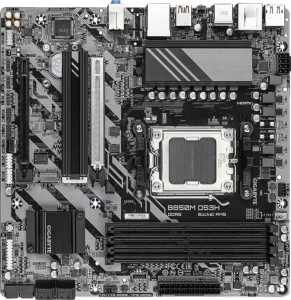
Gigabyte B850M DS3H
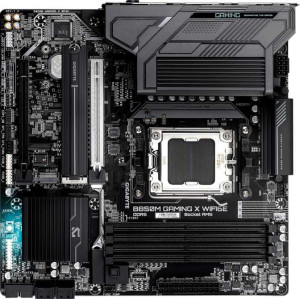
Gigabyte B850M Gaming X WiFi6E

Gigabyte B850M DS3H Gigabyte B850M Gaming X WiFi6E

Overview

Welcome to this head-to-head specification comparison between the Gigabyte B850M DS3H and the Gigabyte B850M Gaming X WiFi6E. Both boards share the same AM5 socket, B850 chipset, and Micro-ATX form factor, making their connectivity and wireless features one of the key battlegrounds. We also examine how they differ in rear-panel port layouts and aesthetic options, to help you decide which board truly fits your next build.

Common Features

  • Both boards use the AM5 CPU socket.
  • Both use the B850 chipset.
  • Both feature a Micro-ATX form factor.
  • Both support a single CPU socket.
  • Both include HDMI 2.1 output.
  • Overclocking is easy on both boards.
  • BIOS reset is not easy on either board.
  • Both feature dual BIOS.
  • Both support a maximum of 256GB of RAM.
  • Both support a maximum RAM speed of 5200 MHz.
  • Both support overclocked RAM speeds up to 8200 MHz.
  • Both have 4 memory slots.
  • Both use DDR5 memory.
  • Both support 2 memory channels.
  • ECC memory is not supported on either board.
  • Both have 1 USB 3.2 Gen 2 port (USB-A) on the rear panel.
  • Both have 2 USB 3.2 Gen 1 ports (USB-A) on the rear panel.
  • Both have 1 USB 3.2 Gen 2 port (USB-C) on the rear panel.
  • Neither board has USB 3.2 Gen 1 (USB-C), USB 3.2 Gen 2x2, USB 4 40Gbps, USB 4 20Gbps, or Thunderbolt 4 ports on the rear panel.
  • Both provide 2 USB 3.2 Gen 1 ports and 1 USB-C 3.2 Gen 2 port through internal expansion headers.
  • Both offer 4 USB 2.0 ports through internal expansion headers.
  • Both have 4 SATA 3 connectors.
  • Both include 4 fan headers.
  • Both feature 2 M.2 sockets.
  • Both include a TPM connector.
  • Both have 1 PCIe 5.0 x16 slot and 1 PCIe x4 slot, with no PCIe 4.0, 3.0, 2.0, x1, x8, or PCI slots.
  • Both support 7.1 audio channels with 3 audio connectors.
  • S/PDIF Out port is not available on either board.
  • Both support RAID 0, RAID 1, RAID 5, and RAID 10, but neither supports RAID 0+1.

Main Differences

  • Wi-Fi support is present on Gigabyte B850M Gaming X WiFi6E but not available on Gigabyte B850M DS3H.
  • Bluetooth is available on Gigabyte B850M Gaming X WiFi6E but not on Gigabyte B850M DS3H.
  • RGB lighting is featured on Gigabyte B850M Gaming X WiFi6E but is absent on Gigabyte B850M DS3H.
  • The Gigabyte B850M Gaming X WiFi6E has 4 rear USB 2.0 ports, while the Gigabyte B850M DS3H has none.
  • The Gigabyte B850M DS3H includes 1 PS/2 port, whereas the Gigabyte B850M Gaming X WiFi6E has no PS/2 port.
Specs Comparison
Gigabyte B850M DS3H

Gigabyte B850M DS3H

Gigabyte B850M Gaming X WiFi6E

Gigabyte B850M Gaming X WiFi6E

General info:
CPU socket AM5 AM5
chipset B850 B850
form factor Micro-ATX Micro-ATX
release date January 2025 January 2025
supports Wi-Fi
Has Bluetooth
HDMI version HDMI 2.1 HDMI 2.1
Easy to overclock
has RGB lighting
Easy to reset BIOS
Has dual BIOS
CPU sockets 1 1
Has integrated graphics
warranty period 3 years 3 years
height 244 mm 244 mm
width 244 mm 244 mm
Has integrated CPU

At their core, the Gigabyte B850M DS3H and the Gigabyte B850M Gaming X WiFi6E share the same fundamental platform: both use the AM5 socket with a B850 chipset, arrive in the compact Micro-ATX form factor at an identical 244×244 mm footprint, support overclocking, include dual BIOS for recovery safety, and carry a 3-year warranty. For a user weighing these two boards on platform capability or build compatibility alone, they are effectively identical.

The real split happens in connectivity and aesthetics. The Gaming X WiFi6E adds Wi-Fi and Bluetooth — features entirely absent on the DS3H. In practical terms this means the Gaming X WiFi6E can connect to a network or peripherals wirelessly without any additional PCIe card or USB adapter, a meaningful convenience in builds where routing an Ethernet cable is impractical. The DS3H, by contrast, is strictly wired-only, so buyers must budget for a separate wireless solution if needed. The Gaming X WiFi6E also includes RGB lighting, which has no performance impact but matters to users building in windowed cases who want a consistent aesthetic.

The Gaming X WiFi6E holds a clear edge in this group, purely because of its integrated wireless connectivity. The DS3H is not a lesser board in terms of core specs, but it offers a subset of what the Gaming X WiFi6E provides — making it the better fit only for builders who are certain they will use a wired network and have no need for wireless of any kind.
Memory:
maximum memory amount 256GB 256GB
RAM speed (max) 5200 MHz 5200 MHz
overclocked RAM speed 8200 MHz 8200 MHz
memory slots 4 4
DDR memory version 5 5
memory channels 2 2
Supports ECC memory

Memory support is one area where choosing between these two boards becomes straightforward: every single specification is identical. Both accommodate up to 256GB of DDR5 RAM across 4 slots in a dual-channel configuration, with a native rated speed of 5200 MHz and overclocked headroom reaching 8200 MHz.

Those numbers carry real weight for a B850-class board. The 8200 MHz overclocked ceiling is notably high, meaning enthusiasts running tuned memory kits for gaming or content creation workloads will find ample room to push performance without hitting a platform wall. The 4-slot layout also offers practical flexibility — users can start with two modules and expand later, or run a full four-stick kit for maximum capacity. Neither board supports ECC memory, which is expected at this tier and only relevant to workstation or server use cases anyway.

This group is a complete tie. No matter which of the two boards a buyer chooses, they get an identical memory platform with no trade-offs or advantages on either side.

Ports:
USB 3.2 Gen 2 ports (USB-A) 1 1
USB 3.2 Gen 1 ports (USB-A) 2 2
USB 3.2 Gen 2 ports (USB-C) 1 1
USB 3.2 Gen 1 ports (USB-C) 0 0
USB 2.0 ports 0 4
USB 3.2 Gen 2x2 ports 0 0
USB 4 40Gbps ports 0 0
USB 4 20Gbps ports 0 0
Thunderbolt 4 ports 0 0
Thunderbolt 3 ports 0 0
has an HDMI output
DisplayPort outputs 2 2
RJ45 ports 1 1
Has USB Type-C
eSATA ports 0 0
DVI outputs 0 0
has a VGA connector
PS/2 ports 1 0

The rear I/O layout of these two boards is nearly identical in its high-speed connectivity: both offer the same mix of USB 3.2 Gen 2 and Gen 1 Type-A ports, a single USB 3.2 Gen 2 Type-C, one RJ45 ethernet jack, HDMI output, and two DisplayPort outputs. For the vast majority of modern peripherals and displays, neither board has an edge over the other.

Where they diverge is in legacy and supplementary connectivity. The DS3H includes a PS/2 port — useful for users with older keyboards or mice, or niche use cases like KVM setups that rely on PS/2 — but ships with zero USB 2.0 ports. The Gaming X WiFi6E flips this: it drops PS/2 entirely but adds 4 USB 2.0 ports. In practical terms, USB 2.0 is still widely relevant for low-bandwidth devices like headset dongles, older input devices, and USB hubs, meaning the Gaming X WiFi6E's rear panel will feel less constrained for users with multiple such peripherals.

The Gaming X WiFi6E has a modest edge here. Four additional USB 2.0 ports is a tangible day-to-day convenience that benefits a wider range of users than a single PS/2 port, which serves a much narrower audience. The DS3H's PS/2 inclusion is only an advantage in very specific legacy scenarios.

Connectors:
USB 3.2 Gen 1 ports (through expansion) 2 2
USB-C 3.2 Gen 2 ports (through expansion) 1 1
USB 2.0 ports (through expansion) 4 4
SATA 3 connectors 4 4
fan headers 4 4
USB 3.0 ports (through expansion) 2 2
M.2 sockets 2 2
Has TPM connector
U.2 sockets 0 0
Has mSATA connector
SATA 2 connectors 0 0

Internal connectors tell the story of how much a board can grow after it leaves the box, and here the two boards are carbon copies of each other. Both provide 2 M.2 sockets for fast NVMe storage, 4 SATA 3 connectors for traditional drives, 4 fan headers for cooling management, and a TPM connector — the latter being relevant for Windows 11 compliance and hardware-level security features.

The internal USB expansion headers are equally matched: the same Gen 1, Gen 2 Type-C, and USB 2.0 internal headers appear on both boards, meaning front-panel I/O options on any case will be equally well served by either. The 2 M.2 sockets are worth highlighting in context — for a Micro-ATX board, this is a practical ceiling that covers the needs of most mainstream and enthusiast builds without requiring SATA drives at all.

This group is a complete tie. Every internal connector and header is shared identically between the DS3H and the Gaming X WiFi6E, so storage capacity, cooling control, and expansion potential are indistinguishable between the two.

Expansion slots:
PCIe 4.0 x16 slots 0 0
PCIe 5.0 x16 slots 1 1
PCIe 3.0 x16 slots 0 0
PCIe x1 slots 0 0
PCI slots 0 0
PCIe 2.0 x16 slots 0 0
PCIe x4 slots 1 1
PCIe x8 slots 0 0

Expansion slot configuration is identical across both boards: one PCIe 5.0 x16 slot for the primary GPU, and one PCIe x4 slot for secondary expansion such as an add-in NVMe controller, capture card, or 10GbE networking card. No legacy PCIe 4.0, 3.0, or x1 slots appear on either board.

The PCIe 5.0 x16 slot is the headline here. It provides full bandwidth headroom for current and next-generation discrete graphics cards, ensuring neither board will bottleneck a high-end GPU. The secondary x4 slot adds meaningful flexibility for users who want to bolt on additional functionality without surrendering the primary slot — a practical consideration in compact Micro-ATX builds where space is already at a premium.

With no differences whatsoever between the two, this group is a complete tie. Buyers prioritizing GPU performance or expansion flexibility will find no reason to choose one board over the other based on slot configuration alone.

Audio:
audio channels 7.1 7.1
Has S/PDIF Out port
audio connectors 3 3

Audio capability is another area where these two boards offer no grounds for differentiation. Both support 7.1 surround sound through 3 analog audio connectors, and neither includes an S/PDIF optical output.

The 7.1 channel support is worth contextualizing: it covers the full range of surround sound configurations, from stereo headsets up to an 8-speaker home theater setup. The 3-connector arrangement is the standard implementation for this — typically line-in, line-out, and microphone — which handles the overwhelming majority of analog audio use cases. The absence of S/PDIF on both boards means users who rely on optical passthrough to an external DAC or AV receiver will need to source that connectivity elsewhere, such as via a discrete sound card or a GPU with HDMI audio.

This group is a complete tie. Neither board offers any audio advantage over the other, and the decision between the two remains entirely unaffected by onboard sound considerations.

Storage:
Supports RAID 1
Supports RAID 10 (1+0)
Supports RAID 5
Supports RAID 0
Supports RAID 0+1

RAID support is uniform across both boards. The DS3H and the Gaming X WiFi6E each support RAID 0, 1, 5, and 10 — covering the most practical configurations for consumer and prosumer multi-drive setups. Neither supports RAID 0+1, though this is rarely missed given that RAID 10 achieves a comparable striped-mirror result and is the more widely adopted standard.

For users who care about this feature, the available modes cover the key use cases well: RAID 0 for pure performance striping, RAID 1 for straightforward mirroring and redundancy, RAID 5 for a balance of performance, capacity, and fault tolerance, and RAID 10 for high-throughput workloads that also require redundancy. These options make either board viable for small NAS-adjacent builds or workstations where data protection across multiple drives matters.

With every supported and unsupported RAID mode matching exactly, this group is a complete tie. Storage configuration options will play no role in differentiating these two boards.

Comparison Summary & Verdict

After a thorough comparison, both the Gigabyte B850M DS3H and the Gigabyte B850M Gaming X WiFi6E deliver an identical foundation: the same AM5 socket, B850 chipset, DDR5 memory support up to 256GB, dual BIOS, and a matching set of storage and expansion options. The real divergence lies in connectivity and aesthetics. The Gaming X WiFi6E stands out with built-in Wi-Fi, Bluetooth, four rear USB 2.0 ports, and RGB lighting, making it the stronger choice for users who want a feature-rich, wireless-ready gaming or desktop build. The DS3H, on the other hand, offers a no-frills approach with a legacy PS/2 port for older peripherals and a cleaner, simpler layout suited to budget-conscious or minimalist builders who have no need for wireless connectivity.

Gigabyte B850M DS3H
Buy Gigabyte B850M DS3H if...

Buy the Gigabyte B850M DS3H if you want a no-frills, budget-friendly AM5 board and still rely on a legacy PS/2 peripheral, with no need for built-in Wi-Fi or Bluetooth.

Gigabyte B850M Gaming X WiFi6E
Buy Gigabyte B850M Gaming X WiFi6E if...

Buy the Gigabyte B850M Gaming X WiFi6E if you want a wireless-ready build with integrated Wi-Fi and Bluetooth, four extra rear USB 2.0 ports, and RGB lighting for a more feature-rich setup.