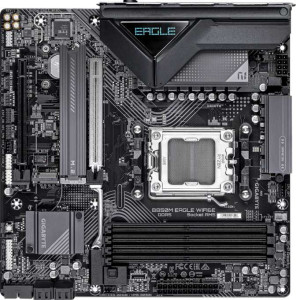
Gigabyte B850M Eagle Wi-Fi6E
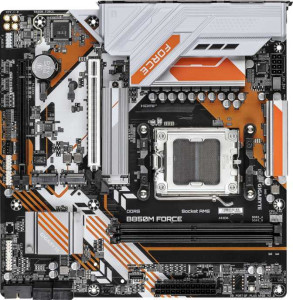
Gigabyte B850M Force

Gigabyte B850M Eagle Wi-Fi6E Gigabyte B850M Force

Overview

Welcome to our detailed spec comparison between the Gigabyte B850M Eagle Wi-Fi6E and the Gigabyte B850M Force — two Micro-ATX motherboards sharing the same AM5 socket and B850 chipset foundation, yet taking meaningfully different paths. From wireless connectivity and memory capacity to overclocking headroom and storage expansion, each board caters to a distinct type of builder. Read on to discover which one aligns with your needs.

Common Features

  • Both boards use the AM5 CPU socket.
  • Both boards feature the B850 chipset.
  • Both boards have a Micro-ATX form factor.
  • Both boards support HDMI 2.1 output.
  • Overclocking is supported on both boards.
  • RGB lighting is present on both boards.
  • Easy BIOS reset is not available on either board.
  • Both boards have a single CPU socket.
  • Both boards support DDR5 memory.
  • Both boards have a maximum native RAM speed of 5200 MHz.
  • Both boards have 2 memory channels.
  • Both boards include 1 USB 3.2 Gen 2 Type-A port.
  • Both boards include 2 USB 3.2 Gen 1 Type-A ports.
  • Neither board has USB 3.2 Gen 2x2, USB 4, or Thunderbolt ports.
  • Both boards have an HDMI output.
  • Both boards provide 2 USB 3.2 Gen 1 ports through expansion.
  • Both boards provide 4 USB 2.0 ports through expansion.
  • Both boards have 4 SATA 3 connectors.
  • Both boards have 4 fan headers.
  • A TPM connector is present on both boards.
  • mSATA connector support is absent on both boards.
  • Both boards have 1 PCIe 5.0 x16 slot and 1 PCIe x4 slot.
  • Both boards support 7.1 audio channels with 3 audio connectors.
  • S/PDIF Out port is not available on either board.
  • Both boards support RAID 0, RAID 1, RAID 5, and RAID 10, but not RAID 0+1.

Main Differences

  • Wi-Fi is available on Gigabyte B850M Eagle Wi-Fi6E but not on Gigabyte B850M Force.
  • Bluetooth is present on Gigabyte B850M Eagle Wi-Fi6E but not on Gigabyte B850M Force.
  • Dual BIOS is available on Gigabyte B850M Force but not on Gigabyte B850M Eagle Wi-Fi6E.
  • Maximum memory capacity is 256GB on Gigabyte B850M Eagle Wi-Fi6E and 128GB on Gigabyte B850M Force.
  • Maximum overclocked RAM speed is 8200 MHz on Gigabyte B850M Eagle Wi-Fi6E and 9600 MHz on Gigabyte B850M Force.
  • Memory slots total 4 on Gigabyte B850M Eagle Wi-Fi6E and 2 on Gigabyte B850M Force.
  • ECC memory support is present on Gigabyte B850M Force but not on Gigabyte B850M Eagle Wi-Fi6E.
  • USB 3.2 Gen 2 Type-C ports number 1 on Gigabyte B850M Eagle Wi-Fi6E and 0 on Gigabyte B850M Force.
  • USB 3.2 Gen 1 Type-C ports number 0 on Gigabyte B850M Eagle Wi-Fi6E and 1 on Gigabyte B850M Force.
  • USB 2.0 ports total 4 on Gigabyte B850M Eagle Wi-Fi6E and 2 on Gigabyte B850M Force.
  • DisplayPort outputs number 2 on Gigabyte B850M Eagle Wi-Fi6E and 1 on Gigabyte B850M Force.
  • M.2 sockets total 2 on Gigabyte B850M Eagle Wi-Fi6E and 3 on Gigabyte B850M Force.
Specs Comparison
Gigabyte B850M Eagle Wi-Fi6E

Gigabyte B850M Eagle Wi-Fi6E

Gigabyte B850M Force

Gigabyte B850M Force

General info:
CPU socket AM5 AM5
chipset B850 B850
form factor Micro-ATX Micro-ATX
release date January 2025 June 2025
supports Wi-Fi
Has Bluetooth
HDMI version HDMI 2.1 HDMI 2.1
Easy to overclock
has RGB lighting
Easy to reset BIOS
Has dual BIOS
CPU sockets 1 1
Has integrated graphics
warranty period 3 years 3 years
height 244 mm 244 mm
width 244 mm 244 mm
Has integrated CPU

Both the Gigabyte B850M Eagle Wi-Fi6E and the Gigabyte B850M Force share a strong common foundation: they use the same AM5 socket, B850 chipset, and Micro-ATX form factor at identical 244×244 mm dimensions. Both support overclocking, feature RGB lighting, output video via HDMI 2.1, and carry a 3-year warranty. For a builder focused purely on platform basics, either board lands in the same category.

The meaningful split comes down to two diverging priorities. The Eagle Wi-Fi6E includes integrated Wi-Fi 6E and Bluetooth, making it a genuinely cable-free solution for builds where running an Ethernet line is inconvenient — a real-world convenience advantage for small form factor or living-room setups. The Force, by contrast, strips wireless entirely but adds dual BIOS, which provides a hardware-level safety net: if a failed BIOS flash bricks the primary chip, the board can recover automatically from a backup. That feature matters most to enthusiasts who push firmware updates aggressively or experiment with BIOS-level tuning.

Neither board offers an easy BIOS reset mechanism, so both require a more manual recovery process in that regard. The edge here depends entirely on use case: the Eagle Wi-Fi6E wins for connectivity flexibility, while the Force wins for firmware resilience. If wireless is irrelevant to your build and you value BIOS stability, the Force is the stronger pick; if you need wireless out of the box and do not plan to flash experimental firmware, the Eagle Wi-Fi6E is the more practical choice.

Memory:
maximum memory amount 256GB 128GB
RAM speed (max) 5200 MHz 5200 MHz
overclocked RAM speed 8200 MHz 9600 MHz
memory slots 4 2
DDR memory version 5 5
memory channels 2 2
Supports ECC memory

On the surface, both boards share the same DDR5 platform with a native 5200 MHz speed ceiling and dual-channel architecture — so out of the box, real-world memory bandwidth is identical. The divergence becomes significant once you look beyond the defaults. The Eagle Wi-Fi6E offers 4 DIMM slots and a maximum capacity of 256 GB, while the Force is limited to 2 slots and tops out at 128 GB. For most gaming or productivity builds today, 128 GB is more than sufficient — but the Eagle′s extra slots provide meaningful headroom for memory-hungry workloads like video editing, virtual machines, or future capacity upgrades without replacing existing sticks.

Where the Force strikes back is in raw overclocking headroom: its maximum overclocked RAM speed reaches 9600 MHz, versus 8200 MHz on the Eagle. That 1400 MHz gap is substantial in the enthusiast overclocking world, and signals that the Force′s memory controller and trace routing are tuned more aggressively for high-frequency operation. In practice, most users will never push either board near those limits, but for builders who want to maximize memory performance through XMP/EXPO profiles and manual tuning, the Force has a clear ceiling advantage.

One additional differentiator worth flagging: the Force supports ECC memory, which provides hardware-level error correction — a feature relevant to small workstation or NAS builds where data integrity is critical. The Eagle offers none of this. Overall, the Eagle Wi-Fi6E has the edge in capacity and expandability, while the Force leads in overclocking potential and ECC support — making the choice a direct reflection of whether you prioritize raw capacity or peak performance and reliability.

Ports:
USB 3.2 Gen 2 ports (USB-A) 1 1
USB 3.2 Gen 1 ports (USB-A) 2 2
USB 3.2 Gen 2 ports (USB-C) 1 0
USB 3.2 Gen 1 ports (USB-C) 0 1
USB 2.0 ports 4 2
USB 3.2 Gen 2x2 ports 0 0
USB 4 40Gbps ports 0 0
USB 4 20Gbps ports 0 0
Thunderbolt 4 ports 0 0
Thunderbolt 3 ports 0 0
has an HDMI output
DisplayPort outputs 2 1
RJ45 ports 1 1
Has USB Type-C
eSATA ports 0 0
DVI outputs 0 0
has a VGA connector
PS/2 ports 1 1

The rear I/O on these two boards is broadly similar — both provide the same complement of USB-A ports, a single RJ45, HDMI output, and a legacy PS/2 connector. The differences, while not dramatic, are consistent enough to matter depending on your peripheral setup. The Eagle Wi-Fi6E edges ahead with two DisplayPort outputs versus just one on the Force, making it the stronger pick for multi-monitor productivity builds that rely on integrated graphics outputs — particularly relevant given both boards carry HDMI as well.

The USB-C situation is where the quality gap shows up. The Eagle ships with a USB 3.2 Gen 2 Type-C port running at 10 Gbps, while the Force offers only a Gen 1 Type-C at 5 Gbps. For users connecting fast external SSDs or modern peripherals via USB-C, that 2× bandwidth difference is tangible — the Eagle′s port will saturate typical NVMe enclosures far more effectively. The Eagle also provides 4 USB 2.0 ports compared to the Force′s 2, which, while low-bandwidth, are practical for mice, keyboards, and dongles that do not need speed but do need dedicated connections.

Neither board offers USB4, Thunderbolt, or any high-bandwidth video alternatives beyond the DisplayPort and HDMI outputs, so both sit firmly in the mainstream tier. Still, the Eagle Wi-Fi6E holds a clear port advantage — faster USB-C, more display outputs, and more legacy USB connections — making it the more versatile choice for a fully populated desk setup.
Connectors:
USB 3.2 Gen 1 ports (through expansion) 2 2
USB 2.0 ports (through expansion) 4 4
SATA 3 connectors 4 4
fan headers 4 4
USB 3.0 ports (through expansion) 2 2
M.2 sockets 2 3
Has TPM connector
U.2 sockets 0 0
Has mSATA connector
SATA 2 connectors 0 0

Internal connectivity is nearly identical across these two boards — both offer the same 4 SATA 3 connectors, 4 fan headers, matching internal USB expansion headers, and a TPM connector. For most Micro-ATX builds, that baseline is more than adequate. The single differentiator here is storage: the Force carries 3 M.2 sockets versus 2 on the Eagle.

That extra M.2 slot is more meaningful than it might initially appear. With NVMe SSDs now the default for both OS drives and fast secondary storage, having a third slot allows a builder to run a dedicated OS drive, a high-speed working drive, and a bulk storage NVMe simultaneously — all without touching any of the SATA ports. On the Eagle, achieving the same storage layout would require using one of the SATA connectors for the third drive, which introduces a bandwidth step-down for that device.

Everything else in this group is a wash. The Force holds a clear edge in internal storage expandability thanks to that additional M.2 socket — a genuine advantage for power users, content creators, or anyone planning a multi-drive NVMe array in a compact build.

Expansion slots:
PCIe 4.0 x16 slots 0 0
PCIe 5.0 x16 slots 1 1
PCIe 3.0 x16 slots 0 0
PCIe x1 slots 0 0
PCI slots 0 0
PCIe 2.0 x16 slots 0 0
PCIe x4 slots 1 1
PCIe x8 slots 0 0

Expansion slot configurations are identical on both boards: one PCIe 5.0 x16 slot for the primary GPU and one PCIe x4 slot for auxiliary cards such as capture cards, NVMe add-in cards, or network adapters. There is nothing to separate them here.

The PCIe 5.0 x16 primary slot is worth contextualizing — it delivers double the bandwidth of PCIe 4.0, ensuring neither board will bottleneck current or near-future discrete GPUs. For a Micro-ATX form factor, the slot count is also expected; the compact layout leaves little room for additional expansion, so the single x4 secondary slot is a practical rather than limiting design choice for the target audience of these boards.

This group is a complete tie. Expansion slot layout offers no basis for choosing one board over the other — both provide the same PCIe generation, the same slot count, and the same physical configuration.

Audio:
audio channels 7.1 7.1
Has S/PDIF Out port
audio connectors 3 3

Audio is an exact match across both boards. Each offers 7.1-channel surround support through 3 analog audio connectors, and neither includes an S/PDIF optical output — meaning users who need digital audio passthrough to an AV receiver or DAC will require a dedicated sound card or USB audio interface regardless of which board they choose.

The 7.1 channel capability covers the full surround spectrum for gaming headsets and multi-speaker setups, and 3 analog jacks is the standard configuration for this — typically covering line-in, line-out, and microphone at minimum. For the vast majority of users connecting a headset or stereo speakers, the onboard audio on either board will be sufficient without any additions.

Audio is a complete tie in this group. Neither board offers any advantage over the other here, and the absence of S/PDIF is equally a limitation on both. Users with more demanding audio requirements should factor in a dedicated solution independently of this comparison.

Storage:
Supports RAID 1
Supports RAID 10 (1+0)
Supports RAID 5
Supports RAID 0
Supports RAID 0+1

RAID support is identical on both boards. Each supports RAID 0, RAID 1, RAID 5, and RAID 10 — covering the full range of configurations most users would practically deploy, from pure performance striping to mirrored redundancy and the hybrid protection of RAID 10. Neither board supports RAID 0+1, though in practice RAID 10 is the more common and flexible implementation of combined striping and mirroring anyway.

The presence of RAID 5 is worth noting for anyone building a compact NAS or workstation — it allows distributed parity across three or more drives, balancing storage efficiency with fault tolerance. That said, realizing this on the Eagle requires using its SATA ports more heavily given its 2 M.2 slots, while the Force′s 3 M.2 slots offer a cleaner path to an all-NVMe RAID array — a distinction rooted in the Connectors group rather than this one.

Taken strictly on the storage feature data provided here, this group is a complete tie. Both boards offer the same RAID levels and the same omission, giving neither a meaningful advantage from a storage configuration standpoint alone.

Comparison Summary & Verdict

Both the Gigabyte B850M Eagle Wi-Fi6E and the Gigabyte B850M Force are capable B850 Micro-ATX platforms, but their strengths diverge clearly. The Eagle Wi-Fi6E stands out with its built-in Wi-Fi 6E and Bluetooth, 4 memory slots supporting up to 256GB of RAM, and more rear USB versatility — making it an excellent all-rounder for mainstream desktop builds that value connectivity out of the box. The Force, on the other hand, appeals to more demanding users with its dual BIOS redundancy, 3 M.2 sockets for expanded NVMe storage, ECC memory support, and a higher overclocked RAM ceiling of 9600 MHz — traits better suited to workstation-oriented or enthusiast builds where reliability and raw performance take priority over wireless features.

Gigabyte B850M Eagle Wi-Fi6E
Buy Gigabyte B850M Eagle Wi-Fi6E if...

Buy the Gigabyte B850M Eagle Wi-Fi6E if you want built-in Wi-Fi 6E and Bluetooth, more memory slots with support for up to 256GB of RAM, and greater rear USB flexibility without needing extra adapters.

Gigabyte B850M Force
Buy Gigabyte B850M Force if...

Buy the Gigabyte B850M Force if you prioritize dual BIOS protection, three M.2 slots for more NVMe storage, ECC memory support, or the highest possible overclocked RAM speeds.