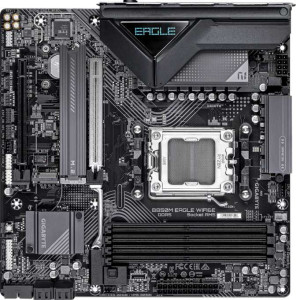
Gigabyte B850M Eagle Wi-Fi6E
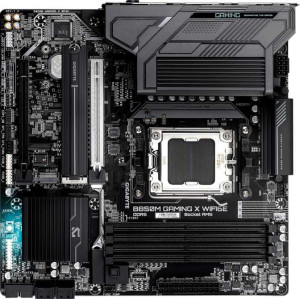
Gigabyte B850M Gaming X WiFi6E

Gigabyte B850M Eagle Wi-Fi6E Gigabyte B850M Gaming X WiFi6E

Overview

Welcome to this detailed spec comparison between the Gigabyte B850M Eagle Wi-Fi6E and the Gigabyte B850M Gaming X WiFi6E. Both are Micro-ATX motherboards built on the AM5 platform with the B850 chipset, sharing an impressively similar feature set across memory, connectivity, and expansion. Yet a closer look reveals key differences in firmware resilience and legacy port support that could tip the scales depending on your build priorities.

Common Features

  • Both boards use the AM5 CPU socket.
  • Both boards feature the B850 chipset.
  • Both boards use the Micro-ATX form factor.
  • Wi-Fi is supported on both boards, covering Wi-Fi 4 (802.11n), Wi-Fi 5 (802.11ac), Wi-Fi 6 (802.11ax), and Wi-Fi 6E (802.11ax).
  • Bluetooth 5.3 is available on both boards.
  • Both boards include an HDMI 2.1 port.
  • Both boards support a maximum of 256GB of RAM.
  • Both boards support a maximum RAM speed of 5200 MHz, and up to 8200 MHz when overclocked.
  • Both boards have 4 memory slots and use DDR5 memory across 2 channels.
  • ECC memory is not supported on either board.
  • Both boards provide 1 USB 3.2 Gen 2 USB-A port, 2 USB 3.2 Gen 1 USB-A ports, and 1 USB 3.2 Gen 2 USB-C port.
  • Neither board includes USB 3.2 Gen 1 USB-C, USB 3.2 Gen 2x2, USB 4 40Gbps, or USB 4 20Gbps ports.
  • Both boards have 4 USB 2.0 rear ports.
  • Both boards provide 2 USB 3.2 Gen 1 ports and 4 USB 2.0 ports through internal expansion headers, plus 1 USB-C 3.2 Gen 2 header.
  • Both boards include 4 SATA 3 connectors and 2 M.2 sockets.
  • Both boards have 4 fan headers.
  • A TPM connector is present on both boards.
  • Both boards feature 1 PCIe 5.0 x16 slot and 1 PCIe x4 slot, with no PCIe 4.0, 3.0, 2.0 x16, x8, x1, or PCI slots.
  • Both boards deliver 7.1-channel audio with 3 audio connectors, and neither includes an S/PDIF Out port.
  • Both boards support RAID 0, RAID 1, RAID 5, and RAID 10 (1+0), but neither supports RAID 0+1.

Main Differences

  • Dual BIOS is present on the Gigabyte B850M Gaming X WiFi6E but not available on the Gigabyte B850M Eagle Wi-Fi6E.
  • The Gigabyte B850M Eagle Wi-Fi6E includes 1 PS/2 port, while the Gigabyte B850M Gaming X WiFi6E has no PS/2 port.
Specs Comparison
Gigabyte B850M Eagle Wi-Fi6E

Gigabyte B850M Eagle Wi-Fi6E

Gigabyte B850M Gaming X WiFi6E

Gigabyte B850M Gaming X WiFi6E

General info:
CPU socket AM5 AM5
chipset B850 B850
form factor Micro-ATX Micro-ATX
release date January 2025 January 2025
supports Wi-Fi
Wi-Fi version Wi-Fi 4 (802.11n), Wi-Fi 5 (802.11ac), Wi-Fi 6 (802.11ax), Wi-Fi 6E (802.11ax) Wi-Fi 4 (802.11n), Wi-Fi 5 (802.11ac), Wi-Fi 6 (802.11ax), Wi-Fi 6E (802.11ax)
Has Bluetooth
Bluetooth version 5.3 5.3
HDMI version HDMI 2.1 HDMI 2.1
Easy to overclock
has RGB lighting
Easy to reset BIOS
Has dual BIOS
has aptX
CPU sockets 1 1
Has integrated graphics
warranty period 3 years 3 years
height 244 mm 244 mm
width 244 mm 244 mm
Has integrated CPU

The Gigabyte B850M Eagle Wi-Fi6E and Gigabyte B850M Gaming X WiFi6E share an identical foundation: both use the AM5 socket with a B850 chipset, adopt the Micro-ATX form factor at 244×244 mm, and support the same wireless stack — Wi-Fi 6E and Bluetooth 5.3 — ensuring fast, low-latency connectivity on both boards. They also match on HDMI 2.1 output, RGB lighting, overclocking support, and a 3-year warranty, making the general feature parity between them very strong.

The only meaningful differentiator in this group is that the Gaming X carries a dual BIOS, while the Eagle does not. In practice, dual BIOS means a hardware-level backup chip: if a firmware update goes wrong or the primary BIOS becomes corrupted, the board can automatically recover using the secondary chip without any user intervention. For enthusiasts who overclock or flash BIOS updates frequently, this is a tangible safety net that can save a build from becoming non-bootable.

Overall, the Gaming X has a clear edge in this group solely because of its dual BIOS. All other general specifications are identical, so the choice here comes down to whether that extra firmware resilience is worth it to you — and for anyone who regularly tinkers with BIOS settings, it very likely is.

Memory:
maximum memory amount 256GB 256GB
RAM speed (max) 5200 MHz 5200 MHz
overclocked RAM speed 8200 MHz 8200 MHz
memory slots 4 4
DDR memory version 5 5
memory channels 2 2
Supports ECC memory

Both the Gigabyte B850M Eagle Wi-Fi6E and the Gigabyte B850M Gaming X WiFi6E support up to 256GB of maximum memory, with identical specifications for RAM speed, overclocked RAM speed, memory slots, DDR memory version, and memory channels. Each model supports RAM speeds up to 5200 MHz, with overclocked speeds reaching up to 8200 MHz. Both boards feature 4 memory slots and support DDR5 memory, operating with a 2-channel memory configuration.

In terms of ECC memory support, neither motherboard offers this feature, as both explicitly do not support ECC memory. The memory-related specifications for both models are therefore fully aligned, with no differences between them in this category.

Ports:
USB 3.2 Gen 2 ports (USB-A) 1 1
USB 3.2 Gen 1 ports (USB-A) 2 2
USB 3.2 Gen 2 ports (USB-C) 1 1
USB 3.2 Gen 1 ports (USB-C) 0 0
USB 2.0 ports 4 4
USB 3.2 Gen 2x2 ports 0 0
USB 4 40Gbps ports 0 0
USB 4 20Gbps ports 0 0
Thunderbolt 4 ports 0 0
Thunderbolt 3 ports 0 0
has an HDMI output
DisplayPort outputs 2 2
RJ45 ports 1 1
Has USB Type-C
eSATA ports 0 0
DVI outputs 0 0
has a VGA connector
PS/2 ports 1 0

The Gigabyte B850M Eagle Wi-Fi6E and the Gigabyte B850M Gaming X WiFi6E have nearly identical port offerings, with a few notable differences. Both models feature 1 USB 3.2 Gen 2 port (USB-A), 2 USB 3.2 Gen 1 ports (USB-A), and 1 USB 3.2 Gen 2 port (USB-C). Both also support 4 USB 2.0 ports and include HDMI outputs and 2 DisplayPort outputs. Additionally, both motherboards have 1 RJ45 port for Ethernet connectivity and support USB Type-C.

The key difference between the two models is that the B850M Eagle Wi-Fi6E has a PS/2 port, while the B850M Gaming X WiFi6E does not. On the other hand, the Gaming X model lacks a PS/2 port but has the same selection of other ports, including the same USB, HDMI, and DisplayPort options.

Both models also lack more advanced ports such as USB 3.2 Gen 2x2, USB 4 40Gbps, Thunderbolt 4, Thunderbolt 3, eSATA, DVI, or VGA connectors, with both offering similar port configurations overall.

Connectors:
USB 3.2 Gen 1 ports (through expansion) 2 2
USB-C 3.2 Gen 2 ports (through expansion) 1 1
USB 2.0 ports (through expansion) 4 4
SATA 3 connectors 4 4
fan headers 4 4
USB 3.0 ports (through expansion) 2 2
M.2 sockets 2 2
Has TPM connector
U.2 sockets 0 0
Has mSATA connector
SATA 2 connectors 0 0

The Gigabyte B850M Eagle Wi-Fi6E and the Gigabyte B850M Gaming X WiFi6E offer identical specifications when it comes to connectors. Both motherboards feature 2 USB 3.2 Gen 1 ports (through expansion), 1 USB-C 3.2 Gen 2 port (through expansion), and 4 USB 2.0 ports (through expansion). Additionally, both include 4 fan headers, 4 SATA 3 connectors, and 2 M.2 sockets, ensuring robust connectivity options for expansion and cooling.

Neither motherboard includes a U.2 socket, and both lack SATA 2 connectors. Additionally, neither model offers an mSATA connector, with both explicitly marked as not having this option. Both boards do include a TPM (Trusted Platform Module) connector for enhanced security features.

As there are no differences between the two models in terms of connectors, both the B850M Eagle Wi-Fi6E and the B850M Gaming X WiFi6E offer identical connector configurations.

Expansion slots:
PCIe 4.0 x16 slots 0 0
PCIe 5.0 x16 slots 1 1
PCIe 3.0 x16 slots 0 0
PCIe x1 slots 0 0
PCI slots 0 0
PCIe 2.0 x16 slots 0 0
PCIe x4 slots 1 1
PCIe x8 slots 0 0

The Gigabyte B850M Eagle Wi-Fi6E and the Gigabyte B850M Gaming X WiFi6E have identical expansion slot configurations. Both motherboards feature 1 PCIe 5.0 x16 slot, 1 PCIe x4 slot, and no PCIe 4.0 x16, PCIe 3.0 x16, PCIe x1, PCI, or PCIe 2.0 x16 slots. Additionally, neither model includes a PCIe x8 slot.

As both models offer the same expansion slots, users can expect an equal level of expansion flexibility for graphics cards and other PCIe devices across these two motherboards.

Audio:
audio channels 7.1 7.1
Has S/PDIF Out port
audio connectors 3 3

Both the Gigabyte B850M Eagle Wi-Fi6E and the Gigabyte B850M Gaming X WiFi6E offer identical audio specifications. Each motherboard supports 7.1 audio channels, ensuring high-quality surround sound for your system. Neither model includes an S/PDIF Out port, and both motherboards feature 3 audio connectors for additional audio equipment connections.

As there are no differences between the two models in terms of audio capabilities, users can expect the same audio performance and connectivity options from both boards.

Storage:
Supports RAID 1
Supports RAID 10 (1+0)
Supports RAID 5
Supports RAID 0
Supports RAID 0+1

Both the Gigabyte B850M Eagle Wi-Fi6E and the Gigabyte B850M Gaming X WiFi6E offer identical RAID support. Each motherboard supports RAID 1, RAID 10 (1+0), RAID 5, and RAID 0, allowing for flexible storage configurations and redundancy options. Neither model supports RAID 0+1, a feature that is not available on either board.

As there are no differences between the two models in terms of RAID functionality, both motherboards provide the same storage configuration options for users seeking advanced RAID setups.

Comparison Summary & Verdict

After a thorough comparison, it is clear that the Gigabyte B850M Eagle Wi-Fi6E and the Gigabyte B850M Gaming X WiFi6E are near-identical boards at their core, sharing the same AM5 socket, B850 chipset, DDR5 memory support, Wi-Fi 6E, Bluetooth 5.3, and a full suite of USB and storage options. The deciding factors come down to two specific features: the Gaming X WiFi6E gains a meaningful edge with its dual BIOS, offering an extra layer of protection against failed firmware updates — a valuable safety net for overclockers and enthusiasts. The Eagle Wi-Fi6E, on the other hand, retains a PS/2 port, making it the better fit for users with legacy peripherals. Choose the Gaming X WiFi6E for added firmware reliability, or the Eagle Wi-Fi6E if legacy keyboard and mouse compatibility matters to your setup.

Gigabyte B850M Eagle Wi-Fi6E
Buy Gigabyte B850M Eagle Wi-Fi6E if...

Buy the Gigabyte B850M Eagle Wi-Fi6E if you still rely on legacy PS/2 peripherals and do not require a dual BIOS safety net for firmware recovery.

Gigabyte B850M Gaming X WiFi6E
Buy Gigabyte B850M Gaming X WiFi6E if...

Buy the Gigabyte B850M Gaming X WiFi6E if firmware resilience is a priority, as its dual BIOS provides reliable protection against failed BIOS updates.