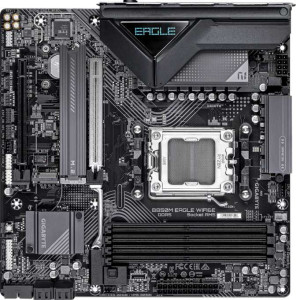
Gigabyte B850M Eagle Wi-Fi6E
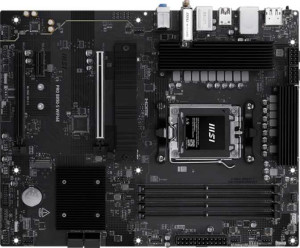
MSI Pro B850-S Wi-Fi6E

Gigabyte B850M Eagle Wi-Fi6E MSI Pro B850-S Wi-Fi6E

Overview

Welcome to our in-depth spec comparison between the Gigabyte B850M Eagle Wi-Fi6E and the MSI Pro B850-S Wi-Fi6E — two B850-chipset motherboards targeting AMD AM5 builds with Wi-Fi 6E connectivity. While they share a strong common foundation, key battlegrounds emerge around form factor and expansion slot design, rear USB port availability, fan header count, and storage configuration flexibility. Read on to see how these two boards stack up across every major specification category.

Common Features

  • Both boards use the AM5 CPU socket.
  • Both boards feature the B850 chipset.
  • Wi-Fi is supported on both products, covering Wi-Fi 4 (802.11n), Wi-Fi 5 (802.11ac), Wi-Fi 6 (802.11ax), and Wi-Fi 6E (802.11ax).
  • Bluetooth 5.3 is available on both products.
  • Both boards output via HDMI 2.1.
  • Overclocking is supported on both products.
  • Both boards support up to 256GB of maximum memory.
  • Overclocked RAM speeds of up to 8200 MHz are supported on both products.
  • Both boards have 4 memory slots.
  • Both boards use DDR5 memory.
  • Both boards operate with 2 memory channels.
  • ECC memory is not supported on either product.
  • Both boards include 1 USB 3.2 Gen 2 port (USB-C).
  • Neither board includes any USB 3.2 Gen 1 ports (USB-C).
  • Neither board includes any USB 3.2 Gen 2x2, USB 4 40Gbps, USB 4 20Gbps, Thunderbolt 4, or Thunderbolt 3 ports.
  • An HDMI output is present on both products.
  • Both boards provide 2 USB 3.2 Gen 1 ports through expansion, 1 USB-C 3.2 Gen 2 port through expansion, 4 USB 2.0 ports through expansion, 4 SATA 3 connectors, 2 M.2 sockets, and 0 U.2 sockets.
  • A TPM connector is present on both products.
  • Both boards deliver 7.1 audio channels with 3 audio connectors, and neither includes an S/PDIF Out port.
  • RAID 0, RAID 1, and RAID 10 (1+0) are supported on both products, while RAID 0+1 is not supported on either.

Main Differences

  • The Gigabyte B850M Eagle Wi-Fi6E uses a Micro-ATX form factor, while the MSI Pro B850-S Wi-Fi6E uses an ATX form factor.
  • Easy BIOS reset is available on the MSI Pro B850-S Wi-Fi6E but not on the Gigabyte B850M Eagle Wi-Fi6E.
  • The width is 244 mm on the Gigabyte B850M Eagle Wi-Fi6E and 304.8 mm on the MSI Pro B850-S Wi-Fi6E.
  • The height is 244 mm on the Gigabyte B850M Eagle Wi-Fi6E and 243.8 mm on the MSI Pro B850-S Wi-Fi6E.
  • Maximum native RAM speed is 5200 MHz on the Gigabyte B850M Eagle Wi-Fi6E and 5600 MHz on the MSI Pro B850-S Wi-Fi6E.
  • USB 3.2 Gen 2 ports (USB-A) number 1 on the Gigabyte B850M Eagle Wi-Fi6E and 3 on the MSI Pro B850-S Wi-Fi6E.
  • USB 3.2 Gen 1 ports (USB-A) number 2 on the Gigabyte B850M Eagle Wi-Fi6E and 4 on the MSI Pro B850-S Wi-Fi6E.
  • USB 2.0 ports number 4 on the Gigabyte B850M Eagle Wi-Fi6E, while the MSI Pro B850-S Wi-Fi6E has none.
  • DisplayPort outputs number 2 on the Gigabyte B850M Eagle Wi-Fi6E and 1 on the MSI Pro B850-S Wi-Fi6E.
  • A PS/2 port is present on the Gigabyte B850M Eagle Wi-Fi6E but not available on the MSI Pro B850-S Wi-Fi6E.
  • Fan headers number 4 on the Gigabyte B850M Eagle Wi-Fi6E and 6 on the MSI Pro B850-S Wi-Fi6E.
  • The Gigabyte B850M Eagle Wi-Fi6E includes 1 PCIe 5.0 x16 slot, while the MSI Pro B850-S Wi-Fi6E has none.
  • The MSI Pro B850-S Wi-Fi6E includes 1 PCIe 4.0 x16 slot, while the Gigabyte B850M Eagle Wi-Fi6E has none.
  • The MSI Pro B850-S Wi-Fi6E includes 1 PCIe x1 slot, while the Gigabyte B850M Eagle Wi-Fi6E has none.
  • RAID 5 support is present on the Gigabyte B850M Eagle Wi-Fi6E but not available on the MSI Pro B850-S Wi-Fi6E.
Specs Comparison
Gigabyte B850M Eagle Wi-Fi6E

Gigabyte B850M Eagle Wi-Fi6E

MSI Pro B850-S Wi-Fi6E

MSI Pro B850-S Wi-Fi6E

General info:
CPU socket AM5 AM5
chipset B850 B850
form factor Micro-ATX ATX
release date January 2025 June 2025
supports Wi-Fi
Wi-Fi version Wi-Fi 4 (802.11n), Wi-Fi 5 (802.11ac), Wi-Fi 6 (802.11ax), Wi-Fi 6E (802.11ax) Wi-Fi 4 (802.11n), Wi-Fi 5 (802.11ac), Wi-Fi 6 (802.11ax), Wi-Fi 6E (802.11ax)
Has Bluetooth
Bluetooth version 5.3 5.3
HDMI version HDMI 2.1 HDMI 2.1
Easy to overclock
has RGB lighting
Easy to reset BIOS
Has dual BIOS
has aptX
CPU sockets 1 1
Has integrated graphics
warranty period 3 years 3 years
height 244 mm 243.8 mm
width 244 mm 304.8 mm
Has integrated CPU

Both the Gigabyte B850M Eagle Wi-Fi6E and the MSI Pro B850-S Wi-Fi6E share the same AM5 socket and B850 chipset, meaning they support the same generation of AMD processors and offer identical overclocking potential. Their wireless feature sets are also identical: full Wi-Fi 6E support across 802.11n/ac/ax standards, Bluetooth 5.3, and HDMI 2.1 output — so neither board has an edge in connectivity.

The most meaningful difference is form factor. The Gigabyte is a Micro-ATX board (244 × 244 mm), while the MSI is a full ATX board (243.8 × 304.8 mm). In practice, the ATX size opens up more room for additional expansion slots, better power delivery layout, and greater airflow headroom inside the case — useful for high-end builds. The Micro-ATX is the smarter pick for compact or mid-tower builds where internal space is at a premium.

A subtle but practical differentiator is easy BIOS reset: the MSI supports it, the Gigabyte does not. For enthusiasts who push memory or CPU settings to the limit, a quick BIOS reset without disassembling the board can save real time and frustration. Overall, the MSI Pro B850-S holds a modest edge in this group — its ATX footprint and BIOS reset capability give it more flexibility for demanding builds, while the Gigabyte is the better fit if case size is a constraint.

Memory:
maximum memory amount 256GB 256GB
RAM speed (max) 5200 MHz 5600 MHz
overclocked RAM speed 8200 MHz 8200 MHz
memory slots 4 4
DDR memory version 5 5
memory channels 2 2
Supports ECC memory

At the foundation, these two boards are nearly identical in memory architecture: both support DDR5, offer 4 slots in a dual-channel configuration, cap out at 256GB maximum capacity, and top the same 8200 MHz overclocked ceiling. For most users — whether running content creation workloads, gaming, or heavy multitasking — this shared framework means either board can accommodate the same high-capacity, high-speed memory kits without compromise.

The one tangible difference lies in native (non-overclocked) RAM speed support. The MSI Pro B850-S handles speeds up to 5600 MHz natively, versus 5200 MHz on the Gigabyte B850M Eagle. In practice, this means the MSI can run certain DDR5 kits at their rated speed without needing to enable XMP/EXPO profiles, which matters for users who want plug-and-play stability or are working within tighter system tuning constraints.

The edge in this group goes to the MSI Pro B850-S, but only narrowly. The 400 MHz advantage in native RAM speed is a real, if modest, benefit — particularly for users prioritizing out-of-the-box memory compatibility. For anyone planning to push RAM speeds via overclocking anyway, both boards land at the same ceiling and the difference becomes largely irrelevant.

Ports:
USB 3.2 Gen 2 ports (USB-A) 1 3
USB 3.2 Gen 1 ports (USB-A) 2 4
USB 3.2 Gen 2 ports (USB-C) 1 1
USB 3.2 Gen 1 ports (USB-C) 0 0
USB 2.0 ports 4 0
USB 3.2 Gen 2x2 ports 0 0
USB 4 40Gbps ports 0 0
USB 4 20Gbps ports 0 0
Thunderbolt 4 ports 0 0
Thunderbolt 3 ports 0 0
has an HDMI output
DisplayPort outputs 2 1
RJ45 ports 1 1
Has USB Type-C
eSATA ports 0 0
DVI outputs 0 0
has a VGA connector
PS/2 ports 1 0

The rear I/O tells two distinct stories about who each board is designed for. The MSI Pro B850-S leads in high-speed USB bandwidth, offering 3× USB 3.2 Gen 2 (USB-A) and 4× USB 3.2 Gen 1 (USB-A) — seven fast USB-A ports in total. The Gigabyte B850M Eagle counters with only 3 USB 3.2 ports (USB-A), but compensates with 4× USB 2.0 ports. For modern peripherals like fast external SSDs, high-res webcams, or audio interfaces, the MSI's port lineup is more capable; the Gigabyte's USB 2.0 slots are adequate only for keyboards, mice, and other low-bandwidth devices.

Where the Gigabyte reclaims ground is in video output flexibility. It provides 2 DisplayPort outputs alongside its HDMI, enabling a three-monitor setup directly from the board (assuming a CPU with integrated graphics). The MSI is limited to 1 DisplayPort plus HDMI — a two-display ceiling. For users running iGPU-driven multi-monitor workstations or home office setups, this is a meaningful distinction. The Gigabyte also includes a PS/2 port, which caters to a niche but real segment of users with legacy input devices.

Overall, the MSI Pro B850-S has the stronger port configuration for most modern users, thanks to its substantially higher count of fast USB-A ports — a clear day-to-day advantage for peripheral-heavy desks. The Gigabyte B850M Eagle is the better fit if multi-monitor output from the board itself is a priority.

Connectors:
USB 3.2 Gen 1 ports (through expansion) 2 2
USB-C 3.2 Gen 2 ports (through expansion) 1 1
USB 2.0 ports (through expansion) 4 4
SATA 3 connectors 4 4
fan headers 4 6
USB 3.0 ports (through expansion) 2 2
M.2 sockets 2 2
Has TPM connector
U.2 sockets 0 0
Has mSATA connector
SATA 2 connectors 0 0

Strip away the one key difference and these two boards are mirror images internally: identical expansion USB headers, 4× SATA 3 connectors, 2× M.2 sockets, and a TPM connector on both. For storage configuration and front-panel connectivity, either board delivers the same options — two NVMe drives alongside up to four SATA devices is a capable setup for most builds.

The single differentiator is fan headers: the MSI Pro B850-S provides 6 fan headers versus 4 on the Gigabyte B850M Eagle. This gap is more meaningful than it might appear. In a well-cooled mid-to-full ATX build — which aligns with the MSI's larger form factor — running a CPU cooler, multiple case fans, and optionally a pump header can quickly exhaust four headers, forcing the use of fan hubs or splitters. Six headers provide direct, individually controllable connections for more complex cooling setups, which is a real convenience advantage for thermal-focused builders.

The MSI Pro B850-S takes a clear, if narrow, edge here. The additional fan headers are a practical benefit that scales with build complexity, and given the MSI's ATX size already caters to larger chassis with more cooling hardware, the pairing makes logical sense. The Gigabyte's four headers are sufficient for straightforward builds but may require workarounds in more elaborate configurations.

Expansion slots:
PCIe 4.0 x16 slots 0 1
PCIe 5.0 x16 slots 1 0
PCIe 3.0 x16 slots 0 0
PCIe x1 slots 0 1
PCI slots 0 0
PCIe 2.0 x16 slots 0 0
PCIe x4 slots 1 1
PCIe x8 slots 0 0

The primary GPU slot is where these boards diverge most significantly. The Gigabyte B850M Eagle offers a PCIe 5.0 x16 slot, while the MSI Pro B850-S provides a PCIe 4.0 x16 slot instead. PCIe 5.0 x16 doubles the theoretical bandwidth of PCIe 4.0 x16 — from roughly 64 GB/s to 128 GB/s. For current-generation discrete GPUs, this distinction is largely academic since no mainstream graphics card today saturates PCIe 4.0 x16 bandwidth. However, the Gigabyte's PCIe 5.0 slot is meaningfully future-proof for next-generation hardware that may eventually leverage that headroom.

The MSI partially compensates with a PCIe x1 slot that the Gigabyte lacks, which is handy for adding low-profile expansion cards — think sound cards, capture cards, or additional network adapters — without sacrificing the x4 slot. Both boards include one PCIe x4 slot, suitable for add-in cards like high-speed NVMe expansion or certain capture devices. Neither board offers legacy PCI or PCIe 3.0 slots, so older expansion cards are not supported on either.

The verdict here depends on the buyer's priority. For raw expansion flexibility today, the MSI Pro B850-S has a slight advantage with its extra x1 slot. But for forward-looking GPU compatibility, the Gigabyte B850M Eagle holds the more technically capable primary slot. Users building around current hardware can treat this as a near-tie; those planning longevity beyond one GPU generation should weigh the Gigabyte's PCIe 5.0 support seriously.

Audio:
audio channels 7.1 7.1
Has S/PDIF Out port
audio connectors 3 3

On audio, there is nothing to separate these two boards — every spec is identical. Both deliver 7.1 surround sound support via 3 analog audio connectors, and neither includes an S/PDIF optical output. The 7.1 channel capability means onboard audio can feed a full surround sound speaker arrangement, which is a reasonable offering for a mainstream motherboard in this segment.

The absence of S/PDIF Out on both boards is worth noting for users who own external DACs, AV receivers, or high-end speaker systems that rely on digital optical input. Those users will need to route audio through USB or a dedicated sound card regardless of which board they choose. For the majority of users connecting standard analog headsets or speakers to the 3.5mm jacks, neither omission nor limitation applies in practice.

This group is a complete tie. The audio configuration is functionally identical across both boards, and no decision between the Gigabyte B850M Eagle and the MSI Pro B850-S should be influenced by onboard audio specifications alone.

Storage:
Supports RAID 1
Supports RAID 10 (1+0)
Supports RAID 5
Supports RAID 0
Supports RAID 0+1

RAID support is nearly identical between these two boards, with one exception. Both handle RAID 0 (striping for performance), RAID 1 (mirroring for redundancy), and RAID 10 (a combination of both) — covering the configurations most home and small office users will ever need. The Gigabyte B850M Eagle goes one step further by also supporting RAID 5, which the MSI Pro B850-S does not.

RAID 5 distributes both data and parity information across three or more drives, offering a balance of read performance, usable capacity, and fault tolerance that neither RAID 1 nor RAID 10 achieves as efficiently at scale. It is particularly relevant for NAS-style or multi-drive storage builds where maximizing usable capacity while maintaining a single-drive failure tolerance is a priority. For a typical two-drive setup, the absence of RAID 5 on the MSI is inconsequential — RAID 5 requires a minimum of three drives to function.

The Gigabyte B850M Eagle takes the edge in this group solely on the strength of its RAID 5 support. It is a niche advantage that only matters to users running three or more storage drives in an array, but for that specific use case — small workstation or home server builds — it is a genuine differentiator the MSI cannot match.

Comparison Summary & Verdict

Both the Gigabyte B850M Eagle Wi-Fi6E and the MSI Pro B850-S Wi-Fi6E deliver a solid AM5 platform with DDR5 support, Wi-Fi 6E, Bluetooth 5.3, and up to 256GB of RAM — but they target meaningfully different builder profiles. The Gigabyte stands out with its PCIe 5.0 x16 slot, dual DisplayPort outputs, RAID 5 support, and a more compact Micro-ATX footprint, making it an appealing choice for small-form-factor enthusiasts who still want cutting-edge GPU bandwidth. The MSI, on the other hand, benefits from its full ATX form factor, a higher native RAM speed of 5600 MHz, more rear USB ports, 6 fan headers, an easy BIOS reset feature, and a PCIe 4.0 x16 slot alongside a PCIe x1 slot — making it better suited for builders who prioritize system management, airflow control, and expandability in a traditional full-size build.

Gigabyte B850M Eagle Wi-Fi6E
Buy Gigabyte B850M Eagle Wi-Fi6E if...

Buy the Gigabyte B850M Eagle Wi-Fi6E if you want a compact Micro-ATX board with a PCIe 5.0 x16 slot, dual DisplayPort outputs, and RAID 5 support for your AM5 build.

MSI Pro B850-S Wi-Fi6E
Buy MSI Pro B850-S Wi-Fi6E if...

Buy the MSI Pro B850-S Wi-Fi6E if you prefer a full ATX board with more rear USB ports, a higher native RAM speed of 5600 MHz, 6 fan headers, and a convenient easy BIOS reset feature.