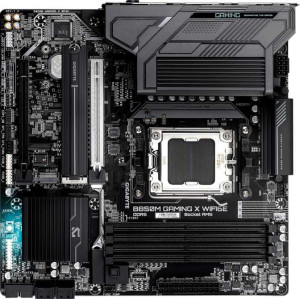
Gigabyte B850M Gaming X WiFi6E
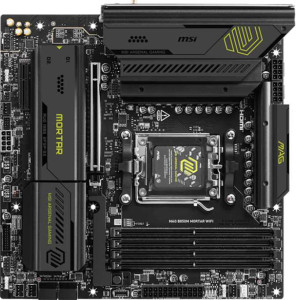
MSI MAG B850M Mortar WiFI

Gigabyte B850M Gaming X WiFi6E MSI MAG B850M Mortar WiFI

Overview

Welcome to our in-depth specification comparison between the Gigabyte B850M Gaming X WiFi6E and the MSI MAG B850M Mortar WiFI — two Micro-ATX motherboards built on the B850 chipset for AMD AM5 platforms. While they share a strong common foundation, key battlegrounds emerge around rear USB connectivity, wireless standards, and storage expansion. Read on to discover which board best suits your next build.

Common Features

  • Both products use the AM5 CPU socket.
  • Both products feature the B850 chipset.
  • Both products have a Micro-ATX form factor.
  • Wi-Fi connectivity is available on both products.
  • Bluetooth is available on both products.
  • Both products support HDMI 2.1.
  • Overclocking support is available on both products.
  • RGB lighting is present on both products.
  • Both products support up to 256GB of maximum memory.
  • Both products support overclocked RAM speeds up to 8200 MHz.
  • Both products have 4 memory slots.
  • Both products use DDR5 memory.
  • Both products have 2 memory channels.
  • ECC memory is not supported on either product.
  • Both products have 1 USB 3.2 Gen 2 port (USB-C) on the rear.
  • Neither product has any USB 3.2 Gen 1 ports (USB-C) on the rear.
  • Neither product has USB 4 40Gbps or 20Gbps ports.
  • Neither product has Thunderbolt 3 or Thunderbolt 4 ports.
  • Both products have an HDMI output.
  • Both products have 1 RJ45 port.
  • Both products provide 2 USB 3.2 Gen 1 ports and 1 USB-C 3.2 Gen 2 port through expansion headers.
  • Both products provide 4 USB 2.0 ports through expansion headers.
  • Both products have 4 SATA 3 connectors.
  • A TPM connector is present on both products.
  • Neither product has a U.2 socket.
  • Neither product has an mSATA connector.
  • Both products have 1 PCIe 5.0 x16 slot and 1 PCIe x4 slot.
  • Neither product has any PCIe 4.0, 3.0, 2.0 x16, x8, or x1 slots.
  • Both products support 7.1 audio channels.
  • Both products support RAID 0, RAID 1, RAID 5, and RAID 10.
  • RAID 0+1 is not supported on either product.

Main Differences

  • Wi-Fi 7 (802.11be) support is present on MSI MAG B850M Mortar WiFI but not available on Gigabyte B850M Gaming X WiFi6E.
  • Bluetooth version is 5.3 on Gigabyte B850M Gaming X WiFi6E and 5.4 on MSI MAG B850M Mortar WiFI.
  • Easy BIOS reset is available on MSI MAG B850M Mortar WiFI but not available on Gigabyte B850M Gaming X WiFi6E.
  • Maximum native RAM speed is 5200 MHz on Gigabyte B850M Gaming X WiFi6E and 5600 MHz on MSI MAG B850M Mortar WiFI.
  • USB 3.2 Gen 2 ports (USB-A) count is 1 on Gigabyte B850M Gaming X WiFi6E and 3 on MSI MAG B850M Mortar WiFI.
  • USB 3.2 Gen 1 ports (USB-A) count is 2 on Gigabyte B850M Gaming X WiFi6E and 4 on MSI MAG B850M Mortar WiFI.
  • USB 2.0 ports count is 4 on Gigabyte B850M Gaming X WiFi6E and 0 on MSI MAG B850M Mortar WiFI.
  • A USB 3.2 Gen 2x2 port is present on MSI MAG B850M Mortar WiFI but not available on Gigabyte B850M Gaming X WiFi6E.
  • DisplayPort outputs count is 2 on Gigabyte B850M Gaming X WiFi6E and 0 on MSI MAG B850M Mortar WiFI.
  • Fan headers count is 4 on Gigabyte B850M Gaming X WiFi6E and 6 on MSI MAG B850M Mortar WiFI.
  • M.2 sockets count is 2 on Gigabyte B850M Gaming X WiFi6E and 3 on MSI MAG B850M Mortar WiFI.
  • An S/PDIF Out port is present on MSI MAG B850M Mortar WiFI but not available on Gigabyte B850M Gaming X WiFi6E.
  • Audio connectors count is 3 on Gigabyte B850M Gaming X WiFi6E and 2 on MSI MAG B850M Mortar WiFI.
Specs Comparison
Gigabyte B850M Gaming X WiFi6E

Gigabyte B850M Gaming X WiFi6E

MSI MAG B850M Mortar WiFI

MSI MAG B850M Mortar WiFI

General info:
CPU socket AM5 AM5
chipset B850 B850
form factor Micro-ATX Micro-ATX
release date January 2025 March 2025
supports Wi-Fi
Wi-Fi version Wi-Fi 4 (802.11n), Wi-Fi 5 (802.11ac), Wi-Fi 6 (802.11ax), Wi-Fi 6E (802.11ax) Wi-Fi 4 (802.11n), Wi-Fi 5 (802.11ac), Wi-Fi 6 (802.11ax), Wi-Fi 6E (802.11ax), Wi-Fi 7 (802.11be)
Has Bluetooth
Bluetooth version 5.3 5.4
HDMI version HDMI 2.1 HDMI 2.1
Easy to overclock
has RGB lighting
Easy to reset BIOS
Has dual BIOS
has aptX
CPU sockets 1 1
Has integrated graphics
warranty period 3 years 3 years
height 244 mm 244 mm
width 244 mm 244 mm
Has integrated CPU

Both the Gigabyte B850M Gaming X WiFi6E and the MSI MAG B850M Mortar WiFi share a near-identical foundation: the same AM5 socket, B850 chipset, Micro-ATX form factor, and identical 244×244 mm dimensions. They also match on dual BIOS, RGB lighting, HDMI 2.1, overclocking support, and a 3-year warranty. For most buyers, this shared platform means either board slots into the same cases and ecosystems without compromise.

The meaningful differences emerge in wireless connectivity. The MSI goes further with support for Wi-Fi 7 (802.11be), while the Gigabyte tops out at Wi-Fi 6E. In practice, Wi-Fi 7 delivers significantly higher throughput and lower latency on compatible routers — relevant today if you already own a Wi-Fi 7 router, or as future-proofing if you plan to upgrade. The MSI also edges ahead with Bluetooth 5.4 versus 5.3 on the Gigabyte, bringing marginally improved connection stability and power efficiency for wireless peripherals. Additionally, the MSI supports easy BIOS reset, a small but real quality-of-life advantage when troubleshooting, whereas the Gigabyte does not.

The MSI MAG B850M Mortar WiFi holds a clear edge in this group. Its Wi-Fi 7 support is the standout differentiator — if your network or use case can leverage it, the Gigabyte simply cannot match it. The Bluetooth and BIOS reset advantages are secondary but consistent with a slightly more feature-complete package at the general spec level.
Memory:
maximum memory amount 256GB 256GB
RAM speed (max) 5200 MHz 5600 MHz
overclocked RAM speed 8200 MHz 8200 MHz
memory slots 4 4
DDR memory version 5 5
memory channels 2 2
Supports ECC memory

On paper, these two boards share most of their memory credentials: both support DDR5, cap out at 256GB across 4 slots in dual-channel configuration, and top out at the same 8200 MHz overclocked ceiling. For the vast majority of users — gamers, content creators, and enthusiasts running standard DDR5 kits — this common ground means neither board imposes a meaningful ceiling on memory performance.

The one concrete difference lies in the native (non-overclocked) RAM speed ceiling: the MSI MAG B850M Mortar WiFi supports up to 5600 MHz without overclocking, versus 5200 MHz on the Gigabyte B850M Gaming X WiFi6E. In practice, this means the MSI can run faster DDR5 kits at their rated speeds out of the box, without requiring XMP/EXPO profiles to be manually enabled. That 400 MHz gap at native speeds is modest in real-world throughput terms, but it does signal slightly more headroom before you need to touch BIOS memory settings.

The MSI holds a narrow edge here, strictly due to its higher native RAM speed support. However, since both boards share identical overclocked ceilings and slot counts, users planning to run XMP/EXPO profiles will find the practical difference minimal. For buyers who prefer plug-and-play simplicity with faster DDR5 kits, the MSI is the slightly safer pick.

Ports:
USB 3.2 Gen 2 ports (USB-A) 1 3
USB 3.2 Gen 1 ports (USB-A) 2 4
USB 3.2 Gen 2 ports (USB-C) 1 1
USB 3.2 Gen 1 ports (USB-C) 0 0
USB 2.0 ports 4 0
USB 3.2 Gen 2x2 ports 0 1
USB 4 40Gbps ports 0 0
USB 4 20Gbps ports 0 0
Thunderbolt 4 ports 0 0
Thunderbolt 3 ports 0 0
has an HDMI output
DisplayPort outputs 2 0
RJ45 ports 1 1
Has USB Type-C
eSATA ports 0 0
DVI outputs 0 0
has a VGA connector
PS/2 ports 0 0

The port layouts of these two boards reveal genuinely different design priorities. The MSI MAG B850M Mortar WiFi goes all-in on modern, high-speed USB connectivity: it offers 3 USB 3.2 Gen 2 Type-A ports (10 Gbps each), 4 USB 3.2 Gen 1 Type-A ports, and notably a USB 3.2 Gen 2x2 port delivering 20 Gbps — the fastest USB connection available on either board. That Gen 2x2 port is particularly valuable for users with high-speed external SSDs or docking stations that can saturate a standard 10 Gbps connection. The Gigabyte B850M Gaming X WiFi6E, by contrast, carries 4 USB 2.0 ports alongside its fewer high-speed USB-A options — useful for legacy peripherals like older keyboards or dongles, but a step back in terms of bandwidth.

Where the Gigabyte reclaims ground is in display output flexibility. It provides 2 DisplayPort outputs alongside its HDMI 2.1, enabling up to three simultaneous displays when using integrated graphics. The MSI offers only the single HDMI port, which limits multi-monitor setups driven directly from the board. For users relying on a discrete GPU this distinction is moot, but for HTPC builds or workstations leaning on iGPU output, the Gigabyte's dual DisplayPort is a real advantage.

Overall, the MSI holds the stronger hand for most desktop users: its higher USB port count, elimination of slow USB 2.0, and the standout Gen 2x2 port make it better suited to a modern peripheral ecosystem. The Gigabyte earns a specific win on multi-display output, making it the more compelling choice only if IO panel display connectivity is a priority.

Connectors:
USB 3.2 Gen 1 ports (through expansion) 2 2
USB-C 3.2 Gen 2 ports (through expansion) 1 1
USB 2.0 ports (through expansion) 4 4
SATA 3 connectors 4 4
fan headers 4 6
USB 3.0 ports (through expansion) 2 2
M.2 sockets 2 3
Has TPM connector
U.2 sockets 0 0
Has mSATA connector
SATA 2 connectors 0 0

Strip away the identical specs — same SATA 3 count, same expansion USB headers, same TPM connector — and two differences define this category. The MSI MAG B850M Mortar WiFi includes 3 M.2 sockets versus 2 on the Gigabyte B850M Gaming X WiFi6E. That extra slot is more significant than it might first appear: in a Micro-ATX build where SATA ports are the only alternative for additional storage, a third M.2 socket allows a fully NVMe storage configuration without consuming any SATA bandwidth or requiring additional cables. For users building a compact, high-speed storage array, this is a meaningful structural advantage.

The MSI also provides 6 fan headers compared to the Gigabyte's 4. In a Micro-ATX chassis where airflow management is already constrained by the smaller footprint, those two extra headers allow direct board-level control of more fans without relying on splitters — which can reduce granular RPM control and complicate cable management. Builders targeting a quiet or thermally optimized system will appreciate the added flexibility.

The MSI MAG B850M Mortar WiFi takes a clear win in this group. Its additional M.2 slot and two extra fan headers both address real builder pain points, particularly in compact form-factor systems where storage expansion and thermal control options are naturally limited. The Gigabyte matches it everywhere else, but in connectors, the MSI simply offers more to work with.

Expansion slots:
PCIe 4.0 x16 slots 0 0
PCIe 5.0 x16 slots 1 1
PCIe 3.0 x16 slots 0 0
PCIe x1 slots 0 0
PCI slots 0 0
PCIe 2.0 x16 slots 0 0
PCIe x4 slots 1 1
PCIe x8 slots 0 0

Expansion slot configurations are identical across both boards: one PCIe 5.0 x16 slot for the primary GPU and one PCIe x4 slot for secondary expansion cards. The PCIe 5.0 x16 slot is the headline spec here — it doubles the bandwidth of PCIe 4.0, and while current consumer GPUs do not yet saturate even PCIe 4.0 x16, this ensures both boards are architecturally ready for next-generation graphics cards without any bottleneck at the slot level.

The PCIe x4 slot provides a reasonable lane count for add-in cards such as capture cards, additional NVMe controllers, or 10GbE network cards — common additions in a performance-oriented Micro-ATX build. Neither board offers PCIe x1 slots, which is typical for the form factor given physical space constraints, and unlikely to be missed given that most modern add-in cards use x4 or larger connectors anyway.

This category is a straightforward tie. Every expansion slot — its type, generation, and count — is exactly matched between the Gigabyte B850M Gaming X WiFi6E and the MSI MAG B850M Mortar WiFi. Buyers should look to other spec groups to differentiate between these two boards.

Audio:
audio channels 7.1 7.1
Has S/PDIF Out port
audio connectors 3 2

Audio is one area where the two boards diverge in opposite directions, each with a distinct trade-off. Both deliver 7.1 channel surround sound support, so the underlying audio capability is matched. The split comes in how that audio is routed out. The Gigabyte B850M Gaming X WiFi6E offers 3 analog audio connectors, giving users more simultaneous analog output options — useful for multi-speaker setups or connecting both front-panel and rear audio devices without a splitter. The MSI MAG B850M Mortar WiFi counters with only 2 analog connectors, but adds an S/PDIF optical output, which the Gigabyte entirely omits.

S/PDIF is the deciding factor for a specific but meaningful segment of users. It carries a clean digital audio signal directly to an AV receiver, soundbar, or external DAC — bypassing the motherboard's analog circuitry entirely and avoiding any interference from onboard components. For a home theater setup or audiophile configuration centered around an external processor, the MSI's S/PDIF port is a genuinely useful feature. The Gigabyte's extra analog connector, meanwhile, benefits users running a traditional multi-jack speaker array from the rear panel.

There is no universal winner here — the right call depends on the audio setup. The MSI MAG B850M Mortar WiFi has the edge for users with AV receivers or external DACs that accept S/PDIF input, while the Gigabyte B850M Gaming X WiFi6E is the stronger choice for those relying purely on analog connections and needing more simultaneous outputs.

Storage:
Supports RAID 1
Supports RAID 10 (1+0)
Supports RAID 5
Supports RAID 0
Supports RAID 0+1

RAID support is identical across both boards. The Gigabyte B850M Gaming X WiFi6E and the MSI MAG B850M Mortar WiFi both support RAID 0, RAID 1, RAID 5, and RAID 10 — and neither supports RAID 0+1. That covers the full practical range of consumer and prosumer RAID configurations: RAID 0 for striped performance, RAID 1 for mirrored redundancy, RAID 5 for a balance of performance and fault tolerance across three or more drives, and RAID 10 for combined redundancy and speed.

RAID 0+1's absence on both boards is worth contextualizing: it is a legacy configuration that has been largely superseded by RAID 10 in modern implementations, making its omission inconsequential for virtually all users. The supported modes cover every meaningful use case a desktop builder would realistically pursue.

This is a clean tie. Storage configuration flexibility is perfectly matched between these two boards, and neither offers any advantage over the other in this category.

Comparison Summary & Verdict

Both boards deliver a solid AM5 / B850 foundation with DDR5 support, PCIe 5.0, and 7.1 audio, making either a capable choice for a modern Ryzen build. However, their differences point to clearly distinct audiences. The Gigabyte B850M Gaming X WiFi6E stands out with its dual DisplayPort outputs and a higher count of audio connectors, making it appealing for users who need multiple monitor outputs from the integrated graphics and a richer analog audio setup. The MSI MAG B850M Mortar WiFI edges ahead in almost every other expansion category: it offers Wi-Fi 7, a faster Bluetooth 5.4, one extra M.2 slot, more fan headers, a broader rear USB-A selection, a USB 3.2 Gen 2x2 port, and a convenient easy BIOS reset button. For builders who value future-proof wireless, richer storage options, and greater connectivity flexibility, the MSI is the stronger all-rounder.

Gigabyte B850M Gaming X WiFi6E
Buy Gigabyte B850M Gaming X WiFi6E if...

Buy the Gigabyte B850M Gaming X WiFi6E if you need multiple DisplayPort outputs for driving several monitors directly from integrated graphics, or prefer more analog audio connectors for a richer headphone and speaker setup.

MSI MAG B850M Mortar WiFI
Buy MSI MAG B850M Mortar WiFI if...

Buy the MSI MAG B850M Mortar WiFI if you want the latest Wi-Fi 7 wireless standard, more M.2 storage slots, greater rear USB-A connectivity, and the convenience of an easy BIOS reset button.