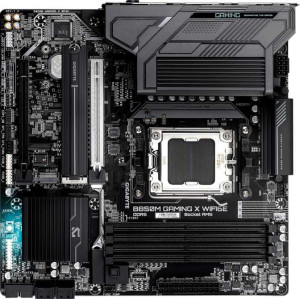
Gigabyte B850M Gaming X WiFi6E
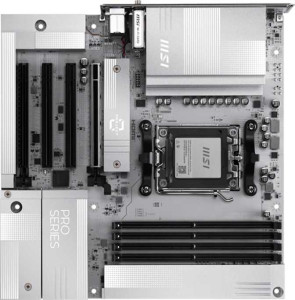
MSI Pro B850M-A Wi-Fi PZ

Gigabyte B850M Gaming X WiFi6E MSI Pro B850M-A Wi-Fi PZ

Overview

Welcome to our head-to-head comparison of the Gigabyte B850M Gaming X WiFi6E and the MSI Pro B850M-A Wi-Fi PZ, two Micro-ATX motherboards sharing the AM5 socket and B850 chipset. While they agree on many fundamentals, key battlegrounds emerge around wireless connectivity, rear USB port layouts, BIOS features, and expansion flexibility — making the choice between them far from straightforward for builders targeting different priorities.

Common Features

  • Both boards use the AM5 CPU socket.
  • Both boards feature the B850 chipset.
  • Both boards have a Micro-ATX form factor.
  • Wi-Fi connectivity is available on both products.
  • Bluetooth is available on both products.
  • Both boards support HDMI 2.1.
  • Overclocking support is present on both products.
  • RGB lighting is present on both products.
  • Both boards support a maximum memory amount of 256GB.
  • Both boards support overclocked RAM speeds up to 8200 MHz.
  • Both boards have 4 memory slots.
  • Both boards use DDR5 memory.
  • Both boards support 2 memory channels.
  • ECC memory is not supported on either product.
  • Neither board has USB 3.2 Gen 1 ports (USB-C) on the rear.
  • Neither board has USB 3.2 Gen 2x2, USB 4, or Thunderbolt ports.
  • Both boards have a single RJ45 port.
  • Both boards provide HDMI output.
  • Both boards have 2 USB 3.2 Gen 1 ports and 1 USB-C 3.2 Gen 2 port through internal expansion headers.
  • Both boards have 4 USB 2.0 ports through internal expansion headers.
  • Both boards include 4 SATA 3 connectors.
  • Both boards have 2 M.2 sockets.
  • Both boards include a TPM connector.
  • Both boards have no U.2 sockets.
  • Both boards feature one PCIe 5.0 x16 slot and one PCIe x4 slot, with no PCIe 3.0, 2.0, 4.0 x16, PCI, or PCIe x8 slots.
  • Both boards support 7.1 audio channels with 3 audio connectors.
  • S/PDIF Out is not available on either product.
  • Both boards support RAID 0, RAID 1, and RAID 10, but not RAID 0+1.

Main Differences

  • Wi-Fi version goes up to Wi-Fi 6E on the Gigabyte B850M Gaming X WiFi6E, while the MSI Pro B850M-A Wi-Fi PZ additionally supports Wi-Fi 7 (802.11be).
  • Bluetooth version is 5.3 on the Gigabyte B850M Gaming X WiFi6E and 5.4 on the MSI Pro B850M-A Wi-Fi PZ.
  • Easy BIOS reset is not available on the Gigabyte B850M Gaming X WiFi6E but is present on the MSI Pro B850M-A Wi-Fi PZ.
  • Dual BIOS is present on the Gigabyte B850M Gaming X WiFi6E but not available on the MSI Pro B850M-A Wi-Fi PZ.
  • Height is 244 mm on the Gigabyte B850M Gaming X WiFi6E and 243.8 mm on the MSI Pro B850M-A Wi-Fi PZ.
  • Width is 244 mm on the Gigabyte B850M Gaming X WiFi6E and 243.8 mm on the MSI Pro B850M-A Wi-Fi PZ.
  • Maximum native RAM speed is 5200 MHz on the Gigabyte B850M Gaming X WiFi6E and 5600 MHz on the MSI Pro B850M-A Wi-Fi PZ.
  • USB 3.2 Gen 2 ports (USB-A) count is 1 on the Gigabyte B850M Gaming X WiFi6E and 3 on the MSI Pro B850M-A Wi-Fi PZ.
  • USB 3.2 Gen 1 ports (USB-A) count is 2 on the Gigabyte B850M Gaming X WiFi6E and 3 on the MSI Pro B850M-A Wi-Fi PZ.
  • USB 3.2 Gen 2 ports (USB-C) count is 1 on the Gigabyte B850M Gaming X WiFi6E and 2 on the MSI Pro B850M-A Wi-Fi PZ.
  • USB 2.0 rear ports number 4 on the Gigabyte B850M Gaming X WiFi6E, while the MSI Pro B850M-A Wi-Fi PZ has none.
  • DisplayPort outputs number 2 on the Gigabyte B850M Gaming X WiFi6E and 1 on the MSI Pro B850M-A Wi-Fi PZ.
  • Fan headers number 4 on the Gigabyte B850M Gaming X WiFi6E and 5 on the MSI Pro B850M-A Wi-Fi PZ.
  • PCIe x1 slots are not present on the Gigabyte B850M Gaming X WiFi6E, while the MSI Pro B850M-A Wi-Fi PZ includes 2.
  • RAID 5 support is present on the Gigabyte B850M Gaming X WiFi6E but not available on the MSI Pro B850M-A Wi-Fi PZ.
Specs Comparison
Gigabyte B850M Gaming X WiFi6E

Gigabyte B850M Gaming X WiFi6E

MSI Pro B850M-A Wi-Fi PZ

MSI Pro B850M-A Wi-Fi PZ

General info:
CPU socket AM5 AM5
chipset B850 B850
form factor Micro-ATX Micro-ATX
release date January 2025 September 2025
supports Wi-Fi
Wi-Fi version Wi-Fi 4 (802.11n), Wi-Fi 5 (802.11ac), Wi-Fi 6 (802.11ax), Wi-Fi 6E (802.11ax) Wi-Fi 4 (802.11n), Wi-Fi 5 (802.11ac), Wi-Fi 6 (802.11ax), Wi-Fi 6E (802.11ax), Wi-Fi 7 (802.11be)
Has Bluetooth
Bluetooth version 5.3 5.4
HDMI version HDMI 2.1 HDMI 2.1
Easy to overclock
has RGB lighting
Easy to reset BIOS
Has dual BIOS
has aptX
CPU sockets 1 1
Has integrated graphics
warranty period 3 years 3 years
height 244 mm 243.8 mm
width 244 mm 243.8 mm
Has integrated CPU

At their core, both the Gigabyte B850M Gaming X WiFi6E and the MSI Pro B850M-A Wi-Fi PZ share the same fundamental DNA: an AM5 socket, B850 chipset, Micro-ATX form factor, and identical HDMI 2.1 output. Their dimensions are virtually indistinguishable, and both offer RGB lighting, overclocking support, a 3-year warranty, and the same broad Wi-Fi stack up through Wi-Fi 6E. For most users building a mid-range AMD system today, either board covers the same foundational ground.

The real differentiators emerge in the details. The MSI pulls ahead on wireless connectivity by adding Wi-Fi 7 (802.11be) support and a newer Bluetooth 5.4 controller, versus the Gigabyte's ceiling of Wi-Fi 6E and Bluetooth 5.3. Wi-Fi 7 delivers significantly higher theoretical throughput and lower latency — a meaningful future-proofing advantage if your router or a future router supports it. On the flip side, the Gigabyte counters with a dual BIOS feature, which provides a hardware-level safety net: if a BIOS update goes wrong or firmware becomes corrupted, the board can automatically fall back to a backup chip. The MSI lacks this but compensates with an easy BIOS reset mechanism, making recovery more accessible to less experienced builders.

Deciding between them depends on your priorities. If future-proofing your wireless stack matters — especially with Wi-Fi 7 routers becoming more mainstream — the MSI Pro B850M-A Wi-Fi PZ holds a clear edge. If firmware reliability and the peace of mind of a hardware BIOS backup are more important, the Gigabyte B850M Gaming X WiFi6E is the safer long-term bet. Neither board has a decisive overall advantage; it is a targeted trade-off between cutting-edge wireless capability and BIOS resilience.

Memory:
maximum memory amount 256GB 256GB
RAM speed (max) 5200 MHz 5600 MHz
overclocked RAM speed 8200 MHz 8200 MHz
memory slots 4 4
DDR memory version 5 5
memory channels 2 2
Supports ECC memory

Both boards share a strong and identical memory foundation: DDR5 support, 4 slots across 2 channels, a 256GB maximum capacity, and a matching overclocked ceiling of 8200 MHz. For the vast majority of users, this means either board can accommodate large, high-speed memory configurations without compromise.

The one meaningful difference lies in the native (non-overclocked) speed ceiling. The MSI supports a native maximum of 5600 MHz, while the Gigabyte tops out at 5200 MHz at stock speeds. In practice, this means the MSI can run certain DDR5 kits at their rated speeds without requiring XMP/EXPO profiles to be enabled — a small but real advantage in plug-and-play compatibility with mid-to-high-speed modules. The gap narrows considerably once overclocking is on the table, since both boards reach the same 8200 MHz ceiling with the right kit and tuning.

The MSI Pro B850M-A Wi-Fi PZ holds a slight edge here due to its higher native RAM speed support, which translates to better out-of-the-box compatibility with faster DDR5 kits. However, this advantage is minor — enthusiasts who plan to use XMP/EXPO profiles will find both boards functionally equivalent at the top end.

Ports:
USB 3.2 Gen 2 ports (USB-A) 1 3
USB 3.2 Gen 1 ports (USB-A) 2 3
USB 3.2 Gen 2 ports (USB-C) 1 2
USB 3.2 Gen 1 ports (USB-C) 0 0
USB 2.0 ports 4 0
USB 3.2 Gen 2x2 ports 0 0
USB 4 40Gbps ports 0 0
USB 4 20Gbps ports 0 0
Thunderbolt 4 ports 0 0
Thunderbolt 3 ports 0 0
has an HDMI output
DisplayPort outputs 2 1
RJ45 ports 1 1
Has USB Type-C
eSATA ports 0 0
DVI outputs 0 0
has a VGA connector
PS/2 ports 0 0

Connectivity is where these two boards diverge most sharply. The MSI offers a substantially larger high-speed USB array — 3 USB 3.2 Gen 2 Type-A and 2 USB 3.2 Gen 2 Type-C ports — compared to the Gigabyte's single Gen 2 Type-A and one Gen 2 Type-C. More importantly, the MSI eliminates USB 2.0 entirely from its rear panel, replacing that bandwidth with additional Gen 1 ports. The Gigabyte, by contrast, devotes 4 slots to USB 2.0, which caps those connections at 480 Mbps — adequate for keyboards and mice, but a bottleneck for anything data-intensive. Users who regularly connect fast external drives, docking stations, or modern peripherals will feel the difference immediately on the MSI side.

The one area where the Gigabyte pushes back is display output: it provides 2 DisplayPort outputs alongside its HDMI port, giving it a three-monitor capability from the rear I/O alone (assuming integrated graphics are in use). The MSI carries only 1 DisplayPort, making it a two-display setup at most from the board's own ports.

Overall, the MSI Pro B850M-A Wi-Fi PZ holds a clear advantage in USB connectivity — it offers more ports, faster speeds across the board, and a more modern layout that ditches legacy 2.0 bandwidth. The Gigabyte's dual DisplayPort is a niche but genuine win for multi-monitor users, but for most builders prioritizing a versatile, high-throughput I/O setup, the MSI is the stronger choice here.

Connectors:
USB 3.2 Gen 1 ports (through expansion) 2 2
USB-C 3.2 Gen 2 ports (through expansion) 1 1
USB 2.0 ports (through expansion) 4 4
SATA 3 connectors 4 4
fan headers 4 5
USB 3.0 ports (through expansion) 2 2
M.2 sockets 2 2
Has TPM connector
U.2 sockets 0 0
Has mSATA connector
SATA 2 connectors 0 0

Internal connectors tell a revealing story about how each board is positioned for system builders. Remarkably, the two boards are nearly identical across this entire spec group — matching on 2 M.2 sockets, 4 SATA 3 connectors, identical USB expansion headers, and a TPM connector on both. For storage builders, this parity means neither board offers a meaningful advantage in drive capacity or flexibility.

The only differentiator in this group is the fan header count: the MSI provides 5 fan headers versus the Gigabyte's 4. In practice, one extra header may seem minor, but in a Micro-ATX build where cable management is already constrained, having a dedicated header for each fan — CPU cooler, case intake, exhaust, and a fourth for an AIO pump or additional fan — without needing a splitter is a genuine quality-of-life advantage. Splitters can complicate fan speed control since they report as a single device, so discrete headers are preferable for fine-grained thermal management.

Given how closely matched these boards are internally, the MSI Pro B850M-A Wi-Fi PZ takes a narrow edge in this group purely on the strength of that additional fan header. It is not a dramatic difference, but for builders planning a multi-fan cooling setup, it removes a small but real point of friction.

Expansion slots:
PCIe 4.0 x16 slots 0 0
PCIe 5.0 x16 slots 1 1
PCIe 3.0 x16 slots 0 0
PCIe x1 slots 0 2
PCI slots 0 0
PCIe 2.0 x16 slots 0 0
PCIe x4 slots 1 1
PCIe x8 slots 0 0

Expansion slot layouts on Micro-ATX boards are always a balancing act given the limited physical real estate, and here the two boards are largely aligned. Both carry a single PCIe 5.0 x16 slot for the primary GPU — the current gold standard for discrete graphics connectivity, ensuring no bandwidth bottleneck with even the most demanding modern cards — and a shared PCIe x4 slot that can accommodate NVMe expansion cards, capture cards, or similar add-ins.

The meaningful difference is that the MSI adds 2 PCIe x1 slots, which the Gigabyte omits entirely. PCIe x1 slots are the traditional home for single-purpose expansion cards: sound cards, additional USB controllers, network adapters, and similar accessories. Their absence on the Gigabyte is not a dealbreaker for most builders — many of these functions are already handled on-board — but it does eliminate flexibility for users who want to add a dedicated audio card or a secondary NIC without consuming the x4 slot.

The MSI Pro B850M-A Wi-Fi PZ has a clear advantage in expansion versatility here. Builders with a straightforward GPU-only setup will find both boards equivalent, but anyone anticipating additional expansion cards will appreciate the MSI's extra slots. For a Micro-ATX form factor, two PCIe x1 slots alongside the primary x16 is a notably flexible offering.

Audio:
audio channels 7.1 7.1
Has S/PDIF Out port
audio connectors 3 3

Audio is the one group in this comparison where there is simply nothing to separate the two boards. Both deliver 7.1-channel onboard audio through 3 analog connectors, and neither includes an S/PDIF optical output. The 7.1 channel support means the onboard codec can drive a full surround sound speaker setup or output a virtual surround signal to compatible headsets — a standard but solid offering for a mid-range motherboard.

The absence of S/PDIF on both boards is worth noting for users who rely on optical connections to an external DAC, AV receiver, or soundbar. Neither board accommodates that use case, so those users would need a discrete sound card or a USB DAC regardless of which board they choose.

This group is a dead tie. The audio specifications are identical across every available data point, and the choice between these two boards should rest entirely on the differentiators found in other spec groups.

Storage:
Supports RAID 1
Supports RAID 10 (1+0)
Supports RAID 5
Supports RAID 0
Supports RAID 0+1

RAID support is a niche but important consideration for users building NAS-adjacent workstations or redundant storage arrays. Both boards cover the common consumer configurations — RAID 0 for pure performance striping, RAID 1 for mirroring and data redundancy, and RAID 10 for a combined stripe-and-mirror setup — so the typical home or prosumer storage build is equally well served by either board.

The single differentiator here is RAID 5 support, which the Gigabyte offers and the MSI does not. RAID 5 distributes parity data across three or more drives, allowing the array to survive a single drive failure while using storage capacity more efficiently than pure mirroring. For users managing a multi-drive array where balancing redundancy and usable capacity matters — think a media server or a small workstation archive — this is a genuine functional advantage.

For the narrow audience that actually uses RAID 5, the Gigabyte B850M Gaming X WiFi6E holds a clear and exclusive edge in this group. That said, most consumer builders never venture beyond RAID 0 or 1, which makes this distinction irrelevant for the majority. If RAID 5 is not part of your plans, the two boards are effectively tied on storage configuration support.

Comparison Summary & Verdict

Both the Gigabyte B850M Gaming X WiFi6E and the MSI Pro B850M-A Wi-Fi PZ are capable B850 Micro-ATX platforms, but they cater to subtly different builders. The Gigabyte B850M Gaming X WiFi6E stands out with its dual BIOS for added reliability, two DisplayPort outputs for multi-monitor setups, and RAID 5 support for those managing larger storage arrays. The MSI Pro B850M-A Wi-Fi PZ, on the other hand, pulls ahead with Wi-Fi 7 and Bluetooth 5.4 for future-proof wireless, a higher native RAM speed of 5600 MHz, more rear USB ports including additional USB-C and USB-A Gen 2 connectors, an extra fan header, and two PCIe x1 slots for greater expansion. Choose the Gigabyte if BIOS resilience, multi-display output, and RAID 5 storage matter most; opt for the MSI if cutting-edge connectivity and a richer rear I/O are your priorities.

Gigabyte B850M Gaming X WiFi6E
Buy Gigabyte B850M Gaming X WiFi6E if...

Buy the Gigabyte B850M Gaming X WiFi6E if you want the safety net of dual BIOS, need two DisplayPort outputs for a multi-monitor setup, or rely on RAID 5 for your storage configuration.

MSI Pro B850M-A Wi-Fi PZ
Buy MSI Pro B850M-A Wi-Fi PZ if...

Buy the MSI Pro B850M-A Wi-Fi PZ if you want Wi-Fi 7 and Bluetooth 5.4 for future-proof wireless, a faster native RAM speed, more rear USB ports, or greater PCIe expansion with two additional x1 slots.