Gigabyte B860 Aorus Elite WiFi7 Ice
Gigabyte B860M Aorus Elite WiFi6E Ice

Gigabyte B860 Aorus Elite WiFi7 Ice Gigabyte B860M Aorus Elite WiFi6E Ice

Overview

Welcome to our in-depth spec comparison between the Gigabyte B860 Aorus Elite WiFi7 Ice and the Gigabyte B860M Aorus Elite WiFi6E Ice — two B860-chipset motherboards built around the LGA 1851 socket that share a surprising amount of common ground. Yet beneath the surface, key battlegrounds emerge around form factor and physical footprint, wireless connectivity generations, expansion slot configurations, and aesthetic choices like RGB lighting. Read on to see which board fits your build.

Common Features

  • Both products use the LGA 1851 CPU socket.
  • Both products feature the B860 chipset.
  • Wi-Fi connectivity is available on both products.
  • Bluetooth is available on both products.
  • Both products support HDMI 2.1.
  • Easy overclocking is supported on both products.
  • Easy BIOS reset is not available on either product.
  • Dual BIOS is present on both products.
  • Both products support a maximum memory amount of 256GB.
  • Both products support a maximum RAM speed of 6400 MHz and an overclocked RAM speed of 9200 MHz.
  • Both products have 4 memory slots and support DDR5 memory across 2 channels.
  • ECC memory is not supported on either product.
  • Both products provide 2 USB 3.2 Gen 2 Type-A ports, 4 USB 3.2 Gen 1 Type-A ports, and 4 USB 2.0 ports.
  • Neither product includes USB 3.2 Gen 2 Type-C or Gen 1 Type-C ports.
  • Both products feature 1 USB 4 40Gbps port and no USB 3.2 Gen 2x2 or USB 4 20Gbps ports.
  • Both products offer 3 M.2 sockets, 4 SATA 3 connectors, and 6 fan headers.
  • A TPM connector is present on both products, and neither includes a U.2 socket.
  • Both products feature 1 PCIe 5.0 x16 slot and no PCIe 4.0, 3.0, 2.0 x16, PCI, or PCIe x8 slots.
  • Both products support 7.1 audio channels, an S/PDIF Out port, and 2 audio connectors.
  • Both products support RAID 0, RAID 1, RAID 5, and RAID 10, but neither supports RAID 0+1.

Main Differences

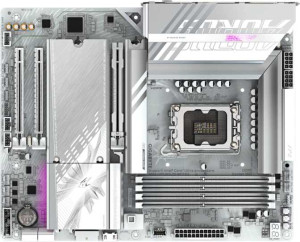
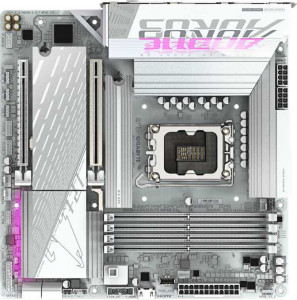
  • The form factor is ATX on Gigabyte B860 Aorus Elite WiFi7 Ice and Micro-ATX on Gigabyte B860M Aorus Elite WiFi6E Ice.
  • The width is 305 mm on Gigabyte B860 Aorus Elite WiFi7 Ice and 244 mm on Gigabyte B860M Aorus Elite WiFi6E Ice.
  • Wi-Fi 7 (802.11be) support is present on Gigabyte B860 Aorus Elite WiFi7 Ice but not available on Gigabyte B860M Aorus Elite WiFi6E Ice.
  • Bluetooth version is 5.4 on Gigabyte B860 Aorus Elite WiFi7 Ice and 5.3 on Gigabyte B860M Aorus Elite WiFi6E Ice.
  • RGB lighting is present on Gigabyte B860M Aorus Elite WiFi6E Ice but not available on Gigabyte B860 Aorus Elite WiFi7 Ice.
  • PCIe x1 slots number 2 on Gigabyte B860 Aorus Elite WiFi7 Ice and 0 on Gigabyte B860M Aorus Elite WiFi6E Ice.
  • A PCIe x4 slot is present on Gigabyte B860M Aorus Elite WiFi6E Ice but not available on Gigabyte B860 Aorus Elite WiFi7 Ice.
Specs Comparison
Gigabyte B860 Aorus Elite WiFi7 Ice

Gigabyte B860 Aorus Elite WiFi7 Ice

Gigabyte B860M Aorus Elite WiFi6E Ice

Gigabyte B860M Aorus Elite WiFi6E Ice

General info:
CPU socket LGA 1851 LGA 1851
chipset B860 B860
form factor ATX Micro-ATX
release date January 2025 January 2025
supports Wi-Fi
Wi-Fi version Wi-Fi 4 (802.11n), Wi-Fi 5 (802.11ac), Wi-Fi 6 (802.11ax), Wi-Fi 6E (802.11ax), Wi-Fi 7 (802.11be) Wi-Fi 4 (802.11n), Wi-Fi 5 (802.11ac), Wi-Fi 6 (802.11ax), Wi-Fi 6E (802.11ax)
Has Bluetooth
Bluetooth version 5.4 5.3
HDMI version HDMI 2.1 HDMI 2.1
Easy to overclock
has RGB lighting
Easy to reset BIOS
Has dual BIOS
has aptX
CPU sockets 1 1
Has integrated graphics
warranty period 3 years 3 years
height 244 mm 244 mm
width 305 mm 244 mm
Has integrated CPU

Both boards share the same LGA 1851 socket and B860 chipset, meaning they target identical CPU compatibility and offer the same overclocking headroom within Intel's B-series restrictions. They also match on dual BIOS protection, HDMI 2.1 output, and a 3-year warranty, so neither has a platform-level advantage. The most consequential difference in this group is the form factor: the Aorus Elite WiFi7 Ice is a full ATX board (305 × 244 mm), while the Aorus Elite WiFi6E Ice is Micro-ATX (244 × 244 mm). This directly dictates case compatibility — the Micro-ATX fits in both Micro-ATX and standard ATX cases, but the ATX board requires a mid-tower or larger enclosure.

On wireless connectivity, the gap is meaningful: the WiFi7 Ice supports Wi-Fi 7 (802.11be) and Bluetooth 5.4, while the WiFi6E Ice tops out at Wi-Fi 6E (802.11ax) and Bluetooth 5.3. Wi-Fi 7 delivers significantly higher theoretical throughput and lower latency through Multi-Link Operation, which matters for users on a compatible router. Bluetooth 5.4 adds improved broadcast isochronous channels over 5.3, a modest but real upgrade for audio peripherals. The WiFi6E Ice compensates with RGB lighting, which the WiFi7 Ice entirely lacks — a purely aesthetic difference with no functional impact.

In this group, the Aorus Elite WiFi7 Ice holds a clear edge on connectivity thanks to its newer Wi-Fi and Bluetooth standards, and it is the right choice for users building in a full ATX case who want future-ready wireless. The Aorus Elite WiFi6E Ice is the better fit for compact or mid-range builds where a smaller footprint and built-in RGB aesthetics take priority, and where Wi-Fi 7 is not yet a practical requirement.
Memory:
maximum memory amount 256GB 256GB
RAM speed (max) 6400 MHz 6400 MHz
overclocked RAM speed 9200 MHz 9200 MHz
memory slots 4 4
DDR memory version 5 5
memory channels 2 2
Supports ECC memory

Across every memory specification in this group, the two boards are in complete lockstep. Both support DDR5 with a maximum capacity of 256 GB across 4 DIMM slots running in dual-channel configuration. DDR5 is the current-generation standard, bringing higher bandwidth and lower voltage compared to DDR4, which benefits memory-intensive workloads like video editing, 3D rendering, and large dataset processing. The 256 GB ceiling is far beyond what most consumer builds will ever use, but it provides meaningful headroom for prosumer or workstation-adjacent use cases.

On the frequency side, the native 6400 MHz ceiling is solid for everyday performance, while the overclocked ceiling of 9200 MHz via XMP/EXPO profiles is notably high for a B-series board. That said, B860 chipsets impose some restrictions on memory overclocking compared to Z-series, so real-world achievable frequencies will depend on the specific kit and CPU combination. Neither board supports ECC memory, which is expected at this tier and only relevant for those with data-integrity requirements in professional or server contexts.

This group is a straightforward tie. The memory subsystem is functionally identical between the WiFi7 Ice and the WiFi6E Ice, meaning your RAM choice, budget, and kit compatibility will be the same regardless of which board you select. Any decision between these two products should rest entirely on the differentiators found in other specification groups.

Ports:
USB 3.2 Gen 2 ports (USB-A) 2 2
USB 3.2 Gen 1 ports (USB-A) 4 4
USB 3.2 Gen 2 ports (USB-C) 0 0
USB 3.2 Gen 1 ports (USB-C) 0 0
USB 2.0 ports 4 4
USB 3.2 Gen 2x2 ports 0 0
USB 4 40Gbps ports 1 1
USB 4 20Gbps ports 0 0
Thunderbolt 4 ports 1 1
Thunderbolt 3 ports 0 0
has an HDMI output
DisplayPort outputs 1 1
RJ45 ports 1 1
Has USB Type-C
eSATA ports 0 0
DVI outputs 0 0
has a VGA connector
PS/2 ports 0 0

The rear I/O layout on these two boards is a mirror image of each other. Most noteworthy is the presence of a USB 4 (40 Gbps) port and a Thunderbolt 4 port on both — a generous inclusion at the B-series price tier. Thunderbolt 4 opens the door to high-bandwidth peripherals like external GPUs, fast NVMe enclosures, and daisy-chained displays, while USB 4 at 40 Gbps delivers comparable throughput for compatible devices. Together, these two ports significantly extend the long-term utility of either board.

Beyond the flagship ports, the USB ecosystem is well-rounded on both: a combined 6 USB-A ports split between Gen 2 (10 Gbps) and Gen 1 (5 Gbps) speeds, plus 4 USB 2.0 ports for legacy peripherals like keyboards and mice that simply don't need high bandwidth. Display output is handled identically too, with one HDMI and one DisplayPort — sufficient for driving two monitors simultaneously when using a CPU with integrated graphics, though neither board has integrated graphics itself, so these outputs depend on a compatible Intel CPU. A single RJ45 port rounds out the connectivity on both.

This group is another tie. Every port type, count, and speed rating is identical across the WiFi7 Ice and the WiFi6E Ice. Whichever board you choose, the rear I/O experience will be exactly the same, so this category introduces no advantage for either side.

Connectors:
USB 3.2 Gen 1 ports (through expansion) 2 2
USB 2.0 ports (through expansion) 4 4
SATA 3 connectors 4 4
fan headers 6 6
USB 3.0 ports (through expansion) 2 2
M.2 sockets 3 3
Has TPM connector
U.2 sockets 0 0
Has mSATA connector
SATA 2 connectors 0 0

Storage expandability is identical on both boards. Three M.2 sockets allow for a fast primary NVMe drive alongside two additional SSDs — a practical configuration for users who want to separate their OS, application, and data storage without relying on SATA. Speaking of which, the four SATA 3 connectors provide additional room for traditional HDDs or SSDs, making either board a solid fit for media storage-heavy builds. The complete absence of slower SATA 2 or legacy mSATA connectors is simply a sign of modern design.

Thermal management gets the same treatment on both, with 6 fan headers offering enough control points to run a well-ventilated build — covering CPU cooler, case fans, and potentially a radiator pump without needing a separate fan controller. The shared TPM connector is a quiet but important inclusion, enabling hardware-based security features required by Windows 11 and relevant for enterprise-adjacent or security-conscious users. Internal USB expansion headers are also matched, supporting front-panel USB connectivity through the case.

Like the ports group before it, connectors result in a complete tie. The internal expansion story is indistinguishable between the WiFi7 Ice and the WiFi6E Ice — same storage options, same fan control, same security and USB headers. Neither board offers anything the other does not in this category.

Expansion slots:
PCIe 4.0 x16 slots 0 0
PCIe 5.0 x16 slots 1 1
PCIe 3.0 x16 slots 0 0
PCIe x1 slots 2 0
PCI slots 0 0
PCIe 2.0 x16 slots 0 0
PCIe x4 slots 0 1
PCIe x8 slots 0 0

The primary GPU slot tells the same story on both boards: a single PCIe 5.0 x16 slot handles the graphics card, delivering the full bandwidth of the current-generation interface. For any modern discrete GPU, this is the only slot that matters, and neither board compromises here. The real divergence lies in the secondary expansion slots, where the two boards make different trade-offs suited to their respective form factors.

The ATX-sized WiFi7 Ice uses its extra board real estate to include 2x PCIe x1 slots, which are best suited for compact add-in cards like sound cards, USB controllers, or capture cards that don't require high bandwidth. The Micro-ATX WiFi6E Ice instead offers a single PCIe x4 slot, which carries four times the lane bandwidth of an x1 slot. This makes it a better fit for higher-throughput expansion cards such as NVMe add-in cards, 10GbE network adapters, or capture solutions that can actually leverage the additional bandwidth.

Neither configuration is strictly superior — the right choice depends entirely on what you plan to add. For users wanting to slot in multiple low-bandwidth peripherals, the WiFi7 Ice's dual x1 slots offer more simultaneous expansion. For those who need a single high-bandwidth card beyond the GPU, the WiFi6E Ice's x4 slot is the more capable option. This group is effectively a functional tie with a use-case split: the WiFi7 Ice wins on expansion quantity, while the WiFi6E Ice edges ahead on secondary slot bandwidth.

Audio:
audio channels 7.1 7.1
Has S/PDIF Out port
audio connectors 2 2

Audio is the shortest comparison in this sequence — every data point is identical. Both boards offer 7.1-channel surround sound support, a S/PDIF optical output for connecting to external DACs, receivers, or soundbars, and 2 analog audio connectors on the rear I/O. The 7.1 configuration is sufficient for full surround speaker setups or high-quality stereo output, and S/PDIF ensures a clean digital signal path that bypasses any analog noise introduced by the motherboard's onboard circuitry.

The relatively modest count of 2 rear analog connectors is worth noting — users with complex multi-speaker analog setups may find this limiting, but for the majority of users relying on headphones, a stereo speaker pair, or a digital receiver via S/PDIF, it covers the practical bases. Anyone with more demanding analog audio needs would typically look to a dedicated sound card regardless of board choice.

This group is a complete tie. The onboard audio configuration is indistinguishable between the WiFi7 Ice and the WiFi6E Ice, and audio capabilities should play no role in choosing between these two boards.

Storage:
Supports RAID 1
Supports RAID 10 (1+0)
Supports RAID 5
Supports RAID 0
Supports RAID 0+1

RAID support is where both boards land on entirely common ground. Each supports RAID 0, RAID 1, RAID 5, and RAID 10 — covering the full practical spectrum for consumer and prosumer use cases. RAID 0 stripes data across drives for maximum throughput, RAID 1 mirrors drives for redundancy, RAID 5 balances storage efficiency with fault tolerance across three or more drives, and RAID 10 combines mirroring and striping for both performance and resilience. Neither board supports RAID 0+1, though in practice RAID 10 is the more widely used alternative and its absence is inconsequential for the vast majority of users.

It is worth noting that with 4 SATA 3 connectors and 3 M.2 sockets available on both boards (as established in the connectors group), there is sufficient physical storage capacity to actually implement any of these RAID configurations in a real build, adding practical weight to what these specs represent on paper.

Predictably, this group concludes as a complete tie. Storage redundancy and performance configurations are handled identically on the WiFi7 Ice and the WiFi6E Ice, and RAID requirements should not factor into a decision between these two boards.

Comparison Summary & Verdict

Both boards deliver a strong and nearly identical feature set at their core — LGA 1851 socket, B860 chipset, DDR5 support up to 256GB, triple M.2 sockets, and a full suite of USB ports — making either a capable foundation for an Intel platform build. The defining split comes down to use case and build style. The Gigabyte B860 Aorus Elite WiFi7 Ice stands out with its ATX form factor, Wi-Fi 7 connectivity, Bluetooth 5.4, and two PCIe x1 slots for greater expansion flexibility. The Gigabyte B860M Aorus Elite WiFi6E Ice counters with a compact Micro-ATX footprint, built-in RGB lighting, and a PCIe x4 slot in place of the x1 slots. Builders working with smaller cases or who value aesthetics out of the box will lean toward the B860M, while those prioritizing future-proof wireless and maximum expansion room will prefer the full-size ATX option.

Gigabyte B860 Aorus Elite WiFi7 Ice
Buy Gigabyte B860 Aorus Elite WiFi7 Ice if...

Buy the Gigabyte B860 Aorus Elite WiFi7 Ice if you want a full ATX board with Wi-Fi 7, Bluetooth 5.4, and more PCIe x1 expansion slots for a future-ready, large-form-factor build.

Gigabyte B860M Aorus Elite WiFi6E Ice
Buy Gigabyte B860M Aorus Elite WiFi6E Ice if...

Buy the Gigabyte B860M Aorus Elite WiFi6E Ice if you need a compact Micro-ATX board that fits smaller cases and comes with built-in RGB lighting straight out of the box.