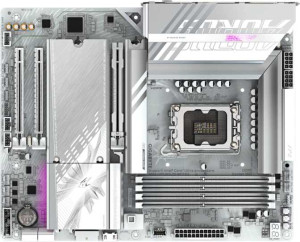
Gigabyte B860 Aorus Elite WiFi7 Ice
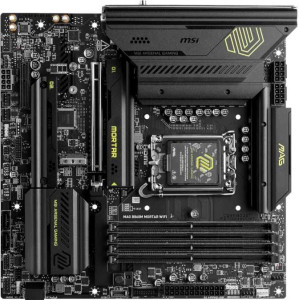
MSI MAG B860M Mortar WiFi

Gigabyte B860 Aorus Elite WiFi7 Ice MSI MAG B860M Mortar WiFi

Overview

When choosing between the Gigabyte B860 Aorus Elite WiFi7 Ice and the MSI MAG B860M Mortar WiFi, builders face a compelling crossroads between full-size ATX flexibility and compact Micro-ATX efficiency. Both boards share the LGA 1851 socket, Wi-Fi 7, DDR5 support, and a robust feature set — yet they diverge in form factor, expansion options, and BIOS conveniences. This comparison digs into exactly where each board pulls ahead.

Common Features

  • Both products use the LGA 1851 CPU socket.
  • Wi-Fi is supported on both products, covering Wi-Fi 4 (802.11n), Wi-Fi 5 (802.11ac), Wi-Fi 6 (802.11ax), Wi-Fi 6E (802.11ax), and Wi-Fi 7 (802.11be).
  • Bluetooth 5.4 is available on both products.
  • Both products feature HDMI 2.1 output.
  • Overclocking support is available on both products.
  • aptX support is not available on either product.
  • Both products support a maximum memory amount of 256GB.
  • Both products support a maximum RAM speed of 6400 MHz.
  • Both products support an overclocked RAM speed of 9200 MHz.
  • Both products have 4 memory slots.
  • Both products use DDR5 memory.
  • Both products operate on 2 memory channels.
  • ECC memory support is not available on either product.
  • Neither product includes USB 3.2 Gen 1 USB-C ports.
  • Both products include 4 USB 2.0 ports.
  • Neither product includes USB 3.2 Gen 2x2 ports.
  • Both products include 1 USB 4 40Gbps port.
  • Neither product includes USB 4 20Gbps ports.
  • Both products include 1 Thunderbolt 4 port.
  • Neither product includes Thunderbolt 3 ports.
  • Both products have an HDMI output.
  • Both products provide 2 USB 3.2 Gen 1 ports through expansion.
  • Both products provide 4 USB 2.0 ports through expansion.
  • Both products include 4 SATA 3 connectors.
  • Both products have 6 fan headers.
  • Both products include 3 M.2 sockets.
  • Both products include a TPM connector.
  • Neither product includes U.2 sockets.
  • Neither product includes PCIe 4.0 x16 slots.
  • Both products include 1 PCIe 5.0 x16 slot.
  • Neither product includes PCIe 3.0 x16 slots, PCI slots, PCIe 2.0 x16 slots, or PCIe x8 slots.
  • Both products support 7.1 audio channels.
  • Both products include an S/PDIF Out port.
  • Both products have 2 audio connectors.
  • Both products support RAID 0, RAID 1, RAID 5, and RAID 10 (1+0).
  • RAID 0+1 support is not available on either product.

Main Differences

  • The form factor is ATX on Gigabyte B860 Aorus Elite WiFi7 Ice and Micro-ATX on MSI MAG B860M Mortar WiFi.
  • RGB lighting is present on MSI MAG B860M Mortar WiFi but not available on Gigabyte B860 Aorus Elite WiFi7 Ice.
  • Easy BIOS reset is available on MSI MAG B860M Mortar WiFi but not on Gigabyte B860 Aorus Elite WiFi7 Ice.
  • Dual BIOS is present on Gigabyte B860 Aorus Elite WiFi7 Ice but not available on MSI MAG B860M Mortar WiFi.
  • The height is 244 mm on Gigabyte B860 Aorus Elite WiFi7 Ice and 243.8 mm on MSI MAG B860M Mortar WiFi.
  • The width is 305 mm on Gigabyte B860 Aorus Elite WiFi7 Ice and 243.8 mm on MSI MAG B860M Mortar WiFi.
  • USB 3.2 Gen 2 USB-A ports number 2 on Gigabyte B860 Aorus Elite WiFi7 Ice and 3 on MSI MAG B860M Mortar WiFi.
  • USB 3.2 Gen 1 USB-A ports number 4 on Gigabyte B860 Aorus Elite WiFi7 Ice and 0 on MSI MAG B860M Mortar WiFi.
  • USB 3.2 Gen 2 USB-C ports number 0 on Gigabyte B860 Aorus Elite WiFi7 Ice and 1 on MSI MAG B860M Mortar WiFi.
  • PCIe x1 slots number 2 on Gigabyte B860 Aorus Elite WiFi7 Ice and 0 on MSI MAG B860M Mortar WiFi.
  • PCIe x4 slots number 0 on Gigabyte B860 Aorus Elite WiFi7 Ice and 1 on MSI MAG B860M Mortar WiFi.
Specs Comparison
Gigabyte B860 Aorus Elite WiFi7 Ice

Gigabyte B860 Aorus Elite WiFi7 Ice

MSI MAG B860M Mortar WiFi

MSI MAG B860M Mortar WiFi

General info:
CPU socket LGA 1851 LGA 1851
form factor ATX Micro-ATX
release date January 2025 January 2025
supports Wi-Fi
Wi-Fi version Wi-Fi 4 (802.11n), Wi-Fi 5 (802.11ac), Wi-Fi 6 (802.11ax), Wi-Fi 6E (802.11ax), Wi-Fi 7 (802.11be) Wi-Fi 4 (802.11n), Wi-Fi 5 (802.11ac), Wi-Fi 6 (802.11ax), Wi-Fi 6E (802.11ax), Wi-Fi 7 (802.11be)
Has Bluetooth
Bluetooth version 5.4 5.4
HDMI version HDMI 2.1 HDMI 2.1
Easy to overclock
has RGB lighting
Easy to reset BIOS
Has dual BIOS
has aptX
CPU sockets 1 1
Has integrated graphics
warranty period 3 years 3 years
height 244 mm 243.8 mm
width 305 mm 243.8 mm
Has integrated CPU

Both boards share the same LGA 1851 socket, identical Wi-Fi 7 support, Bluetooth 5.4, HDMI 2.1, overclocking capability, and a 3-year warranty — so at a platform level, neither has an inherent advantage. The most immediate and practical difference is form factor: the Gigabyte B860 Aorus Elite WiFi7 Ice is a full-size ATX board (305 × 244 mm), while the MSI MAG B860M Mortar WiFi is a compact Micro-ATX (243.8 × 243.8 mm). This matters because ATX fits only in mid-tower or full-tower cases and typically offers more expansion slots, whereas Micro-ATX opens the door to smaller, more space-efficient builds without necessarily sacrificing core features.

On the reliability and usability side, the two boards take opposite approaches. The Gigabyte offers dual BIOS, which is a meaningful safety net — if a firmware update goes wrong or the primary BIOS becomes corrupted, the board can automatically fall back to a backup chip, protecting the system from a potentially unbootable state. The MSI, by contrast, lacks dual BIOS but compensates with an easy BIOS reset mechanism, which is handy for less experienced users who need a quick recovery path after a failed overclock or misconfiguration. The Gigabyte does not offer this convenience.

For aesthetics, the MSI includes RGB lighting, which the Gigabyte omits entirely — relevant for users building in windowed cases who want visual customization. Overall, neither board is objectively superior: the Gigabyte B860 Aorus Elite WiFi7 Ice edges ahead for builders prioritizing resilience (dual BIOS) and a larger platform, while the MSI MAG B860M Mortar WiFi better suits compact builds with its Micro-ATX footprint, simpler BIOS recovery, and built-in RGB support.
Memory:
maximum memory amount 256GB 256GB
RAM speed (max) 6400 MHz 6400 MHz
overclocked RAM speed 9200 MHz 9200 MHz
memory slots 4 4
DDR memory version 5 5
memory channels 2 2
Supports ECC memory

The Gigabyte B860 Aorus Elite WiFi7 Ice and the MSI MAG B860M Mortar WiFi have identical specifications when it comes to memory. Both motherboards support a maximum memory amount of 256GB and can handle DDR5 memory, with a maximum RAM speed of 6400 MHz. In terms of overclocked RAM speed, both models also reach 9200 MHz. Each board has 4 memory slots and supports dual-channel memory configuration.

Neither motherboard supports ECC memory, so users will need to rely on non-ECC RAM for error-correction needs.

Ports:
USB 3.2 Gen 2 ports (USB-A) 2 3
USB 3.2 Gen 1 ports (USB-A) 4 0
USB 3.2 Gen 2 ports (USB-C) 0 1
USB 3.2 Gen 1 ports (USB-C) 0 0
USB 2.0 ports 4 4
USB 3.2 Gen 2x2 ports 0 0
USB 4 40Gbps ports 1 1
USB 4 20Gbps ports 0 0
Thunderbolt 4 ports 1 1
Thunderbolt 3 ports 0 0
has an HDMI output
DisplayPort outputs 1 1
RJ45 ports 1 1
Has USB Type-C
eSATA ports 0 0
DVI outputs 0 0
has a VGA connector
PS/2 ports 0 0

The Gigabyte B860 Aorus Elite WiFi7 Ice and the MSI MAG B860M Mortar WiFi have similar port configurations with a few differences. Both motherboards feature an HDMI output and a DisplayPort output, and each has a single RJ45 Ethernet port. They also both include USB Type-C support and one USB 4 40Gbps port.

When it comes to USB ports, the Gigabyte board has 2 USB 3.2 Gen 2 (USB-A) ports, 4 USB 3.2 Gen 1 (USB-A) ports, and 4 USB 2.0 ports. In contrast, the MSI board has 3 USB 3.2 Gen 2 (USB-A) ports, no USB 3.2 Gen 1 (USB-A) ports, and 4 USB 2.0 ports. Additionally, the Gigabyte board lacks USB 3.2 Gen 2 (USB-C) ports, while the MSI board includes 1 such port.

Both boards feature Thunderbolt 4 ports, but the Gigabyte B860 Aorus Elite WiFi7 Ice lacks USB 3.2 Gen 2x2 ports, whereas the MSI model also does not include any. Neither board has eSATA ports, DVI outputs, or a VGA connector, and both are without PS/2 ports.

Connectors:
USB 3.2 Gen 1 ports (through expansion) 2 2
USB 2.0 ports (through expansion) 4 4
SATA 3 connectors 4 4
fan headers 6 6
USB 3.0 ports (through expansion) 2 2
M.2 sockets 3 3
Has TPM connector
U.2 sockets 0 0
Has mSATA connector
SATA 2 connectors 0 0

The Gigabyte B860 Aorus Elite WiFi7 Ice and the MSI MAG B860M Mortar WiFi offer identical connectivity options in terms of expansion slots and connectors. Both motherboards provide 2 USB 3.2 Gen 1 ports (through expansion), 4 USB 2.0 ports (through expansion), and 2 USB 3.0 ports (through expansion). Additionally, they each feature 4 SATA 3 connectors, 6 fan headers, and 3 M.2 sockets.

Both motherboards support a TPM connector, while neither has a U.2 socket or mSATA connector. Additionally, both boards are without SATA 2 connectors.

Expansion slots:
PCIe 4.0 x16 slots 0 0
PCIe 5.0 x16 slots 1 1
PCIe 3.0 x16 slots 0 0
PCIe x1 slots 2 0
PCI slots 0 0
PCIe 2.0 x16 slots 0 0
PCIe x4 slots 0 1
PCIe x8 slots 0 0

The Gigabyte B860 Aorus Elite WiFi7 Ice and the MSI MAG B860M Mortar WiFi are similar in terms of expansion slots. Both motherboards feature one PCIe 5.0 x16 slot. Neither board includes PCIe 4.0 x16, PCIe 3.0 x16, or PCIe 2.0 x16 slots.

The Gigabyte model offers 2 PCIe x1 slots, while the MSI model provides 1 PCIe x4 slot. The MSI board does not include any PCIe x1 slots, and neither board has PCI slots or PCIe x8 slots.

Audio:
audio channels 7.1 7.1
Has S/PDIF Out port
audio connectors 2 2

The Gigabyte B860 Aorus Elite WiFi7 Ice and the MSI MAG B860M Mortar WiFi both support 7.1 audio channels, offering high-quality surround sound for a rich audio experience. Both motherboards are equipped with an S/PDIF Out port, allowing for digital audio output to compatible devices. Additionally, each board has 2 audio connectors for further audio device connectivity.

In terms of audio capabilities, the two products are identical, with no differences in the number of audio channels, S/PDIF Out port availability, or the number of audio connectors.

Storage:
Supports RAID 1
Supports RAID 10 (1+0)
Supports RAID 5
Supports RAID 0
Supports RAID 0+1

The Gigabyte B860 Aorus Elite WiFi7 Ice and the MSI MAG B860M Mortar WiFi offer identical support for various RAID configurations. Both motherboards support RAID 1, RAID 10 (1+0), RAID 5, and RAID 0, providing flexibility for users looking to configure their storage for redundancy or performance. Neither motherboard supports RAID 0+1.

There are no differences between the two products in terms of RAID support, making their storage capabilities the same in this regard.

Comparison Summary & Verdict

Both boards deliver a strong foundation with Wi-Fi 7, DDR5 support up to 256GB, three M.2 sockets, a PCIe 5.0 x16 slot, and Thunderbolt 4 — making either a capable platform for Intel Core Ultra 200 builds. The Gigabyte B860 Aorus Elite WiFi7 Ice stands out with its full ATX layout, dual BIOS for added resilience, and four USB 3.2 Gen 1 Type-A rear ports, suiting builders who prioritize expandability and data protection. The MSI MAG B860M Mortar WiFi appeals to those in tighter spaces, offering a Micro-ATX footprint, RGB lighting, an easy BIOS reset button, a USB 3.2 Gen 2 Type-C rear port, and a PCIe x4 slot — making it a more user-friendly and versatile small-form option.

Gigabyte B860 Aorus Elite WiFi7 Ice
Buy Gigabyte B860 Aorus Elite WiFi7 Ice if...

Buy the Gigabyte B860 Aorus Elite WiFi7 Ice if you need a full ATX board with dual BIOS protection and more USB 3.2 Gen 1 Type-A ports for a spacious, expandable build.

MSI MAG B860M Mortar WiFi
Buy MSI MAG B860M Mortar WiFi if...

Buy the MSI MAG B860M Mortar WiFi if you want a compact Micro-ATX board with RGB lighting, an easy BIOS reset, a rear USB 3.2 Gen 2 Type-C port, and a PCIe x4 slot for smaller system builds.