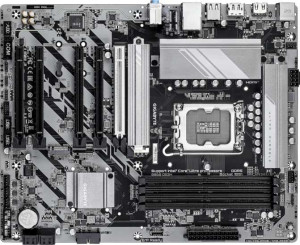
Gigabyte B860 DS3H
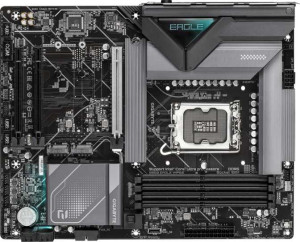
Gigabyte B860 Eagle WiFi6E

Gigabyte B860 DS3H Gigabyte B860 Eagle WiFi6E

Overview

Welcome to our in-depth spec comparison between the Gigabyte B860 DS3H and the Gigabyte B860 Eagle WiFi6E — two B860-chipset motherboards built on the same LGA 1851 platform but targeting subtly different builders. While they share a strong common foundation in memory support, expansion, and storage capabilities, key battlegrounds emerge around wireless connectivity, M.2 storage slots, and onboard aesthetics. Read on to see which board earns its place in your next build.

Common Features

  • Both products use the LGA 1851 CPU socket.
  • Both products feature the B860 chipset.
  • Both products have an ATX form factor.
  • Both products support HDMI 2.1.
  • Both products support easy overclocking.
  • Neither product supports easy BIOS reset.
  • Both products have dual BIOS.
  • Both products have 1 CPU socket.
  • Both products support a maximum memory amount of 256GB.
  • Both products support a maximum RAM speed of 6400 MHz and overclocked RAM speed of 9066 MHz.
  • Both products have 4 memory slots and support DDR5 memory across 2 channels.
  • ECC memory is not supported on either product.
  • Both products have 1 USB 3.2 Gen 2 port (USB-A), 4 USB 2.0 ports, and 1 USB 3.2 Gen 2x2 port.
  • Neither product has USB 3.2 Gen 1 ports (USB-A or USB-C), USB 3.2 Gen 2 ports (USB-C), or USB 4 ports.
  • Both products have 2 USB 3.2 Gen 1 ports and 4 USB 2.0 ports available through expansion.
  • Both products have 4 SATA 3 connectors and 6 fan headers.
  • Both products include a TPM connector.
  • Neither product has an mSATA connector or U.2 sockets.
  • Both products have 1 PCIe 5.0 x16 slot and no PCIe 4.0, 3.0, 2.0, x4, x8, or PCI slots.
  • Both products support 7.1 audio channels with 3 audio connectors, and neither has an S/PDIF Out port.
  • Both products support RAID 0, RAID 1, RAID 5, and RAID 10, but neither supports RAID 0+1.

Main Differences

  • Wi-Fi support is present on Gigabyte B860 Eagle WiFi6E but not available on Gigabyte B860 DS3H.
  • Bluetooth is present on Gigabyte B860 Eagle WiFi6E but not available on Gigabyte B860 DS3H.
  • RGB lighting is present on Gigabyte B860 DS3H but not available on Gigabyte B860 Eagle WiFi6E.
  • M.2 sockets total 2 on Gigabyte B860 DS3H and 3 on Gigabyte B860 Eagle WiFi6E.
  • PCIe x1 slots total 4 on Gigabyte B860 DS3H and 2 on Gigabyte B860 Eagle WiFi6E.
Specs Comparison
Gigabyte B860 DS3H

Gigabyte B860 DS3H

Gigabyte B860 Eagle WiFi6E

Gigabyte B860 Eagle WiFi6E

General info:
CPU socket LGA 1851 LGA 1851
chipset B860 B860
form factor ATX ATX
release date January 2025 January 2025
supports Wi-Fi
Has Bluetooth
HDMI version HDMI 2.1 HDMI 2.1
Easy to overclock
has RGB lighting
Easy to reset BIOS
Has dual BIOS
CPU sockets 1 1
Has integrated graphics
warranty period 3 years 3 years
height 244 mm 244 mm
width 305 mm 305 mm
Has integrated CPU

At the platform level, the Gigabyte B860 DS3H and the Gigabyte B860 Eagle WiFi6E are built on identical foundations: both use the LGA 1851 socket with the B860 chipset, share the same ATX form factor (244 × 305 mm), support overclocking, include dual BIOS protection, and carry a 3-year warranty. For a buyer evaluating platform longevity, compatibility, or repairability, these two boards are effectively interchangeable.

The real fork in the road is connectivity. The Eagle WiFi6E adds Wi-Fi and Bluetooth — features the DS3H entirely lacks. In practice, this means the Eagle can be placed anywhere in a room without running an Ethernet cable, and it supports wireless peripherals or audio devices natively. The DS3H, by contrast, requires a wired network connection and would need a separate adapter for any wireless functionality — an added cost and a slot or port consumed. On the flip side, the DS3H includes RGB lighting, which the Eagle omits, a minor aesthetic consideration with no performance implication.

The Eagle WiFi6E holds a clear advantage in this group for most users. Built-in wireless connectivity is a meaningful, practical feature that removes infrastructure constraints, and its absence on the DS3H is a genuine limitation rather than a minor omission. The RGB difference is cosmetic and unlikely to drive a purchasing decision on its own. Unless a builder has a dedicated wired setup and zero need for Bluetooth, the Eagle WiFi6E is the more capable and versatile choice based solely on these general specifications.
Memory:
maximum memory amount 256GB 256GB
RAM speed (max) 6400 MHz 6400 MHz
overclocked RAM speed 9066 MHz 9066 MHz
memory slots 4 4
DDR memory version 5 5
memory channels 2 2
Supports ECC memory

Both the Gigabyte B860 DS3H and the Gigabyte B860 Eagle WiFi6E support up to 256GB of maximum memory and are capable of handling DDR5 memory. They each have 4 memory slots, and both motherboards support dual memory channels for better performance. When it comes to RAM speed, both models have a maximum supported speed of 6400 MHz and can handle overclocked RAM speeds up to 9066 MHz.

Neither motherboard supports ECC (Error-Correcting Code) memory, as indicated by the provided specs for both models.

Ports:
USB 3.2 Gen 2 ports (USB-A) 1 1
USB 3.2 Gen 1 ports (USB-A) 0 0
USB 3.2 Gen 2 ports (USB-C) 0 0
USB 3.2 Gen 1 ports (USB-C) 0 0
USB 2.0 ports 4 4
USB 3.2 Gen 2x2 ports 1 1
USB 4 40Gbps ports 0 0
USB 4 20Gbps ports 0 0
Thunderbolt 4 ports 0 0
Thunderbolt 3 ports 0 0
has an HDMI output
DisplayPort outputs 1 1
RJ45 ports 1 1
Has USB Type-C
eSATA ports 0 0
DVI outputs 0 0
has a VGA connector
PS/2 ports 1 1

The Gigabyte B860 DS3H and the Gigabyte B860 Eagle WiFi6E share a very similar selection of ports. Both motherboards include 1 USB 3.2 Gen 2 port (USB-A), 4 USB 2.0 ports, 1 USB 3.2 Gen 2x2 port, 1 HDMI output, 1 DisplayPort output, and 1 RJ45 Ethernet port. Additionally, both have a USB Type-C port and a PS/2 port.

Neither motherboard features USB 3.2 Gen 1 or Gen 2 ports in USB-C format, USB 4 ports, Thunderbolt 3 or 4 ports, or eSATA ports. Both motherboards lack a VGA connector and DVI outputs, though they do support DisplayPort output.

Overall, the port configurations for both the B860 DS3H and B860 Eagle WiFi6E are identical, offering a range of connectivity options suitable for most users.

Connectors:
USB 3.2 Gen 1 ports (through expansion) 2 2
USB 2.0 ports (through expansion) 4 4
SATA 3 connectors 4 4
fan headers 6 6
USB 3.0 ports (through expansion) 2 2
M.2 sockets 2 3
Has TPM connector
U.2 sockets 0 0
Has mSATA connector
SATA 2 connectors 0 0

The Gigabyte B860 DS3H and the Gigabyte B860 Eagle WiFi6E share many similar connectors, including 2 USB 3.2 Gen 1 ports, 4 USB 2.0 ports, 2 USB 3.0 ports, and 4 SATA 3 connectors. Both motherboards also feature 6 fan headers and a TPM connector. Additionally, neither motherboard includes mSATA connectors or U.2 sockets, and both lack SATA 2 connectors.

However, the B860 DS3H has 2 M.2 sockets, while the B860 Eagle WiFi6E has 3 M.2 sockets, giving the latter slightly more expansion options for M.2 devices.

Expansion slots:
PCIe 4.0 x16 slots 0 0
PCIe 5.0 x16 slots 1 1
PCIe 3.0 x16 slots 0 0
PCIe x1 slots 4 2
PCI slots 0 0
PCIe 2.0 x16 slots 0 0
PCIe x4 slots 0 0
PCIe x8 slots 0 0

Both the Gigabyte B860 DS3H and the Gigabyte B860 Eagle WiFi6E include 1 PCIe 5.0 x16 slot and 4 PCIe x1 slots. The B860 DS3H has a total of 4 PCIe x1 slots, while the B860 Eagle WiFi6E has only 2 PCIe x1 slots. Neither motherboard includes any PCIe 4.0 x16, PCIe 3.0 x16, PCIe 2.0 x16, PCIe x4, or PCIe x8 slots, nor do they have any PCI slots.

Overall, the two models are quite similar in their expansion slot configurations, with the key difference being the number of PCIe x1 slots available on each motherboard.

Audio:
audio channels 7.1 7.1
Has S/PDIF Out port
audio connectors 3 3

Both the Gigabyte B860 DS3H and the Gigabyte B860 Eagle WiFi6E support 7.1 audio channels and feature 3 audio connectors. Neither motherboard includes an S/PDIF Out port, as indicated by the specs for both models.

With identical audio specifications, these two motherboards offer the same level of audio functionality.

Storage:
Supports RAID 1
Supports RAID 10 (1+0)
Supports RAID 5
Supports RAID 0
Supports RAID 0+1

Both the Gigabyte B860 DS3H and the Gigabyte B860 Eagle WiFi6E support the same RAID configurations, including RAID 1, RAID 10 (1+0), RAID 5, and RAID 0. Neither motherboard supports RAID 0+1.

These two models have identical storage capabilities when it comes to RAID support, offering the same options for data redundancy and performance.

Comparison Summary & Verdict

Both the Gigabyte B860 DS3H and the Gigabyte B860 Eagle WiFi6E are well-matched ATX motherboards sharing the same B860 chipset, DDR5 support up to 6400 MHz (or 9066 MHz overclocked), 256GB max RAM, and a robust PCIe 5.0 x16 slot. The Eagle WiFi6E pulls ahead for users who need built-in Wi-Fi and Bluetooth and an extra third M.2 slot for expanded NVMe storage — making it the stronger choice for wireless-first or storage-heavy builds. The DS3H, on the other hand, offers RGB lighting and four PCIe x1 slots versus the Eagle's two, appealing to enthusiasts who want more expansion flexibility and visual customization without paying for wireless features they may not need. Choose the Eagle WiFi6E for a cleaner, connectivity-ready build; choose the DS3H if wired networking suits you and you value RGB aesthetics and greater PCIe x1 expansion.

Gigabyte B860 DS3H
Buy Gigabyte B860 DS3H if...

Buy the Gigabyte B860 DS3H if you prefer a wired network setup, want RGB lighting on your board, and need more PCIe x1 expansion slots for additional add-in cards.

Gigabyte B860 Eagle WiFi6E
Buy Gigabyte B860 Eagle WiFi6E if...

Buy the Gigabyte B860 Eagle WiFi6E if built-in Wi-Fi 6E and Bluetooth are essential for your build, or if you need the extra third M.2 slot for additional NVMe storage.