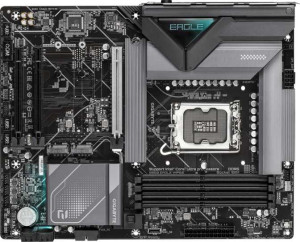
Gigabyte B860 Eagle WiFi6E
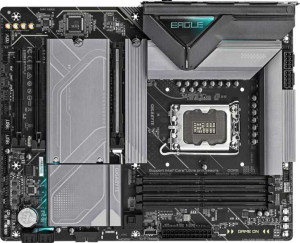
Gigabyte Z890 Eagle

Gigabyte B860 Eagle WiFi6E Gigabyte Z890 Eagle

Overview

Choosing between the Gigabyte B860 Eagle WiFi6E and the Gigabyte Z890 Eagle means evaluating two LGA 1851 ATX motherboards that share a strong common foundation yet diverge in important ways. From wireless connectivity and storage capacity to USB versatility and overclocking potential, each board carves out a distinct identity. This detailed spec comparison will help you identify which motherboard best aligns with your build priorities.

Common Features

  • Both products use the LGA 1851 CPU socket.
  • Both products have an ATX form factor.
  • Both products support overclocking easily.
  • Neither product supports easy BIOS reset.
  • Both products have 1 CPU socket.
  • Neither product has integrated graphics.
  • Both products come with a 3-year warranty.
  • Both products have a height of 244 mm.
  • Both products support a maximum memory amount of 256 GB.
  • Both products support a maximum RAM speed of 6400 MHz.
  • Both products have 4 memory slots.
  • Both products use DDR5 memory.
  • Both products have 2 memory channels.
  • Neither product supports ECC memory.
  • Neither product has USB 3.2 Gen 2 ports of Type-C.
  • Neither product has USB 3.2 Gen 1 ports of Type-C.
  • Both products have 4 USB 2.0 ports.
  • Both products have 1 DisplayPort output.
  • Both products have 1 RJ45 port.
  • Both products include a USB Type-C port.
  • Both products have 2 USB 3.2 Gen 1 ports available through expansion.
  • Both products have 4 USB 2.0 ports available through expansion.
  • Both products have 4 SATA 3 connectors.
  • Both products have 6 fan headers.
  • Both products include a TPM connector.
  • Neither product has an mSATA connector.
  • Both products have 1 PCIe 5.0 x16 slot.
  • Both products support 7.1 audio channels.
  • Neither product has an S/PDIF Out port.
  • Both products have 3 audio connectors.
  • Both products support RAID 0, RAID 1, RAID 5, and RAID 10.
  • Neither product supports RAID 0+1.

Main Differences

  • The chipset is B860 on Gigabyte B860 Eagle WiFi6E and Z890 on Gigabyte Z890 Eagle.
  • Wi-Fi support is present on Gigabyte B860 Eagle WiFi6E but not available on Gigabyte Z890 Eagle.
  • Bluetooth is present on Gigabyte B860 Eagle WiFi6E but not available on Gigabyte Z890 Eagle.
  • RGB lighting is present on Gigabyte Z890 Eagle but not available on Gigabyte B860 Eagle WiFi6E.
  • Dual BIOS is present on Gigabyte B860 Eagle WiFi6E but not available on Gigabyte Z890 Eagle.
  • The maximum overclocked RAM speed is 9066 MHz on Gigabyte B860 Eagle WiFi6E and 8800 MHz on Gigabyte Z890 Eagle.
  • USB 3.2 Gen 2 ports (USB-A) count is 1 on Gigabyte B860 Eagle WiFi6E and 2 on Gigabyte Z890 Eagle.
  • USB 3.2 Gen 1 ports (USB-A) count is 0 on Gigabyte B860 Eagle WiFi6E and 3 on Gigabyte Z890 Eagle.
  • USB 3.2 Gen 2x2 ports count is 1 on Gigabyte B860 Eagle WiFi6E and 0 on Gigabyte Z890 Eagle.
  • USB 4 40Gbps ports count is 0 on Gigabyte B860 Eagle WiFi6E and 1 on Gigabyte Z890 Eagle.
  • An HDMI output is present on Gigabyte B860 Eagle WiFi6E but not available on Gigabyte Z890 Eagle.
  • A PS/2 port is present on Gigabyte B860 Eagle WiFi6E but not available on Gigabyte Z890 Eagle.
  • The number of M.2 sockets is 3 on Gigabyte B860 Eagle WiFi6E and 4 on Gigabyte Z890 Eagle.
  • PCIe x1 slots count is 2 on Gigabyte B860 Eagle WiFi6E and 0 on Gigabyte Z890 Eagle.
  • PCIe x4 slots count is 0 on Gigabyte B860 Eagle WiFi6E and 2 on Gigabyte Z890 Eagle.
Specs Comparison
Gigabyte B860 Eagle WiFi6E

Gigabyte B860 Eagle WiFi6E

Gigabyte Z890 Eagle

Gigabyte Z890 Eagle

General info:
CPU socket LGA 1851 LGA 1851
chipset B860 Z890
form factor ATX ATX
release date January 2025 October 2025
supports Wi-Fi
Has Bluetooth
Easy to overclock
has RGB lighting
Easy to reset BIOS
Has dual BIOS
CPU sockets 1 1
Has integrated graphics
warranty period 3 years 3 years
height 244 mm 244 mm
width 305 mm 305 mm
Has integrated CPU

Both the Gigabyte B860 Eagle WiFi6E and the Gigabyte Z890 Eagle share the same LGA 1851 socket, ATX form factor, identical dimensions, and a 3-year warranty, making them direct siblings on the same platform. Both support overclocking and neither integrates a CPU or graphics solution, positioning them squarely as dedicated desktop motherboards for discrete builds.

The most meaningful split between the two comes down to chipset features and connectivity trade-offs. The B860 Eagle WiFi6E ships with built-in Wi-Fi and Bluetooth plus a dual BIOS — a real safety net if a firmware update goes wrong, since you can fall back to a backup chip without any tools. The Z890 Eagle, built on the higher-tier Z890 chipset, drops all of that but gains RGB lighting, which is a purely aesthetic addition. In practical terms, the Z890 chipset typically unlocks more PCIe lanes and greater memory overclocking headroom, but none of those differences are reflected in the provided specs.

On balance, the B860 Eagle WiFi6E holds a clear edge for most users within this spec group: it covers wireless connectivity out of the box and offers dual BIOS resilience — both tangible, everyday advantages — while the Z890 Eagle's gains here amount to RGB aesthetics alone. Builders who already own a discrete Wi-Fi card and prioritize the Z890 platform's broader potential may still prefer it, but based strictly on the general specs provided, the B860 Eagle WiFi6E delivers more practical built-in value.
Memory:
maximum memory amount 256GB 256GB
RAM speed (max) 6400 MHz 6400 MHz
overclocked RAM speed 9066 MHz 8800 MHz
memory slots 4 4
DDR memory version 5 5
memory channels 2 2
Supports ECC memory

At the foundation, these two boards are nearly identical in memory architecture: both support DDR5, offer 4 slots across a dual-channel configuration, cap out at 256GB of total capacity, and share the same native 6400 MHz ceiling. For the vast majority of builds — gaming, content creation, general workstation use — this common ground means real-world memory performance will be virtually indistinguishable between the two at stock speeds.

The only differentiator here is overclocked RAM headroom. The B860 Eagle WiFi6E tops out at 9066 MHz via XMP/EXPO profiles, while the Z890 Eagle reaches 8800 MHz. A 266 MHz gap at these frequencies is a relatively modest difference — in practice it translates to marginal gains in memory-bandwidth-sensitive tasks like video encoding or large dataset processing, and will be imperceptible in gaming or everyday workloads.

For this spec group, the B860 Eagle WiFi6E holds a narrow edge purely on overclocked ceiling, which is somewhat surprising given the Z890's higher-tier chipset. That said, the gap is slim enough that memory subsystem performance should not be a deciding factor between these two boards — the choice is better made on other grounds.

Ports:
USB 3.2 Gen 2 ports (USB-A) 1 2
USB 3.2 Gen 1 ports (USB-A) 0 3
USB 3.2 Gen 2 ports (USB-C) 0 0
USB 3.2 Gen 1 ports (USB-C) 0 0
USB 2.0 ports 4 4
USB 3.2 Gen 2x2 ports 1 0
USB 4 40Gbps ports 0 1
USB 4 20Gbps ports 0 0
Thunderbolt 3 ports 0 0
has an HDMI output
DisplayPort outputs 1 1
RJ45 ports 1 1
Has USB Type-C
eSATA ports 0 0
DVI outputs 0 0
has a VGA connector
PS/2 ports 1 0

The rear I/O panel is where these two boards diverge most sharply. The Z890 Eagle offers significantly more USB-A connectivity — 2x USB 3.2 Gen 2 and 3x USB 3.2 Gen 1 ports — giving it five high-speed USB-A outputs in total. More importantly, it includes a USB4 40Gbps port, the fastest interface available on either board, capable of driving external NVMe enclosures at near-full speed or connecting high-bandwidth peripherals and docks. The B860 Eagle WiFi6E, by contrast, offers just one USB 3.2 Gen 2 port on the USB-A side, but counters with a USB 3.2 Gen 2x2 port delivering 20Gbps — a solid mid-tier option, though it falls short of USB4.

Two other differences are worth flagging. The B860 includes an HDMI output and a PS/2 port, while the Z890 has neither. The HDMI output is only useful if the installed CPU has integrated graphics — without iGPU support, it goes unused. The PS/2 port is a legacy holdover relevant only to users with older keyboards or mice, which is a niche scenario in modern builds.

Taken together, the Z890 Eagle holds a clear edge in this category. Its USB4 40Gbps port alone represents a meaningful connectivity advantage for users with fast external storage or high-bandwidth peripherals, and its greater USB-A port count makes daily cable management more flexible. The B860's HDMI and Gen 2x2 are useful additions, but they don't offset the Z890's broader and faster rear panel offering.

Connectors:
USB 3.2 Gen 1 ports (through expansion) 2 2
USB 2.0 ports (through expansion) 4 4
SATA 3 connectors 4 4
fan headers 6 6
USB 3.0 ports (through expansion) 2 2
M.2 sockets 3 4
Has TPM connector
U.2 sockets 0 0
Has mSATA connector
SATA 2 connectors 0 0

Internal connectivity is remarkably consistent across these two boards — identical SATA 3 port counts, fan headers, expansion USB headers, and TPM connectors across the board. For builders planning typical configurations with a few drives and a well-cooled case, either board covers the bases without compromise. The one place they part ways is M.2 storage: the Z890 Eagle offers 4 M.2 sockets versus 3 on the B860 Eagle WiFi6E.

That extra M.2 slot matters more than it might seem at first glance. M.2 has become the default interface for fast NVMe SSDs, and builders running multiple high-speed drives — for OS, scratch storage, and bulk data simultaneously — will feel the constraint of a three-slot board sooner than expected. The fourth slot on the Z890 also leaves room to add an M.2-based Wi-Fi card without sacrificing a storage slot, a relevant consideration given the Z890 Eagle lacks onboard wireless.

This group goes to the Z890 Eagle, narrowly but clearly. With every other internal connector spec tied, the additional M.2 socket is the sole differentiator — and for storage-intensive builds or future expansion, it is a tangible, practical advantage.

Expansion slots:
PCIe 4.0 x16 slots 0 0
PCIe 5.0 x16 slots 1 1
PCIe 3.0 x16 slots 0 0
PCIe x1 slots 2 0
PCI slots 0 0
PCIe 2.0 x16 slots 0 0
PCIe x4 slots 0 2
PCIe x8 slots 0 0

Both boards lead with a single PCIe 5.0 x16 slot — the current gold standard for discrete GPU installation, offering double the bandwidth of PCIe 4.0 x16 and ensuring full compatibility with the latest graphics cards without any bottlenecking. For the primary GPU use case, there is no difference between these two boards whatsoever.

Where they diverge is in the secondary expansion slots. The B860 Eagle WiFi6E provides 2x PCIe x1 slots, while the Z890 Eagle instead offers 2x PCIe x4 slots. This is a meaningful distinction: x4 slots carry four times the lane bandwidth of x1 slots, making them far more capable hosts for bandwidth-hungry add-in cards such as 10GbE network adapters, capture cards, NVMe RAID controllers, or USB expansion cards. An x1 slot, by comparison, is largely limited to low-throughput cards like basic sound cards or simple network adapters.

The Z890 Eagle has a clear advantage here. Its PCIe x4 secondary slots open the door to a much broader and more capable range of expansion hardware, whereas the B860's x1 slots are functionally restrictive for anything beyond light accessory cards. For builders who anticipate adding high-performance peripherals beyond a GPU, this difference carries real weight.

Audio:
audio channels 7.1 7.1
Has S/PDIF Out port
audio connectors 3 3

Audio is the one category where there is nothing to debate: the Gigabyte B860 Eagle WiFi6E and the Gigabyte Z890 Eagle are identical in every provided spec. Both deliver 7.1-channel audio support across 3 analog audio connectors, and neither includes an S/PDIF optical output.

The 7.1-channel configuration is a capable offering for surround sound headsets and speaker setups, covering the needs of most gamers and casual audio users. The absence of S/PDIF means users who want to connect to an external DAC, AV receiver, or optical-input speakers via digital audio will need a dedicated sound card or USB DAC — a consideration for audiophiles, but a non-issue for the majority of desktop users.

This group is an unambiguous tie. With every measured audio spec matching exactly, onboard audio capability plays no role in differentiating these two boards.

Storage:
Supports RAID 1
Supports RAID 10 (1+0)
Supports RAID 5
Supports RAID 0
Supports RAID 0+1

Storage redundancy support is identical across both boards. The Gigabyte B860 Eagle WiFi6E and Gigabyte Z890 Eagle both support RAID 0, 1, 5, and 10, covering the full practical spectrum of consumer and prosumer RAID configurations — neither supports RAID 0+1, but that mode is functionally superseded by RAID 10 in virtually all real-world scenarios.

The supported modes cover meaningful use cases: RAID 0 for striped performance, RAID 1 for straightforward mirroring and data redundancy, RAID 5 for a balance of capacity and fault tolerance across three or more drives, and RAID 10 for combined performance and redundancy in larger arrays. Any builder looking to run a RAID setup for a NAS-adjacent workstation, media server, or data-critical workflow will find both boards equally capable.

Storage is another clean tie. With every RAID mode matched spec-for-spec, this category offers no basis for choosing one board over the other.

Comparison Summary & Verdict

Both boards deliver a solid DDR5 platform with PCIe 5.0, four memory slots, and up to 256 GB of RAM, making either a capable foundation. However, their strengths point to different builders. The Gigabyte B860 Eagle WiFi6E is the stronger choice for users who want built-in Wi-Fi 6E and Bluetooth, a safety-net dual BIOS, and an HDMI output for flexible display options, all at a likely lower price point thanks to its B860 chipset. The Gigabyte Z890 Eagle, on the other hand, suits builders who prioritize maximum storage expansion with four M.2 sockets, a USB 4 40Gbps port, more USB 3.2 rear connectivity, and RGB lighting for an aesthetically driven build. Your choice ultimately comes down to wireless convenience versus wired expandability.

Gigabyte B860 Eagle WiFi6E
Buy Gigabyte B860 Eagle WiFi6E if...

Buy the Gigabyte B860 Eagle WiFi6E if you want integrated Wi-Fi 6E and Bluetooth out of the box, value the peace of mind of a dual BIOS, and need an HDMI output for your setup.

Gigabyte Z890 Eagle
Buy Gigabyte Z890 Eagle if...

Buy the Gigabyte Z890 Eagle if you need more storage headroom with four M.2 sockets, a USB 4 40Gbps port, greater USB 3.2 rear connectivity, and RGB lighting for a customized build aesthetic.