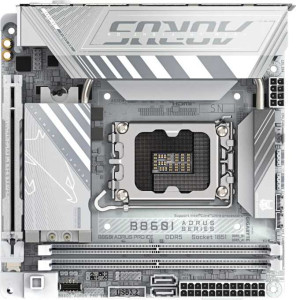
Gigabyte B860I Aorus Pro Ice
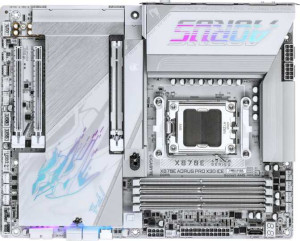
Gigabyte X870E Aorus Pro X3D Ice

Gigabyte B860I Aorus Pro Ice Gigabyte X870E Aorus Pro X3D Ice

Overview

Welcome to our in-depth spec comparison between the Gigabyte B860I Aorus Pro Ice and the Gigabyte X870E Aorus Pro X3D Ice. These two motherboards share a family resemblance — both offering Wi-Fi 7, Bluetooth 5.4, DDR5 memory support, and a PCIe 5.0 x16 slot — but they diverge sharply in platform, form factor, and expansion capabilities. Read on to explore how their chipsets, memory limits, port configurations, and storage options stack up against each other.

Common Features

  • Both products support Wi-Fi, including Wi-Fi 4 (802.11n), Wi-Fi 5 (802.11ac), Wi-Fi 6 (802.11ax), Wi-Fi 6E (802.11ax), and Wi-Fi 7 (802.11be).
  • Bluetooth is available on both products at version 5.4.
  • Both products feature an HDMI 2.1 output.
  • Both products are easy to overclock.
  • aptX support is not available on either product.
  • Both products have 1 CPU socket.
  • Both products use DDR5 memory.
  • Both products support 2 memory channels.
  • ECC memory is not supported on either product.
  • Neither product has USB 3.2 Gen 1 USB-C ports, USB 2.0 ports, USB 3.2 Gen 2x2 ports, USB 4 20Gbps ports, or Thunderbolt 3 ports.
  • Both products include an HDMI output.
  • Both products have USB Type-C connectivity.
  • Both products include 1 RJ45 port.
  • Both products have a TPM connector.
  • Neither product has a U.2 socket or mSATA connector.
  • Neither product has SATA 2 connectors.
  • Both products support 7.1 audio channels.
  • Both products have an S/PDIF Out port and 2 audio connectors.
  • Both products feature 1 PCIe 5.0 x16 slot and no PCIe 4.0 x16, PCIe 3.0 x16, PCIe 2.0 x16, PCIe x1, PCIe x8, or PCI slots.
  • Both products support RAID 0 and RAID 1, but neither supports RAID 0+1.

Main Differences

  • The CPU socket is LGA 1851 on Gigabyte B860I Aorus Pro Ice and AM5 on Gigabyte X870E Aorus Pro X3D Ice.
  • The chipset is B860 on Gigabyte B860I Aorus Pro Ice and X870 on Gigabyte X870E Aorus Pro X3D Ice.
  • The form factor is Mini-ITX on Gigabyte B860I Aorus Pro Ice and ATX on Gigabyte X870E Aorus Pro X3D Ice.
  • RGB lighting is present on Gigabyte X870E Aorus Pro X3D Ice but not available on Gigabyte B860I Aorus Pro Ice.
  • Easy BIOS reset is available on Gigabyte X870E Aorus Pro X3D Ice but not on Gigabyte B860I Aorus Pro Ice.
  • Dual BIOS is featured on Gigabyte B860I Aorus Pro Ice but not on Gigabyte X870E Aorus Pro X3D Ice.
  • The board dimensions are 170 mm x 170 mm on Gigabyte B860I Aorus Pro Ice and 244 mm x 305 mm on Gigabyte X870E Aorus Pro X3D Ice.
  • Maximum memory capacity is 128 GB on Gigabyte B860I Aorus Pro Ice and 256 GB on Gigabyte X870E Aorus Pro X3D Ice.
  • Maximum native RAM speed is 6400 MHz on Gigabyte B860I Aorus Pro Ice and 5200 MHz on Gigabyte X870E Aorus Pro X3D Ice.
  • Maximum overclocked RAM speed is 9200 MHz on Gigabyte B860I Aorus Pro Ice and 9000 MHz on Gigabyte X870E Aorus Pro X3D Ice.
  • Memory slots number 2 on Gigabyte B860I Aorus Pro Ice and 4 on Gigabyte X870E Aorus Pro X3D Ice.
  • USB 3.2 Gen 2 USB-A ports number 3 on Gigabyte B860I Aorus Pro Ice and 5 on Gigabyte X870E Aorus Pro X3D Ice.
  • USB 3.2 Gen 1 USB-A ports number 2 on Gigabyte B860I Aorus Pro Ice and 3 on Gigabyte X870E Aorus Pro X3D Ice.
  • USB 3.2 Gen 2 USB-C ports are absent on Gigabyte B860I Aorus Pro Ice but number 2 on Gigabyte X870E Aorus Pro X3D Ice.
  • USB 4 40Gbps ports number 1 on Gigabyte B860I Aorus Pro Ice and 2 on Gigabyte X870E Aorus Pro X3D Ice.
  • Thunderbolt 4 ports number 1 on Gigabyte B860I Aorus Pro Ice and 2 on Gigabyte X870E Aorus Pro X3D Ice.
  • DisplayPort output is present on Gigabyte B860I Aorus Pro Ice (1 port) but absent on Gigabyte X870E Aorus Pro X3D Ice.
  • SATA 3 connectors number 2 on Gigabyte B860I Aorus Pro Ice and 4 on Gigabyte X870E Aorus Pro X3D Ice.
  • Fan headers number 3 on Gigabyte B860I Aorus Pro Ice and 8 on Gigabyte X870E Aorus Pro X3D Ice.
  • M.2 sockets number 2 on Gigabyte B860I Aorus Pro Ice and 4 on Gigabyte X870E Aorus Pro X3D Ice.
  • A PCIe x4 slot is absent on Gigabyte B860I Aorus Pro Ice but present on Gigabyte X870E Aorus Pro X3D Ice.
  • RAID 10 (1+0) support is present on Gigabyte X870E Aorus Pro X3D Ice but not available on Gigabyte B860I Aorus Pro Ice.
  • RAID 5 support is present on Gigabyte X870E Aorus Pro X3D Ice but not available on Gigabyte B860I Aorus Pro Ice.
Specs Comparison
Gigabyte B860I Aorus Pro Ice

Gigabyte B860I Aorus Pro Ice

Gigabyte X870E Aorus Pro X3D Ice

Gigabyte X870E Aorus Pro X3D Ice

General info:
CPU socket LGA 1851 AM5
chipset B860 X870
form factor Mini-ITX ATX
release date January 2025 September 2025
supports Wi-Fi
Wi-Fi version Wi-Fi 4 (802.11n), Wi-Fi 5 (802.11ac), Wi-Fi 6 (802.11ax), Wi-Fi 6E (802.11ax), Wi-Fi 7 (802.11be) Wi-Fi 4 (802.11n), Wi-Fi 5 (802.11ac), Wi-Fi 6 (802.11ax), Wi-Fi 6E (802.11ax), Wi-Fi 7 (802.11be)
Has Bluetooth
Bluetooth version 5.4 5.4
HDMI version HDMI 2.1 HDMI 2.1
Easy to overclock
has RGB lighting
Easy to reset BIOS
Has dual BIOS
has aptX
CPU sockets 1 1
Has integrated graphics
warranty period 3 years 3 years
height 170 mm 244 mm
width 170 mm 305 mm
Has integrated CPU

The most fundamental divide between these two boards is platform and form factor. The B860I Aorus Pro Ice targets Intel's LGA 1851 ecosystem with a Mini-ITX footprint (170 × 170 mm), while the X870E Aorus Pro X3D Ice is built around AMD's AM5 socket on a full ATX layout (305 × 244 mm). This means the two boards are not cross-compatible choices — your CPU platform decision drives which board is even relevant to you. Beyond platform, the size difference is significant: Mini-ITX enables compact, space-efficient builds, whereas ATX provides more room for expansion slots, VRM cooling, and cable management. The chipset tier also differs — B860 is a mainstream Intel chipset with some feature restrictions, whereas X870 is AMD's enthusiast-grade chipset, which typically unlocks more PCIe lanes and connectivity options.

On shared ground, both boards are well-equipped for modern connectivity: each supports Wi-Fi 7 (802.11be) with the full generational stack below it, Bluetooth 5.4, and HDMI 2.1 output. Both carry a 3-year warranty and are flagged as easy to overclock, which is somewhat notable for the B860I given that B-series Intel chipsets have historically imposed overclocking limitations. Neither board includes an integrated CPU or integrated graphics, so a discrete GPU or a CPU with onboard graphics is required in both cases.

Where the boards diverge in features: the B860I Aorus Pro Ice offers dual BIOS — a meaningful reliability safeguard that lets the board recover from a failed BIOS flash automatically — but lacks an easy BIOS reset mechanism and has no RGB lighting. The X870E Aorus Pro X3D Ice flips this: it includes an easy BIOS reset and RGB lighting for aesthetics, but has no dual BIOS redundancy. For users who prioritize build resilience, the dual BIOS on the B860I is a practical edge. For enthusiasts who want a simpler recovery button and visual customization in a larger build, the X870E has the advantage. Overall, neither board is strictly superior in this group — the right choice depends entirely on your CPU platform preference and case size constraints.
Memory:
maximum memory amount 128GB 256GB
RAM speed (max) 6400 MHz 5200 MHz
overclocked RAM speed 9200 MHz 9000 MHz
memory slots 2 4
DDR memory version 5 5
memory channels 2 2
Supports ECC memory

Both boards run DDR5 memory in a dual-channel configuration, so the generational baseline is identical. The meaningful differences lie in capacity ceiling, slot count, and native speed support. The X870E Aorus Pro X3D Ice offers 4 memory slots with a maximum capacity of 256GB, whereas the B860I Aorus Pro Ice is limited to 2 slots and caps out at 128GB — a direct consequence of its Mini-ITX size constraints. For most consumer workloads, 128GB is more than sufficient, but content creators, virtualization users, or anyone running memory-intensive professional applications will appreciate the headroom the X870E provides.

On raw speed, the picture is more nuanced. The B860I supports a higher native RAM speed of 6400 MHz versus the X870E's 5200 MHz, and its overclocked ceiling edges ahead at 9200 MHz compared to 9000 MHz. In practice, the gap between these overclocked limits is negligible for real-world performance, but the higher native speed on the B860I means users can run fast DDR5 kits without necessarily relying on XMP/EXPO profiles — a minor convenience advantage. Neither board supports ECC memory, so error-correcting configurations are off the table for both.

Overall, the X870E Aorus Pro X3D Ice holds a clear advantage in this group for users who need scalability — double the slots and double the maximum capacity make it the stronger platform for demanding or future-facing builds. The B860I's slightly higher speed ceilings are a real but narrow counterpoint, unlikely to be decisive for most buyers. If maximum memory capacity and upgrade flexibility matter, the X870E wins this category outright.

Ports:
USB 3.2 Gen 2 ports (USB-A) 3 5
USB 3.2 Gen 1 ports (USB-A) 2 3
USB 3.2 Gen 2 ports (USB-C) 0 2
USB 3.2 Gen 1 ports (USB-C) 0 0
USB 2.0 ports 0 0
USB 3.2 Gen 2x2 ports 0 0
USB 4 40Gbps ports 1 2
USB 4 20Gbps ports 0 0
Thunderbolt 4 ports 1 2
Thunderbolt 3 ports 0 0
has an HDMI output
DisplayPort outputs 1 0
RJ45 ports 1 1
Has USB Type-C
eSATA ports 0 0
DVI outputs 0 0
has a VGA connector
PS/2 ports 0 0

Raw port count alone tells a clear story here: the X870E Aorus Pro X3D Ice offers substantially more connectivity across nearly every category. It provides 5 USB 3.2 Gen 2 Type-A ports versus 3 on the B860I, adds 2 USB 3.2 Gen 2 Type-C ports that the B860I lacks entirely, and doubles the high-bandwidth options with 2 USB4 40Gbps and 2 Thunderbolt 4 ports compared to one of each on the B860I. For a desk loaded with peripherals, external SSDs, docks, or daisy-chained Thunderbolt devices, this abundance of fast ports reduces reliance on hubs and adapters significantly.

The one area where the B860I Aorus Pro Ice carves out a unique advantage is display output: it includes both HDMI 2.1 and a DisplayPort output, enabling two simultaneous display connections directly from the board. The X870E, by contrast, offers only HDMI with no DisplayPort — a notable omission for a flagship board that limits direct multi-monitor setups from the rear I/O. Both boards share a single RJ45 LAN port and sensibly omit legacy connectors like VGA, DVI, and PS/2, keeping the I/O panel clean and modern.

In this group, the verdict depends on your priority. The X870E has a decisive edge in overall USB bandwidth and peripheral connectivity — the combination of more Gen 2 ports, Type-C outputs, and dual Thunderbolt 4 makes it the stronger choice for power users and content creators. The B860I counters specifically on display versatility with its added DisplayPort, which matters for compact builds driving two monitors. Unless that DisplayPort is a dealbreaker, the X870E is the more comprehensively connected board.

Connectors:
USB 3.2 Gen 1 ports (through expansion) 2 4
USB 2.0 ports (through expansion) 2 4
SATA 3 connectors 2 4
fan headers 3 8
USB 3.0 ports (through expansion) 2 4
M.2 sockets 2 4
Has TPM connector
U.2 sockets 0 0
Has mSATA connector
SATA 2 connectors 0 0

The internal connector story mirrors the broader pattern established in previous groups: the X870E Aorus Pro X3D Ice offers exactly double the capacity of the B860I Aorus Pro Ice across almost every category. Storage expansion is the most consequential gap — 4 M.2 sockets and 4 SATA 3 ports on the X870E versus 2 of each on the B860I. For a high-capacity NAS-style build, a video editing workstation with multiple fast NVMe drives, or simply a system intended to grow over time, the X870E's storage headroom is a tangible advantage. The B860I's 2 M.2 and 2 SATA slots are workable for typical consumer builds but leave little room to expand without replacing existing drives.

Thermal management scalability follows the same trajectory. With 8 fan headers, the X870E can natively support a complex cooling setup — multiple case fans, a CPU cooler, and dedicated radiator pumps — all without splitters. The B860I's 3 fan headers will require splitter cables in any build with more than a handful of fans, which can complicate fan curve control and reduce per-header precision. For a compact Mini-ITX case this is more forgivable, but it is worth noting for users planning aggressive thermal management. Expansion USB headers also double on the X870E, which matters when front-panel I/O or add-in cards need internal connectivity.

Both boards include a TPM connector and sensibly omit legacy interfaces like mSATA and SATA 2, keeping the feature set firmly modern. Still, the conclusion here is unambiguous: the X870E Aorus Pro X3D Ice holds a clear and consistent advantage in internal connectivity, making it the stronger platform for storage-intensive, thermally complex, or expandable builds. The B860I's more modest connector count is a natural trade-off of its compact form factor rather than a design flaw, but users with growing storage or cooling needs should factor this gap in carefully.

Expansion slots:
PCIe 4.0 x16 slots 0 0
PCIe 5.0 x16 slots 1 1
PCIe 3.0 x16 slots 0 0
PCIe x1 slots 0 0
PCI slots 0 0
PCIe 2.0 x16 slots 0 0
PCIe x4 slots 0 1
PCIe x8 slots 0 0

Expansion slot options are lean on both boards, which is expected given their respective form factors. The shared centerpiece is a single PCIe 5.0 x16 slot — the current standard for discrete GPU installation, offering double the bandwidth of PCIe 4.0 and ensuring neither board is a bottleneck for even the most demanding modern graphics cards. For the vast majority of users building a single-GPU system, this is all that is needed, and both boards deliver it equally.

The only differentiator in this group is the X870E Aorus Pro X3D Ice's additional PCIe x4 slot, which the B860I Aorus Pro Ice entirely lacks. This secondary slot opens the door for add-in cards — a dedicated USB or SATA expansion card, a capture card, a 10GbE NIC, or similar accessories — without consuming any of the board's M.2 or other internal resources. On the B860I, the absence of any secondary slot means the primary PCIe 5.0 x16 lane is the only expansion path, a constraint that is largely acceptable in a Mini-ITX context where physical space is the binding limit anyway.

This group results in a narrow but real edge for the X870E. The PCIe x4 slot adds meaningful flexibility for users who want to supplement their build with a specialist card alongside their GPU. For the B860I, the single-slot limitation is an architectural reality of Mini-ITX rather than a shortcoming per se — but buyers who anticipate needing any add-in card beyond a GPU should treat this as a notable constraint.

Audio:
audio channels 7.1 7.1
Has S/PDIF Out port
audio connectors 2 2

Audio is the one category where these two boards are in complete lockstep. Both the B860I Aorus Pro Ice and the X870E Aorus Pro X3D Ice offer 7.1-channel audio output, S/PDIF out for digital passthrough to an external DAC or AV receiver, and 2 analog audio connectors on the rear I/O. There is no differentiator to analyze here — the specification is identical across every data point provided.

In practical terms, 7.1 surround support means both boards can feed a full eight-channel speaker setup or deliver virtualized surround to headphones, which is relevant for immersive gaming and home theater use cases. The S/PDIF output is a useful inclusion for users who prefer to offload audio processing to a dedicated external device, bypassing the onboard codec entirely for potentially cleaner results. Two rear analog connectors is a modest but functional offering for a typical headset-plus-speaker arrangement.

This group is a straightforward tie — neither board holds any audio advantage over the other based on the provided specifications. Users with demanding audio requirements beyond what onboard solutions provide would be looking at external hardware regardless of which board they choose, making this a non-factor in the decision between these two products.

Storage:
Supports RAID 1
Supports RAID 10 (1+0)
Supports RAID 5
Supports RAID 0
Supports RAID 0+1

RAID support is where a meaningful gap opens up between these two boards. Both support RAID 0 (striping for performance) and RAID 1 (mirroring for redundancy) — the two most common configurations for consumer builds. The X870E Aorus Pro X3D Ice goes further, adding support for RAID 5 and RAID 10, while the B860I Aorus Pro Ice tops out at those two basic modes.

The practical significance depends heavily on the use case. For the typical consumer who wants a simple performance stripe or a mirrored backup pair, both boards are equally capable. However, RAID 5 — which distributes parity data across three or more drives for a balance of redundancy, capacity efficiency, and read performance — is a staple of small workstation and prosumer NAS-style configurations. RAID 10 combines striping and mirroring across four drives to deliver both speed and fault tolerance, making it a preferred option for environments where data loss is unacceptable but performance cannot be sacrificed. The X870E's support for these modes signals a board designed with more demanding, multi-drive scenarios in mind.

It is worth noting that the B860I's 2 SATA ports and 2 M.2 slots from the previous connector group already impose a practical ceiling on how elaborate any RAID array can realistically be, so the absence of RAID 5 and RAID 10 is consistent with its overall storage philosophy. Still, based strictly on the specs here, the X870E Aorus Pro X3D Ice holds a clear advantage in storage versatility — it is the only board of the two that can serve users with serious multi-drive redundancy or performance requirements.

Comparison Summary & Verdict

After examining every specification, it is clear that these two boards target very different builders. The Gigabyte B860I Aorus Pro Ice is a compact Mini-ITX powerhouse for Intel LGA 1851 systems, offering a dual BIOS, a higher native RAM speed ceiling of 6400 MHz, and a DisplayPort output — ideal for space-constrained, small-form-factor builds. The Gigabyte X870E Aorus Pro X3D Ice, by contrast, is a full-size ATX board on the AMD AM5 platform built for maximum expandability, boasting 4 memory slots for up to 256 GB of RAM, 4 M.2 sockets, 8 fan headers, RGB lighting, and extended RAID support including RAID 5 and RAID 10. Choose the B860I if you value a small footprint and Intel compatibility; choose the X870E for a high-expansion AMD workstation or enthusiast desktop.

Gigabyte B860I Aorus Pro Ice
Buy Gigabyte B860I Aorus Pro Ice if...

Buy the Gigabyte B860I Aorus Pro Ice if you are building a compact Intel LGA 1851 Mini-ITX system and want a dual BIOS, a DisplayPort output, and the highest native RAM speeds in a small footprint.

Gigabyte X870E Aorus Pro X3D Ice
Buy Gigabyte X870E Aorus Pro X3D Ice if...

Buy the Gigabyte X870E Aorus Pro X3D Ice if you need a full-featured AMD AM5 ATX motherboard with maximum RAM capacity, more M.2 slots, additional fan headers, RGB lighting, and broader RAID support for a high-expansion desktop build.