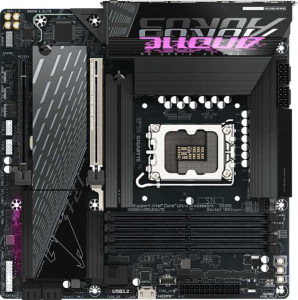
Gigabyte B860M Aorus Elite
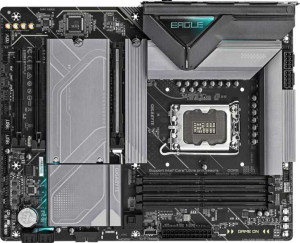
Gigabyte Z890 Eagle

Gigabyte B860M Aorus Elite Gigabyte Z890 Eagle

Overview

Welcome to our in-depth specification comparison between the Gigabyte B860M Aorus Elite and the Gigabyte Z890 Eagle. Both motherboards share the same LGA 1851 socket and DDR5 memory support, but they diverge sharply when it comes to chipset capability, form factor, and expandability. Whether you are building a compact system or a full-sized desktop, understanding these key battlegrounds will help you make the right choice for your next build.

Common Features

  • Both products use the LGA 1851 CPU socket.
  • Neither product supports Wi-Fi.
  • Neither product has Bluetooth.
  • Both products support overclocking.
  • Both products feature RGB lighting.
  • Neither product has an easy BIOS reset feature.
  • Both products have 1 CPU socket.
  • Neither product has integrated graphics.
  • Both products support a maximum memory amount of 256GB.
  • Both products support a maximum RAM speed of 6400 MHz.
  • Both products have 4 memory slots.
  • Both products use DDR5 memory.
  • Both products have 2 memory channels.
  • Neither product supports ECC memory.
  • Both products have 2 USB 3.2 Gen 2 Type-A ports.
  • Neither product has USB 3.2 Gen 2 Type-C ports.
  • Both products have 4 USB 2.0 ports.
  • Both products have 1 USB 4 40Gbps port.
  • Neither product has Thunderbolt 3 ports.
  • Both products have 4 SATA 3 connectors.
  • Both products have 6 fan headers.
  • Both products include a TPM connector.
  • Both products have 1 PCIe 5.0 x16 slot.
  • Both products support 7.1 audio channels.
  • Both products support RAID 0, RAID 1, RAID 5, and RAID 10.
  • Neither product supports RAID 0+1.

Main Differences

  • The chipset is B860 on the Gigabyte B860M Aorus Elite and Z890 on the Gigabyte Z890 Eagle.
  • The form factor is Micro-ATX on the Gigabyte B860M Aorus Elite and ATX on the Gigabyte Z890 Eagle.
  • Dual BIOS is present on the Gigabyte B860M Aorus Elite but not available on the Gigabyte Z890 Eagle.
  • The width is 244 mm on the Gigabyte B860M Aorus Elite and 305 mm on the Gigabyte Z890 Eagle.
  • The maximum overclocked RAM speed is 9200 MHz on the Gigabyte B860M Aorus Elite and 8800 MHz on the Gigabyte Z890 Eagle.
  • There are 4 USB 3.2 Gen 1 Type-A ports on the Gigabyte B860M Aorus Elite and 3 on the Gigabyte Z890 Eagle.
  • An HDMI output is present on the Gigabyte B860M Aorus Elite but not available on the Gigabyte Z890 Eagle.
  • There are 3 M.2 sockets on the Gigabyte B860M Aorus Elite and 4 on the Gigabyte Z890 Eagle.
  • There is 1 PCIe x4 slot on the Gigabyte B860M Aorus Elite and 2 on the Gigabyte Z890 Eagle.
  • An S/PDIF Out port is present on the Gigabyte B860M Aorus Elite but not available on the Gigabyte Z890 Eagle.
  • There are 2 audio connectors on the Gigabyte B860M Aorus Elite and 3 on the Gigabyte Z890 Eagle.
Specs Comparison
Gigabyte B860M Aorus Elite

Gigabyte B860M Aorus Elite

Gigabyte Z890 Eagle

Gigabyte Z890 Eagle

General info:
CPU socket LGA 1851 LGA 1851
chipset B860 Z890
form factor Micro-ATX ATX
release date January 2025 October 2025
supports Wi-Fi
Has Bluetooth
Easy to overclock
has RGB lighting
Easy to reset BIOS
Has dual BIOS
CPU sockets 1 1
Has integrated graphics
warranty period 3 years 3 years
height 244 mm 244 mm
width 244 mm 305 mm
Has integrated CPU

Both boards share the same LGA 1851 socket and are built around Intel's current-generation platform, meaning CPU compatibility is identical. The most immediate structural difference is the form factor: the B860M Aorus Elite is a Micro-ATX (244×244 mm), while the Z890 Eagle is a full ATX (244×305 mm). That extra 61 mm of width on the Z890 Eagle translates to more PCB real estate for additional expansion slots, VRM phases, and routing — relevant if you plan to populate multiple PCIe cards or want more headroom for cooling components.

The chipset difference is the most functionally significant split here. The B860 on the Aorus Elite is Intel's mid-range chipset with restricted overclocking capabilities on memory and limited PCIe lane flexibility, whereas the Z890 on the Eagle is Intel's enthusiast chipset, unlocking full memory overclocking (XMP/EXPO beyond spec) and greater configurability. Both boards are flagged as ″Easy to overclock: YES,″ but in practice the Z890 gives you substantially more tuning latitude — so that shared ″YES″ means more on the Eagle. Notably, the Aorus Elite includes dual BIOS, a meaningful reliability feature that lets the board recover from a failed flash automatically; the Z890 Eagle lacks this, which is a tangible resilience advantage for the B860M in build stability terms.

All other general attributes are identical: both omit Wi-Fi and Bluetooth (requiring add-in cards or adapters for wireless), both include RGB lighting, neither has an integrated CPU or GPU, and both carry a 3-year warranty. On balance, the Z890 Eagle holds the edge for performance-oriented builders who want chipset-level overclocking flexibility and a larger board canvas, while the B860M Aorus Elite counters with a smaller footprint and the practical safety net of dual BIOS — making it the stronger pick for compact or reliability-focused builds.
Memory:
maximum memory amount 256GB 256GB
RAM speed (max) 6400 MHz 6400 MHz
overclocked RAM speed 9200 MHz 8800 MHz
memory slots 4 4
DDR memory version 5 5
memory channels 2 2
Supports ECC memory

The memory profiles of these two boards are remarkably similar across the fundamentals: both support DDR5, offer 4 slots in a dual-channel configuration, cap out at 256 GB of total capacity, and share an identical native speed ceiling of 6400 MHz. For the vast majority of users running standard DDR5 kits, the experience on either board will be functionally indistinguishable.

The one meaningful divergence appears in overclocked memory headroom. The B860M Aorus Elite reaches up to 9200 MHz via overclocking, compared to 8800 MHz on the Z890 Eagle — a 400 MHz gap that is counterintuitive given that the Z890 is the higher-tier chipset. In practice, chasing RAM frequencies above 7000–7600 MHz yields diminishing real-world returns in most workloads, so neither ceiling is a practical limitation for typical use. However, for enthusiasts specifically targeting extreme memory overclocking benchmarks, the Aorus Elite's higher rated ceiling is a notable, if niche, advantage.

Neither board supports ECC memory, so workstation or server use cases requiring error-correcting RAM are off the table for both. On this spec group, the B860M Aorus Elite holds a narrow technical edge purely due to its higher overclocked memory ceiling, but for any real-world build, the two boards are effectively tied on memory capability.

Ports:
USB 3.2 Gen 2 ports (USB-A) 2 2
USB 3.2 Gen 1 ports (USB-A) 4 3
USB 3.2 Gen 2 ports (USB-C) 0 0
USB 3.2 Gen 1 ports (USB-C) 0 0
USB 2.0 ports 4 4
USB 3.2 Gen 2x2 ports 0 0
USB 4 40Gbps ports 1 1
USB 4 20Gbps ports 0 0
Thunderbolt 3 ports 0 0
has an HDMI output
DisplayPort outputs 1 1
RJ45 ports 1 1
Has USB Type-C
eSATA ports 0 0
DVI outputs 0 0
has a VGA connector
PS/2 ports 0 0

The Gigabyte B860M Aorus Elite and the Gigabyte Z890 Eagle have several similarities and a few differences when it comes to ports. Both motherboards feature 2 USB 3.2 Gen 2 ports (USB-A), 4 USB 2.0 ports, 1 USB 4 40Gbps port, 1 DisplayPort output, and 1 RJ45 port. They also both have USB Type-C support, though neither has any USB 3.2 Gen 2 or USB 3.2 Gen 1 USB-C ports.

One key difference between the two is that the B860M Aorus Elite includes an HDMI output, which is not present on the Z890 Eagle. Additionally, the Z890 Eagle has one fewer USB 3.2 Gen 1 (USB-A) port (3 versus 4 on the B860M Aorus Elite). Neither motherboard offers Thunderbolt 3 ports, eSATA ports, DVI outputs, or a VGA connector, and both lack PS/2 ports.

Overall, the port selection is quite similar on both boards, with the main distinctions being the inclusion of HDMI on the B860M Aorus Elite and the slight variation in USB 3.2 Gen 1 ports.

Connectors:
USB 3.2 Gen 1 ports (through expansion) 2 2
USB-C 3.2 Gen 2 ports (through expansion) 1 1
USB 2.0 ports (through expansion) 4 4
SATA 3 connectors 4 4
fan headers 6 6
USB 3.0 ports (through expansion) 2 2
M.2 sockets 3 4
Has TPM connector
U.2 sockets 0 0
Has mSATA connector
SATA 2 connectors 0 0

Both the Gigabyte B860M Aorus Elite and the Gigabyte Z890 Eagle provide similar connector options. They both feature 2 USB 3.2 Gen 1 ports, 1 USB-C 3.2 Gen 2 port, 4 USB 2.0 ports, and 2 USB 3.0 ports through expansion. Both motherboards also offer 4 SATA 3 connectors and 6 fan headers, ensuring flexibility for storage and cooling setups. Additionally, both models have a TPM connector, and neither includes U.2 or mSATA connectors.

The key difference between the two motherboards lies in the number of M.2 sockets: the B860M Aorus Elite has 3 M.2 sockets, while the Z890 Eagle has 4. However, neither motherboard includes SATA 2 connectors, so there is no variation in that regard.

Overall, both motherboards have a very similar set of connectors, with the only notable difference being the additional M.2 socket on the Z890 Eagle.

Expansion slots:
PCIe 4.0 x16 slots 0 0
PCIe 5.0 x16 slots 1 1
PCIe 3.0 x16 slots 0 0
PCIe x1 slots 0 0
PCI slots 0 0
PCIe 2.0 x16 slots 0 0
PCIe x4 slots 1 2
PCIe x8 slots 0 0

Both the Gigabyte B860M Aorus Elite and the Gigabyte Z890 Eagle feature a PCIe 5.0 x16 slot, but they differ in the number of PCIe x4 slots. The B860M Aorus Elite has 1 PCIe x4 slot, while the Z890 Eagle has 2. Neither motherboard includes PCIe 4.0 x16 slots, PCIe 3.0 x16 slots, PCIe x1 slots, or PCI slots. Additionally, both boards lack PCIe 2.0 x16 slots and PCIe x8 slots.

Overall, the primary difference in expansion slots is the number of PCIe x4 slots, with the Z890 Eagle offering one more than the B860M Aorus Elite.

Both motherboards share a similar set of high-speed expansion options, with the notable exception being the additional PCIe x4 slot on the Z890 Eagle.

Audio:
audio channels 7.1 7.1
Has S/PDIF Out port
audio connectors 2 3

Both the Gigabyte B860M Aorus Elite and the Gigabyte Z890 Eagle support 7.1 audio channels, providing high-quality surround sound for an immersive audio experience. The B860M Aorus Elite includes an S/PDIF Out port, which is not available on the Z890 Eagle. In terms of audio connectors, the B860M Aorus Elite has 2, while the Z890 Eagle offers 3.

These differences highlight that while both motherboards deliver similar core audio capabilities, the B860M Aorus Elite includes the S/PDIF Out port, which could be important for certain audio setups, and the Z890 Eagle provides an additional audio connector.

Overall, the B860M Aorus Elite has the edge in terms of output options with its S/PDIF Out port, while the Z890 Eagle offers a slightly expanded number of audio connectors.

Storage:
Supports RAID 1
Supports RAID 10 (1+0)
Supports RAID 5
Supports RAID 0
Supports RAID 0+1

Both the Gigabyte B860M Aorus Elite and the Gigabyte Z890 Eagle support the same set of RAID configurations. They both support RAID 1, RAID 10 (1+0), RAID 5, and RAID 0, allowing for various storage performance and redundancy setups. Neither motherboard supports RAID 0+1.

Since their RAID support capabilities are identical, there is no difference between the two in terms of storage management options.

Overall, both motherboards offer the same RAID functionality, ensuring flexibility in storage configurations for users looking to optimize their drives for performance or redundancy.

Comparison Summary & Verdict

After reviewing every specification, it is clear that these two boards target different types of builders. The Gigabyte B860M Aorus Elite stands out with its compact Micro-ATX form factor, a dedicated HDMI output for display connectivity, a dual BIOS safety net, and a higher overclocked RAM ceiling of 9200 MHz, making it an excellent choice for space-conscious builds or budget-minded enthusiasts who still want capable memory performance. The Gigabyte Z890 Eagle, on the other hand, leverages its full ATX size and the more capable Z890 chipset to deliver an extra M.2 socket, more PCIe x4 slots, and additional audio connectors, catering to power users who need maximum storage expansion and a richer feature set in a traditional tower setup. Both boards share strong fundamentals including PCIe 5.0, USB 4 40Gbps, and full RAID support, so the decision ultimately comes down to size, storage ambition, and budget.

Gigabyte B860M Aorus Elite
Buy Gigabyte B860M Aorus Elite if...

Buy the Gigabyte B860M Aorus Elite if you want a compact Micro-ATX build with a dual BIOS safety feature, a built-in HDMI output, and the highest overclocked RAM speeds in the comparison.

Gigabyte Z890 Eagle
Buy Gigabyte Z890 Eagle if...

Buy the Gigabyte Z890 Eagle if you need maximum storage expansion with four M.2 sockets and more PCIe x4 slots in a full ATX platform powered by the feature-rich Z890 chipset.