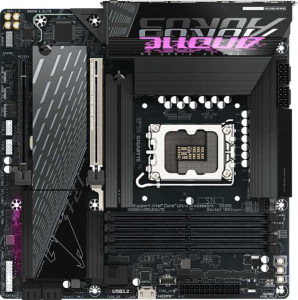
Gigabyte B860M Aorus Elite
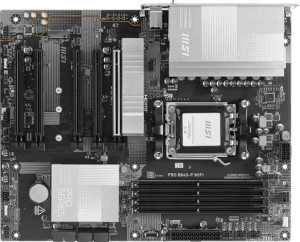
MSI Pro B840-P WiFi

Gigabyte B860M Aorus Elite MSI Pro B840-P WiFi

Overview

Welcome to our in-depth spec comparison between the Gigabyte B860M Aorus Elite and the MSI Pro B840-P WiFi. These two motherboards share a common DDR5 foundation and RGB aesthetics, yet they diverge sharply when it comes to platform and connectivity. From their distinct CPU socket ecosystems to their expansion slot configurations and wireless capabilities, this head-to-head comparison explores every key battleground to help you decide which board best fits your next build.

Common Features

  • Both products support HDMI 2.1.
  • Both products are easy to overclock.
  • RGB lighting is present on both products.
  • Both products feature dual BIOS.
  • Both products have a single CPU socket.
  • Neither product has integrated graphics.
  • Both products carry a 3-year warranty.
  • Neither product has an integrated CPU.
  • Both products support up to 256GB of maximum memory.
  • Both products have 4 memory slots.
  • Both products use DDR5 memory.
  • Both products operate on 2 memory channels.
  • Neither product supports ECC memory.
  • Neither product has USB 3.2 Gen 1 USB-C ports on the rear.
  • Both products have 4 USB 2.0 rear ports.
  • Neither product has USB 3.2 Gen 2x2 ports.
  • Neither product has USB 4 20Gbps ports.
  • Neither product has Thunderbolt 3 ports.
  • Both products have an HDMI output.
  • Both products have 1 RJ45 port.
  • Both products have at least one USB Type-C port.
  • Both products provide 2 USB 3.2 Gen 1 ports through expansion.
  • Both products provide 4 USB 2.0 ports through expansion.
  • Both products have 4 SATA 3 connectors.
  • Both products have 6 fan headers.
  • Both products provide 2 USB 3.0 ports through expansion.
  • Both products include a TPM connector.
  • Neither product has a U.2 socket.
  • Neither product has an mSATA connector.
  • Neither product has PCI slots.
  • Neither product has PCIe 2.0 x16 slots.
  • Neither product has PCIe x8 slots.
  • Both products support 7.1 audio channels.
  • Both products support RAID 0, RAID 1, and RAID 10.

Main Differences

  • The CPU socket is LGA 1851 on Gigabyte B860M Aorus Elite and AM5 on MSI Pro B840-P WiFi.
  • The chipset is B860 on Gigabyte B860M Aorus Elite and B840 on MSI Pro B840-P WiFi.
  • The form factor is Micro-ATX on Gigabyte B860M Aorus Elite and ATX on MSI Pro B840-P WiFi.
  • Wi-Fi support is present on MSI Pro B840-P WiFi but not available on Gigabyte B860M Aorus Elite.
  • Bluetooth is present on MSI Pro B840-P WiFi but not available on Gigabyte B860M Aorus Elite.
  • Easy BIOS reset is supported on MSI Pro B840-P WiFi but not on Gigabyte B860M Aorus Elite.
  • The board width is 244 mm on Gigabyte B860M Aorus Elite and 304.8 mm on MSI Pro B840-P WiFi.
  • The board height is 244 mm on Gigabyte B860M Aorus Elite and 243.8 mm on MSI Pro B840-P WiFi.
  • Maximum RAM speed is 6400 MHz on Gigabyte B860M Aorus Elite and 5600 MHz on MSI Pro B840-P WiFi.
  • Maximum overclocked RAM speed is 9200 MHz on Gigabyte B860M Aorus Elite and 8000 MHz on MSI Pro B840-P WiFi.
  • USB 3.2 Gen 2 USB-A ports number 2 on Gigabyte B860M Aorus Elite and 1 on MSI Pro B840-P WiFi.
  • USB 3.2 Gen 1 USB-A ports number 4 on Gigabyte B860M Aorus Elite and 2 on MSI Pro B840-P WiFi.
  • A USB 3.2 Gen 2 USB-C port is present on MSI Pro B840-P WiFi but not on Gigabyte B860M Aorus Elite.
  • A USB 4 40Gbps port is present on Gigabyte B860M Aorus Elite but not on MSI Pro B840-P WiFi.
  • A Thunderbolt 4 port is present on Gigabyte B860M Aorus Elite but not on MSI Pro B840-P WiFi.
  • A DisplayPort output is available on Gigabyte B860M Aorus Elite but not on MSI Pro B840-P WiFi.
  • M.2 sockets number 3 on Gigabyte B860M Aorus Elite and 2 on MSI Pro B840-P WiFi.
  • A PCIe 5.0 x16 slot is present on Gigabyte B860M Aorus Elite, while MSI Pro B840-P WiFi has a PCIe 4.0 x16 slot instead.
  • A PCIe 3.0 x16 slot is present on MSI Pro B840-P WiFi but not on Gigabyte B860M Aorus Elite.
  • MSI Pro B840-P WiFi has 3 PCIe x1 slots while Gigabyte B860M Aorus Elite has none.
  • Gigabyte B860M Aorus Elite has 1 PCIe x4 slot while MSI Pro B840-P WiFi has none.
  • An S/PDIF Out port is present on Gigabyte B860M Aorus Elite but not on MSI Pro B840-P WiFi.
  • Audio connectors number 2 on Gigabyte B860M Aorus Elite and 3 on MSI Pro B840-P WiFi.
  • RAID 5 support is available on Gigabyte B860M Aorus Elite but not on MSI Pro B840-P WiFi.
Specs Comparison
Gigabyte B860M Aorus Elite

Gigabyte B860M Aorus Elite

MSI Pro B840-P WiFi

MSI Pro B840-P WiFi

General info:
CPU socket LGA 1851 AM5
chipset B860 B840
form factor Micro-ATX ATX
release date January 2025 January 2025
supports Wi-Fi
Has Bluetooth
HDMI version HDMI 2.1 HDMI 2.1
Easy to overclock
has RGB lighting
Easy to reset BIOS
Has dual BIOS
CPU sockets 1 1
Has integrated graphics
warranty period 3 years 3 years
height 244 mm 243.8 mm
width 244 mm 304.8 mm
Has integrated CPU

The most fundamental distinction here is platform compatibility: the Gigabyte B860M Aorus Elite uses an LGA 1851 socket paired with Intel's B860 chipset, while the MSI Pro B840-P WiFi uses an AM5 socket with AMD's B840 chipset. These two boards are entirely incompatible with each other's processors, so your CPU choice — Intel Arrow Lake or AMD Ryzen 9000 series — will determine which board is even relevant to you. Neither decision is objectively superior; it comes down to the broader ecosystem you are investing in.

Beyond platform, the boards diverge meaningfully in form factor and connectivity. The Gigabyte is a compact Micro-ATX (244 × 244 mm), making it a better fit for smaller builds or cases with tight clearances. The MSI is a full ATX (304.8 mm wide), offering more physical space for expansion slots and airflow routing in mid-tower or larger cases. On wireless connectivity, the MSI holds a clear practical edge: it includes both Wi-Fi and Bluetooth out of the box, while the Gigabyte offers neither — a significant omission in 2025 that would require an add-in card or USB adapter for wireless use.

Both boards share HDMI 2.1 output, dual BIOS, RGB lighting, a 3-year warranty, and are rated as easy to overclock — so neither has an edge on firmware resilience or longevity. However, the MSI also supports easy BIOS reset while the Gigabyte does not, which is a minor but real convenience advantage during troubleshooting. Overall, if wireless connectivity and BIOS accessibility matter to your build, the MSI Pro B840-P WiFi has a tangible edge in this category — provided you are building on the AMD platform.
Memory:
maximum memory amount 256GB 256GB
RAM speed (max) 6400 MHz 5600 MHz
overclocked RAM speed 9200 MHz 8000 MHz
memory slots 4 4
DDR memory version 5 5
memory channels 2 2
Supports ECC memory

Both the Gigabyte B860M Aorus Elite and the MSI Pro B840-P WiFi support a maximum memory capacity of 256GB, with no difference in this regard. Both motherboards also come with 4 memory slots and support DDR5 memory, with dual memory channels available on each board.

When it comes to memory speed, the Gigabyte model offers a higher maximum RAM speed of 6400 MHz compared to the MSI Pro's 5600 MHz. The Gigabyte board also supports higher overclocked RAM speeds, reaching 9200 MHz, while the MSI Pro is limited to 8000 MHz.

Neither motherboard supports ECC memory, so both are intended for consumer-grade rather than enterprise-level memory error correction.

Ports:
USB 3.2 Gen 2 ports (USB-A) 2 1
USB 3.2 Gen 1 ports (USB-A) 4 2
USB 3.2 Gen 2 ports (USB-C) 0 1
USB 3.2 Gen 1 ports (USB-C) 0 0
USB 2.0 ports 4 4
USB 3.2 Gen 2x2 ports 0 0
USB 4 40Gbps ports 1 0
USB 4 20Gbps ports 0 0
Thunderbolt 4 ports 1 0
Thunderbolt 3 ports 0 0
has an HDMI output
DisplayPort outputs 1 0
RJ45 ports 1 1
Has USB Type-C
eSATA ports 0 0
DVI outputs 0 0
has a VGA connector
PS/2 ports 0 0

The Gigabyte B860M Aorus Elite and the MSI Pro B840-P WiFi differ in several port categories. The Gigabyte board offers more USB 3.2 Gen 2 (USB-A) ports, with 2 compared to the MSI Pro's 1. In contrast, the MSI Pro offers 1 USB 3.2 Gen 2 (USB-C) port, whereas the Gigabyte model has none. Both motherboards include 4 USB 2.0 ports, and neither offers USB 3.2 Gen 2x2 or USB 4 ports.

For video outputs, both motherboards provide an HDMI output. However, the Gigabyte model includes a DisplayPort output, while the MSI Pro lacks one. Neither board has a VGA connector or eSATA ports, and both omit DVI outputs.

Both motherboards feature 1 RJ45 port for Ethernet connectivity. The Gigabyte B860M Aorus Elite has USB Type-C support, but the MSI Pro includes both a USB Type-C (USB 3.2 Gen 2) and Thunderbolt 4 ports, giving it some additional flexibility for high-speed connectivity.

Connectors:
USB 3.2 Gen 1 ports (through expansion) 2 2
USB 2.0 ports (through expansion) 4 4
SATA 3 connectors 4 4
fan headers 6 6
USB 3.0 ports (through expansion) 2 2
M.2 sockets 3 2
Has TPM connector
U.2 sockets 0 0
Has mSATA connector
SATA 2 connectors 0 0

The Gigabyte B860M Aorus Elite and the MSI Pro B840-P WiFi share several similar connector features. Both motherboards offer 2 USB 3.2 Gen 1 ports, 4 USB 2.0 ports, and 2 USB 3.0 ports through expansion. They also both have 4 SATA 3 connectors and 6 fan headers, ensuring ample connectivity for storage and cooling solutions.

When it comes to M.2 sockets, the Gigabyte B860M Aorus Elite provides 3, while the MSI Pro B840-P WiFi offers 2, giving the former a slight advantage for expansion. Both motherboards feature a TPM connector for enhanced security. Neither board includes U.2 sockets, and both lack mSATA connectors, as well as SATA 2 connectors.

Overall, the key differences are the additional M.2 socket on the Gigabyte B860M Aorus Elite and the otherwise matching feature set between the two boards.

Expansion slots:
PCIe 4.0 x16 slots 0 1
PCIe 5.0 x16 slots 1 0
PCIe 3.0 x16 slots 0 1
PCIe x1 slots 0 3
PCI slots 0 0
PCIe 2.0 x16 slots 0 0
PCIe x4 slots 1 0
PCIe x8 slots 0 0

The Gigabyte B860M Aorus Elite and the MSI Pro B840-P WiFi differ in their expansion slot configurations. The Gigabyte model features 1 PCIe 5.0 x16 slot and 1 PCIe x4 slot, while the MSI Pro offers 1 PCIe 4.0 x16 slot and 1 PCIe 3.0 x16 slot. Both motherboards have no PCIe x8 or PCI slots.

Additionally, the Gigabyte B860M Aorus Elite does not have any PCIe 3.0 x16 slots or PCIe x1 slots, while the MSI Pro B840-P WiFi provides 3 PCIe x1 slots, which gives it more flexibility for smaller expansion cards.

Overall, the Gigabyte board is focused on a more advanced PCIe 5.0 x16 slot, while the MSI board provides more options for smaller expansion cards with its PCIe x1 slots and an older PCIe 4.0 x16 slot.

Audio:
audio channels 7.1 7.1
Has S/PDIF Out port
audio connectors 2 3

Both the Gigabyte B860M Aorus Elite and the MSI Pro B840-P WiFi support 7.1 audio channels, providing high-quality sound. The key difference between them lies in the audio connectors and S/PDIF Out port. The Gigabyte board has 2 audio connectors and includes an S/PDIF Out port, while the MSI Pro offers 3 audio connectors but lacks the S/PDIF Out port.

Therefore, while both motherboards offer similar audio channel support, the Gigabyte model offers more comprehensive audio output options with the inclusion of the S/PDIF Out port, whereas the MSI Pro provides one extra audio connector.

Storage:
Supports RAID 1
Supports RAID 10 (1+0)
Supports RAID 5
Supports RAID 0
Supports RAID 0+1

The Gigabyte B860M Aorus Elite and the MSI Pro B840-P WiFi both support RAID 1, RAID 10 (1+0), and RAID 0 configurations, allowing users to choose from several storage array options for redundancy or performance. However, the Gigabyte model also supports RAID 5, offering an additional option for fault tolerance and data protection, which the MSI Pro does not.

Neither motherboard supports RAID 0+1, but this feature is typically less commonly used. Overall, the key difference between the two is the RAID 5 support available on the Gigabyte B860M Aorus Elite.

Comparison Summary & Verdict

After examining every specification, it is clear that these two boards serve different builder profiles. The Gigabyte B860M Aorus Elite stands out for its PCIe 5.0 x16 slot, Thunderbolt 4 and USB 4 40Gbps connectivity, higher overclocked RAM speeds of up to 9200 MHz, three M.2 sockets, and RAID 5 support, making it an excellent choice for power users on the Intel LGA 1851 platform who demand cutting-edge I/O. The MSI Pro B840-P WiFi, on the other hand, targets AMD AM5 builders who prioritize a full ATX layout with built-in Wi-Fi and Bluetooth, more PCIe expansion slots, and greater audio connector flexibility. Neither board is universally superior; your ideal choice hinges entirely on your CPU platform preference and the specific features your workflow demands.

Gigabyte B860M Aorus Elite
Buy Gigabyte B860M Aorus Elite if...

Buy the Gigabyte B860M Aorus Elite if you are building on the Intel LGA 1851 platform and want Thunderbolt 4, USB 4 40Gbps, a PCIe 5.0 x16 slot, and higher overclocked RAM speeds in a compact Micro-ATX form factor.

MSI Pro B840-P WiFi
Buy MSI Pro B840-P WiFi if...

Buy the MSI Pro B840-P WiFi if you are building on the AMD AM5 platform and need built-in Wi-Fi and Bluetooth, a full ATX layout with more PCIe expansion slots, and straightforward BIOS reset functionality.