Gigabyte B860M Aorus Elite WiFi6E Ice
MSI B860 Gaming Plus WiFi

Gigabyte B860M Aorus Elite WiFi6E Ice MSI B860 Gaming Plus WiFi

Overview

Welcome to our in-depth spec comparison between the Gigabyte B860M Aorus Elite WiFi6E Ice and the MSI B860 Gaming Plus WiFi, two B860-chipset motherboards targeting different types of builders. Both share a strong common foundation, yet they diverge in meaningful ways across form factor, wireless connectivity, expansion slots, and memory overclocking headroom. Read on to see how these two boards stack up across every major specification category.

Common Features

  • Both products use the LGA 1851 CPU socket.
  • Both products feature the B860 chipset.
  • Wi-Fi connectivity is available on both products.
  • Bluetooth is available on both products.
  • Both products support HDMI 2.1.
  • Both products support memory overclocking.
  • RGB lighting is present on both products.
  • A dual BIOS feature is available on both products.
  • Both products support a maximum memory amount of 256GB.
  • Both products support a maximum RAM speed of 6400 MHz.
  • Both products have 4 memory slots.
  • Both products use DDR5 memory.
  • Both products have 2 memory channels.
  • ECC memory is not supported on either product.
  • Both products include 2 USB 3.2 Gen 2 Type-A ports.
  • Neither product has USB 3.2 Gen 2 Type-C ports.
  • Both products include 4 USB 2.0 ports.
  • Neither product has USB 3.2 Gen 2x2 ports.
  • Both products include 1 USB 4 40Gbps port.
  • Both products include 1 Thunderbolt 4 port.
  • Both products have 1 USB-C 3.2 Gen 2 port available through expansion.
  • Both products have 4 USB 2.0 ports available through expansion.
  • Both products include 4 SATA 3 connectors.
  • Both products have 6 fan headers.
  • Both products feature 3 M.2 sockets.
  • Both products include a TPM connector.
  • Neither product has U.2 sockets.
  • Neither product has an mSATA connector.
  • Both products include 1 PCIe 5.0 x16 slot.
  • Neither product has PCIe 3.0 x16, PCIe 2.0 x16, PCI, or PCIe x8 slots.
  • Both products support 7.1 audio channels.
  • Both products support RAID 0, RAID 1, RAID 5, and RAID 10.
  • RAID 0+1 is not supported on either product.

Main Differences

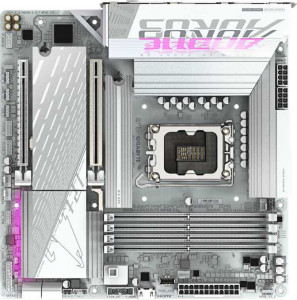
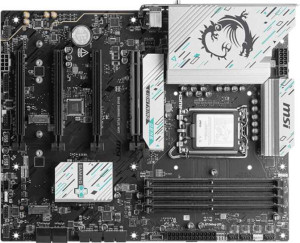
  • The Gigabyte B860M Aorus Elite WiFi6E Ice has a Micro-ATX form factor, while the MSI B860 Gaming Plus WiFi has an ATX form factor.
  • Wi-Fi 7 (802.11be) support is present on the MSI B860 Gaming Plus WiFi but not available on the Gigabyte B860M Aorus Elite WiFi6E Ice.
  • Bluetooth version is 5.3 on the Gigabyte B860M Aorus Elite WiFi6E Ice and 5.4 on the MSI B860 Gaming Plus WiFi.
  • Easy BIOS reset is available on the MSI B860 Gaming Plus WiFi but not on the Gigabyte B860M Aorus Elite WiFi6E Ice.
  • The width is 244 mm on the Gigabyte B860M Aorus Elite WiFi6E Ice and 304.8 mm on the MSI B860 Gaming Plus WiFi.
  • The height is 244 mm on the Gigabyte B860M Aorus Elite WiFi6E Ice and 243.8 mm on the MSI B860 Gaming Plus WiFi.
  • The maximum overclocked RAM speed is 9200 MHz on the Gigabyte B860M Aorus Elite WiFi6E Ice and 8600 MHz on the MSI B860 Gaming Plus WiFi.
  • USB 3.2 Gen 1 Type-A ports number 4 on the Gigabyte B860M Aorus Elite WiFi6E Ice and 2 on the MSI B860 Gaming Plus WiFi.
  • USB 3.2 Gen 1 ports through expansion number 2 on the Gigabyte B860M Aorus Elite WiFi6E Ice and 4 on the MSI B860 Gaming Plus WiFi.
  • USB 3.0 ports through expansion number 2 on the Gigabyte B860M Aorus Elite WiFi6E Ice and 4 on the MSI B860 Gaming Plus WiFi.
  • A PCIe 4.0 x16 slot is present on the MSI B860 Gaming Plus WiFi but absent on the Gigabyte B860M Aorus Elite WiFi6E Ice.
  • PCIe x1 slots number 0 on the Gigabyte B860M Aorus Elite WiFi6E Ice and 2 on the MSI B860 Gaming Plus WiFi.
  • A PCIe x4 slot is present on the Gigabyte B860M Aorus Elite WiFi6E Ice but absent on the MSI B860 Gaming Plus WiFi.
  • An S/PDIF Out port is available on the Gigabyte B860M Aorus Elite WiFi6E Ice but not on the MSI B860 Gaming Plus WiFi.
  • Audio connectors number 2 on the Gigabyte B860M Aorus Elite WiFi6E Ice and 3 on the MSI B860 Gaming Plus WiFi.
Specs Comparison
Gigabyte B860M Aorus Elite WiFi6E Ice

Gigabyte B860M Aorus Elite WiFi6E Ice

MSI B860 Gaming Plus WiFi

MSI B860 Gaming Plus WiFi

General info:
CPU socket LGA 1851 LGA 1851
chipset B860 B860
form factor Micro-ATX ATX
release date January 2025 January 2025
supports Wi-Fi
Wi-Fi version Wi-Fi 4 (802.11n), Wi-Fi 5 (802.11ac), Wi-Fi 6 (802.11ax), Wi-Fi 6E (802.11ax) Wi-Fi 4 (802.11n), Wi-Fi 5 (802.11ac), Wi-Fi 6 (802.11ax), Wi-Fi 6E (802.11ax), Wi-Fi 7 (802.11be)
Has Bluetooth
Bluetooth version 5.3 5.4
HDMI version HDMI 2.1 HDMI 2.1
Easy to overclock
has RGB lighting
Easy to reset BIOS
Has dual BIOS
has aptX
CPU sockets 1 1
Has integrated graphics
warranty period 3 years 3 years
height 244 mm 243.8 mm
width 244 mm 304.8 mm
Has integrated CPU

Both boards share the same LGA 1851 socket and B860 chipset, meaning they target the same CPU generation with identical platform-level capabilities — neither has a silicon advantage here. They also match on HDMI 2.1, dual BIOS protection, RGB lighting, and a 3-year warranty, so those factors won't drive your decision. The most structurally significant difference is form factor: the Gigabyte Aorus is a Micro-ATX board (244 × 244 mm), while the MSI is a full ATX board (243.8 × 304.8 mm). In practice, the ATX layout gives the MSI more room for additional PCIe slots, VRM circuitry spread, and airflow paths — but it also requires a mid-tower or larger case. The Aorus Micro-ATX is the right pick for compact or small-form-factor builds where physical space is the constraint.

On wireless connectivity, both support Wi-Fi 6E, but the MSI goes one step further with Wi-Fi 7 (802.11be) — the newest standard, offering significantly higher theoretical throughput and lower latency over compatible routers. Similarly, the MSI's Bluetooth 5.4 edges out the Aorus's 5.3, with marginal improvements in connection stability and coexistence with other wireless devices. These are future-proofing advantages: most users won't feel the difference today, but they matter if you're investing in next-generation peripherals or routers.

A practical day-to-day differentiator is BIOS accessibility: the MSI supports easy BIOS reset, which simplifies recovery from a bad overclock or failed update without needing to locate and pull a CMOS battery — a genuine convenience for builders who tinker. The Aorus lacks this feature. Overall, the MSI B860 Gaming Plus WiFi holds a clear edge in this group: it offers newer wireless standards, a slightly newer Bluetooth version, and easier BIOS management — the Aorus Micro-ATX is the better fit only if a compact footprint is your primary requirement.
Memory:
maximum memory amount 256GB 256GB
RAM speed (max) 6400 MHz 6400 MHz
overclocked RAM speed 9200 MHz 8600 MHz
memory slots 4 4
DDR memory version 5 5
memory channels 2 2
Supports ECC memory

At the native and mainstream level, these two boards are functionally identical: both support DDR5 memory, top out at 256GB across 4 slots in a dual-channel configuration, and cap official JEDEC speeds at 6400 MHz. For the vast majority of users running standard DDR5 kits, neither board offers any memory advantage over the other.

The single differentiator emerges at the enthusiast end: overclocked RAM support. The Gigabyte Aorus accommodates XMP/EXPO profiles up to 9200 MHz, whereas the MSI peaks at 8600 MHz. That 600 MHz gap matters specifically if you're pairing either board with a high-binned DDR5 kit rated above 8600 MHz — a scenario that applies to a niche but growing segment of performance-focused builders. In latency-sensitive workloads like content creation, game streaming, or memory-bandwidth-heavy applications, squeezing the last gigahertz out of a premium RAM kit is a real, if incremental, gain. For everyone else running 6000–7200 MHz kits, the distinction is academic.

On this group, the Gigabyte B860M Aorus Elite WiFi6E Ice holds a narrow but clear edge purely due to its higher overclocked memory ceiling. If pushing a top-tier DDR5 kit to its limits is part of your build strategy, the Aorus gives you more headroom. Otherwise, memory capability is a wash between the two.

Ports:
USB 3.2 Gen 2 ports (USB-A) 2 2
USB 3.2 Gen 1 ports (USB-A) 4 2
USB 3.2 Gen 2 ports (USB-C) 0 0
USB 3.2 Gen 1 ports (USB-C) 0 0
USB 2.0 ports 4 4
USB 3.2 Gen 2x2 ports 0 0
USB 4 40Gbps ports 1 1
USB 4 20Gbps ports 0 0
Thunderbolt 4 ports 1 1
Thunderbolt 3 ports 0 0
has an HDMI output
DisplayPort outputs 1 1
RJ45 ports 1 1
Has USB Type-C
eSATA ports 0 0
DVI outputs 0 0
has a VGA connector
PS/2 ports 0 0

The high-end I/O on these two boards is remarkably well-matched. Both feature a USB4 40Gbps port and a Thunderbolt 4 port — a combination that covers fast external NVMe enclosures, eGPUs, and daisy-chained peripherals without compromise. Display output parity continues with HDMI and a DisplayPort output on each, alongside a single RJ45 Ethernet jack. For a builder prioritizing cutting-edge connectivity, neither board shortchanges you at the top of the speed ladder.

The only measurable gap between them sits at the mid-tier USB-A level. The Gigabyte Aorus offers 4 USB 3.2 Gen 1 (5Gbps) rear ports, while the MSI provides just 2. Gen 1 at 5Gbps is perfectly adequate for mice, keyboards, headsets, USB drives, and most external hard drives — everyday peripherals that don't demand the highest bandwidth. Having two extra ports in this category reduces the likelihood of needing a separate USB hub, which is a small but genuine quality-of-life advantage in a fully populated desk setup.

Taken as a whole, the port selection difference is minor rather than decisive — the high-value Thunderbolt 4 and USB4 slots are shared, and those are the ports that define a modern board's connectivity ceiling. Still, on a strict reading of the provided specs, the Gigabyte B860M Aorus Elite WiFi6E Ice earns a slim edge here thanks to its additional Gen 1 USB-A ports, making it the more plug-and-play-friendly option for users with multiple USB peripherals.

Connectors:
USB 3.2 Gen 1 ports (through expansion) 2 4
USB-C 3.2 Gen 2 ports (through expansion) 1 1
USB 2.0 ports (through expansion) 4 4
SATA 3 connectors 4 4
fan headers 6 6
USB 3.0 ports (through expansion) 2 4
M.2 sockets 3 3
Has TPM connector
U.2 sockets 0 0
Has mSATA connector
SATA 2 connectors 0 0

Internal connector parity is strong across the board here. Both the Aorus and the MSI Gaming Plus offer 3 M.2 sockets — enough to run a boot drive plus two additional NVMe storage devices without touching the SATA ports — alongside 4 SATA 3 connectors for traditional drives or SATA SSDs. Six fan headers each means neither board will leave a well-cooled build underserved, and the shared TPM connector ensures compatibility with hardware-based security requirements on both platforms.

The one concrete differentiator is internal USB 3.2 Gen 1 expansion: the MSI provides 4 ports through expansion headers compared to the Aorus's 2. In practical terms, these headers feed front-panel USB ports on your case. More headers means you can support cases with richer front-panel I/O — or connect a USB hub internally — without occupying rear I/O slots. For builders choosing a full ATX case with a well-equipped front panel, the MSI's extra internal USB capacity is a meaningful advantage. On a Micro-ATX build with a simpler case front panel, the Aorus's two headers are likely sufficient.

Framed in context, this is a close group — the storage and thermal connector ecosystems are identical, and the gap exists only at the internal USB layer. The MSI B860 Gaming Plus WiFi takes a narrow edge here, and it's one that aligns naturally with its ATX form factor: larger cases tend to have more front-panel ports to feed, making those extra Gen 1 headers genuinely useful rather than speculative.

Expansion slots:
PCIe 4.0 x16 slots 0 1
PCIe 5.0 x16 slots 1 1
PCIe 3.0 x16 slots 0 0
PCIe x1 slots 0 2
PCI slots 0 0
PCIe 2.0 x16 slots 0 0
PCIe x4 slots 1 0
PCIe x8 slots 0 0

Where expansion slots are concerned, the two boards diverge more meaningfully than in previous categories. Both carry a single PCIe 5.0 x16 slot as the primary GPU lane — the current gold standard, delivering bandwidth that even the fastest modern graphics cards don't fully saturate. That shared foundation means neither board bottlenecks a high-end GPU installation.

Beyond the primary slot, the designs take different directions. The MSI Gaming Plus adds a PCIe 4.0 x16 slot (likely wired at x4 electrically, as is common on B-series boards) alongside two PCIe x1 slots, giving builders room for capture cards, dedicated sound cards, 10GbE NICs, or additional NVMe adapters in x1 form factor. The Aorus Micro-ATX instead offers a single PCIe x4 slot in place of any x1 options — useful for an NVMe add-in card or a riser, but less versatile for the range of small form-factor expansion cards that rely on x1 slots.

This is a group where the MSI's ATX footprint pays a tangible dividend. More physical space translates directly into more slot real estate, and for a builder planning a multi-card configuration — GPU plus capture card, or GPU plus dedicated audio — the MSI's slot variety is a genuine functional advantage. The MSI B860 Gaming Plus WiFi wins this group clearly, offering greater expansion flexibility for anyone looking to grow their build beyond a single GPU.

Audio:
audio channels 7.1 7.1
Has S/PDIF Out port
audio connectors 2 3

Integrated audio is a compact but telling category here, with each board holding one advantage over the other. The shared baseline is solid: both deliver 7.1-channel surround audio, which is the standard for immersive gaming headsets and multi-speaker desktop setups alike.

The Gigabyte Aorus includes an S/PDIF optical output, which the MSI omits entirely. S/PDIF matters for users routing audio to an AV receiver, soundbar, or external DAC via optical cable — it passes a clean digital signal that bypasses the motherboard's analog circuitry, avoiding potential interference. It's a niche feature, but for home theater PC setups or audiophiles using optical-capable equipment, its absence on the MSI is a real limitation. Conversely, the MSI counters with 3 rear audio connectors versus the Aorus's 2, which is relevant for analog multi-speaker configurations where separate jacks are needed for front, rear, and center/subwoofer channels simultaneously.

The verdict here depends squarely on use case. Digital output via optical cable favors the Gigabyte B860M Aorus Elite WiFi6E Ice; more analog jacks for traditional speaker arrays favors the MSI. Neither board holds a universal edge — but for the more common desktop scenario of headphones plus speakers over analog connections, the MSI's extra connector offers slightly greater plug-in flexibility without adapters.

Storage:
Supports RAID 1
Supports RAID 10 (1+0)
Supports RAID 5
Supports RAID 0
Supports RAID 0+1

Storage redundancy support is a clean draw between these two boards. Both cover the four most practically relevant RAID modes: RAID 0 for striped performance, RAID 1 for mirrored redundancy, RAID 5 for distributed parity across three or more drives, and RAID 10 for the combined speed-and-redundancy configuration favored in workstation and small server contexts. Neither supports RAID 0+1, but that mode is rarely missed — RAID 10 achieves a functionally superior outcome for the same use case.

For a typical consumer or prosumer build, RAID 1 and RAID 10 are the configurations that see real-world use — protecting against single-drive failure without the complexity of a dedicated NAS. RAID 5 is the more ambitious option, requiring at least three drives and offering better storage efficiency, though it demands more from the controller and is more commonly associated with workstation rather than gaming deployments. Having it available on both boards is a plus for power users, even if most buyers will never enable it.

There is no basis for distinguishing the two products here — the RAID capability set is identical in every respect. This group is a complete tie, and storage redundancy should play no role in choosing between the Gigabyte B860M Aorus Elite WiFi6E Ice and the MSI B860 Gaming Plus WiFi.

Comparison Summary & Verdict

After examining every specification, it is clear that both boards serve distinct audiences. The Gigabyte B860M Aorus Elite WiFi6E Ice is the stronger pick for compact builds, offering a Micro-ATX footprint, a higher overclocked RAM ceiling of 9200 MHz, more USB 3.2 Gen 1 Type-A rear ports, a PCIe x4 slot, and an S/PDIF Out port for digital audio — all appealing to users who need a smaller, feature-dense board. The MSI B860 Gaming Plus WiFi, on the other hand, is purpose-built for full-tower enthusiasts who want future-ready wireless thanks to Wi-Fi 7 support, a more modern Bluetooth 5.4, an additional PCIe 4.0 x16 slot, more PCIe x1 slots, easier BIOS reset, and greater front-panel USB expansion. Neither board is strictly superior — your choice should be driven by case size, expansion needs, and whether cutting-edge wireless standards matter to your build.

Gigabyte B860M Aorus Elite WiFi6E Ice
Buy Gigabyte B860M Aorus Elite WiFi6E Ice if...

Buy the Gigabyte B860M Aorus Elite WiFi6E Ice if you are building a compact Micro-ATX system and want higher overclocked RAM speeds, more rear USB 3.2 Gen 1 ports, or S/PDIF digital audio output.

MSI B860 Gaming Plus WiFi
Buy MSI B860 Gaming Plus WiFi if...

Buy the MSI B860 Gaming Plus WiFi if you want a full ATX board with Wi-Fi 7, Bluetooth 5.4, greater PCIe expansion options, and a convenient one-click BIOS reset button.