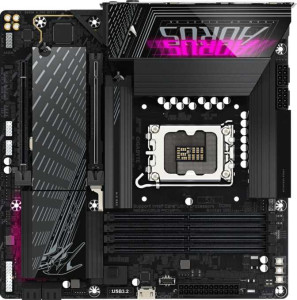
Gigabyte B860M Aorus Pro WiFi7
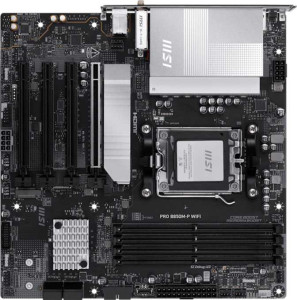
MSI Pro B850M-P Wi-Fi

Gigabyte B860M Aorus Pro WiFi7 MSI Pro B850M-P Wi-Fi

Overview

Welcome to our in-depth spec comparison between the Gigabyte B860M Aorus Pro WiFi7 and the MSI Pro B850M-P Wi-Fi, two Micro-ATX motherboards that share a surprising amount of common ground while diverging in some key areas. From their different CPU socket ecosystems to contrasting approaches to rear-panel connectivity and expansion slots, this head-to-head breaks down exactly what sets these boards apart and what they have in common.

Common Features

  • Both products use the Micro-ATX form factor.
  • Wi-Fi is supported on both products, covering Wi-Fi 4 (802.11n), Wi-Fi 5 (802.11ac), Wi-Fi 6 (802.11ax), Wi-Fi 6E (802.11ax), and Wi-Fi 7 (802.11be).
  • Bluetooth 5.4 is available on both products.
  • Both products feature an HDMI 2.1 output.
  • Overclocking support is available on both products.
  • RGB lighting is present on both products.
  • Both products support a maximum memory amount of 256GB.
  • Both products have 4 memory slots.
  • Both products use DDR5 memory.
  • Both products support 2 memory channels.
  • ECC memory is not supported on either product.
  • Neither product has USB 3.2 Gen 1 ports (USB-C) on the rear panel.
  • Both products have 4 USB 2.0 ports on the rear panel.
  • Neither product has USB 3.2 Gen 2x2 ports on the rear panel.
  • Neither product has USB 4 20Gbps ports on the rear panel.
  • Neither product has Thunderbolt 3 ports.
  • Both products have 1 DisplayPort output.
  • Both products have 1 RJ45 port.
  • Both products include 1 USB-C 3.2 Gen 2 port through expansion.
  • Both products include 4 USB 2.0 ports through expansion.
  • Both products have 4 SATA 3 connectors.
  • Both products have 3 M.2 sockets.
  • A TPM connector is present on both products.
  • Neither product has an mSATA connector.
  • Neither product has SATA 2 connectors.
  • Both products feature 1 PCIe 5.0 x16 slot.
  • Neither product has PCIe 4.0 x16, PCIe 3.0 x16, PCIe 2.0 x16, PCIe x8, or PCI slots.
  • Both products support 7.1 audio channels.
  • Both products support RAID 0, RAID 1, RAID 5, and RAID 10 (1+0).
  • RAID 0+1 is not supported on either product.

Main Differences

  • The CPU socket is LGA 1851 on Gigabyte B860M Aorus Pro WiFi7 and AM5 on MSI Pro B850M-P Wi-Fi.
  • The chipset is B860 on Gigabyte B860M Aorus Pro WiFi7 and B850 on MSI Pro B850M-P Wi-Fi.
  • Easy BIOS reset is available on MSI Pro B850M-P Wi-Fi but not on Gigabyte B860M Aorus Pro WiFi7.
  • The board height is 244 mm on Gigabyte B860M Aorus Pro WiFi7 and 243.8 mm on MSI Pro B850M-P Wi-Fi.
  • The board width is 244 mm on Gigabyte B860M Aorus Pro WiFi7 and 243.8 mm on MSI Pro B850M-P Wi-Fi.
  • Maximum RAM speed is 6400 MHz on Gigabyte B860M Aorus Pro WiFi7 and 5600 MHz on MSI Pro B850M-P Wi-Fi.
  • Maximum overclocked RAM speed is 9200 MHz on Gigabyte B860M Aorus Pro WiFi7 and 8200 MHz on MSI Pro B850M-P Wi-Fi.
  • USB 3.2 Gen 2 ports (USB-A) number 2 on Gigabyte B860M Aorus Pro WiFi7 and 1 on MSI Pro B850M-P Wi-Fi.
  • USB 3.2 Gen 1 ports (USB-A) number 4 on Gigabyte B860M Aorus Pro WiFi7 and 2 on MSI Pro B850M-P Wi-Fi.
  • A USB 3.2 Gen 2 port (USB-C) is present on MSI Pro B850M-P Wi-Fi but absent on Gigabyte B860M Aorus Pro WiFi7.
  • A USB 4 40Gbps port is present on Gigabyte B860M Aorus Pro WiFi7 but absent on MSI Pro B850M-P Wi-Fi.
  • A Thunderbolt 4 port is present on Gigabyte B860M Aorus Pro WiFi7 but absent on MSI Pro B850M-P Wi-Fi.
  • USB 3.2 Gen 1 ports through expansion number 2 on Gigabyte B860M Aorus Pro WiFi7 and 4 on MSI Pro B850M-P Wi-Fi.
  • USB 3.0 ports through expansion number 2 on Gigabyte B860M Aorus Pro WiFi7 and 4 on MSI Pro B850M-P Wi-Fi.
  • Fan headers number 6 on Gigabyte B860M Aorus Pro WiFi7 and 5 on MSI Pro B850M-P Wi-Fi.
  • PCIe x1 slots number 0 on Gigabyte B860M Aorus Pro WiFi7 and 3 on MSI Pro B850M-P Wi-Fi.
  • PCIe x4 slots number 1 on Gigabyte B860M Aorus Pro WiFi7 and 0 on MSI Pro B850M-P Wi-Fi.
  • An S/PDIF Out port is present on Gigabyte B860M Aorus Pro WiFi7 but absent on MSI Pro B850M-P Wi-Fi.
  • Audio connectors number 2 on Gigabyte B860M Aorus Pro WiFi7 and 3 on MSI Pro B850M-P Wi-Fi.
Specs Comparison
Gigabyte B860M Aorus Pro WiFi7

Gigabyte B860M Aorus Pro WiFi7

MSI Pro B850M-P Wi-Fi

MSI Pro B850M-P Wi-Fi

General info:
CPU socket LGA 1851 AM5
chipset B860 B850
form factor Micro-ATX Micro-ATX
release date January 2025 January 2025
supports Wi-Fi
Wi-Fi version Wi-Fi 4 (802.11n), Wi-Fi 5 (802.11ac), Wi-Fi 6 (802.11ax), Wi-Fi 6E (802.11ax), Wi-Fi 7 (802.11be) Wi-Fi 4 (802.11n), Wi-Fi 5 (802.11ac), Wi-Fi 6 (802.11ax), Wi-Fi 6E (802.11ax), Wi-Fi 7 (802.11be)
Has Bluetooth
Bluetooth version 5.4 5.4
HDMI version HDMI 2.1 HDMI 2.1
Easy to overclock
has RGB lighting
Easy to reset BIOS
Has dual BIOS
has aptX
CPU sockets 1 1
Has integrated graphics
warranty period 3 years 3 years
height 244 mm 243.8 mm
width 244 mm 243.8 mm
Has integrated CPU

The single most important difference in this group is platform allegiance: the Gigabyte B860M Aorus Pro WiFi7 targets Intel's LGA 1851 socket with its B860 chipset, while the MSI Pro B850M-P Wi-Fi is built for AMD's AM5 socket with a B850 chipset. This is a binary fork in the road — your CPU choice dictates which board is even an option — so neither platform is universally superior here; the decision depends entirely on whether you are going Intel or AMD. Both are mid-range chipsets in their respective ecosystems, offering a solid feature set without the premium of a Z890 or X870 tier.

Beyond platform, the two boards are remarkably similar. Both share an identical Micro-ATX form factor with near-identical dimensions (~244 mm square), both support up to Wi-Fi 7 and Bluetooth 5.4, both carry HDMI 2.1, dual BIOS, RGB lighting, and a 3-year warranty. One meaningful operational difference, however, is BIOS accessibility: the MSI board supports easy BIOS reset, while the Gigabyte does not. In practice, this matters when troubleshooting a failed overclock or a memory training loop — the MSI board makes recovery less disruptive.

Overall, these two boards are evenly matched on general features, with the platform choice (Intel vs. AMD) being the decisive factor for most buyers. The one concrete functional edge goes to the MSI Pro B850M-P Wi-Fi for its easy BIOS reset capability, which adds a layer of convenience that enthusiasts and first-time builders alike will appreciate.
Memory:
maximum memory amount 256GB 256GB
RAM speed (max) 6400 MHz 5600 MHz
overclocked RAM speed 9200 MHz 8200 MHz
memory slots 4 4
DDR memory version 5 5
memory channels 2 2
Supports ECC memory

Both the Gigabyte B860M Aorus Pro WiFi7 and the MSI Pro B850M-P Wi-Fi support a maximum memory amount of 256GB and have 4 memory slots, with two memory channels. Both motherboards are compatible with DDR5 memory, and neither supports ECC memory. However, their maximum RAM speeds differ. The Gigabyte B860M Aorus Pro WiFi7 supports a maximum RAM speed of 6400 MHz, while the MSI Pro B850M-P Wi-Fi has a maximum RAM speed of 5600 MHz.

In terms of overclocked RAM speed, the Gigabyte B860M Aorus Pro WiFi7 can reach speeds up to 9200 MHz, which is higher than the MSI Pro B850M-P Wi-Fi's overclocked speed of 8200 MHz. These differences highlight the Gigabyte motherboard's higher overclocking potential for RAM.

Overall, while both motherboards offer the same maximum memory capacity, the Gigabyte B860M Aorus Pro WiFi7 provides higher RAM speeds both at stock and overclocked levels compared to the MSI Pro B850M-P Wi-Fi.

Ports:
USB 3.2 Gen 2 ports (USB-A) 2 1
USB 3.2 Gen 1 ports (USB-A) 4 2
USB 3.2 Gen 2 ports (USB-C) 0 1
USB 3.2 Gen 1 ports (USB-C) 0 0
USB 2.0 ports 4 4
USB 3.2 Gen 2x2 ports 0 0
USB 4 40Gbps ports 1 0
USB 4 20Gbps ports 0 0
Thunderbolt 4 ports 1 0
Thunderbolt 3 ports 0 0
has an HDMI output
DisplayPort outputs 1 1
RJ45 ports 1 1
Has USB Type-C
eSATA ports 0 0
DVI outputs 0 0
has a VGA connector
PS/2 ports 0 0

The Gigabyte B860M Aorus Pro WiFi7 and MSI Pro B850M-P Wi-Fi motherboards have similar port configurations, with both offering a range of USB and display outputs. The Gigabyte B860M Aorus Pro WiFi7 has 2 USB 3.2 Gen 2 (USB-A) ports and 4 USB 3.2 Gen 1 (USB-A) ports, while the MSI Pro B850M-P Wi-Fi has fewer, with just 1 USB 3.2 Gen 2 (USB-A) port and 2 USB 3.2 Gen 1 (USB-A) ports. The Gigabyte board also lacks USB 3.2 Gen 2 (USB-C) and USB 3.2 Gen 1 (USB-C) ports, while the MSI board includes 1 USB 3.2 Gen 2 (USB-C) port and none for USB 3.2 Gen 1 (USB-C).

Both motherboards feature 4 USB 2.0 ports, and neither includes USB 3.2 Gen 2x2 or USB 4 40Gbps ports. The Gigabyte board has a USB 4 40Gbps port, while the MSI board lacks this feature. Neither board supports USB 4 20Gbps ports. When it comes to Thunderbolt, the Gigabyte motherboard includes 1 Thunderbolt 4 port, while the MSI motherboard does not offer any Thunderbolt ports.

For display outputs, both motherboards include an HDMI output and a DisplayPort output. They each have 1 RJ45 port for networking, and both feature USB Type-C support. Neither board includes eSATA ports, DVI outputs, VGA connectors, or PS/2 ports.

Connectors:
USB 3.2 Gen 1 ports (through expansion) 2 4
USB-C 3.2 Gen 2 ports (through expansion) 1 1
USB 2.0 ports (through expansion) 4 4
SATA 3 connectors 4 4
fan headers 6 5
USB 3.0 ports (through expansion) 2 4
M.2 sockets 3 3
Has TPM connector
Has mSATA connector
SATA 2 connectors 0 0

The Gigabyte B860M Aorus Pro WiFi7 and MSI Pro B850M-P Wi-Fi motherboards share several common connectors, but there are a few differences. Both motherboards offer 4 SATA 3 connectors and 4 USB 2.0 ports (through expansion). The Gigabyte board has 2 USB 3.2 Gen 1 ports (through expansion), while the MSI board has 4 of these ports. Both motherboards include 1 USB-C 3.2 Gen 2 port (through expansion) and 2 USB 3.0 ports (through expansion) on the Gigabyte board, compared to 4 USB 3.0 ports (through expansion) on the MSI board.

When it comes to fan headers, the Gigabyte B860M Aorus Pro WiFi7 offers 6 fan headers, while the MSI Pro B850M-P Wi-Fi has 5 fan headers. Both motherboards feature 3 M.2 sockets. Additionally, both boards include a TPM connector and lack an mSATA connector. Neither motherboard has SATA 2 connectors.

Overall, the key differences between the two products in terms of connectors are the number of USB 3.2 Gen 1 and USB 3.0 ports (through expansion) and the fan headers, with the Gigabyte board having more fan headers, while the MSI board has more USB 3.2 Gen 1 and USB 3.0 ports.

Expansion slots:
PCIe 4.0 x16 slots 0 0
PCIe 5.0 x16 slots 1 1
PCIe 3.0 x16 slots 0 0
PCIe x1 slots 0 3
PCI slots 0 0
PCIe 2.0 x16 slots 0 0
PCIe x4 slots 1 0
PCIe x8 slots 0 0

The Gigabyte B860M Aorus Pro WiFi7 and MSI Pro B850M-P Wi-Fi motherboards have similar expansion slot configurations, but with some key differences. Both boards feature 1 PCIe 5.0 x16 slot. The Gigabyte board has a single PCIe x4 slot, while the MSI board does not include a PCIe x4 slot. The Gigabyte motherboard lacks PCIe x1 slots, while the MSI motherboard includes 3 PCIe x1 slots. Neither motherboard has PCI slots or PCIe 2.0 x16 slots.

In terms of PCIe 3.0 x16 slots and PCIe x8 slots, neither motherboard has any of these types of slots. The Gigabyte B860M Aorus Pro WiFi7 offers a more limited expansion option with just 1 PCIe x4 slot, while the MSI Pro B850M-P Wi-Fi provides more flexibility with 3 PCIe x1 slots.

Overall, the MSI motherboard offers more PCIe x1 slots, while the Gigabyte board focuses on a single PCIe x4 slot, which could influence the overall expansion potential depending on the user's needs.

Audio:
audio channels 7.1 7.1
Has S/PDIF Out port
audio connectors 2 3

The Gigabyte B860M Aorus Pro WiFi7 and MSI Pro B850M-P Wi-Fi motherboards both support 7.1 audio channels, offering similar audio capabilities. However, there are some differences in the additional audio features. The Gigabyte board includes an S/PDIF Out port, which the MSI board does not have. On the other hand, the MSI board provides 3 audio connectors, while the Gigabyte board has only 2 audio connectors.

Overall, while both motherboards offer 7.1 audio channels, the Gigabyte B860M Aorus Pro WiFi7 provides the added benefit of an S/PDIF Out port, while the MSI Pro B850M-P Wi-Fi offers more audio connectors.

These differences may be important depending on your specific audio needs, such as the desire for more connectors or the need for an S/PDIF Out port.

Storage:
Supports RAID 1
Supports RAID 10 (1+0)
Supports RAID 5
Supports RAID 0
Supports RAID 0+1

The Gigabyte B860M Aorus Pro WiFi7 and MSI Pro B850M-P Wi-Fi motherboards both offer similar storage capabilities when it comes to RAID support. Both support RAID 1, RAID 10 (1+0), RAID 5, and RAID 0, allowing for a variety of storage configurations. Neither motherboard supports RAID 0+1.

There are no differences between the two products in this category; both motherboards provide the same RAID support features. These configurations will suit users looking to set up reliable, high-performance storage arrays.

Ultimately, both the Gigabyte and MSI boards provide robust RAID options, with no distinguishing features in terms of supported RAID levels.

Comparison Summary & Verdict

Both the Gigabyte B860M Aorus Pro WiFi7 and the MSI Pro B850M-P Wi-Fi are capable Micro-ATX boards with Wi-Fi 7, Bluetooth 5.4, DDR5 support up to 256GB, and three M.2 sockets. However, their differences reveal distinct audiences. The Gigabyte B860M Aorus Pro WiFi7 stands out with its higher maximum RAM speeds (up to 9200 MHz overclocked), a Thunderbolt 4 and USB 4 40Gbps port, an extra fan header, and S/PDIF audio output, making it a stronger pick for Intel platform enthusiasts who need cutting-edge connectivity. The MSI Pro B850M-P Wi-Fi counters with a one-click BIOS reset, more USB expansion headers, three PCIe x1 slots for add-in cards, an extra audio connector, and a USB-C rear port, making it the better choice for AMD Ryzen builders who value flexibility and ease of use.

Gigabyte B860M Aorus Pro WiFi7
Buy Gigabyte B860M Aorus Pro WiFi7 if...

Buy the Gigabyte B860M Aorus Pro WiFi7 if you are building on the Intel LGA 1851 platform and want faster RAM speeds, Thunderbolt 4, USB 4 40Gbps connectivity, and an S/PDIF audio output.

MSI Pro B850M-P Wi-Fi
Buy MSI Pro B850M-P Wi-Fi if...

Buy the MSI Pro B850M-P Wi-Fi if you are building on the AMD AM5 platform and prioritize easy BIOS reset, more rear USB expansion headers, a USB-C rear port, and additional PCIe x1 expansion slots.