Gigabyte B860M D
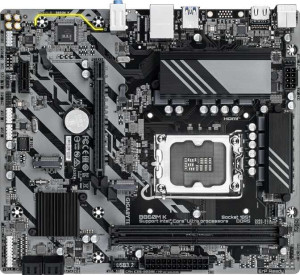
Gigabyte B860M K

Gigabyte B860M D Gigabyte B860M K

Overview

Welcome to our detailed spec comparison between the Gigabyte B860M D and the Gigabyte B860M K, two Micro-ATX motherboards built on the B860 chipset with the LGA 1851 socket. Both boards share a remarkably similar feature set, making the choice between them a focused one. In this comparison, we examine their expansion slot generations and overall platform capabilities to help you decide which board best suits your next build.

Common Features

  • Both boards use the LGA 1851 CPU socket.
  • Both boards feature the B860 chipset.
  • Both boards use the Micro-ATX form factor.
  • Neither board supports Wi-Fi.
  • Neither board has Bluetooth.
  • Both boards have HDMI 2.1 output.
  • Both boards support overclocking.
  • Neither board has RGB lighting.
  • Both boards support a maximum of 128GB of RAM.
  • Both boards support a maximum RAM speed of 6400 MHz.
  • Both boards support an overclocked RAM speed of 8800 MHz.
  • Both boards have 2 memory slots.
  • Both boards use DDR5 memory.
  • Both boards operate in dual-channel memory mode.
  • Neither board supports ECC memory.
  • Both boards have 4 USB 3.2 Gen 1 Type-A ports.
  • Both boards have 2 USB 2.0 ports.
  • Neither board has USB 3.2 Gen 2 Type-A, Type-C, Gen 2x2, USB 4 40Gbps, or USB 4 20Gbps ports.
  • Both boards have 4 SATA 3 connectors and 2 M.2 sockets.
  • Both boards have 3 fan headers.
  • Both boards include a TPM connector.
  • Both boards feature 1 PCIe x1 slot and no PCIe 3.0 x16, PCIe 2.0 x16, PCIe x4, PCIe x8, or PCI slots.
  • Both boards support 7.1 audio channels with 3 audio connectors.
  • Neither board has an S/PDIF Out port.
  • Both boards support RAID 0, RAID 1, RAID 5, and RAID 10, but neither supports RAID 0+1.

Main Differences

  • The primary PCIe x16 slot is PCIe 5.0 on Gigabyte B860M D but PCIe 4.0 on Gigabyte B860M K.
Specs Comparison
Gigabyte B860M D

Gigabyte B860M D

Gigabyte B860M K

Gigabyte B860M K

General info:
CPU socket LGA 1851 LGA 1851
chipset B860 B860
form factor Micro-ATX Micro-ATX
release date January 2025 January 2025
supports Wi-Fi
Has Bluetooth
HDMI version HDMI 2.1 HDMI 2.1
Easy to overclock
has RGB lighting
Easy to reset BIOS
Has dual BIOS
CPU sockets 1 1
Has integrated graphics
warranty period 3 years 3 years
height 215 mm 215 mm
width 244 mm 244 mm
Has integrated CPU

In terms of general specifications, the Gigabyte B860M D and Gigabyte B860M K are essentially identical twins. Both boards share the same LGA 1851 socket and B860 chipset, meaning they support the same generation of Intel processors with the same platform-level feature set. Their Micro-ATX form factor and exact physical dimensions — 215 × 244 mm — confirm these are practically the same PCB footprint, making them equally compatible with compact and mid-tower cases alike.

Key shared traits worth noting: neither board supports Wi-Fi or Bluetooth, so wireless connectivity will require an add-in card or USB adapter on both. Both lack integrated graphics and an integrated CPU, meaning a discrete GPU and a socketed processor are mandatory purchases. On the positive side, both offer HDMI 2.1 output, support overclocking, and include a dual BIOS — a meaningful safety net that allows recovery from a failed BIOS flash without additional hardware. Both carry a 3-year warranty, which is standard for this market segment.

Based strictly on the provided general specs, these two boards are in a complete tie. There is no differentiating factor in this group — every listed attribute is identical. A buyer choosing between the B860M D and B860M K will need to look beyond general info — specifically at I/O, memory support, power delivery, or pricing — to find any meaningful distinction.

Memory:
maximum memory amount 128GB 128GB
RAM speed (max) 6400 MHz 6400 MHz
overclocked RAM speed 8800 MHz 8800 MHz
memory slots 2 2
DDR memory version 5 5
memory channels 2 2
Supports ECC memory

The Gigabyte B860M D and Gigabyte B860M K have identical specifications when it comes to memory. Both motherboards support a maximum memory amount of 128GB and feature a maximum RAM speed of 6400 MHz. They also support overclocked RAM speeds of up to 8800 MHz, offering significant potential for high-performance memory setups.

Each board comes with two memory slots and supports DDR5 memory. Both products are equipped with dual memory channels, enhancing bandwidth and overall memory performance. Additionally, neither motherboard supports ECC memory, which is typically used for error-checking in more specialized systems.

In summary, the memory specifications are exactly the same for both the B860M D and the B860M K, with no differences in capacity, speed, or other features in this group.

Ports:
USB 3.2 Gen 2 ports (USB-A) 0 0
USB 3.2 Gen 1 ports (USB-A) 4 4
USB 3.2 Gen 2 ports (USB-C) 0 0
USB 3.2 Gen 1 ports (USB-C) 0 0
USB 2.0 ports 2 2
USB 3.2 Gen 2x2 ports 0 0
USB 4 40Gbps ports 0 0
USB 4 20Gbps ports 0 0
Thunderbolt 4 ports 0 0
Thunderbolt 3 ports 0 0
has an HDMI output
DisplayPort outputs 0 0
RJ45 ports 1 1
Has USB Type-C
eSATA ports 0 0
DVI outputs 0 0
has a VGA connector
PS/2 ports 1 1

The Gigabyte B860M D and Gigabyte B860M K offer identical port configurations. Both motherboards feature four USB 3.2 Gen 1 USB-A ports, two USB 2.0 ports, and one RJ45 Ethernet port. Neither model includes USB Type-C ports, USB 3.2 Gen 2 ports, or any USB 4 or Thunderbolt ports. Both motherboards also have an HDMI output but lack DisplayPort, DVI, or VGA connectors. Additionally, both models come with one PS/2 port for legacy input devices.

In summary, the port offerings are exactly the same on the B860M D and B860M K. There are no differences between the two motherboards in terms of available ports or connectivity features.

Connectors:
USB 3.2 Gen 1 ports (through expansion) 2 2
USB 2.0 ports (through expansion) 4 4
SATA 3 connectors 4 4
fan headers 3 3
USB 3.0 ports (through expansion) 2 2
M.2 sockets 2 2
Has TPM connector
U.2 sockets 0 0
Has mSATA connector
SATA 2 connectors 0 0

The Gigabyte B860M D and Gigabyte B860M K have identical connector configurations. Both motherboards offer two USB 3.2 Gen 1 ports and four USB 2.0 ports through expansion. They each feature four SATA 3 connectors for storage devices and come with three fan headers for cooling solutions. Additionally, both boards provide two M.2 sockets for high-speed storage expansion and have a TPM connector for security features. Neither motherboard includes U.2 sockets or mSATA connectors, and both lack SATA 2 connectors.

Overall, the connectors and expansion options are exactly the same between the B860M D and the B860M K, with no differences in the available ports and connectors on either motherboard.

Expansion slots:
PCIe 4.0 x16 slots 0 1
PCIe 5.0 x16 slots 1 0
PCIe 3.0 x16 slots 0 0
PCIe x1 slots 1 1
PCI slots 0 0
PCIe 2.0 x16 slots 0 0
PCIe x4 slots 0 0
PCIe x8 slots 0 0

The Gigabyte B860M D and Gigabyte B860M K differ in their expansion slot offerings. The B860M D features a PCIe 5.0 x16 slot, but lacks any PCIe 4.0 x16, PCIe 3.0 x16, or PCIe 2.0 x16 slots. It also includes one PCIe x1 slot for additional expansion. On the other hand, the B860M K has a PCIe 4.0 x16 slot, with no PCIe 5.0 x16 slot available. Similar to the B860M D, it also includes one PCIe x1 slot.

Both motherboards do not have any PCI, PCIe x4, or PCIe x8 slots, and neither model offers more than one PCIe x1 slot. Both also lack PCI slots, which means they are similarly limited in legacy expansion options.

In summary, the key difference between the two models in terms of expansion slots is that the B860M D offers a PCIe 5.0 x16 slot, while the B860M K provides a PCIe 4.0 x16 slot, with all other slot configurations identical between the two boards.

Audio:
audio channels 7.1 7.1
Has S/PDIF Out port
audio connectors 3 3

The Gigabyte B860M D and Gigabyte B860M K offer identical audio features. Both motherboards support 7.1 audio channels, providing surround sound capabilities. Neither model includes an S/PDIF Out port for digital audio output. Both motherboards come with three audio connectors, which can be used for various audio input and output devices.

In summary, there are no differences between the two products in terms of their audio specifications. Both provide the same channel support and audio connectors.

Storage:
Supports RAID 1
Supports RAID 10 (1+0)
Supports RAID 5
Supports RAID 0
Supports RAID 0+1

The Gigabyte B860M D and Gigabyte B860M K share identical storage capabilities. Both motherboards support RAID 1, RAID 10 (1+0), and RAID 5, allowing for various configurations for data redundancy and performance. Neither model supports RAID 0+1, but both do support RAID 0 for performance-oriented setups.

In summary, the storage-related features, including RAID support, are exactly the same across both the B860M D and B860M K. There are no differences between the two products in this specification group.

Comparison Summary & Verdict

After a thorough review of both boards, it is clear that the Gigabyte B860M D and the Gigabyte B860M K are nearly identical in almost every category, including memory support up to 128GB of DDR5 at 6400 MHz, connectivity, audio, and storage options. The single defining difference lies in their primary expansion slot: the B860M D offers a PCIe 5.0 x16 slot, making it the better choice for users who want to future-proof their build with next-generation GPUs or NVMe add-in cards. The B860M K, on the other hand, features a PCIe 4.0 x16 slot, which remains fully capable for current-generation hardware and may appeal to budget-conscious builders who do not need the latest slot standard. If PCIe generation is not a priority for your use case, either board will serve you equally well.

Gigabyte B860M D
Buy Gigabyte B860M D if...

Choose the Gigabyte B860M D if you want to future-proof your build with a PCIe 5.0 x16 slot for next-generation graphics cards or expansion devices.

Gigabyte B860M K
Buy Gigabyte B860M K if...

Choose the Gigabyte B860M K if current-generation hardware is all you need and a PCIe 4.0 x16 slot is sufficient for your GPU or expansion card.