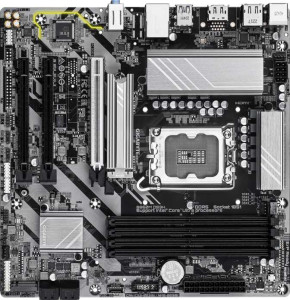
Gigabyte B860M DS3H
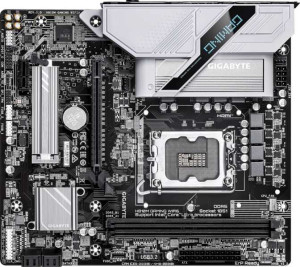
Gigabyte H810M Gaming Wi-Fi6

Gigabyte B860M DS3H Gigabyte H810M Gaming Wi-Fi6

Overview

Choosing between the Gigabyte B860M DS3H and the Gigabyte H810M Gaming Wi-Fi6 is far from straightforward. Both Micro-ATX boards share the LGA 1851 socket, DDR5 support, and a 3-year warranty, yet they diverge sharply in areas like wireless connectivity, memory capacity, storage expansion, and PCIe generation support. This comparison breaks down every specification to help you decide which board truly fits your build.

Common Features

  • Both products use the LGA 1851 CPU socket.
  • Both products have a Micro-ATX form factor.
  • Both products support HDMI 2.1.
  • Neither product makes it easy to reset the BIOS.
  • Both products have 1 CPU socket.
  • Neither product has integrated graphics.
  • Both products come with a 3-year warranty.
  • Both products are 244 mm wide.
  • Both products support a maximum RAM speed of 6400 MHz.
  • Both products use DDR5 memory.
  • Both products have 2 memory channels.
  • Neither product supports ECC memory.
  • Neither product has USB 3.2 Gen 2 ports in USB-C format.
  • Neither product has USB 3.2 Gen 1 ports in USB-C format.
  • Neither product has USB 3.2 Gen 2x2 ports.
  • Neither product has USB 4 40Gbps or 20Gbps ports.
  • Neither product has Thunderbolt 3 or Thunderbolt 4 ports.
  • Both products have an HDMI output.
  • Both products provide 2 USB 3.2 Gen 1 ports through expansion and 4 USB 2.0 ports through expansion.
  • Both products have 4 SATA 3 connectors and no SATA 2 connectors.
  • Both products include a TPM connector.
  • Neither product has an mSATA connector.
  • Both products have no U.2 sockets.
  • Neither product has PCIe 3.0 x16, PCIe 2.0 x16, PCIe x4, PCIe x8, or PCI slots.
  • Both products deliver 7.1 audio channels with 3 audio connectors.
  • Neither product has an S/PDIF Out port.
  • Both products support RAID 0, RAID 1, RAID 5, and RAID 10, but neither supports RAID 0+1.

Main Differences

  • Wi-Fi support is present on Gigabyte H810M Gaming Wi-Fi6 but not available on Gigabyte B860M DS3H.
  • Bluetooth support is present on Gigabyte H810M Gaming Wi-Fi6 but not available on Gigabyte B860M DS3H.
  • Overclocking capability is available on Gigabyte B860M DS3H but not on Gigabyte H810M Gaming Wi-Fi6.
  • RGB lighting is present on Gigabyte H810M Gaming Wi-Fi6 but not available on Gigabyte B860M DS3H.
  • Dual BIOS is featured on Gigabyte B860M DS3H but not on Gigabyte H810M Gaming Wi-Fi6.
  • The height is 244 mm on Gigabyte B860M DS3H and 215 mm on Gigabyte H810M Gaming Wi-Fi6.
  • Maximum memory capacity is 256 GB on Gigabyte B860M DS3H and 128 GB on Gigabyte H810M Gaming Wi-Fi6.
  • Memory slots number 4 on Gigabyte B860M DS3H and 2 on Gigabyte H810M Gaming Wi-Fi6.
  • USB 3.2 Gen 2 ports (USB-A) count is 1 on Gigabyte B860M DS3H and 0 on Gigabyte H810M Gaming Wi-Fi6.
  • USB 3.2 Gen 1 ports (USB-A) count is 2 on Gigabyte B860M DS3H and 1 on Gigabyte H810M Gaming Wi-Fi6.
  • USB 2.0 ports count is 3 on Gigabyte B860M DS3H and 5 on Gigabyte H810M Gaming Wi-Fi6.
  • Fan headers number 4 on Gigabyte B860M DS3H and 3 on Gigabyte H810M Gaming Wi-Fi6.
  • M.2 sockets number 2 on Gigabyte B860M DS3H and 1 on Gigabyte H810M Gaming Wi-Fi6.
  • PCIe 5.0 x16 slot is present on Gigabyte B860M DS3H but not on Gigabyte H810M Gaming Wi-Fi6.
  • PCIe 4.0 x16 slot is present on Gigabyte H810M Gaming Wi-Fi6 but not on Gigabyte B860M DS3H.
  • PCIe x1 slots number 2 on Gigabyte B860M DS3H and 1 on Gigabyte H810M Gaming Wi-Fi6.
Specs Comparison
Gigabyte B860M DS3H

Gigabyte B860M DS3H

Gigabyte H810M Gaming Wi-Fi6

Gigabyte H810M Gaming Wi-Fi6

General info:
CPU socket LGA 1851 LGA 1851
form factor Micro-ATX Micro-ATX
release date January 2025 March 2025
supports Wi-Fi
Has Bluetooth
HDMI version HDMI 2.1 HDMI 2.1
Easy to overclock
has RGB lighting
Easy to reset BIOS
Has dual BIOS
CPU sockets 1 1
Has integrated graphics
warranty period 3 years 3 years
height 244 mm 215 mm
width 244 mm 244 mm
Has integrated CPU

Both boards share the same LGA 1851 socket, Micro-ATX form factor, HDMI 2.1 output, and a 3-year warranty, making them structurally comparable starting points for an Intel platform build. They are also identical in width at 244 mm, though the H810M Gaming Wi-Fi 6 is notably more compact at 215 mm tall versus the B860M DS3H's 244 mm, which could matter in tighter cases.

The key differentiators pull these boards in opposite directions depending on the user's priorities. The B860M DS3H stands out with overclocking support and a dual BIOS — the former unlocks CPU performance headroom, while the latter provides a hardware-level safety net if a BIOS update goes wrong, a genuinely useful feature for enthusiasts who flash firmware regularly. The H810M Gaming Wi-Fi 6 counters with built-in Wi-Fi 6 and Bluetooth, plus RGB lighting — meaning it arrives cable-ready for wireless peripherals and networks without needing additional adapters, which adds real convenience and saves a PCIe slot.

The right choice hinges on use case: builders who want performance tuning and firmware resilience should favor the B860M DS3H, while those prioritizing wireless connectivity out of the box and a gaming aesthetic will find the H810M Gaming Wi-Fi 6 more practical. Neither board holds an absolute overall edge — they simply serve different builder profiles.

Memory:
maximum memory amount 256GB 128GB
RAM speed (max) 6400 MHz 6400 MHz
memory slots 4 2
DDR memory version 5 5
memory channels 2 2
Supports ECC memory

On the fundamentals, both boards are aligned: they run DDR5 memory at up to 6400 MHz across dual channels, meaning neither has an architectural speed advantage — throughput potential is identical in equivalent configurations.

Where they diverge is capacity and expandability. The B860M DS3H ships with 4 memory slots supporting up to 256 GB, while the H810M Gaming Wi-Fi 6 offers only 2 slots with a ceiling of 128 GB. In practical terms, four slots allow users to start with a modest kit and add more sticks later without replacing existing modules — a meaningful upgrade path. The two-slot design of the H810M forces an either/or decision upfront, and its lower ceiling rules it out for memory-intensive workloads like large-scale virtualization or professional content creation.

For most mainstream gaming or everyday desktop use, 128 GB is more than sufficient and the slot difference rarely matters day-to-day. However, as a scalable platform investment, the B860M DS3H holds a clear memory advantage — it offers twice the headroom and greater flexibility for users whose needs may grow over time.

Ports:
USB 3.2 Gen 2 ports (USB-A) 1 0
USB 3.2 Gen 1 ports (USB-A) 2 1
USB 3.2 Gen 2 ports (USB-C) 0 0
USB 3.2 Gen 1 ports (USB-C) 0 0
USB 2.0 ports 3 5
USB 3.2 Gen 2x2 ports 0 0
USB 4 40Gbps ports 0 0
USB 4 20Gbps ports 0 0
Thunderbolt 4 ports 0 0
Thunderbolt 3 ports 0 0
has an HDMI output
DisplayPort outputs 1 1
RJ45 ports 1 1
Has USB Type-C
eSATA ports 0 0
DVI outputs 0 0
has a VGA connector
PS/2 ports 1 1

Video output and networking are identical across both boards — each provides HDMI, a DisplayPort, and a single RJ45 ethernet port, so neither holds an advantage for display connectivity or wired networking. The real story is in the USB layout.

The B860M DS3H takes a clear lead in high-speed USB: it includes a USB 3.2 Gen 2 port (10 Gbps) alongside two USB 3.2 Gen 1 ports (5 Gbps), making it well-suited for fast external SSDs, high-bandwidth peripherals, and modern docking stations. The H810M Gaming Wi-Fi 6, by contrast, tops out at a single USB 3.2 Gen 1 port and fills the rest of its rear panel with five USB 2.0 ports — which are adequate for keyboards, mice, and low-bandwidth devices, but a bottleneck for anything requiring real throughput.

For users who regularly connect fast external storage or high-speed peripherals, the B860M DS3H's rear I/O is meaningfully more capable. The H810M Gaming Wi-Fi 6 offers sheer port count, which suits setups with many legacy peripherals, but in terms of connectivity quality, the B860M DS3H has a clear advantage here.

Connectors:
USB 3.2 Gen 1 ports (through expansion) 2 2
USB 2.0 ports (through expansion) 4 4
SATA 3 connectors 4 4
fan headers 4 3
USB 3.0 ports (through expansion) 2 2
M.2 sockets 2 1
Has TPM connector
U.2 sockets 0 0
Has mSATA connector
SATA 2 connectors 0 0

Internal connectivity is largely a wash between these two boards — both offer 4 SATA 3 connectors, identical USB expansion headers, and a TPM connector, making them equally capable for standard storage arrays and front-panel USB setups. The differences, though small in number, carry meaningful practical weight.

The standout gap is in M.2 sockets: the B860M DS3H provides two versus just one on the H810M Gaming Wi-Fi 6. A second M.2 slot opens the door to combining a fast NVMe boot drive with a secondary high-speed storage drive — useful for separating the OS from a game library or work files — without consuming any SATA ports. The H810M's single socket forces users who want more storage to fall back entirely on SATA drives. Additionally, the B860M DS3H includes 4 fan headers compared to the H810M's 3, which gives builders one extra point of thermal control — relevant for more elaborate cooling setups with multiple case fans.

Taken together, the B860M DS3H holds the edge in internal connectors, particularly for users planning a multi-drive NVMe configuration or a more carefully managed cooling layout.

Expansion slots:
PCIe 4.0 x16 slots 0 1
PCIe 5.0 x16 slots 1 0
PCIe 3.0 x16 slots 0 0
PCIe x1 slots 2 1
PCI slots 0 0
PCIe 2.0 x16 slots 0 0
PCIe x4 slots 0 0
PCIe x8 slots 0 0

The primary x16 slot is where these two boards diverge most significantly. The B860M DS3H equips its main slot with PCIe 5.0, while the H810M Gaming Wi-Fi 6 offers a PCIe 4.0 x16 slot. In practical terms, PCIe 5.0 doubles the available bandwidth over PCIe 4.0 — relevant today for the latest high-end GPUs and next-generation NVMe drives that can leverage that headroom, and increasingly important as hardware continues to push those limits.

The B860M DS3H also includes 2 PCIe x1 slots versus just one on the H810M Gaming Wi-Fi 6. That extra slot provides an additional expansion point for add-in cards such as sound cards, network adapters, or capture cards — a minor but real advantage for users building a more fully loaded system.

Across this category, the B860M DS3H holds a clear advantage: its PCIe 5.0 primary slot offers greater longevity and bandwidth for future hardware, and the extra x1 slot adds flexibility. The H810M Gaming Wi-Fi 6 is not without merit for current-gen GPU use, but its PCIe 4.0 ceiling and single auxiliary slot leave it trailing here.

Audio:
audio channels 7.1 7.1
Has S/PDIF Out port
audio connectors 3 3

Audio is a straight tie between these two boards. Both deliver 7.1 channel surround sound support through 3 analog audio connectors, and neither includes an S/PDIF optical output — meaning users who rely on digital audio passthrough to an AV receiver or DAC will need an add-in solution regardless of which board they choose.

The 7.1 channel configuration is well-suited for gaming headsets and multi-speaker setups, covering the needs of most desktop users without requiring a dedicated sound card. The absence of S/PDIF is a minor limitation shared equally by both, so it does not factor into any relative judgment here.

With every audio specification identical, this category is a complete draw — audio hardware should play no role in deciding between these two boards.

Storage:
Supports RAID 1
Supports RAID 10 (1+0)
Supports RAID 5
Supports RAID 0
Supports RAID 0+1

Storage configuration support is identical across both boards. Each offers RAID 0, 1, 5, and 10, covering the most practical array types for desktop and prosumer use — from pure performance striping (RAID 0) to mirrored redundancy (RAID 1) and the balanced parity-based protection of RAID 5. Neither supports RAID 0+1, though this omission is equally shared and rarely a deciding factor at this product tier.

For the vast majority of users, this RAID feature set is more than sufficient — RAID 10 in particular is a robust choice for those wanting both speed and redundancy across four drives. The lack of differentiation here means storage configuration capability should carry no weight in choosing between these two boards.

This category is a complete tie — both products offer exactly the same RAID support profile.

Comparison Summary & Verdict

After a thorough look at both boards, each product carves out a clear niche. The Gigabyte B860M DS3H is the stronger choice for builders who want maximum expandability: it offers PCIe 5.0 x16, four memory slots with up to 256 GB of DDR5, two M.2 sockets, four fan headers, and a dual BIOS safety net alongside overclocking support. The Gigabyte H810M Gaming Wi-Fi6, on the other hand, appeals to users who value an out-of-the-box wireless experience, delivering built-in Wi-Fi 6 and Bluetooth, RGB lighting, and a more compact 215 mm height, albeit with fewer expansion options. Neither board supports ECC memory or easy BIOS reset, and audio capabilities are identical on both. Your decision ultimately comes down to expansion headroom versus wireless convenience.

Gigabyte B860M DS3H
Buy Gigabyte B860M DS3H if...

Buy the Gigabyte B860M DS3H if you need maximum memory capacity, dual BIOS protection, PCIe 5.0 support, and greater storage and fan expansion through its four memory slots, two M.2 sockets, and overclocking capability.

Gigabyte H810M Gaming Wi-Fi6
Buy Gigabyte H810M Gaming Wi-Fi6 if...

Buy the Gigabyte H810M Gaming Wi-Fi6 if built-in Wi-Fi 6, Bluetooth, and RGB lighting matter to you and you are working within a tighter physical footprint with a more compact 215 mm height.